Mastering Forex Trading with Projectreaper Bollinger Bands Indicator V1.08 for MT4
The forex market is a dynamic and volatile environment where traders seek reliable tools to navigate price movements and make informed decisions. One such tool is the Projectreaper Bollinger Bands Indicator V1.08 for MetaTrader 4 (MT4), a powerful and versatile indicator designed to enhance trading strategies. This blog post explores the features of this indicator, its application across currency pairs and timeframes, and how traders with a minimum deposit of $200 can leverage it to optimize their trading performance.
What is the Projectreaper Bollinger Bands Indicator V1.08?
Bollinger Bands, developed by John Bollinger in the 1980s, are a widely used technical analysis tool that measures market volatility and identifies potential price reversals or breakouts. The standard Bollinger Bands consist of three lines:
-
Middle Band: A simple moving average (SMA), typically set to 20 periods.
-
Upper Band: The SMA plus a specified number of standard deviations (usually 2).
-
Lower Band: The SMA minus the same number of standard deviations.
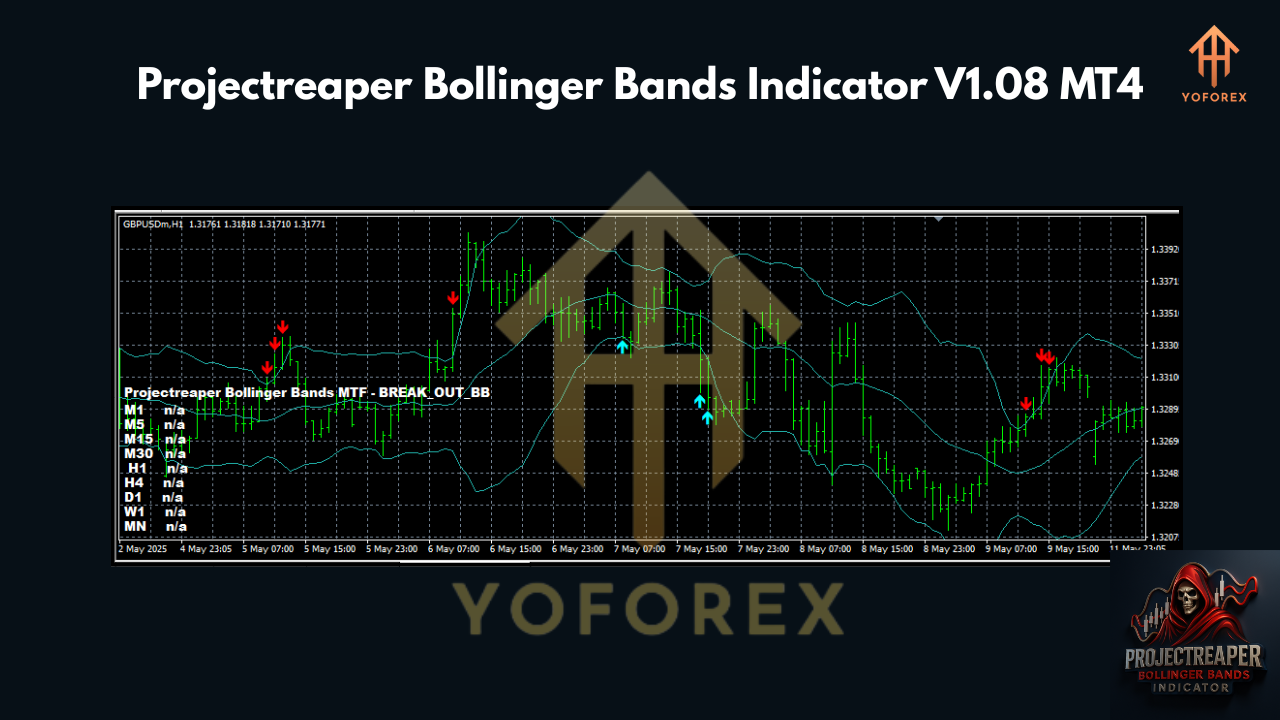
The Projectreaper Bollinger Bands Indicator V1.08 is an advanced, multi-timeframe (MTF) version of this classic indicator, tailored for MT4 users. It builds on the traditional Bollinger Bands by incorporating smoothed bands, customizable alert features, and cross-timeframe signal monitoring, making it a robust tool for traders seeking precision and flexibility. According to updates from the Projectreaper Team, this indicator includes a new smoothed bands feature, a step function for band adjustments, and enhanced alert capabilities, making it suitable for various trading styles, including scalping, swing trading, and trend trading.
Key Features of the Indicator
The Projectreaper Bollinger Bands Indicator V1.08 offers several standout features:
-
Multi-Timeframe Monitoring: Displays Bollinger Bands signals across multiple timeframes (e.g., M15, H1, D1) on a single chart, allowing traders to assess market conditions comprehensively.
-
Smoothed Bands: Introduces a smoothing method to reduce noise and improve signal clarity, enhancing the accuracy of breakout and reversal signals.
-
Customizable Alerts: Provides alerts for price interactions with the bands (e.g., breakouts or touches), which can be configured for specific timeframes like M30, H1, or D1.
-
Cross-Timeframe Signal Monitor: A visual dashboard on the chart duplicates signals from all selected timeframes for the chosen currency pair, streamlining decision-making.
-
Flexible Parameters: Allows customization of band deviation (default 2.0), price type (open, close, high, low), and signal logic, catering to individual trading preferences.
These features make the indicator versatile for traders operating on a modest budget, such as a $200 minimum deposit, as it provides actionable insights without requiring expensive tools or platforms.
Recommended Currency Pairs and Timeframes
The Projectreaper Bollinger Bands Indicator V1.08 is compatible with any currency pair, but its performance can vary depending on market volatility and liquidity. Here are some recommendations:
-
Major Currency Pairs: Pairs like EUR/USD, GBP/USD, and USD/JPY are ideal due to their high liquidity and tight spreads, which are crucial for traders with smaller accounts to minimize trading costs.
-
Volatile Pairs: For breakout strategies, pairs like GBP/JPY or AUD/USD can be effective, as they often exhibit strong price movements that align with Bollinger Bands signals.
-
Exotic Pairs: While possible, exotic pairs (e.g., USD/TRY) may have higher spreads, which could erode profits for traders with a $200 deposit. Stick to majors or minors for better cost efficiency.
Timeframe Selection:
-
Scalping (M5, M15): Short timeframes are suitable for quick trades, leveraging the indicator’s alerts for price touching or breaking the bands. However, scalping requires careful risk management due to higher transaction costs.
-
Day Trading (M30, H1): These timeframes balance signal frequency and reliability, making them ideal for traders with limited capital who want to capture intraday trends.
-
Swing Trading (H4, D1): Longer timeframes suit traders aiming for larger price movements, using the MTF feature to confirm trends across multiple timeframes.
For a $200 account, the H1 or H4 timeframe is recommended to reduce the impact of spread costs and market noise, allowing for more stable trade setups.
Setting Up the Indicator on MT4
To use the Projectreaper Bollinger Bands Indicator V1.08, follow these steps:
-
Download the Indicator: Obtain the indicator file (.mq4 or .ex4) from a trusted source, such as the Projectreaper website.
-
Install in MT4:
-
Open MT4 and navigate to File > Open Data Folder.
-
Go to the MQL4 > Indicators folder.
-
Copy the indicator file into this folder.
-
Restart MT4 or refresh the Navigator window (right-click and select “Refresh”).
-
-
Apply to Chart:
-
Drag the indicator onto your desired chart.
-
Configure settings, such as period (default 20), deviation (default 2.0), and MTF_Alerts for preferred timeframes (e.g., M30, H1, D1).
-
-
Enable Alerts: Adjust the InpBandsPipsOffset and Calculation parameters to receive alerts when the price hits or closes outside the bands.
Ensure your MT4 account is with a broker offering low spreads to maximize the $200 deposit’s potential.
Trading Strategies with Projectreaper Bollinger Bands
Here are two effective strategies tailored for the indicator:
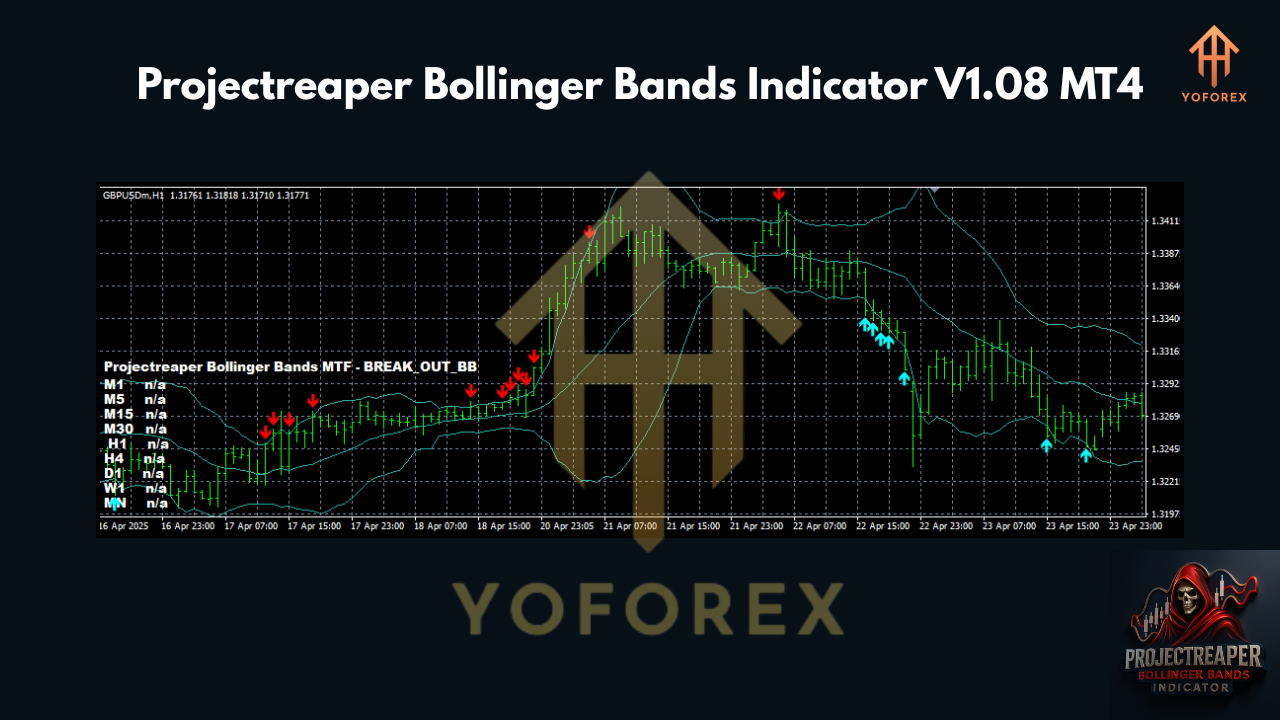
1. Breakout Strategy
-
Setup: Use the H1 or H4 timeframe on a major pair like EUR/USD.
-
Signal: Wait for the price to close outside the upper or lower band, confirmed by an alert from the indicator.
-
Entry: Enter a buy trade if the price breaks above the upper band or a sell trade if it breaks below the lower band.
-
Stop-Loss: Place below the recent swing low (for buys) or above the swing high (for sells), typically 20-30 pips for H1.
-
Take-Profit: Target a 1:2 risk-reward ratio or exit when the price returns to the middle band.
-
Risk Management: Risk 1-2% of your $200 account per trade (e.g., $2-$4), using a lot size of 0.01 or lower.
2. Reversal Strategy
-
Setup: Use the M15 or H1 timeframe with the MTF monitor enabled.
-
Signal: Look for the price touching the upper or lower band with a rejection pattern (e.g., pin bar) and confirmation from another timeframe’s signal.
-
Entry: Enter a buy trade at the lower band or a sell trade at the upper band, ensuring the MTF monitor shows alignment.
-
Stop-Loss: Set 10-15 pips beyond the band to account for volatility.
-
Take-Profit: Aim for the middle band or a 1:1.5 risk-reward ratio.
-
Risk Management: Limit risk to 1% per trade to preserve capital.
Risk Management for a $200 Account
Trading with a $200 deposit requires strict discipline:
-
Position Sizing: Use micro-lots (0.01) to keep risk low. For example, a 20-pip stop-loss on EUR/USD with a 0.01 lot risks approximately $2.
-
Daily Risk Limit: Cap total daily risk at 5% of the account ($10) to avoid significant drawdowns.
-
Broker Selection: Choose a broker with low spreads (1-2 pips on majors) and no commissions to maximize profitability.
-
Avoid Overtrading: Limit to 1-2 high-probability trades per day, focusing on signals confirmed by multiple timeframes.
Tips for Success
-
Backtest First: Use MT4’s Strategy Tester to evaluate the indicator’s performance on your chosen pair and timeframe.
-
Combine Indicators: Pair the Bollinger Bands with oscillators like RSI or MACD to filter false signals, as suggested in some strategies.
-
Monitor Volatility: Narrow bands indicate low volatility (consolidation), while wide bands suggest high volatility (potential breakouts).
-
Stay Updated: Check the Projectreaper website for updates to the indicator, as the team frequently adds features like color pickers or price type options.
-
Practice on Demo: Before risking your $200, test the indicator on a demo account to build confidence.
Conclusion
The Projectreaper Bollinger Bands Indicator V1.08 is a versatile tool for MT4 traders, offering advanced features like MTF monitoring, smoothed bands, and customizable alerts. Whether you’re scalping on M15 or swing trading on H4, this indicator can enhance your ability to identify high-probability setups across various currency pairs. For traders with a $200 deposit, disciplined risk management and strategic use of this indicator can pave the way for consistent profits. Download the indicator, set it up, and start exploring its potential to elevate your forex trading journey.
Join our Telegram for the latest updates and support