The Quantitative Qualitative Estimation (QQE) Weighted Oscillator Indicator is a beneficial tool for traders using MetaTrader 4 (MT4). Built upon the Relative Strength Index (RSI), this advanced oscillator improves trading accuracy by applying a special weighting approach. This piece will explore the QQE Weighted Oscillator, covering its operation, how to utilize it, and how traders can employ it to improve their methods across different markets, including forex, stocks, cryptocurrencies, and commodities. We will also review its settings, practical uses, and recommendations for maximizing its effectiveness.
What is the QQE Weighted Oscillator?
The QQE Weighted Oscillator is an advanced version of the classic QQE indicator, itself a smoothed version of the RSI. Designed to offer more reliable signals, the QQE Weighted Oscillator uses a weighting approach for the RSI, making it more challenging for the oscillator to cross its trailing stop, thereby minimizing false signals and boosting precision. This indicator has two main components:
Smoothed RSI Oscillator: A refined RSI that smooths price data to give a clearer picture of momentum.
Trailing Stop: Derived from the smoothed RSI, this functions as a dynamic level to measure trend direction and potential shifts.
The QQE Weighted Oscillator is particularly useful for identifying overbought and oversold situations, identifying trend reversals, and spotting divergences that could signal future price movements. Its versatility makes it suitable for various trading approaches, including day trading, swing trading, and long-term strategies.
How Does the QQE Weighted Oscillator Work?
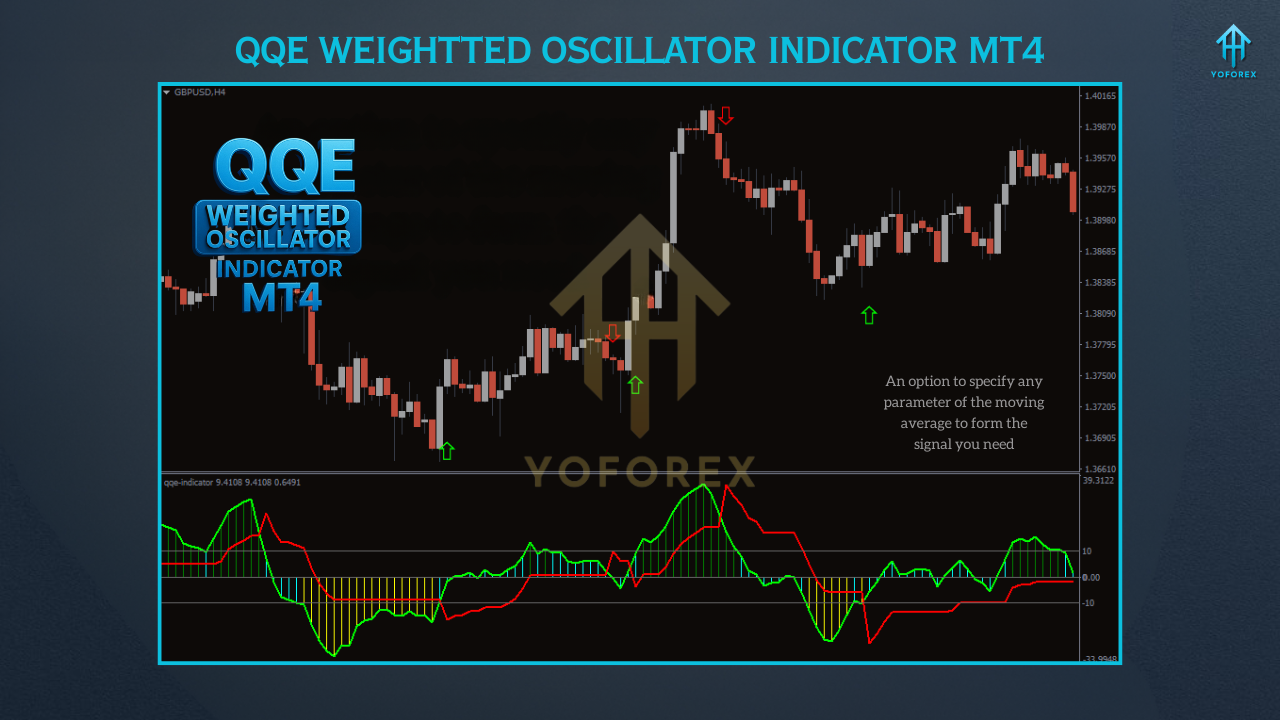
The QQE Weighted Oscillator works by combining RSI-based analysis with smoothing methods. The indicator displays two lines in a separate window below the price chart:
Fast QQE Line (Red): This line reacts rapidly to price changes, showing short-term momentum.
Slow QQE Line (Green): A smoother line representing longer-term trends, reducing noise and false signals.
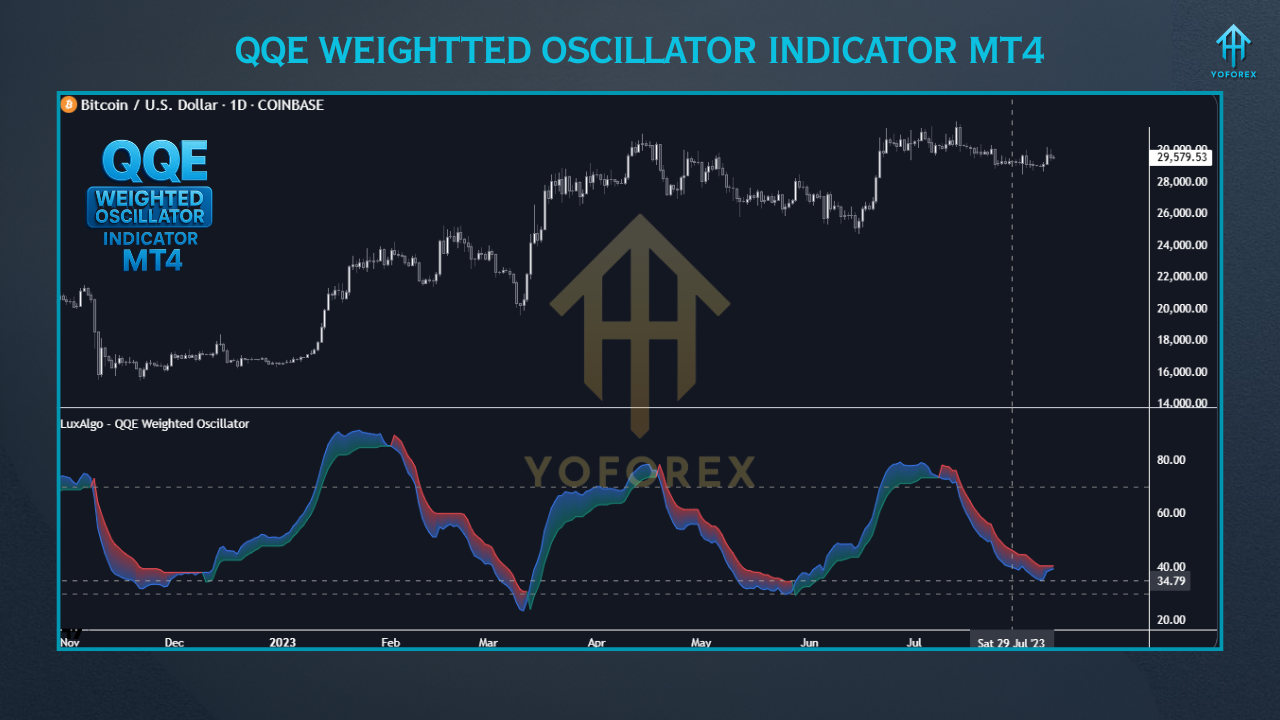
Moreover, the indicator typically has a zero line (or level 50) and threshold levels (e.g., 70 and 30) to emphasize overbought and oversold regions. Signals are produced based on:
Line Crossovers: A bullish signal happens when the Fast QQE Line crosses above the Slow QQE Line, suggesting probable upward momentum. Conversely, a bearish signal is activated when the Fast QQE Line crosses below the Slow QQE Line, indicating a downward shift.
Zero Line Crossings: When the Fast QQE Line crosses above the zero line, it may signal a buying opportunity, while crossing below could indicate a selling opportunity.
Divergences: Bullish divergence (price forms higher lows while the QQE forms lower lows) or bearish divergence (price forms higher highs while the QQE forms lower highs) can predict potential reversals.
The weighting technique improves the effort needed for the RSI to cross the trailing stop, making the indicator less susceptible to whipsaws in unstable markets. Traders can adjust settings like the RSI period, smoothing factor, and weight to fit the indicator to their trading style and market conditions.
Setting Up the QQE Weighted Oscillator on MT4
Download the Indicator: Obtain the QQE Weighted Oscillator from reliable sources like the LuxAlgo Library or other trustworthy platforms that offer free MT4 indicators.
Install the Indicator:
Open MT4 and go to File > Open Data Folder.
Go to MQL4 > Indicators and paste the downloaded .ex4 or .mq4 file.
Restart MT4, then drag the indicator onto your chart from the Navigator panel.
Customize Settings:
RSI Period: Commonly defaults to 14, but traders can adjust it based on their timeframe (e.g., shorter for scalping, longer for swing trading).
Smoothing Factor (SF): Controls signal smoothness; higher values reduce noise but might delay signals.
Weight: Changes the weighting applied to the RSI, impacting sensitivity.
Factor: Higher values create a longer-term trailing stop, ideal for medium- to long-term strategies.
Upper/Lower Bounds: Set to 70/30 by default for overbought/oversold levels.
Experimenting with these settings enables traders to refine the indicator for particular markets or timeframes, such as M15 for scalping or D1 for swing trading.
Practical Uses in Trading
The QQE Weighted Oscillator is versatile and can be applied in different trading situations:
1. Trend Identification
The indicator helps in confirming the trend’s direction. When both QQE lines are above the zero line, it suggests bullish momentum, while both below indicate bearish momentum. Traders can align trades with the existing trend to improve success.
2. Overbought and Oversold Conditions
Levels at 70 and 30 (or 10 and -10 in some versions) show overbought and oversold areas. For instance, a move over 70 could signal a possible reversal or pullback, encouraging traders to think about selling or waiting for confirmation.
3. Reversal Signals
The QQE Weighted Oscillator excels at recognizing early reversal signals through crossovers and divergences. For example, a bearish divergence on a 1-hour USD/JPY chart, where the price forms higher highs, but the QQE forms lower highs, can precede a price drop.
4. Confirmation Tool
To reduce false signals, use the QQE with trend indicators like moving averages or Bollinger Bands. For example, only take buy signals when the QQE crossover happens above a 50-period EMA, confirming an uptrend.
Tips for Improving the QQE Weighted Oscillator
Employ Multi-Timeframe Analysis: Use the QQE on a higher timeframe (e.g., H4) to validate signals on a lower timeframe (e.g., H1) for improved accuracy.
Integrate with Price Action: Look for support/resistance levels or candlestick patterns to confirm QQE signals.
Avoid News Events: The QQE might produce unpredictable signals during high-impact news releases. Review economic calendars to prevent trading during unstable periods.
Backtest Settings: Test different RSI periods and weights on historical data to find the ideal setup for your market and timeframe.
Risk Management: Always employ stop-loss orders and proper position sizing, as trading involves substantial risk, and the QQE isn’t perfect.
Advantages and Limitations
Advantages
Reduces False Signals: The weighting method and smoothing make the QQE more reliable than a standard RSI.
Versatile: Usable across forex, stocks, crypto, and commodities, and suitable for various timeframes.
Early Reversal Detection: Divergences and crossovers give early warnings of potential trend changes.
Limitations
Lagging Nature: Like all oscillators, the QQE may lag in rapidly moving markets.
Requires Tuning: Default settings might not be perfect for all markets, needing experimentation.
Not a Standalone Tool: Best utilized with other indicators or price action for confirmation.
Where to Access the QQE Weighted Oscillator
The QQE Weighted Oscillator is freely available on platforms such as the LuxAlgo Library, IndicatorsPot, and TradingFinder. Be certain to download from trusted sources to prevent corrupted files. Some versions, like the QQE with Alerts or QQE Mod Histogram, have additional features such as arrows or notifications for easier signal recognition.
Conclusion
The QQE Weighted Oscillator for MT4 is a powerful tool that enhances the standard RSI with smoothing and weighting methods, offering traders a trustworthy way to recognize trends, reversals, and overbought/oversold situations. By understanding its functions, adapting its settings, and integrating it with other resources, traders can improve their decision-making. However, like all indicators, it’s not flawless, and effective risk management is essential. Whether you’re a beginner or a seasoned trader, the QQE Weighted Oscillator can be a valuable addition to your MT4 toolkit, if you dedicate time to understanding its use.