
Quantum Queen EA V2.91 MT5
Introduction
Automated trading continues to evolve rapidly, and modern traders are no longer satisfied with basic Expert Advisors that rely on outdated indicators or rigid rule sets. Today’s market demands adaptive logic, intelligent execution, and risk-aware automation. This is where Quantum Queen EA enters the spotlight.
Quantum Queen EA is a sophisticated MT5 Expert Advisor designed to help traders automate forex trading with precision, discipline, and consistency. Built around dynamic market analysis and adaptive trade execution, this EA aims to eliminate emotional trading while maintaining professional-grade risk control.
Unlike many generic bots, Quantum Queen EA focuses on structured market behavior, volatility awareness, and algorithmic confirmation before entering trades. This makes it suitable for traders who prefer stability, logic-based execution, and long-term sustainability over reckless high-risk strategies.
In this detailed review, we will explore everything you need to know about Quantum Queen EA V2.91 MT5, including its trading logic, features, settings, performance expectations, advantages, limitations, and who it is best suited for.
Overview of Quantum Queen EA V2.91 MT5
Quantum Queen EA V2.91 MT5
is an automated forex trading robot developed exclusively for the MetaTrader 5 (MT5) platform. It is designed to analyze price action, volatility conditions, and market structure to identify high-probability trading opportunities.
The EA operates without emotional bias, following pre-programmed logic that adapts to changing market conditions. Rather than relying on a single indicator, Quantum Queen EA integrates multiple analytical layers, allowing it to filter out low-quality trades and focus on statistically favorable setups.
This system is particularly attractive for traders who want:
- Hands-free automated trading
- Rule-based execution
- Controlled drawdowns
- Long-term trading consistency
Key Features of Quantum Queen EA V2.91 MT5
- Advanced Algorithmic Logic
- The EA uses layered decision-making rather than single-indicator triggers.
- Adaptive Market Behavior
- Quantum Queen EA adjusts to different market environments instead of using static rules.
- News-Sensitive Trading
- The system can be configured to avoid high-impact news periods.
- Fully Automated Execution
- Once attached to a chart, Quantum Queen EA operates without manual intervention.
- Customizable Settings
- Traders can fine-tune risk levels, lot sizing, and execution behavior.
- MT5 Optimization
- Built specifically for MetaTrader 5, ensuring efficient execution.
Platform Compatibility
Quantum Queen EA is fully compatible with:
- MetaTrader 5 (MT5)
- Windows-based trading environments
- VPS hosting setups (recommended)
The EA is optimized for MT5’s advanced execution engine, improved order handling, and faster backtesting environment.
Supported Trading Instruments
Quantum Queen EA is primarily designed for:
- Major forex pairs
- Minor forex pairs
- Select high-liquidity currency crosses
The EA performs best on pairs with stable spreads and consistent liquidity, making it suitable for brokers offering ECN or raw spread accounts.
Timeframes and Trading Style
Quantum Queen EA is optimized for medium-to-short-term trading strategies. It typically operates on:
- M15 timeframe
- M30 timeframe
- H1 timeframe
The EA avoids ultra-high-frequency scalping and instead focuses on structured intraday and short swing opportunities. This approach helps reduce spread sensitivity and execution issues.
Core Trading Strategy Explained
At its core, Quantum Queen EA uses a multi-layered algorithmic strategy that blends market structure analysis, volatility filtering, and confirmation-based execution.
1. Market Structure Recognition
The EA identifies directional bias by analyzing price behavior over recent sessions. It avoids trading against dominant market momentum unless specific reversal conditions are met.
2. Volatility Filtering
One of the strongest features of Quantum Queen EA is its volatility awareness. The system avoids entering trades during erratic or news-driven price spikes, reducing unnecessary drawdowns.
3. Entry Confirmation Logic
Before placing any trade, Quantum Queen EA waits for multiple confirmations. This includes price alignment, volatility conditions, and internal signal validation.
4. Dynamic Trade Management
Once a trade is opened, the EA actively manages it using predefined rules. This includes adaptive stop-loss placement and controlled take-profit execution.
Risk Management System
Risk management is where Quantum Queen EA truly stands out.
Key risk control elements include:
- Fixed or percentage-based lot sizing
- Intelligent stop-loss placement
- Trade exposure control
- Maximum drawdown protection
- Optional daily trade limits
By default, Quantum Queen EA V2.91 MT5 prioritizes capital preservation over aggressive growth, making it suitable for traders who value longevity.
Recommended Settings
To get optimal performance from Quantum Queen EA V2.91 MT5, traders should start with conservative settings.
Suggested Starting Parameters
- Risk per trade: 1%–2%
- Timeframe: M30 or H1
- Lot mode: Auto (balance-based)
- Max simultaneous trades: Low to moderate
These settings allow the EA to operate smoothly while maintaining controlled exposure.
Minimum Deposit Requirements
While Quantum Queen EA V2.91 MT% can technically run on small accounts, a realistic minimum deposit is recommended for stable performance.
Recommended Capital
- Minimum: $300–$500
- Optimal: $1,000+
Higher balances allow better risk distribution and smoother equity curves.
Quantum Queen EA V2.91 MT5 – Installation & Setup Guide
Follow these simple steps to correctly install and configure Quantum Queen EA on the MetaTrader 5 platform:
Step 1: Download the EA Files
- Download the Quantum Queen EA V2.91 MT5 ZIP package.
- Extract the files using WinRAR or any unzip tool.
Step 2: Copy EA Files
- Open MetaTrader 5.
- Click File → Open Data Folder.
- Navigate to:
MQL5 → Experts - Paste the Quantum Queen EA file into the Experts folder.
Step 3: Refresh MT5
- Restart MetaTrader 5
OR - Right-click on the Navigator → Expert Advisors section and click Refresh.
Step 4: Open the Trading Chart
- Open the recommended currency pair chart.
- Select the preferred timeframe (M30 or H1 recommended).
Step 5: Attach the EA
- Drag Quantum Queen EA from the Navigator onto the chart.
- Enable Algo Trading at the top of MT5.
Step 6: Configure Settings
- Allow Auto Trading
- Enable DLL imports (if required)
-
Set:
- Risk per trade (1%–2% recommended)
- Lot size mode (Auto or Manual)
- Maximum open trades
Step 7: Risk & Safety Check
- Confirm Stop Loss and Take Profit are enabled.
- Avoid trading during major news events (optional news filter).
Step 8: Use a VPS (Recommended)
- Run Quantum Queen EA on a 24/7 VPS for uninterrupted performance.
- Ensure stable internet and low latency to broker servers.
Step 9: Monitor First Trades
- Monitor the EA during initial trades.
- Make adjustments only after observing behavior for a few sessions.
Performance Expectations
It is important to maintain realistic expectations when using Quantum Queen EA.
This EA is not designed for overnight account flipping. Instead, it focuses on:
- Consistent monthly growth
- Controlled drawdowns
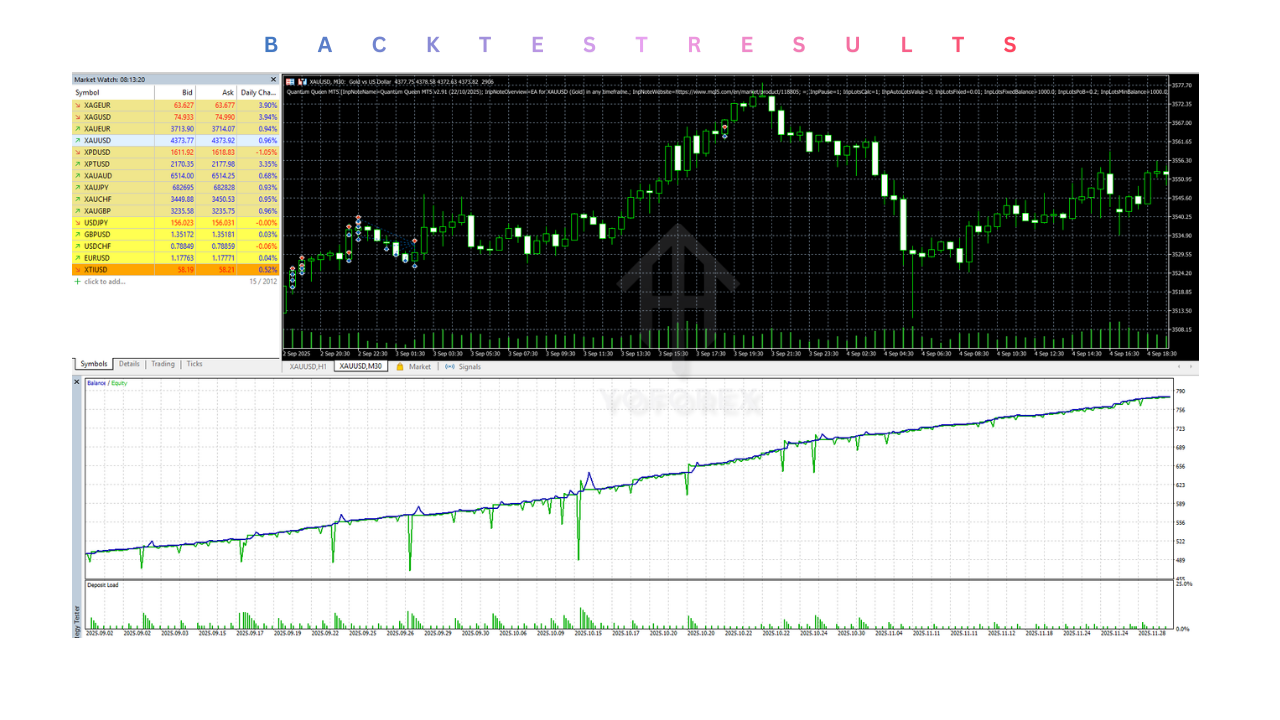
- Stable equity progression
Traders using Quantum Queen EA correctly can expect disciplined, system-driven performance rather than erratic gains.
Backtesting and Optimization
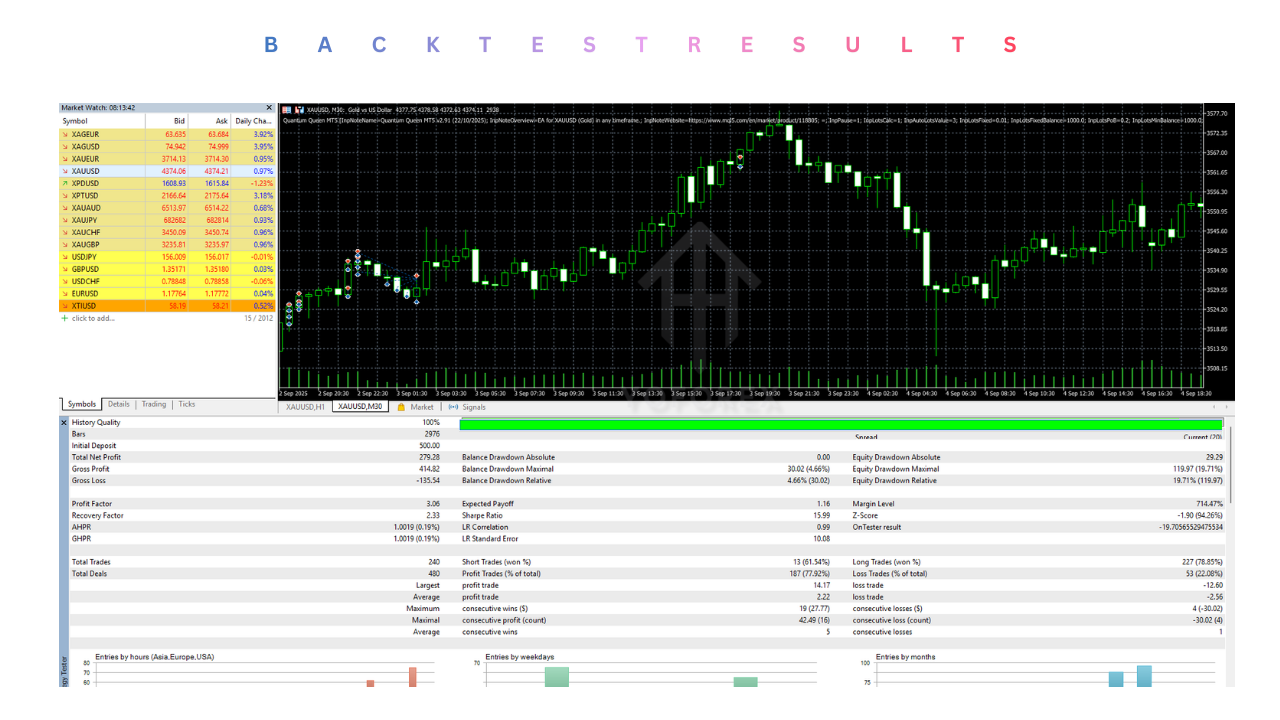
Backtesting Quantum Queen EA on MT5 provides insight into how the strategy behaves across different market cycles.
Key benefits of MT5 backtesting include:
- Multi-currency testing
- Faster execution modeling
- Higher data accuracy
Optimization should be done carefully to avoid overfitting.
VPS and Broker Recommendations
For uninterrupted performance, running Quantum Queen EA V2.91 MT5 on a VPS is highly recommended.
Broker Requirements
- Low spread environment
- Fast execution
- MT5 support
- Stable liquidity
Avoid brokers with excessive slippage or artificial execution delays.
Advantages
- Strong risk management
- Adaptive trading logic
- MT5-optimized performance
- Suitable for disciplined traders
Limitations
- Not a high-frequency scalper
- Requires patience
- Results depend on broker quality
Who Should Use Quantum Queen EA V2.91 MT5?
Quantum Queen EA is ideal for:
- Traders seeking automation with discipline
- Busy professionals who cannot trade manually
- Investors focused on long-term growth
- Traders tired of emotional decision-making
It is less suitable for gamblers or traders seeking extremely aggressive returns.
Safety, Transparency, and Trading Ethics
Quantum Queen EA V2.91 MT5 follows a transparent algorithmic approach without martingale or grid-based risk stacking. This significantly reduces the probability of catastrophic drawdowns.
Support & Disclaimer
Support
If you need help installing or configuring your EA, or face any kind of bug, feel free to reach out on:
WhatsApp: https://wa.me/+443300272265
Telegram Group: https://t.me/yoforexrobot
Disclaimer:
Forex and gold trading involve risk. Past performance doesn’t guarantee future results. Always test robots on demo before live trading and use proper risk management.
REFERRAL
Join the VIP Signals Telegram Channel for real-time expert trading signals and stay ahead in the forex market. Get personalized strategies by becoming a part of our Real Account Management Telegram Channel and optimize your trading experience. If you’re aiming to Pass PropFirm Challenges , join our dedicated channel for tips and proven methods. Start managing your capital effectively with expert advice from our Funded Account Management Telegram Channel. For advanced traders, our HFT EA / Passing Telegram Channel offers high-frequency trading insights and strategies to boost your performance.