

Unlock Profitable Forex Trading with the Raff Channel Indicator V1.0 MT4
Are you searching for a reliable tool to elevate your Forex trading game? The Raff Channel Indicator V1.0 MT4 might just be the edge you need. Designed for the MetaTrader 4 (MT4) platform, this powerful technical indicator leverages the proven methodology of Gilbert Raff to help traders identify trends, spot key entry points, and maximize profits. Whether you’re a seasoned trader or just starting, understanding how this indicator works and how its Expert Advisor (EA) executes trades can transform your trading strategy. In this article, we’ll dive deep into the specifics of the Raff Channel Indicator V1.0 MT4, including its minimum deposit, recommended timeframe, and ideal currency pair. Plus, we’ll break down its trading strategy in a clear, actionable way.
What is the Raff Channel Indicator V1.0 MT4?
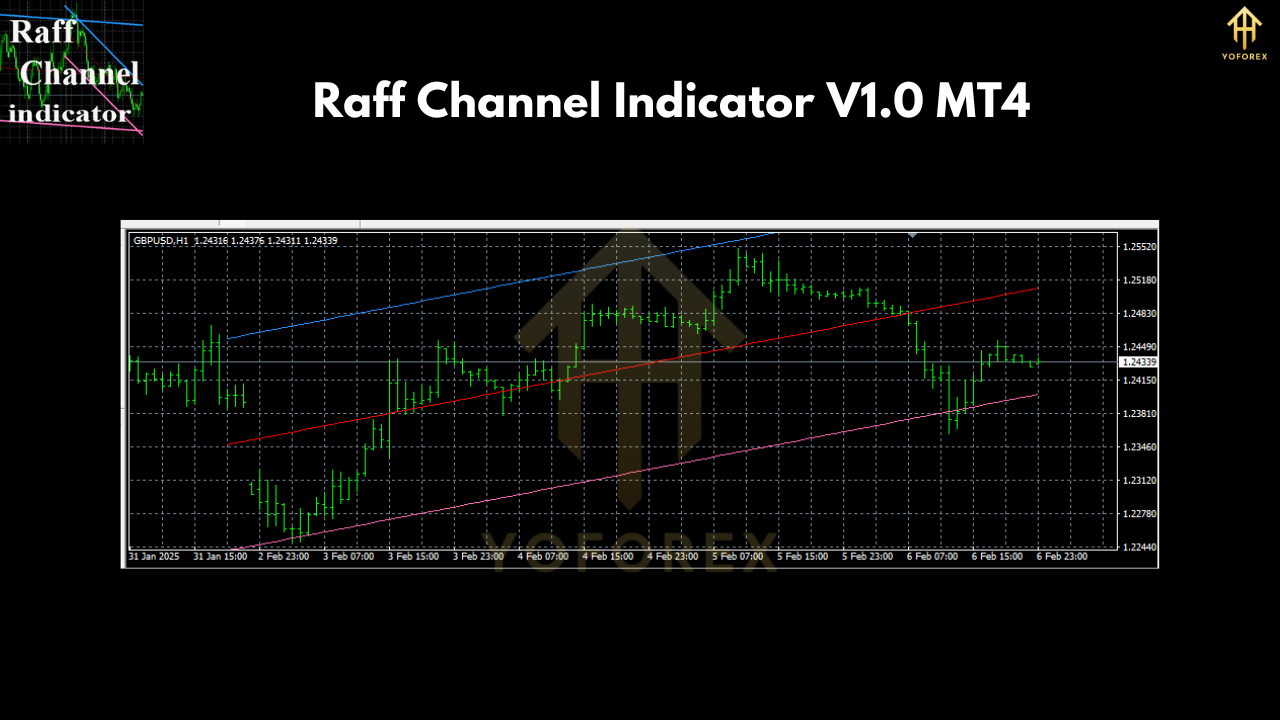
The Raff Channel Indicator is a trend-following tool that plots a dynamic channel around price action using linear regression techniques. Originally developed by Gilbert Raff, this indicator creates a central regression line (the midline) with two parallel lines above and below it, forming a channel. These outer lines represent the maximum distance prices have deviated from the midline, acting as dynamic support and resistance levels. The V1.0 MT4 version brings this concept into an automated EA format, allowing traders to execute trades based on the indicator’s signals without constant manual intervention.
What sets this tool apart? It’s all about precision. The EA analyzes price movements within the channel and triggers trades based on specific breakout or reversal conditions. Let’s explore the key settings and how the EA takes trades.
Key Settings for the Raff Channel Indicator V1.0 MT4
To make the most of this EA, you need to know its operational parameters. Below is a concise breakdown of the essentials:
| Parameter | Details |
|---|---|
| Currency Pair | EUR/USD |
| Timeframe | H1 (1-hour chart) |
| Minimum Deposit | $500 |
- Currency Pair: EUR/USD
The Raff Channel Indicator V1.0 MT4 is optimized for the EUR/USD pair, one of the most liquid and widely traded currency pairs in Forex. Its consistent volatility and tight spreads make it an ideal match for the EA’s trend-based strategy. - Timeframe: H1 (1-hour chart)
The H1 timeframe strikes a balance between capturing short-term trends and filtering out market noise. This setting allows the EA to analyze hourly price movements, making it suitable for traders who want actionable signals without the chaos of lower timeframes. - Minimum Deposit: $500
With a minimum deposit of $500, this EA is accessible to traders with moderate capital. This amount ensures the account can withstand potential drawdowns while allowing the EA to execute trades effectively using proper risk management.
How the Raff Channel Indicator V1.0 MT4 EA Takes Trades
The true value of the Raff Channel Indicator V1.0 MT4 lies in its automated trading strategy. The EA uses the channel’s structure to identify high-probability trade setups. Here’s a step-by-step look at how it operates:
1. Trend Identification
- The EA calculates the slope of the midline (regression line) to determine the market’s direction.
- Uptrend: If the midline slopes upward, the market is bullish.
- Downtrend: If the midline slopes downward, the market is bearish.
2. Channel Boundaries as Entry Points
- The upper and lower lines of the Raff Channel act as dynamic support and resistance.
- Buy Signal:
- Price touches or breaks below the lower channel line during an uptrend, signaling a potential reversal or pullback to the midline.
- The EA enters a long (buy) position, expecting the price to rise back toward the midline or upper channel.
- Sell Signal:
- Price touches or breaks above the upper channel line during a downtrend, indicating overextension.
- The EA enters a short (sell) position, anticipating a drop back to the midline or lower channel.
3. Breakout Confirmation
- If price breaks decisively beyond the channel (above the upper line in an uptrend or below the lower line in a downtrend), the EA may interpret this as a trend continuation.
- Action: The EA places a trade in the direction of the breakout, riding the momentum for larger gains.
4. Risk Management
- Every trade includes a stop-loss placed just outside the opposite channel boundary to limit losses.
- Take-profit levels are often set near the midline or the opposite channel line, depending on the trade direction.
5. Trade Execution
- The EA automates the entire process—scanning the H1 EUR/USD chart, identifying signals, and placing trades—all while you focus on strategy refinement or other tasks.
This strategy leverages the natural ebb and flow of price within the channel, capitalizing on reversals and breakouts with precision.

Why Choose the Raff Channel Indicator V1.0 MT4?
Here’s why this EA stands out for Forex traders:
- Trend Clarity: The channel visually simplifies trend analysis, making it easier to spot market direction.
- Automation: No need for constant chart monitoring—the EA does the heavy lifting.
- Versatility: Works well in trending markets and can adapt to ranging conditions with proper settings.
- Accessibility: A $500 minimum deposit opens the door for traders with modest budgets.
Getting Started with the Raff Channel Indicator V1.0 MT4
Ready to put this EA to work? Follow these simple steps:
- Download the EA: Visit https://www.yoforex.org/ to grab the Raff Channel Indicator V1.0 MT4 for free.
- Install on MT4: Add the EA to your MT4 platform by placing it in the “Experts” folder and restarting the terminal.
- Set Up Your Chart: Apply the EA to an H1 EUR/USD chart and ensure your account balance meets the $500 minimum.
- Test First: Run the EA on a demo account to familiarize yourself with its behavior before going live.
- Join the Community: Connect with us on Telegram at https://t.me/yoforexrobot for ongoing support and updates.
Tips for Maximizing Success
To get the most out of the Raff Channel Indicator V1.0 MT4, consider these pro tips:
- Monitor Volatility: EUR/USD can experience spikes during major news events. Adjust the EA’s settings or pause it during high-impact releases.
- Backtest Regularly: Use MT4’s strategy tester to fine-tune the EA’s parameters based on historical data.
- Combine Indicators: Pair the Raff Channel with tools like RSI or MACD for added confirmation on trade signals.
Conclusion: Trade Smarter with Raff Channel Indicator V1.0 MT4
The Raff Channel Indicator V1.0 MT4 offers a straightforward yet powerful way to automate your Forex trading. With a minimum deposit of $500, an H1 timeframe, and a focus on EUR/USD, this EA taps into the proven Raff Channel methodology to deliver consistent trade signals. Its strategy—centered on trend identification, channel-based entries, and breakout confirmation—makes it a valuable addition to any trader’s toolkit.
Join our Telegram for the latest updates and support


