Schaff Trend Cycle Indicator V1.04 MT4: A Powerful Tool for Identifying Forex Market Trends
In the dynamic world of forex trading, accuracy, timing, and speed can make or break your strategy. Traders are constantly seeking tools that can provide early trend signals while filtering out market noise. One such powerful and innovative technical analysis tool is the Schaff Trend Cycle Indicator V1.04. This indicator blends the best of momentum and trend-following strategies to help traders pinpoint precise entry and exit points.
In this comprehensive blog, we’ll dive deep into the Schaff Trend Cycle Indicator V1.04, how it works, its advantages, how to install it on MT4, and most importantly, how to use it effectively to boost your forex trading performance.
What Is the Schaff Trend Cycle (STC) Indicator?
The Schaff Trend Cycle (STC) indicator is a unique and advanced trend indicator developed by Doug Schaff. Unlike traditional trend indicators like MACD or Moving Averages that often lag, the STC is designed to generate faster and more accurate signals by combining MACD with a cyclical component.
The STC detects not just trends but also trend cycles, making it especially useful in volatile markets like forex. This makes it a hybrid indicator, combining both momentum and trend analysis in a single tool.
What’s New in Version 1.04?
The V1.04 version of the Schaff Trend Cycle Indicator introduces several enhancements that make it even more effective for modern trading conditions:
-
✅ Optimized Signal Processing – Faster and more accurate response to market changes.
-
✅ Visual Enhancements – Improved chart readability with dynamic color coding.
-
✅ Customizable Alerts – Set alerts for buy/sell signals based on your strategy.
-
✅ Improved Compatibility – Seamlessly works with the latest MetaTrader 4 builds.
-
✅ User-Friendly Interface – Simple layout with editable parameters for all skill levels.
How Does the Schaff Trend Cycle Work?
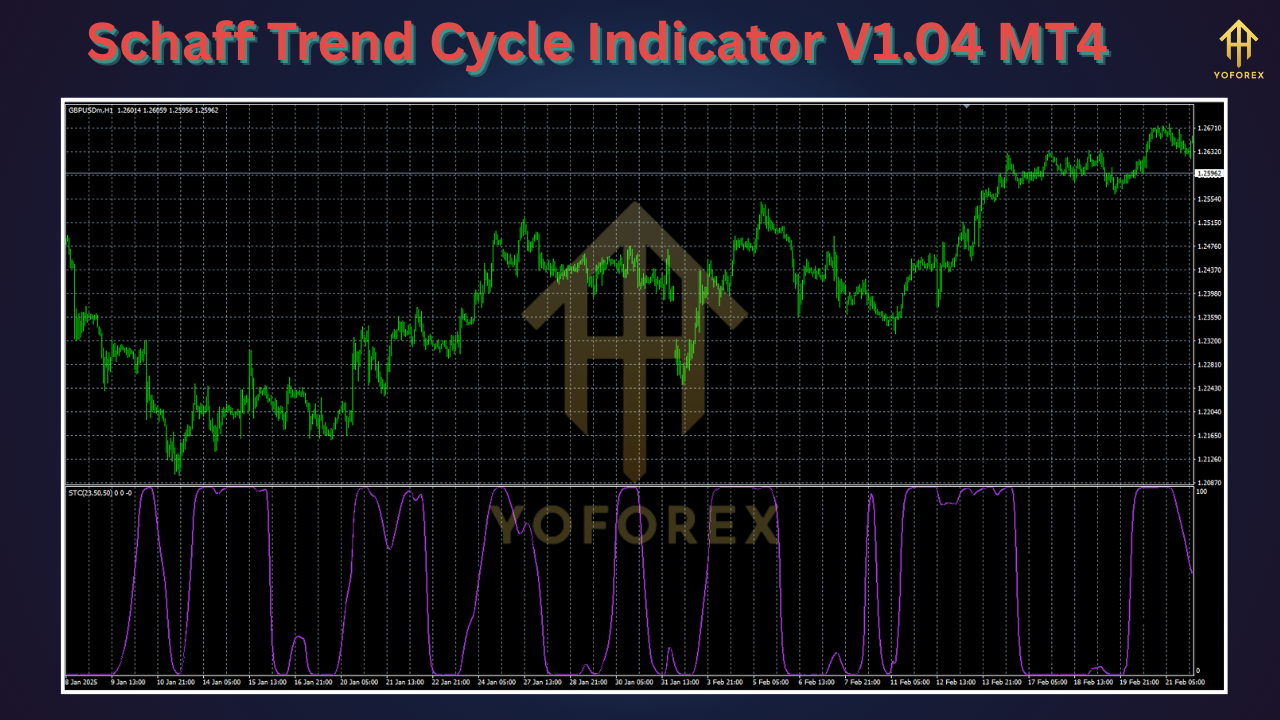
The STC is based on the MACD (Moving Average Convergence Divergence) but applies a cycle component to it, which enables the indicator to detect market turns faster than traditional MACD.
Here’s a step-by-step breakdown:
-
MACD Calculation
It first calculates the MACD using two exponential moving averages (commonly 12 and 26-period EMAs). -
Cycle Conversion
It then applies a stochastic cycle filter to the MACD line, converting it into a cycle that oscillates between 0 and 100. -
Buy/Sell Signal Generation
When the cycle crosses above a specific threshold (typically 25 or 50), it signals a buy. When it crosses below, it signals a sell.
✅ Example:
-
STC Rising and Crossing 25 or 50: Buy Signal
-
STC Falling and Crossing 75 or 50: Sell Signal
This dual-layer filtering ensures that the STC reacts faster while also maintaining reliability.
Key Features of Schaff Trend Cycle Indicator V1.04
Let’s explore the most impactful features:
1. Fast Signal Generation
Unlike traditional trend indicators that lag, the STC provides quicker signals thanks to its dual filter design. This means fewer late entries and exits.
2. Highly Accurate
By filtering MACD with cycles, it reduces false signals and whipsaws, making it ideal for volatile currency pairs.
3. Custom Thresholds
You can modify the threshold levels (e.g., 25 and 75) to match your risk tolerance and trading style.
4. Visual Clarity
The color-coded graph helps traders instantly identify the trend direction:
-
Green Zone: Uptrend
-
Red Zone: Downtrend
-
Neutral Zone (Gray): Trendless or consolidating market
5. Built-In Alerts
Get alerted when the STC crosses specific levels, so you never miss an opportunity.
Installation Guide: How to Use STC V1.04 in MT4
Using the Schaff Trend Cycle Indicator V1.04 on MetaTrader 4 is easy. Here’s a step-by-step guide:
🔧 Step 1: Download the Indicator
You can download STC V1.04 from trusted forex software websites like:
-
fxcracked.org
-
mql5.software
-
forexfactory.cc
🔧 Step 2: Add to MetaTrader 4
-
Open MetaTrader 4.
-
Go to File > Open Data Folder.
-
Navigate to MQL4 > Indicators.
-
Paste the Schaff Trend Cycle V1.04.ex4 file.
-
Restart MT4.
🔧 Step 3: Apply to Chart
-
Go to Navigator > Indicators.
-
Find Schaff Trend Cycle V1.04.
-
Drag and drop onto your chart.
-
Customize parameters (optional).
Best Settings for Forex Trading
Although the default settings work well, you can tweak them for better accuracy:
-
Fast EMA: 23
-
Slow EMA: 50
-
Cycle Length: 10
-
Thresholds: 25/75 for conservative, 40/60 for aggressive traders
⚠️ Pro Tip: Backtest your settings on demo accounts or using Strategy Tester to find the optimal combination for your trading style.
How to Trade with Schaff Trend Cycle Indicator V1.04
Here are some effective trading strategies:
📌 1. Trend Reversal Strategy
-
Buy when STC crosses above the lower threshold (25 or 40).
-
Sell when STC crosses below the upper threshold (75 or 60).
📌 2. Trend Continuation Strategy
-
Combine with Moving Averages or Bollinger Bands.
-
Enter trades in the direction of the trend when STC confirms momentum.
📌 3. Scalping Strategy
-
Use STC on 5M or 15M charts.
-
Confirm with RSI or MACD for quick entries and exits.
Pros and Cons
| Pros | Cons |
|---|---|
| ✅ Fast and reliable signals | ❌ May give false signals in flat markets |
| ✅ Reduces lag significantly | ❌ Requires tuning for each currency pair |
| ✅ Works on all timeframes | ❌ Best results when combined with other indicators |
| ✅ Ideal for forex traders | ❌ Not widely available on mobile MT4 apps |
Best Currency Pairs and Timeframes
The STC V1.04 indicator works on all currency pairs, but here are some high-probability options:
-
EUR/USD
-
GBP/JPY
-
USD/JPY
-
GBP/USD
-
XAU/USD (Gold)
Recommended Timeframes:
-
Day Traders: M15, M30
-
Swing Traders: H1, H4
-
Position Traders: D1
Combining STC with Other Indicators
To increase accuracy and reduce false signals, combine STC V1.04 with these:
-
✅ RSI (Relative Strength Index) – To confirm overbought/oversold conditions.
-
✅ Bollinger Bands – To spot breakouts and volatility.
-
✅ MACD – For trend confirmation.
-
✅ Moving Averages – For overall trend direction.
Real-Life Use Case Example
Let’s take an example:
You’re trading EUR/USD on a 1-hour chart. The STC indicator crosses above 25, changing color from red to green. At the same time, the RSI is at 40, and price is bouncing from the 200 EMA.
This is a strong confluence of a bullish trend signal. You enter a buy trade, set your SL below the recent swing low, and TP at the next resistance. The STC helps you time the entry before the trend fully develops, giving you a head start.
Final Thoughts: Is Schaff Trend Cycle V1.04 Worth It?
Absolutely. The Schaff Trend Cycle Indicator V1.04 is a versatile and powerful trading tool that combines the strength of trend-following and momentum strategies. Whether you are a beginner or an experienced trader, this indicator can enhance your decision-making by providing early trend signals with reduced lag.
However, as with any tool, no indicator is perfect. The STC should be used as part of a broader trading strategy that includes risk management, proper position sizing, and confluence with other indicators or price action.
FAQs
❓Is the Schaff Trend Cycle V1.04 free?
Yes, many sources offer this version for free. However, always download from trusted sites.
❓Can I use this indicator for crypto trading?
Yes, if your broker offers crypto on MT4. It works on any asset.
❓Is it beginner-friendly?
Absolutely. Its color-coded signals make it very easy to understand.
❓Does it repaint?
No. Once a signal is given, it does not repaint, making it reliable for decision-making.
✨ Final Tip
Use the STC V1.04 as a confirmation tool in your trading arsenal. Combined with smart analysis and discipline, it can become your secret weapon in the forex market.