
Unlocking Precision Trading with the SMART ENTRY SUPER INDICATOR V2.2 for MT4
In the fast-paced world of forex trading, precision and timing are everything. Traders are constantly on the lookout for tools that can provide an edge in identifying high-probability entry and exit points. Enter the SMART ENTRY SUPER INDICATOR V2.2 for MetaTrader 4 (MT4), a powerful technical analysis tool designed to enhance trading strategies by offering accurate signals, advanced market analysis, and user-friendly features. This blog post dives deep into the functionalities, benefits, and practical applications of this indicator, exploring how it can transform your trading experience in 2025.
Introduction to the SMART ENTRY SUPER INDICATOR V2.2
The SMART ENTRY SUPER INDICATOR V2.2 is a custom-built tool for the MT4 platform, one of the most widely used trading platforms globally due to its versatility and robust features. This indicator is crafted to help traders—whether novice or experienced—navigate the complexities of the forex market by providing clear, non-repainting signals for entering and exiting trades. Unlike many indicators that rely on a single metric, the SMART ENTRY SUPER INDICATOR V2.2 combines multiple technical analysis elements, such as trend analysis, volatility filters, and momentum confirmation, to deliver reliable trading signals.
The indicator is particularly appealing because it caters to various trading styles, including scalping, day trading, and swing trading. Its adaptability across different timeframes and currency pairs makes it a versatile addition to any trader’s toolkit. In this blog, we’ll explore its key features, installation process, trading strategies, and tips for maximizing its potential, all while addressing its limitations and best practices for use.
Key Features
The SMART ENTRY SUPER INDICATOR V2.2 stands out due to its sophisticated yet user-friendly design. Here are its core features:
-
Non-Repainting Signals: One of the biggest frustrations for traders is dealing with indicators that repaint, giving misleading signals after the fact. This indicator provides non-repainting arrows, ensuring that once a signal appears, it remains fixed, offering confidence in decision-making.
-
Multi-Timeframe Analysis: The indicator incorporates multi-timeframe (MTF) trend filters, analyzing higher timeframes (e.g., H4 or D1) to confirm the market’s overall direction. This reduces the risk of trading against the prevailing trend, a common pitfall for beginners.
-
Volatility-Based Entry Zones: Using Adaptive Volatility Zones based on the Average True Range (ATR), the indicator identifies high-probability breakout and pullback opportunities. It excels in detecting market squeeze phases, where volatility is low, signaling potential explosive moves.
-
Momentum Confirmation: A built-in oscillator filters out weak signals by gauging the strength behind price movements. This ensures that only high-probability setups are highlighted, reducing false signals in choppy markets.
-
Customizable Alerts: Traders can configure alerts for various scenarios, including pop-up notifications, email alerts, and push notifications to mobile devices. This feature is ideal for those who can’t monitor charts constantly.
-
User-Friendly Interface: The indicator displays clean, color-coded arrows (green for buy, red for sell) and optional support/resistance zones, making it easy to interpret even for beginners. It also includes in-chart parameter panels for quick adjustments.
-
Risk Management Tools: The indicator suggests stop-loss and take-profit levels based on recent swing highs and lows, helping traders manage risk effectively.
-
Lightweight Performance: Designed to run smoothly on any MT4 setup, the indicator is optimized for minimal CPU usage, ensuring it doesn’t slow down your platform during backtesting or live trading.
Installing the SMART ENTRY SUPER INDICATOR V2.2 on MT4
Installing the SMART ENTRY SUPER INDICATOR V2.2 is straightforward, even for those new to MT4. Follow these steps to get started:
-
Download the Indicator: Obtain the indicator file (typically a .ex4 or .mq4 file) from a trusted source, such as the provider’s website or a reputable marketplace like MQL5. Ensure the file is compatible with MT4.
-
Access the MT4 Data Folder: Open your MT4 terminal, click on “File” in the top left corner, and select “Open Data Folder.” Navigate to the “MQL4” folder, then the “Indicators” subfolder.
-
Install the Indicator: Copy and paste the downloaded indicator file into the “Indicators” folder. If the file is in a .zip format, extract it first.
-
Restart MT4: Close and reopen the MT4 platform to load the indicator. Alternatively, right-click the “Navigator” window and select “Refresh” to update the indicator list.
-
Apply to a Chart: In the “Navigator” window, locate the SMART ENTRY SUPER INDICATOR V2.2 under “Custom Indicators.” Drag and drop it onto your desired chart. A settings window will appear, allowing you to customize parameters like signal sensitivity, alert types, and visual styles.
-
Confirm DLL Usage (if prompted): Some indicators require DLL files for advanced calculations. If prompted, click “Yes” to allow DLL usage, but only if you trust the source to avoid security risks.
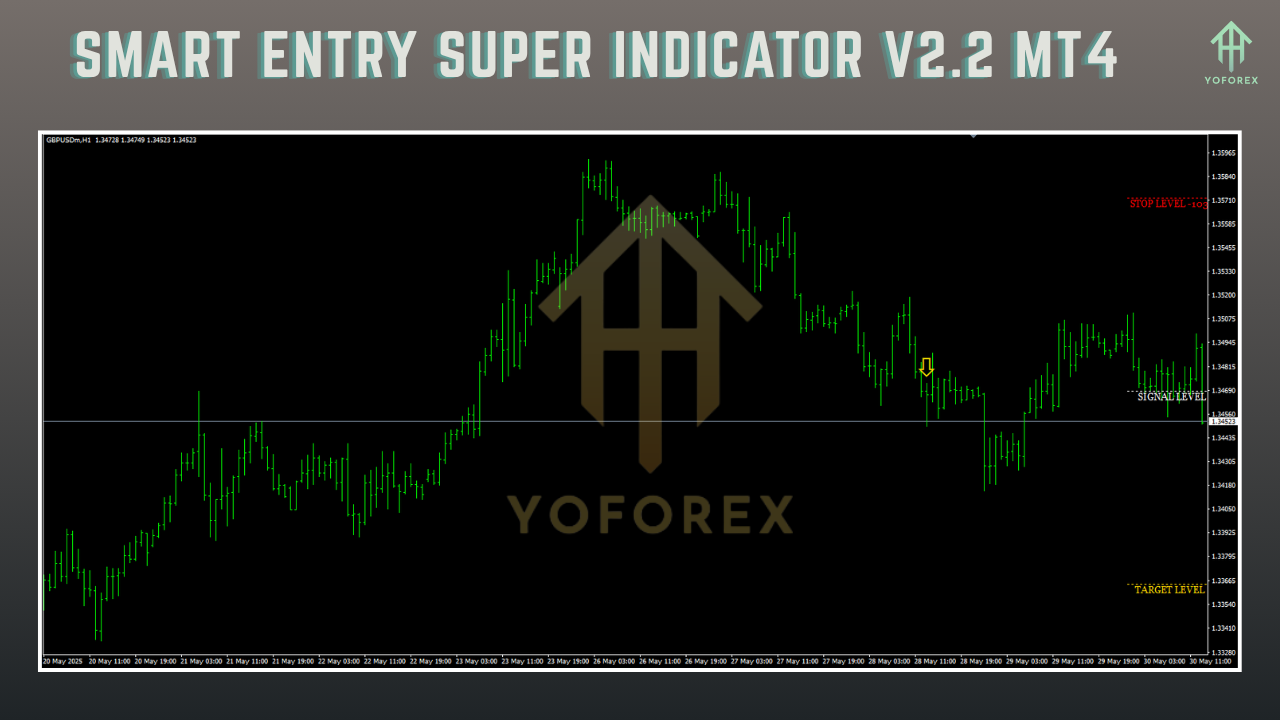
Once installed, the indicator will display arrows and optional support/resistance zones on your chart, ready for analysis.
How the Indicator Works
The SMART ENTRY SUPER INDICATOR V2.2 combines several technical analysis principles to generate actionable trading signals. At its core, it uses:
-
Trend Analysis: The MTF filter analyzes higher timeframes to confirm the market’s direction. For example, on a 15-minute chart, it may reference the H4 trend to ensure alignment.
-
Volatility Assessment: The ATR-based volatility zones identify periods of low volatility (squeeze phases) and high volatility (expansion phases), helping traders anticipate breakouts or pullbacks.
-
Momentum Confirmation: The built-in oscillator evaluates the strength of price movements, filtering out weak signals to focus on high-probability setups.
When these conditions align, the indicator plots a green arrow for a buy signal or a red arrow for a sell signal. Suggested stop-loss and take-profit levels are also displayed, based on recent price action, to aid in risk management.
Trading Strategies with the SMART ENTRY SUPER INDICATOR V2.2
The versatility of the SMART ENTRY SUPER INDICATOR V2.2 allows it to be used in various trading strategies. Here are three popular approaches:
1. Trend-Following Strategy
-
Setup: Apply the indicator to a 1-hour (H1) or 4-hour (H4) chart for major currency pairs like EUR/USD or GBP/JPY.
-
Entry: Enter a buy trade when a green arrow appears, and the MTF filter confirms an uptrend (e.g., price above the 200-period SMA). For a sell trade, wait for a red arrow and a confirmed downtrend.
-
Exit: Set the stop-loss below the recent swing low (for buys) or above the swing high (for sells). Use the indicator’s suggested take-profit level or trail the stop using the indicator’s volatility zones.
-
Tip: Combine with a moving average (e.g., 50-period SMA) to filter out counter-trend signals, as suggested by some trading blogs.
2. Breakout Strategy
-
Setup: Use a 15-minute (M15) chart for faster-paced trading, focusing on volatile pairs like USD/JPY.
-
Entry: Look for a green or red arrow during a squeeze phase (narrow ATR zones), indicating a potential breakout. Confirm the breakout with increased volume or a candlestick pattern like a strong bullish/barish candle.
-
Exit: Place stop-losses outside the ATR zone to account for volatility spikes. Take profits at a 2:1 or 3:1 reward-to-risk ratio.
-
Tip: Avoid trading during low-liquidity sessions (e.g., Asian session) to reduce false breakouts.
3. Scalping Strategy
-
Setup: Apply the indicator to a 5-minute (M5) chart for quick trades on pairs like EUR/CHF.
-
Entry: Enter trades only when the MTF filter aligns with the shorter timeframe’s signal (e.g., green arrow on M5 with an H1 uptrend).
-
Exit: Use tight stop-losses (e.g., 5-10 pips) and aim for small, quick profits (e.g., 10-15 pips).
-
Tip: Pair with a momentum indicator like the Relative Strength Index (RSI) to confirm overbought/oversold conditions.
Benefits of Using the SMART ENTRY SUPER INDICATOR V2.2
-
Improved Timing: The indicator’s precise, non-repainting signals help traders enter and exit trades at optimal points, reducing guesswork.
-
Versatility: Suitable for multiple trading styles and timeframes, making it ideal for diverse market conditions.
-
Risk Management: Built-in stop-loss and take-profit suggestions simplify trade management, crucial for maintaining a positive risk-reward ratio.
-
Time Efficiency: Customizable alerts allow traders to step away from the screen without missing opportunities.
-
Beginner-Friendly: The intuitive interface and clear signals make it accessible for new traders, while its advanced features appeal to professionals.
Limitations and Considerations
While powerful, the SMART ENTRY SUPER INDICATOR V2.2 is not a holy grail. Traders should be aware of the following:
-
Ranging Markets: Like many trend-based indicators, it may produce false signals in choppy, sideways markets. Combining it with oscillators like RSI or Stochastic can mitigate this.
-
Broker Dependency: Signal accuracy can vary slightly depending on the broker’s data feed and MT4 platform settings.
-
Learning Curve: While user-friendly, mastering the indicator’s settings and combining it with other tools requires practice.
-
Risk Warning: Forex trading carries significant risk. Always test the indicator on a demo account and apply strict risk management, risking no more than 1-2% of your capital per trade.
Tips for Maximizing Performance
-
Backtest Thoroughly: Before using the indicator with real capital, backtest it on historical data to understand its performance across different market conditions.
-
Combine with Other Tools: Pair the indicator with complementary tools like moving averages, RSI, or Fibonacci retracements to filter signals and improve accuracy.
-
Optimize Settings: Adjust the indicator’s sensitivity and timeframe settings to match your trading style and the asset’s volatility.
-
Stay Disciplined: Follow the indicator’s signals consistently, but avoid overtrading. Stick to a well-defined trading plan.
-
Monitor News Events: Avoid trading during high-impact news releases, as volatility can lead to false signals.
Conclusion
The SMART ENTRY SUPER INDICATOR V2.2 for MT4 is a game-changer for traders seeking precision and reliability in their trading strategies. Its non-repainting signals, multi-timeframe analysis, and customizable features make it a versatile tool for navigating the forex market’s complexities. Whether you’re a scalper chasing quick profits or a swing trader riding long-term trends, this indicator offers actionable insights to enhance your decision-making.
However, no indicator guarantees success. The SMART ENTRY SUPER INDICATOR V2.2 is most effective when used as part of a comprehensive trading plan, combined with sound risk management and complementary tools. By backtesting, optimizing settings, and staying disciplined, traders can unlock the full potential of this powerful tool.
Ready to elevate your trading? Download the SMART ENTRY SUPER INDICATOR V2.2 from a trusted source, install it on your MT4 platform, and start exploring its capabilities in a demo account. With practice and patience, this indicator could become a cornerstone of your trading success in 2025.
Disclaimer: Forex trading involves significant risk of loss. Always conduct thorough research, test indicators on demo accounts, and never risk more than you can afford to lose. Past performance is not indicative of future results.