The world of forex trading evolves. With algorithmic systems becoming more powerful, the entry of artificial intelligence into Expert Advisors (EAs) is now more than a novelty: it’s a potential edge. One of the more recent offerings in this category is Soluna AI EA V6.28 for MetaTrader 4 (MT4). Released by developer Mr Nattawut Poochomchuen, this EA claims to combine enterprise AI infrastructure with automated trading logic. Version 6.28, updated 31 October 2025, brings the latest enhancements.
In this article, we will examine what Soluna AI EA offers, its key features, how it works in practice, recommended setup and risk considerations — ultimately helping you decide if this is a system worth exploring for your automated trading portfolio.
What is Soluna AI EA V6.28?
At its core, Soluna AI EA is an Expert Advisor for MT4 that uses artificial intelligence as part of its decision-making engine. According to the product description:
-
It markets itself as “enterprise-grade artificial intelligence” integrated into MT4.
-
The description emphasises that it is not simply an indicator system, but rather “it thinks, analyses and adapts like a human expert — but with machine precision, zero emotion, and limitless capacity.”
-
Version 6.28 is current and has activations limited to 10 (as of publication).
-
The published price is US $179 (at time of listing), and the product page shows demo downloads and update logs.
In simple terms, Soluna AI EA V6.28 offers a fully automated trading bot which uses AI models (via third-party services) to assess the market and open/close trades on behalf of the user.
Key Features at a Glance
Let’s break down some of the headline features and what they mean for traders:
1. Advanced AI Integration
The product description lists integration with platforms such as:
-
Google Gemini – for deep qualitative market insight.
-
Groq AI – for lightning-fast inference and live trading executions.
-
OpenRouter – enabling access to multiple specialised AI models.
This kind of integration suggests that the EA relies on external cloud AI services via API keys, meaning setup involves more than just placing an EA on a chart.
2. Capital Protection & Risk Management
The description presents an “Intelligent News Protection System” which features:
-
Real-time economic calendar integration
-
Automatic suspension of trading before major announcements
-
Currency-specific impact analysis to avoid unsafe trades around news.
Also included is dynamic lot sizing (based on risk tolerance) and real-time equity monitoring plus trailing stop & auto breakeven features.
3. Transparency and Learning Engine
Soluna emphasises transparency:
-
A dashboard showing AI analysis (Buy/Sell/Hold), predicted win rate and signal urgency.
-
A “Self-Improving Engine” which analyses its trade history, learns from both wins and losses, and adapts accordingly.
4. Multi-Asset and Multi-Timeframe Support
Although broad in scope, specifics include:
-
Platform: MT4
-
Assets: Forex, Gold, Metals
-
Timeframes: “All TF” (i.e., supports multiple timeframes)
Why This EA Might Be Appealing
For traders who are serious about automation and willing to engage more deeply with AI-driven systems, Soluna AI EA has several attractive selling points:
-
Cutting-edge technology: The combination of advanced AI services with MT4 automation brings a futuristic angle to trading automation.
-
Capital preservation focus: The inclusion of news filters and dynamic risk features addresses many of the pain points in algorithmic trading (unexpected news events, large drawdowns).
-
Adaptability: Because the EA claims to learn from history and adapt, it offers potential for longevity in changing markets, compared to static rule-based bots.
-
Transparency: The dashboard and analytical features indicate a move away from opaque “black-box” EAs.
These qualities align with current trader expectations, especially among more advanced or AI-curious users.
Important Setup Requirements & Considerations
However, it’s essential to understand the setup demands and caveats before diving in.
API Keys & External Services
You must obtain API keys from the listed AI providers (Gemini, Groq, OpenRouter). The product page walks through registration steps: creating a key, linking account/project, etc. This introduces additional costs (free tiers may exist) and complexity.
Broker & Account Type
Because of the reliance on external processing and possibly lower-latency execution, using a low-spread ECN broker, a proper VPS, and correct account type are likely recommended to ensure performance. Although not spelled out in the product overview, as it is for advanced users it follows that execution environment matters.
Testing & Risk Four-Letter Word
Despite strong marketing, the product page carries the standard risk disclaimer: “Trading involves substantial risk, and you may lose your entire investment. Past performance does not guarantee future results. Always test on a demo account first…”
This is particularly relevant because AI-driven systems may show strong historical edge, but live market conditions vary (latency, spread, slippage, broker restrictions).
Version & Activations
Version 6.28 is the current release (as of 31 October 2025) and activations are limited. It is important to ensure you download the correct version and keep it updated.
Real-World Evidence: Backtests & Live Trading
When assessing any trading EA, proof of performance is key. For Soluna AI, here’s what can be gleaned from available sources:
-
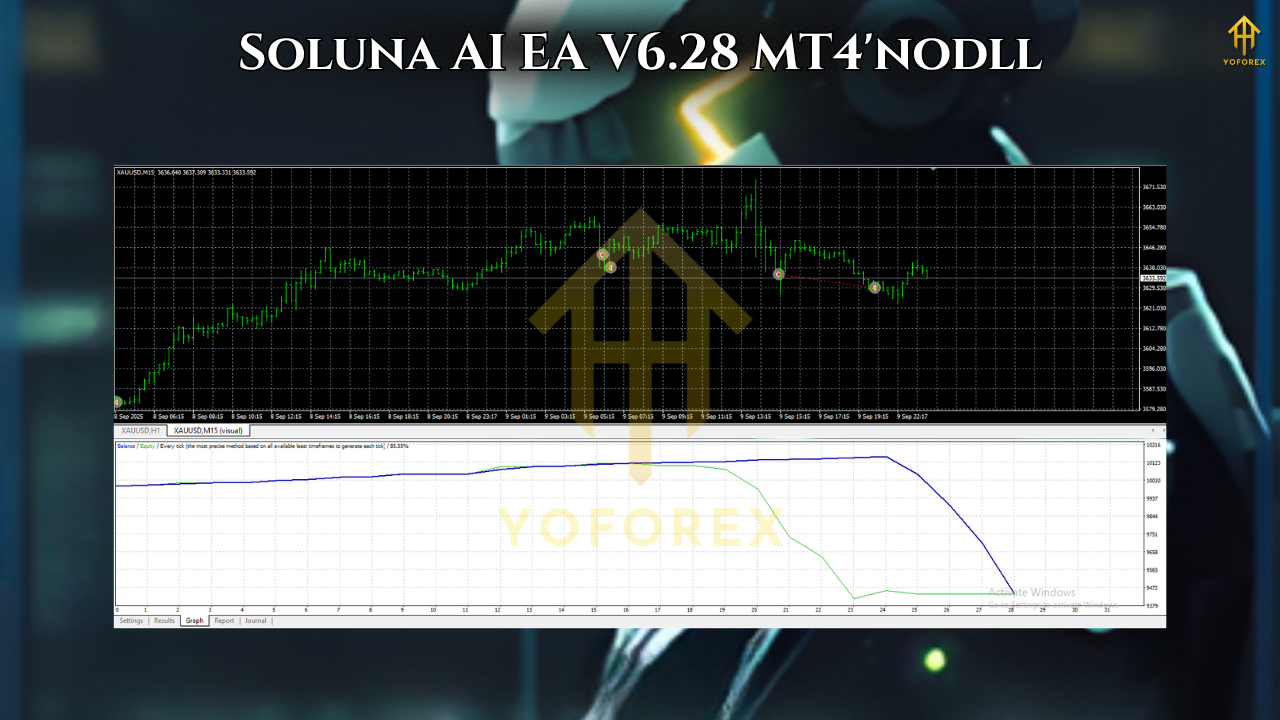
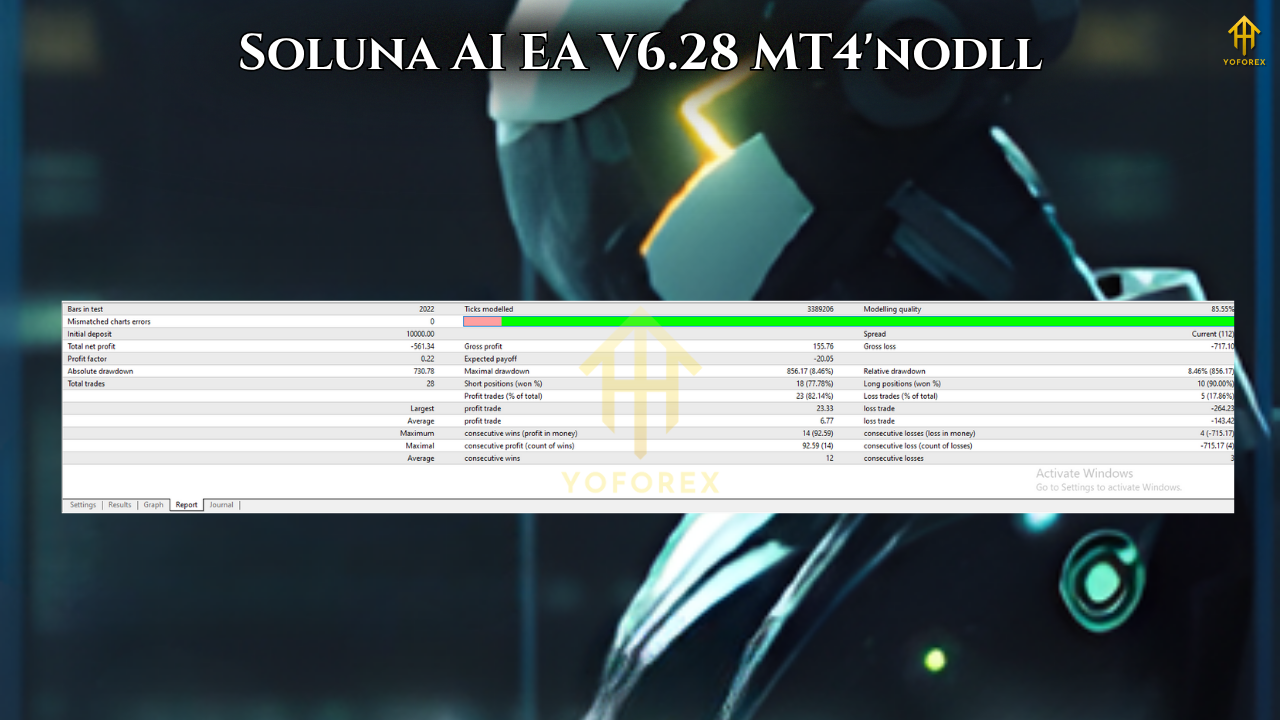
On a site summarising the EA, a back-test from 2021–2025 (tick-data 99% quality) showed results such as: EURUSD M15 ~11-16% monthly average with max drawdown ~5-7%; GBPUSD slightly higher; USDJPY H1 smoother; XAUUSD M15 more volatile with recommended lower risk.
-
The company states that in live forward tests under conservative risk the EA maintained a similar profile, albeit with fewer trades and tighter expectancy dispersion.
-
On the official product page, we also find “Demo downloaded: 4” and “Activations: 10” (as of the listing).
While these results are promising, caution must be maintained: data is not independently verified in every case, live trading conditions may vary, and the typical caveats of EAs (broker restrictions, slippage, human interference) apply.
Proposed Workflow: How to Use Soluna AI EA Effectively
Here’s a step-by-step guide (adapted for the YoForex audience) to help you deploy Soluna AI with discipline and care.
-
Demo Testing
-
Install the EA in MT4 on a demo account.
-
Use default settings first; run at least 4-8 weeks to observe behaviour across market conditions (trending, range, news events).
-
Monitor drawdown, trade frequency, average risk per trade, and whether the dashboard metrics (win-rate, signal urgency) match expectations.
-
-
Select Suitable Broker & Environment
-
Choose a broker with low spreads, good ECN/RAW type execution and allow algorithmic trading.
-
Consider running the EA on a VPS for stability and low-latency connectivity, especially if using external API keys and high-frequency triggers.
-
-
Risk Configuration
-
The EA supports dynamic lot sizing; choose a conservative risk percentage initially (e.g., 0.5%-1% of equity).
-
Enable the news filter and dynamic risk controls to reduce exposure during volatile times.
-
-
Set Up the AI Configuration
-
Register and acquire API keys for the supported AI-providers as instructed in the product overview.
-
Enter these keys in the EA’s input settings in MT4. Ensure connection is confirmed (“AI Connected ✓”).
-
-
Monitor & Adapt
-
Review the dashboard daily: look at current signal urgency, predicted win-rate, open positions, historic trades.
-
Keep an eye on equity curve, drawdown, worst-case open trade scenarios.
-
At pre-defined milestones (e.g., every 500 hours/100 trades), evaluate performance and make adjustments if needed (e.g., risk reduction or tuning).
-
-
Transition to Live (If Ready)
-
Only if the demo performance meets your expectations and you’re comfortable with risk.
-
Start live with a modest capital allocation and similar risk settings.
-
Continue monitoring closely—automated does not mean “set and forget”.
-
Pros & Cons: What You Should Weigh
Pros
-
Advanced AI infrastructure gives the possibility of more “intelligent” trading logic compared to conventional EAs.
-
Good risk controls (news filter, dynamic lot sizing) help avoid common pitfalls.
-
Transparency with dashboard and AI-analysis makes the system more user-friendly for advanced traders.
-
Suitable for a range of assets (Forex, Gold, Metals) and multiple time-frames.
Cons
-
Requires extra setup (API keys, potentially extra cost and knowledge).
-
Performance still subject to external factors (broker execution, latency, slippage).
-
Recent version means limited large-scale historical verification (as activation count is low).
-
As with all EAs, past or backtested results do not guarantee future profits — risk remains.
Who is Soluna AI EA Best Suited For?
-
Traders who have some experience with EAs and automated trading and are comfortable working through setup nuances (VPS, broker selection, API keys).
-
Those wanting to deploy a “next-gen” trading system and are open to using AI models rather than purely rule-based logic.
-
Investors who value transparency and want to monitor the “thinking” of their bot rather than blindly running it.
-
Anyone willing to test first on demo, apply proper risk control and monitor performance rigorously.
Conversely, if you are brand new to automated EAs, or unwilling to commit time for testing and monitoring, then a simpler plug-and-play EA may be more appropriate until you build up comfort with AI-driven automation.
Final Thoughts: Should You Consider Soluna AI EA V6.28?
In the evolving world of automated forex trading, Soluna AI EA V6.28 stands out as one of the more ambitious offerings: combining MT4 automation with enterprise AI, full transparency, and modern risk controls. For traders serious about harnessing automation, and willing to invest the setup time and monitor performance, it presents a compelling proposition.
That said, no system is perfect and no automated bot replaces trading discipline, risk management and ongoing oversight. Because Soluna requires more than just a simple install—given the API key registration, broker environment tuning and monitoring—it is best approached with realistic expectations. Use demo testing, check how the EA behaves under real-market conditions, understand its strength and weaknesses, then decide whether it fits your trading style and capital.
If you deploy it well, Soluna AI EA could become a valuable tool in your arsenal. But if you skip the essential steps of testing, risk control and live monitoring, you may end up disappointed. As always in trading: automation is a tool, not a guarantee.