

Stealth Hunter EA V1.0 MT4: Your Ultimate Guide to Automated Forex Trading
The Stealth Hunter EA V1.0 for MetaTrader 4 (MT4) is a cutting-edge Expert Advisor designed to revolutionize forex trading by automating strategies with precision and efficiency. Whether you’re a novice trader or a seasoned professional, this EA offers a seamless way to capitalize on market opportunities with minimal manual intervention. In this blog post, we’ll explore the features, setup, recommended settings, currency pairs, timeframes, and benefits of the Stealth Hunter EA V1.0, focusing on its accessibility with a low minimum deposit of $200.
What is Stealth Hunter EA V1.0?
The Stealth Hunter EA V1.0 is an automated trading robot built for the MetaTrader 4 platform, one of the most popular trading platforms globally due to its robust features and user-friendly interface. This EA leverages advanced algorithms to analyze market conditions, identify high-probability trading opportunities, and execute trades with precision. Unlike manual trading, which can be time-consuming and emotionally driven, the Stealth Hunter EA operates based on predefined rules, eliminating human error and emotional biases.
The EA is designed to cater to traders with varying levels of experience. With a minimum deposit requirement of just $200, it’s accessible to those with smaller trading accounts, making it an excellent choice for beginners looking to dip their toes into automated trading. The Stealth Hunter EA employs a scalping strategy, focusing on capturing small, consistent profits from rapid price movements in the forex market.
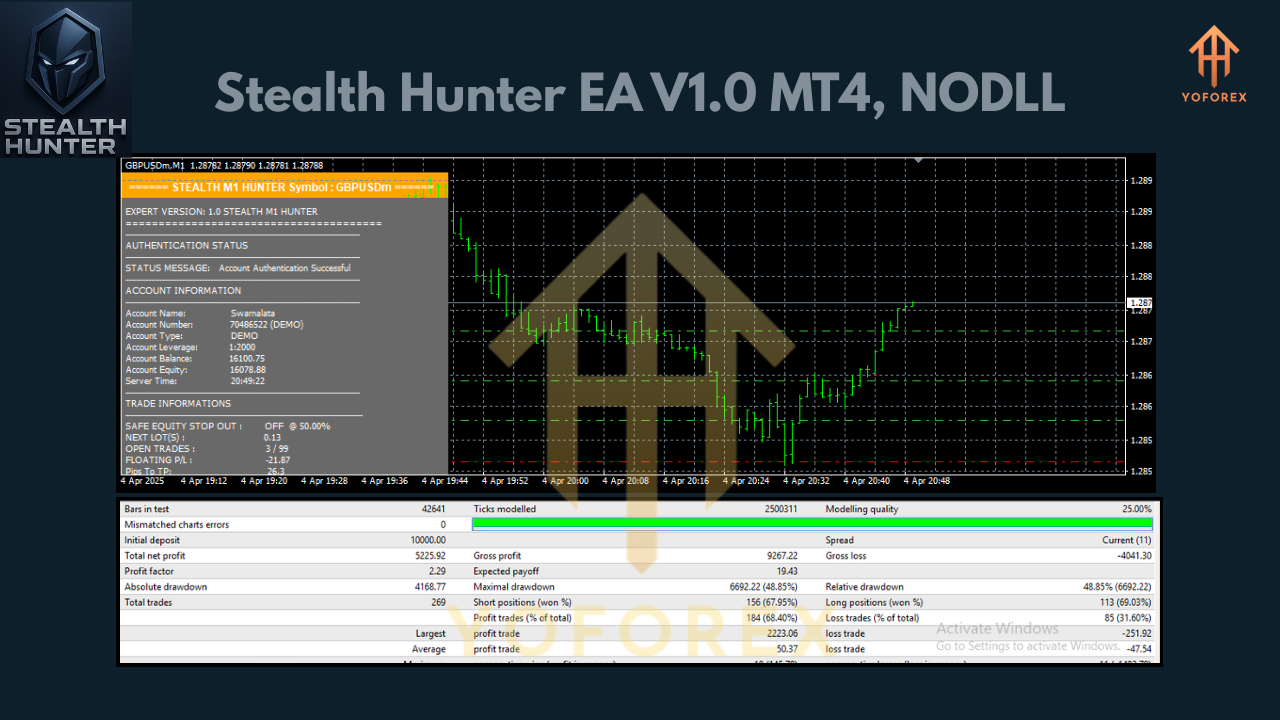
Key Features of Stealth Hunter EA V1.0
-
Scalping Strategy: The EA targets small price movements, entering and exiting trades quickly to accumulate gains. This approach thrives in volatile markets where precise entries and exits are critical.
-
Low Deposit Requirement: With a minimum deposit of $200, the Stealth Hunter EA is ideal for traders with limited capital, allowing them to test and deploy the EA without significant financial risk.
-
Advanced Market Analysis: The EA uses technical indicators such as moving averages, Relative Strength Index (RSI), and candlestick patterns to identify trends and reversals.
-
Risk Management: Built-in features like stop-loss and take-profit settings ensure capital protection, while adaptive algorithms adjust to changing market conditions.
-
Multi-Currency Compatibility: Optimized for major currency pairs like EUR/USD, GBP/USD, USD/JPY, and AUD/USD, offering flexibility across various market conditions.
-
User-Friendly Setup: The EA integrates seamlessly with MT4, with straightforward installation and configuration processes.
-
Backtesting Capabilities: Traders can test the EA’s performance using historical data to optimize settings before deploying it in live trading.
Recommended Currency Pairs
The Stealth Hunter EA V1.0 is optimized for major currency pairs known for their liquidity and volatility, which are ideal for scalping strategies. Based on industry standards and similar EAs, the recommended currency pairs include:
-
EUR/USD: The most traded pair, offering tight spreads and high liquidity.
-
GBP/USD: Known for its volatility, ideal for capturing quick price movements.
-
USD/JPY: A stable pair with consistent trends, suitable for scalping.
-
AUD/USD: Offers moderate volatility and reliable price patterns.
These pairs perform well due to their high trading volume and predictable price action, making them perfect for the EA’s scalping approach.
Optimal Timeframe
The recommended timeframe for the Stealth Hunter EA V1.0 is the 15-minute (M15) chart. This timeframe strikes a balance between capturing short-term price movements and avoiding excessive market noise, which is common in lower timeframes like M1 or M5. The M15 chart allows the EA to analyze trends and execute trades with precision, making it ideal for scalping while maintaining stability in volatile markets.
Minimum Deposit and Account Setup
With a minimum deposit of $200, the Stealth Hunter EA V1.0 is accessible to a wide range of traders. Here’s how to set up your account for optimal performance:
-
Choose a Reliable Broker: Select an MT4-compatible broker with low spreads and fast execution, such as IC Markets or FP Markets. Ensure the broker supports micro-lot trading (0.01 lots) to accommodate the low deposit.
-
Account Type: Opt for a Raw ECN account for competitive spreads, which are crucial for scalping strategies.
-
Leverage: A leverage of 1:100 or higher is recommended to maximize the EA’s potential with a $200 deposit, though traders should be cautious of the associated risks.
-
VPS Hosting: Use a Virtual Private Server (VPS) to ensure 24/7 uptime and low latency, especially if running the EA continuously.
How to Install Stealth Hunter EA V1.0 on MT4
Installing the Stealth Hunter EA on MT4 is straightforward:
-
Download the EA: Obtain the Stealth Hunter EA V1.0 file (typically an .ex4 or .mq4 file) from a trusted source.
-
Open MT4 Data Folder: In MT4, go to “File” > “Open Data Folder,” then navigate to the “MQL4” > “Experts” folder.
-
Place the EA File: Copy the EA file into the “Experts” folder.
-
Restart MT4: Close and reopen MT4 to load the EA.
-
Apply the EA: In the Navigator panel, locate the Stealth Hunter EA under “Expert Advisors.” Drag it onto the desired chart (e.g., EUR/USD M15).
-
Configure Settings: Enable “Auto-Trading” in MT4 and adjust the EA’s settings, such as lot size, stop-loss, and take-profit levels.
-
Test on Demo Account: Before going live, run the EA on a demo account to familiarize yourself with its performance and tweak settings as needed.
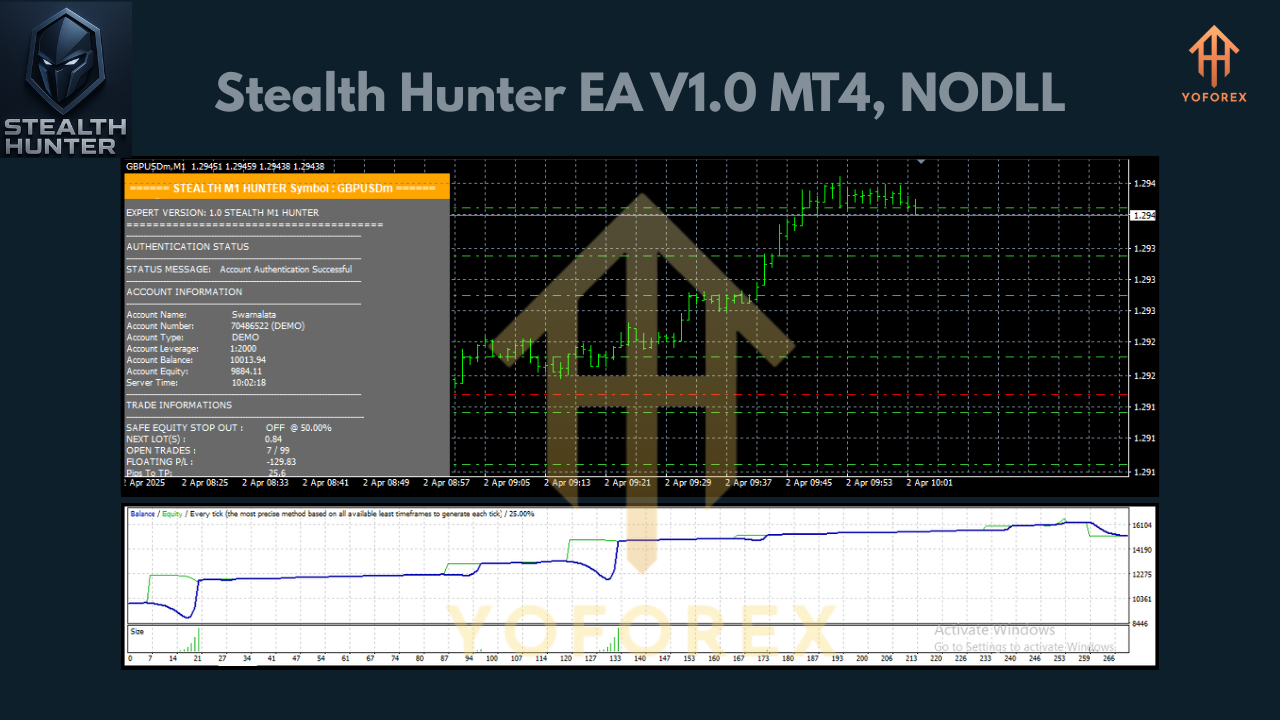
Recommended Settings
To optimize the Stealth Hunter EA V1.0, consider the following settings:
-
Lot Size: Start with 0.01 lots to minimize risk, especially with a $200 deposit. The EA can automatically adjust lot sizes based on account balance.
-
Stop Loss: Set a tight stop-loss (e.g., 10-20 pips) to protect capital.
-
Take Profit: Aim for 5-15 pips per trade, aligning with the scalping strategy.
-
Risk Percentage: Limit risk to 1-2% per trade to ensure sustainable trading.
-
Timeframe: Use the M15 chart for optimal performance.
-
Currency Pairs: Focus on EUR/USD, GBP/USD, USD/JPY, and AUD/USD.
Always backtest these settings using MT4’s Strategy Tester to ensure they suit your trading style and market conditions.
Benefits of Using Stealth Hunter EA V1.0
-
Time-Saving Automation: The EA eliminates the need for constant market monitoring, allowing traders to focus on strategy optimization or other tasks.
-
Emotion-Free Trading: By following predefined rules, the EA removes emotional decision-making, reducing the risk of impulsive trades.
-
Accessibility: The $200 minimum deposit makes it affordable for beginners, while its advanced features appeal to experienced traders.
-
Consistency: The scalping strategy aims for small, consistent profits, reducing exposure to large market swings.
-
Flexibility: Compatibility with major currency pairs and customizable settings allows traders to adapt the EA to their preferences.
Risks and Considerations
While the Stealth Hunter EA V1.0 offers significant advantages, traders should be aware of potential risks:
-
Market Volatility: Scalping strategies can be sensitive to sudden market spikes, so proper risk management is essential.
-
Broker Dependency: The EA’s performance depends on low spreads and fast execution, so choosing a reliable broker is critical.
-
Optimization Required: Regular backtesting and tweaking of settings are necessary to adapt to changing market conditions.
-
Capital Risk: Even with a low deposit, forex trading carries inherent risks, and traders should only invest what they can afford to lose.
Conclusion
The Stealth Hunter EA V1.0 for MT4 is a powerful tool for traders seeking to automate their forex trading with a modest $200 deposit. Its scalping strategy, optimized for major currency pairs like EUR/USD, GBP/USD, USD/JPY, and AUD/USD, and the M15 timeframe, offers a balance of accessibility and performance. By leveraging advanced market analysis, adaptive risk management, and user-friendly setup, this EA empowers traders to achieve consistent profits while minimizing manual effort.
To maximize its potential, use a reputable broker, test the EA on a demo account, and fine-tune settings through backtesting. Whether you’re new to forex or an experienced trader, the Stealth Hunter EA V1.0 can elevate your trading game, making it a worthy addition to your trading arsenal. Start exploring its capabilities today and take the first step toward automated trading success!
Join our Telegram for the latest updates and support


