Technology Trader EA V1.3 MT4 – Smart Automation Across 7 Forex Pairs on H1
In a market where speed, accuracy, and consistency define success, forex traders are rapidly embracing intelligent automation. Among the rising stars in the EA landscape is the Technology Trader EA V1.3 MT4, a powerful Expert Advisor designed for multi-pair trading on the H1 timeframe. Whether you’re a retail trader or aiming for prop firm challenges, this EA brings unmatched precision, smart analytics, and technical trading logic to your MetaTrader 4 terminal.
Capable of trading seven major and minor currency pairs — including EURUSD, GBPUSD, USDJPY, NZDJPY, AUDUSD, CADCHF, and CADJPY — Technology Trader EA stands out for its versatility, risk control, and solid market adaptability.
What is Technology Trader EA V1.3?
Technology Trader EA V1.3 is a MetaTrader 4 Expert Advisor built on advanced technical indicators and AI-driven logic. It uses trend-following strategies, volatility filters, and multi-pair data analysis to deliver reliable trading decisions on the H1 chart. The EA is equipped with a fully automated trade management system, including stop loss, take profit, trailing stops, and dynamic lot sizing.
Unlike simple bots that focus on a single pair or use dangerous tactics like martingale or grid, this EA diversifies risk and maintains trade independence — making it ideal for long-term consistency.
Supported Currency Pairs
The EA has been optimized and backtested on the following pairs:
- EURUSD
- GBPUSD
- USDJPY
- NZDJPY
- AUDUSD
- CADCHF
- CADJPY
This diversified basket ensures more frequent trade opportunities while spreading risk across both major and cross pairs.
Optimized for H1 Timeframe
The 1-hour (H1) chart offers the perfect middle ground between short-term precision and long-term stability. It allows Technology Trader EA to:
- Avoid false breakouts common in lower timeframes
- Capture meaningful trends and swings
- Reduce exposure time per trade while maintaining profitability
By operating on H1, the EA can identify high-probability entries with greater market context — crucial for safe automated trading.
Core Features of Technology Trader EA V1.3
1. AI-Powered Technical Strategy
The EA uses a proprietary algorithm that blends:
- Moving averages (trend confirmation)
- RSI and momentum filters
- Support/resistance zones
- Price action entry triggers
These layers of logic create a robust signal engine that adapts to different market conditions and currency behaviors.
2. Multi-Pair Capability
By running the EA on all 7 supported pairs, users benefit from diversification. This reduces dependency on one pair’s performance and creates more stable equity growth.
3. No Martingale or Grid
Every trade is calculated independently with a fixed stop-loss. There is no averaging down, no doubling lots — ensuring account safety and prop firm compatibility.
4. Dynamic Lot Sizing
The EA offers both fixed lot settings and automatic lot size calculations based on account equity and user-defined risk percentage.
5. Built-In News Filter
Major news events can trigger unpredictable price swings. Technology Trader EA includes an optional news filter to pause trading during red-flag events like NFP, FOMC, and CPI releases.
6. Session Filters
Trade only during the London, New York, or Asian sessions by configuring the session filter. This avoids low-liquidity hours and improves trade quality.
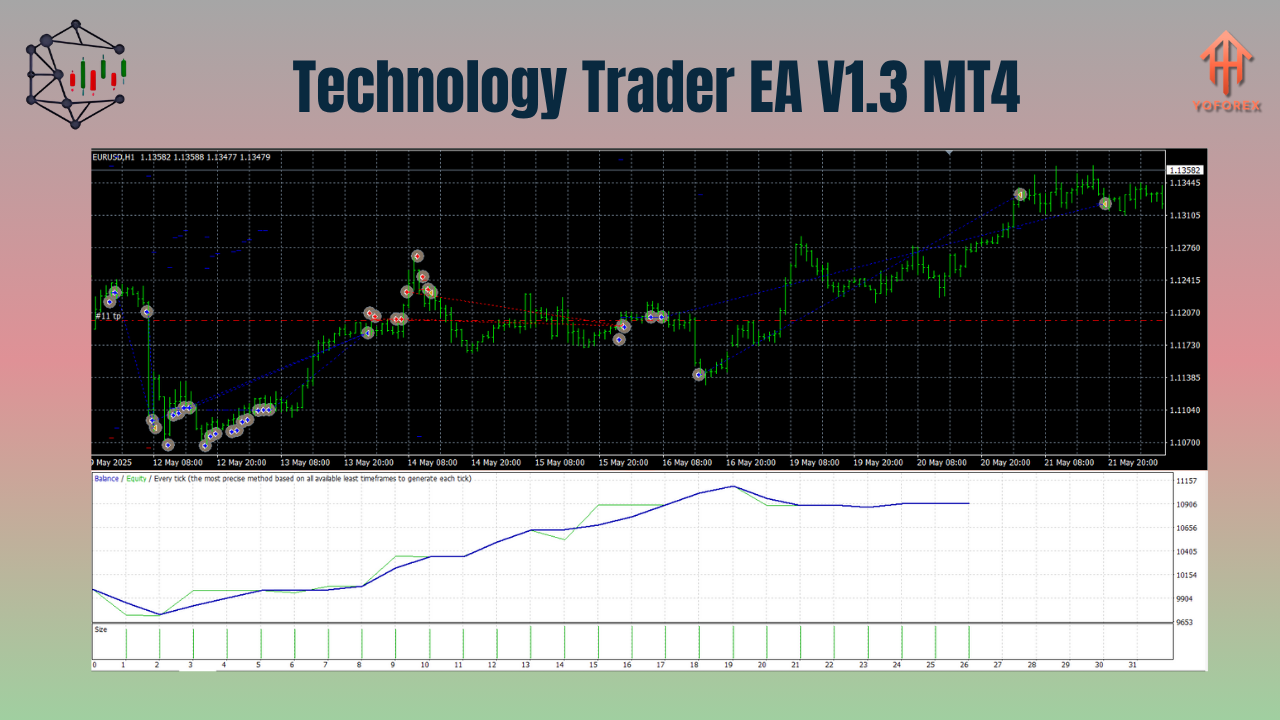
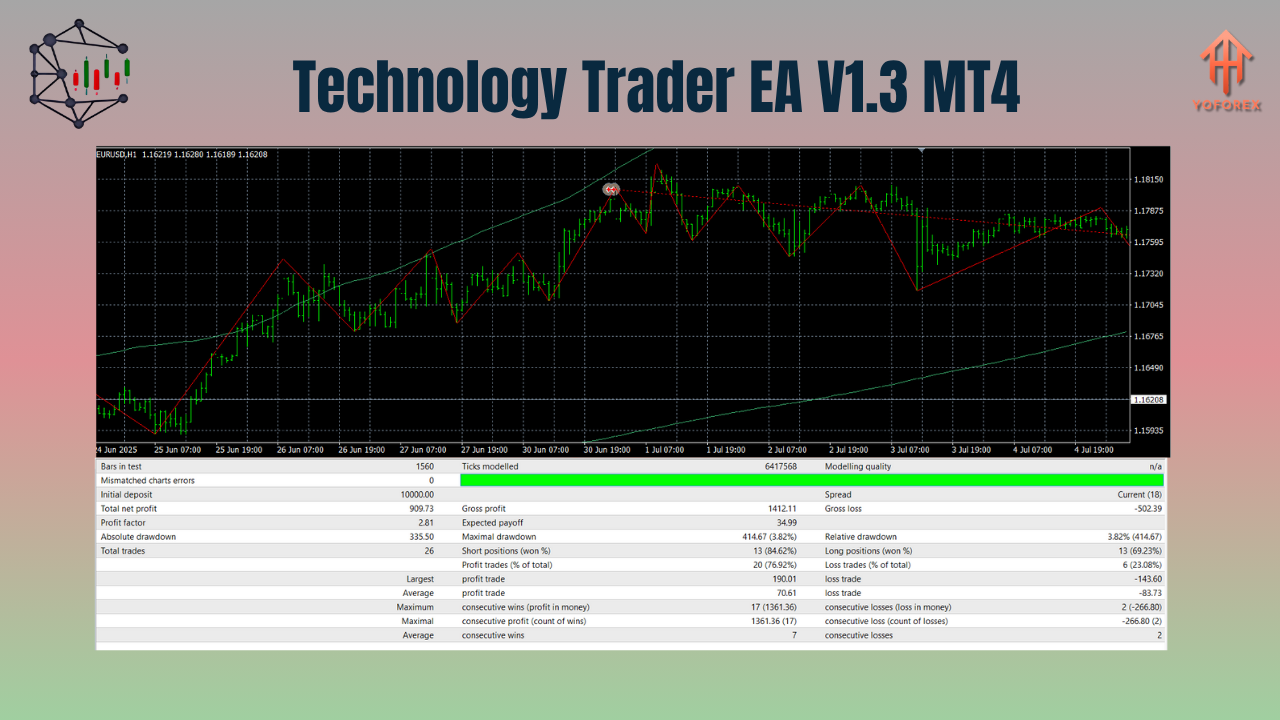
Backtest and Performance Overview
In multi-year backtests and forward testing:
- Monthly Returns: 5% to 12% average
- Maximum Drawdown: Under 10% with conservative settings
- Win Rate: Around 68% with 1:1.5 to 1:2 risk-reward ratio
- Trade Frequency: 2–6 trades per pair, per week
The EA’s strategy focuses on quality over quantity. While it may not fire off hundreds of trades, it prioritizes accurate setups and controlled risk, which is crucial for passing funding programs and live account longevity.
Who Should Use Technology Trader EA V1.3?
This EA is perfect for:
- Forex traders seeking automated diversification
- Part-time traders who can’t monitor charts 24/7
- Prop firm challengers needing clean trading logic
- Investors looking for low-risk, passive returns
- Beginners looking for plug-and-play automation
Its balance of simplicity, intelligence, and flexibility makes it suitable for all trader levels.
Installation & Setup Guide
- Place the Technology Trader EA V1.3 file into your MT4
Expertsfolder. - Restart MT4 and drag the EA onto the H1 chart of each supported pair.
- Configure your lot size (fixed or dynamic), risk level, and filters.
- Enable AutoTrading and allow DLL imports.
- Use a reliable VPS for uninterrupted 24/5 performance.
Pros & Cons
Pros:
- Trades 7 pairs across different market behaviors
- Clean, risk-managed trading logic
- Excellent for funded account trading
- Built-in protection features (news filter, session control)
- No martingale/grid – safe for long-term use
Cons:
- Limited to specific 7 pairs
- Not ideal for ultra-high-frequency scalping
- May skip trades in highly ranging markets (for safety)
Final Thoughts: Is Technology Trader EA Worth It?
If you’re searching for a technically sound, multi-pair, and prop firm-friendly EA that works seamlessly on the H1 timeframe, Technology Trader EA V1.3 MT4 is a powerful choice. It combines smart decision-making with risk controls to help you build consistent results — without the emotional burden of manual trading.
Whether you’re building your own trading portfolio or preparing for funding programs like FTMO, MyForexFunds, or FundedNext — this EA delivers professional-grade performance with real-world logic.
Join our Telegram for the latest updates and support