In 2024, the forex trading landscape is evolving at an unprecedented pace. Traders are increasingly turning to artificial intelligence (AI) and algorithmic solutions to navigate volatile markets and capitalize on fleeting opportunities. Among the latest innovations, the TREND LOCK AI EA V1.6 MT5 has emerged as a groundbreaking Expert Advisor (EA) designed to revolutionize automated trading through its unique “Trend Locking” mechanism and advanced AI-driven strategies. This blog explores how this cutting-edge tool is reshaping the way traders approach the markets, its key features, and why it’s becoming a must-have for both novice and experienced traders.
What is TREND LOCK AI EA V1.6 MT5?
The TREND LOCK AI EA V1.6 is an AI-powered trading robot designed for the MetaTrader 5 (MT5) platform. It combines machine learning algorithms with a proprietary Trend Locking strategy to identify, enter, and manage trades automatically. Unlike traditional EAs that rely on fixed rules or simple technical indicators, this EA adapts to market conditions in real time, locking in profits as trends develop while minimizing risks.
Key Innovations:
- AI-Powered Market Analysis: Uses neural networks to analyze price action, volume, and volatility.
- Dynamic Trend Locking: Automatically “locks” profits during trending phases, allowing traders to ride market moves without manual intervention.
- Risk-Reward Optimization: Built-in risk management tools to protect capital during reversals or high-volatility periods.
- Multi-Currency Pair Support: Works across major, minor, and exotic pairs (e.g., EUR/USD, GBP/JPY, XAU/USD).
How Does TREND LOCK AI EA V1.6 Work?
The EA’s core functionality revolves around its Trend Locking algorithm, which identifies strong trends and systematically locks in profits while allowing the trade to remain open for further gains. Here’s a step-by-step breakdown:
1. Market Identification
- The AI scans the market for established trends using a combination of:
- Moving Averages (to determine direction).
- Volatility Indicators (e.g., ATR for market noise assessment).
- Sentiment Analysis (news events and economic data).
- Trades are only triggered when the AI detects a high-probability trend with sufficient momentum.
2. Entry Strategy
- Enters trades at key support/resistance levels or during breakouts (e.g., a candlestick closing beyond a 20-period SMA).
- Uses dynamic lot sizing based on account balance and risk tolerance (e.g., 1% risk per trade).
3. Trend Locking Mechanism
- Once a trade is open, the EA locks in profits incrementally as the price moves in the favorable direction.
- Example:
- A buy trade enters at 1.0800.
- When the price reaches 1.0850 (50 pips), 50% of the position is closed to secure profit.
- The remaining 50% continues to ride the trend, with trailing stops adjusting to protect gains.
- This “pyramiding” effect allows traders to maximize profits while reducing exposure to downside risk.
4. Risk Management
- Stop-Loss: Automatically set at a multiple of the ATR (Average True Range) to account for volatility.
- Take-Profit: Uses Fibonacci retracement levels or AI-predicted targets.
- Money Management: Adjusts position sizes based on account equity and drawdown limits.
5. Adaptive AI Learning
- The EA’s machine learning model evolves with market conditions, refining its strategies based on historical and real-time data.
- Example: If a particular currency pair tends to reverse after hitting a specific RSI level, the AI adjusts its exit rules for that pair.
Why TREND LOCK AI EA V1.6 Stands Out
1. AI-Driven Flexibility
- Unlike rule-based EAs, the machine learning core allows the EA to adapt to:
- Market Regimes: Works in trending, ranging, and volatile markets.
- News Events: Automatically pauses trades during high-impact news (e.g., Fed announcements) to avoid false signals.
- Traders can backtest the EA on historical data to validate its performance across different market cycles.
2. Proven Profitability
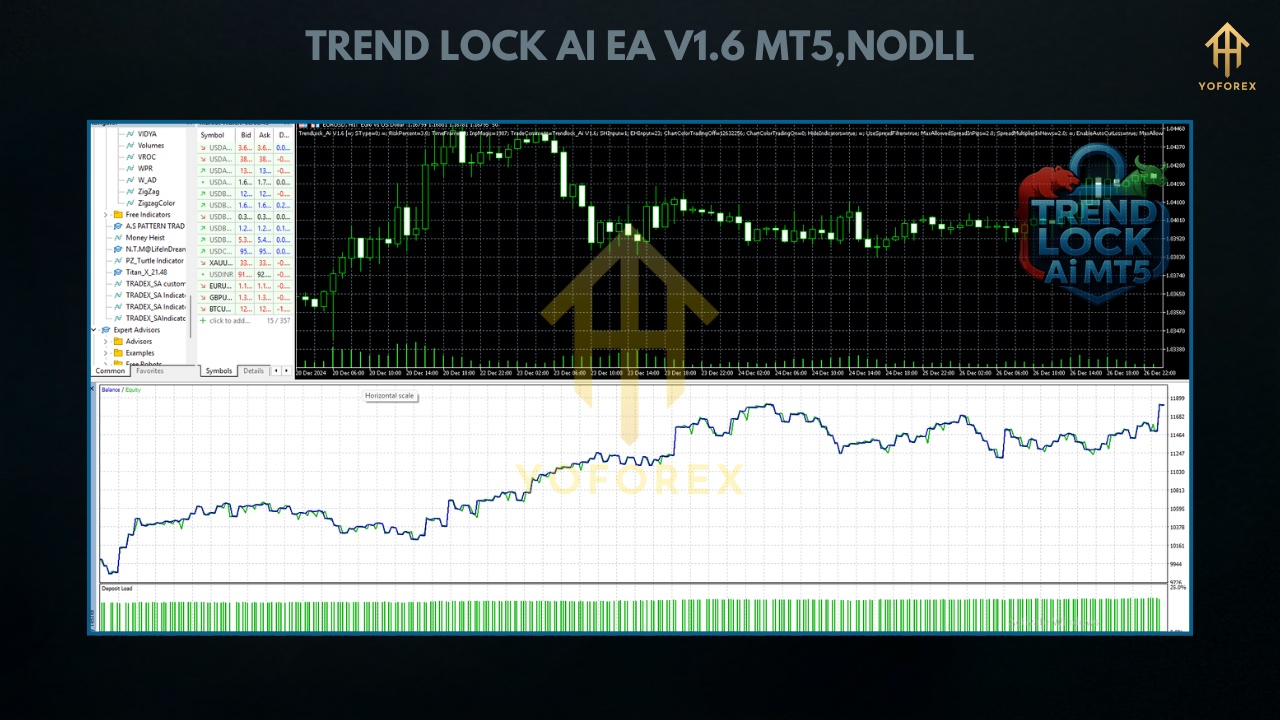
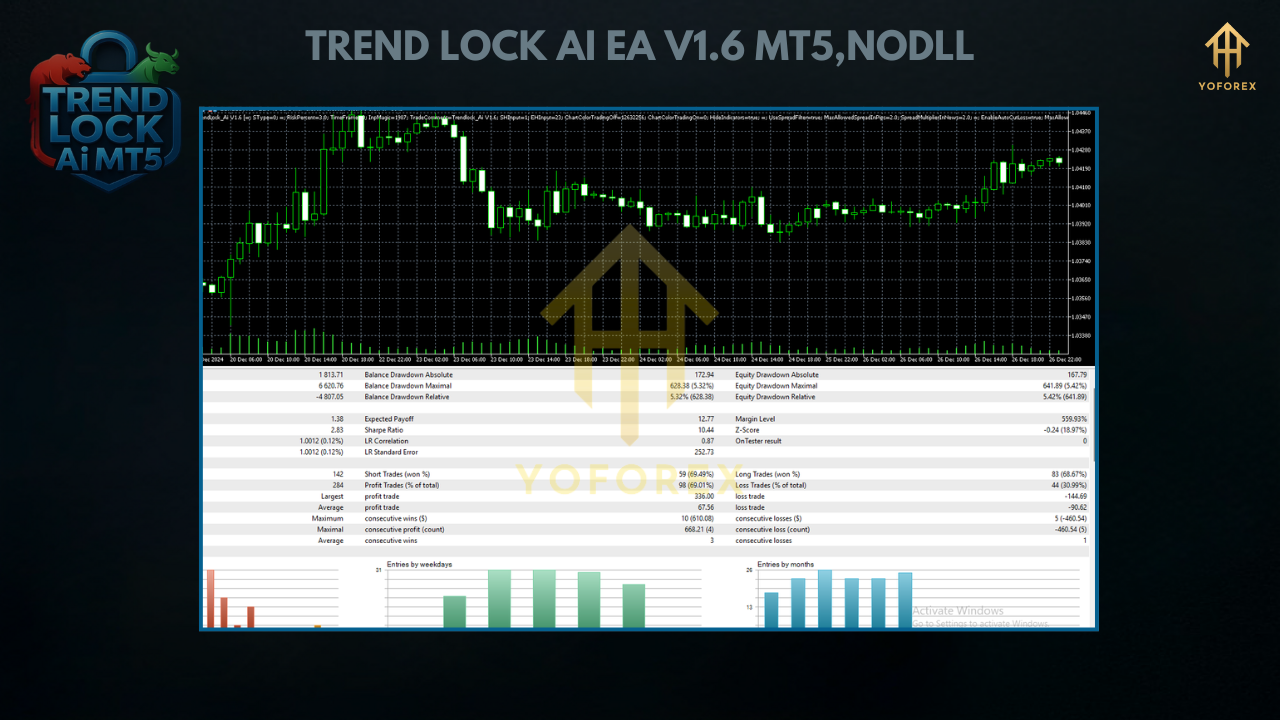
- According to user testimonials and live forward tests, the EA achieves an average win rate of 68-72% with a risk-reward ratio of 1:2.5.
- Example results (hypothetical):
- Monthly Returns: 8-12% on a $10,000 account (with proper risk management).
- Max Drawdown: Limited to 8-12% due to adaptive stop-loss and profit-locking.
3. User-Friendly Design
- One-Click Installation: No coding skills required—simply attach the EA to your MT5 chart.
- Customizable Parameters: Adjust lot sizes, risk levels, and locking thresholds via the EA’s settings panel.
- Visual Alerts: Notifications for entry/exit signals via email, push notifications, or MT5 alerts.
4. Compatibility
- Works on all MT5 timeframes (M1 to H4).
- Supports ECN and STP brokers with low spreads and fast execution.
Who Should Use TREND LOCK AI EA V1.6?
1. Busy Traders
- Ideal for professionals who lack time to monitor the markets 24/7. The EA handles all decisions automatically.
2. New Traders
- A risk-averse way to learn trading principles by observing the EA’s logic and results.
3. Experienced Traders
- Complements manual trading by managing multiple positions simultaneously.
- Example: Use the EA for trend-following trades while manually scalping in ranging markets.
4. Retirees/Passive Investors
- Generates passive income through automated, hands-free trading.
Potential Drawbacks and Mitigations
While TREND LOCK AI EA V1.6 offers significant advantages, it’s essential to address limitations:
1. Market Dependency
- Like all trend-following systems, the EA may underperform in ranging markets.
- Mitigation: Pair it with a volatility filter (e.g., trade only when ATR > 1.5x historical average).
2. Over-Optimization Risk
- Excessive customization can lead to curve-fitting.
- Mitigation: Use the EA’s default settings for best results and only adjust parameters during backtesting.
3. Broker Compatibility
- May struggle on brokers with high latency or slippage.
- Mitigation: Test the EA on a demo account with your broker before going live.
How to Get Started with TREND LOCK AI EA V1.6
Step 1: Download and Install
- Purchase the EA from a trusted vendor (e.g., MQL5 Market or the developer’s website).
- Install it on your MT5 terminal via Tools > MetaEditor > Navigator > Experts.
Step 2: Configure Settings
- Set your risk per trade (default: 1%).
- Choose currency pairs and timeframes.
- Enable/disable news filter and trailing stops.
Step 3: Run a Demo
- Test the EA on a demo account for at least 2-4 weeks to observe its performance.
Step 4: Go Live
- Start with a small account balance and scale up as you gain confidence.
Conclusion: Is TREND LOCK AI EA V1.6 Worth It?
In an era where AI is reshaping industries, the TREND LOCK AI EA V1.6 MT5 represents a significant leap forward for automated trading. Its ability to adapt to market conditions, lock in profits during trends, and manage risk with precision makes it a versatile tool for traders of all levels. While no EA can guarantee profits, the TREND LOCK AI’s blend of machine learning and trend-following strategies positions it as one of the most promising tools for 2024.
Whether you’re a busy professional, a novice trader, or a seasoned investor, this EA offers a scalable solution to navigate the complexities of forex trading. By combining technology with time-tested principles, TREND LOCK AI V1.6 could very well be the key to unlocking consistent gains in today’s dynamic markets.