
Understanding the Valid Pullback Indicator V1.0 for MT4: A Comprehensive Guide
Introduction to Pullbacks in Forex Trading
In the dynamic world of forex trading, identifying the right entry and exit points is crucial for success. One of the most effective strategies for capitalizing on market trends is trading pullbacks—temporary price retracements within a larger trend. These pullbacks allow traders to enter the market at more favorable prices, aligning with the prevailing trend to maximize potential profits while managing risk. The Valid Pullback Indicator V1.0 for MetaTrader 4 (MT4) is a powerful tool designed to help traders identify these opportunities with precision. In this blog, we’ll explore the mechanics, functionality, and practical applications of the Valid Pullback Indicator V1.0, diving into how it can enhance your trading strategy.
What is a Pullback?
A pullback, often referred to as a retracement or correction, is a temporary price movement against the prevailing trend. In an uptrend, a pullback is a downward price movement, while in a downtrend, it’s an upward movement. These movements are natural in financial markets, often driven by profit-taking, market hesitation, or liquidity hunting. Unlike reversals, which indicate a change in trend direction, pullbacks are short-term and typically resolve with the trend resuming.
Recognizing valid pullbacks is critical because not every retracement offers a high-probability trading opportunity. A valid pullback adheres to specific characteristics, such as interacting with key price levels or technical indicators without breaking the overall trend structure. The Valid Pullback Indicator V1.0 for MT4 automates this identification process, making it easier for traders to spot high-probability setups.
Overview of the Valid Pullback Indicator V1.0 for MT4
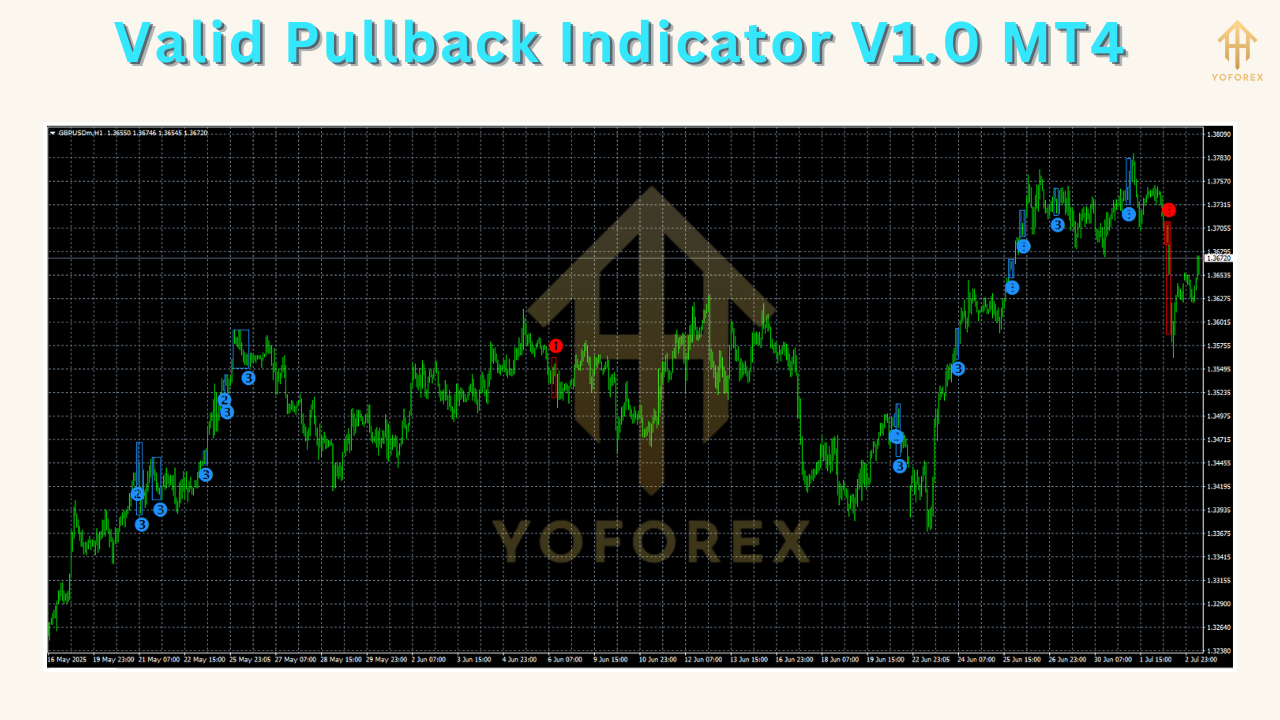
The Valid Pullback Indicator V1.0 is a custom technical analysis tool developed for the MetaTrader 4 platform, one of the most widely used trading platforms in the forex market. This indicator is designed to detect valid pullback points within bullish or bearish trends, providing traders with clear, actionable signals. It leverages price action, momentum indicators, and market structure analysis to pinpoint moments when a retracement is likely to end, and the original trend is poised to resume.
Key features of the Valid Pullback Indicator V1.0 include:
-
Arrow-based signals: Green arrows for bullish pullback opportunities and red arrows for bearish pullback opportunities.
-
Customizable settings: Adjustable parameters to suit different trading instruments and timeframes.
-
Non-repainting signals: Once a signal is generated, it remains fixed, ensuring reliability.
-
Multi-timeframe compatibility: Works across various timeframes, from M1 to D1, and supports multiple asset classes, including forex pairs, indices, and commodities.
-
Integration with other indicators: Can be combined with moving averages, Fibonacci retracement levels, or support/resistance zones for enhanced accuracy.
The indicator is particularly valuable for traders employing trend-following or swing trading strategies, as it helps them enter trades at optimal points within the trend.
How the Valid Pullback Indicator Works
The Valid Pullback Indicator V1.0 operates by analyzing price action and momentum to identify retracement zones that align with the broader market trend. It often incorporates elements of the Relative Strength Index (RSI), moving averages, or Fibonacci retracement levels to validate pullbacks. Here’s a breakdown of its core mechanics:
-
Trend Identification: The indicator first determines the prevailing trend using price action or moving averages (e.g., a 50-period Exponential Moving Average). For example, if the price is above the 50 EMA, the trend is considered bullish, and the indicator looks for buy opportunities during pullbacks.
-
Retracement Detection: The indicator monitors price movements for temporary reversals against the trend. It uses momentum indicators like RSI or Stochastic Oscillator to identify overbought or oversold conditions within the retracement.
-
Signal Generation: When a pullback meets specific criteria (e.g., price retraces to a key Fibonacci level or touches a moving average), the indicator generates a signal. A green arrow appears for a bullish pullback (buy signal), and a red arrow for a bearish pullback (sell signal).
-
Validation of Pullbacks: The indicator ensures the pullback is valid by checking for characteristics such as:
-
The retracement does not break key support/resistance levels.
-
The price interacts with significant levels, like the low of the highest bullish candle in an uptrend.
-
Momentum indicators confirm the retracement is losing strength, signaling a potential trend resumption.
-
-
Customization: Traders can adjust parameters like RSI thresholds, moving average periods, or Fibonacci levels to tailor the indicator to their preferred trading style or market conditions.
This systematic approach reduces the guesswork in identifying pullbacks, allowing traders to focus on high-probability setups.

Installing the Valid Pullback Indicator on MT4
To use the Valid Pullback Indicator V1.0, you’ll need to install it on your MT4 platform. Here’s a step-by-step guide:
-
Download the Indicator: Obtain the indicator file (.mq4 or .ex4) from a reputable source, such as IndicatorSpot or MQL5. Ensure the source is trustworthy to avoid malware or corrupted files.
-
Open MT4 Data Folder: Launch MT4, go to File > Open Data Folder, and navigate to the MQL4 > Indicators folder.
-
Copy the Indicator File: Place the downloaded .mq4 or .ex4 file into the Indicators folder.
-
Restart MT4: Close and reopen the MT4 platform to load the indicator.
-
Apply to Chart: Open a chart for your desired asset and timeframe, go to Insert > Indicators > Custom, and select the Valid Pullback Indicator V1.0. Adjust settings as needed (e.g., RSI period, signal thresholds).
-
Verify DLL Permissions: If the indicator uses DLLs for advanced calculations, ensure you allow DLL imports in MT4’s settings (under Tools > Options > Expert barbed wireAdvisors).
Once installed, the indicator will display on your chart, with arrows marking potential pullback entry points.
Using the Valid Pullback Indicator in Trading
To maximize the effectiveness of the Valid Pullback Indicator, traders should integrate it into a broader trading strategy. Here’s a practical approach to using the indicator:
Step 1: Confirm the Trend
Use a higher timeframe (e.g., H4 or D1) to identify the overall trend. For instance:
-
Bullish Trend: Price is above the 50 EMA, and higher highs and higher lows are forming.
-
Bearish Trend: Price is below the 50 EMA, with lower highs and lower lows.
The indicator’s signals are most reliable when aligned with the dominant trend.
Step 2: Wait for a Pullback Signal
Monitor the chart for green (buy) or red (sell) arrows. These signals indicate a potential end to the retracement. For example:
-
In an uptrend, a green arrow suggests the price has completed a downward retracement and is likely to resume upward.
-
In a downtrend, a red arrow indicates the end of an upward retracement.
Step 3: Validate with Additional Tools
To increase confidence in the signal, combine the indicator with other technical tools:
-
Fibonacci Retracement: Confirm the pullback has reached key levels (e.g., 50% or 61.8%).
-
Support/Resistance Levels: Ensure the price is near a significant level.
-
Moving Averages: Check if the price is interacting with a moving average (e.g., 50 EMA).
-
RSI or Stochastic: Verify overbought/oversold conditions to confirm momentum exhaustion.
For example, in a bullish trend, a green arrow near the 61.8% Fibonacci level and the 50 EMA provides a high-probability buy signal.
Step 4: Set Entry, Stop-Loss, and Take-Profit
-
Entry: Enter the trade at the open of the next candle after the signal arrow appears.
-
Stop-Loss: Place the stop-loss below the recent swing low (for buys) or above the recent swing high (for sells), typically 10-15 pips beyond the level.
-
Take-Profit: Target a risk-reward ratio of at least 1:2, aiming for the next significant support/resistance level or a Fibonacci extension.
Step 5: Manage Risk
Always use proper risk management. Limit risk to 1-2% of your account per trade, and adjust position sizes based on the distance to your stop-loss.
Advantages of the Valid Pullback Indicator
-
Precision: The indicator’s algorithm reduces false signals by focusing on valid pullbacks, improving trade accuracy.
-
Ease of Use: Clear arrow signals make it beginner-friendly, while customizable settings cater to advanced traders.
-
Versatility: Works across multiple timeframes and asset classes, from forex to commodities.
-
Non-Repainting: Signals remain fixed, providing reliable historical data for backtesting.
-
Enhanced Decision-Making: Combines price action and momentum analysis for robust trade setups.
Limitations and Considerations
While powerful, the Valid Pullback Indicator is not infallible. Consider the following:
-
False Signals in Choppy Markets: The indicator may generate less reliable signals in ranging or highly volatile markets.
-
Lagging Nature: Like most technical indicators, it relies on historical data, which may delay signals in fast-moving markets.
-
Dependency on Trend: The indicator performs best in trending markets and may underperform in sideways conditions.
-
Need for Confirmation: Relying solely on the indicator can lead to losses; always use additional tools for validation.
To mitigate these limitations, test the indicator on a demo account and combine it with sound risk management and market analysis.
Customizing the Indicator
The Valid Pullback Indicator V1.0 allows traders to adjust settings to match their trading style. Common parameters include:
-
RSI Period: Default is typically 14, but shorter periods (e.g., 9) increase sensitivity, while longer periods (e.g., 21) reduce noise.
-
Moving Average Period: Adjust the EMA period (e.g., 50, 100) to align with your timeframe.
-
Fibonacci Levels: Customize retracement levels (e.g., 38.2%, 50%, 61.8%) for precise entry points.
-
Signal Thresholds: Set minimum pullback strength to filter out weak signals.
Experiment with these settings on a demo account to find the optimal configuration for your preferred market and timeframe.
Practical Example: Trading EUR/USD with the Indicator
Let’s walk through a hypothetical trade setup using the Valid Pullback Indicator on the EUR/USD pair (H4 timeframe):
-
Trend Confirmation: The price is above the 50 EMA, indicating a bullish trend.
-
Pullback Signal: A green arrow appears after the price retraces to the 50% Fibonacci level and touches the 50 EMA.
-
Validation: The RSI shows an oversold condition (below 30), and the price is near a key support level.
-
Entry: Enter a buy trade at the open of the next candle (e.g., 1.1200).
-
Stop-Loss: Place the stop-loss 15 pips below the recent swing low (e.g., 1.1180).
-
Take-Profit: Target a 1:2 risk-reward ratio, aiming for 1.1240 (40 pips profit).
-
Outcome: The price resumes its uptrend, hitting the take-profit level within a few hours.
This example illustrates how the indicator, combined with other tools, can guide precise trade entries.
Combining with Other Strategies
The Valid Pullback Indicator shines when integrated with other trading methodologies:
-
Smart Money Concepts (SMC): Use the indicator to identify pullbacks within order blocks or liquidity zones.
-
Inner Circle Trader (ICT) Concepts: Combine with ICT’s market structure analysis to confirm valid pullbacks.
-
Price Action: Look for candlestick patterns (e.g., engulfing candles) at signal points to increase confidence.
-
Multi-Timeframe Analysis: Use a higher timeframe for trend direction and a lower timeframe for precise entries.
Conclusion
The Valid Pullback Indicator V1.0 for MT4 is a game-changer for traders seeking to capitalize on trend retracements. By automating the identification of valid pullbacks, it simplifies the trading process while offering robust signals for trend-following strategies. Whether you’re a beginner or an experienced trader, this indicator can enhance your ability to enter trades at optimal points, improving your risk-reward ratio and overall profitability.
To get the most out of the indicator, use it in conjunction with other technical tools, practice proper risk management, and test it thoroughly on a demo account. By mastering the Valid Pullback Indicator V1.0, you can navigate the forex market with greater confidence and precision, riding the waves of trends with ease.
Support & Disclaimer
If you encounter any bugs or need assistance configuring the Valid Pullback Indicator V1.0 MT4, our support team is ready to help. Reach out via WhatsApp at https://wa.me/+443300272265 or join our Telegram group at https://t.me/yoforexrobot for real-time support and community discussions. While we strive for accuracy and reliability, please note that past performance is not a guarantee of future results. Indicators are tools to assist your analysis—they do not eliminate risk. Always test new strategies on a demo account before trading live and use proper risk management, such as position sizing and stop-loss orders. YoForex disclaims any liability for losses incurred; consult a licensed professional if you have any doubts regarding your trading decisions.