Unlocking the Power of the WAE (MTF) Indicator V1.3 for MT4: A Comprehensive Guide
The world of forex trading is filled with tools and indicators designed to give traders an edge in navigating the volatile markets. Among these, the Waddah Attar Explosion (WAE) Multi-Time Frame (MTF) Indicator V1.3 for MetaTrader 4 (MT4) stands out as a powerful technical analysis tool. Known for its ability to identify trend strength, momentum, and potential entry/exit points, the WAE (MTF) Indicator has gained popularity among traders seeking to enhance their strategies. In this 1500-word blog post, we’ll dive deep into what the WAE (MTF) Indicator V1.3 is, how it works, its key features, and how traders can effectively use it to improve their trading outcomes.
What is the WAE (MTF) Indicator V1.3?
The WAE Indicator, originally developed by Waddah Attar, is a momentum-based technical indicator designed to measure the strength of price movements and identify explosive market trends. The Multi-Time Frame (MTF) version, specifically V1.3, enhances this functionality by allowing traders to analyze price action across multiple timeframes simultaneously on a single chart. This MTF capability is particularly valuable for traders who want to align their strategies with higher timeframe trends while trading on lower timeframes.
Built for the MetaTrader 4 platform, the WAE (MTF) Indicator V1.3 combines elements of trend analysis, volatility, and momentum to provide clear visual signals. It is often praised for its simplicity and effectiveness, making it suitable for both novice and experienced traders. The indicator is freely available on platforms like MTDownloads and Forex Factory, where it has garnered positive feedback for its reliability in spotting trend changes and trade opportunities.
How Does the WAE (MTF) Indicator Work?
The WAE (MTF) Indicator V1.3 operates by analyzing price action through a combination of moving averages, the MACD (Moving Average Convergence Divergence), and volatility metrics. Its core components include:
-
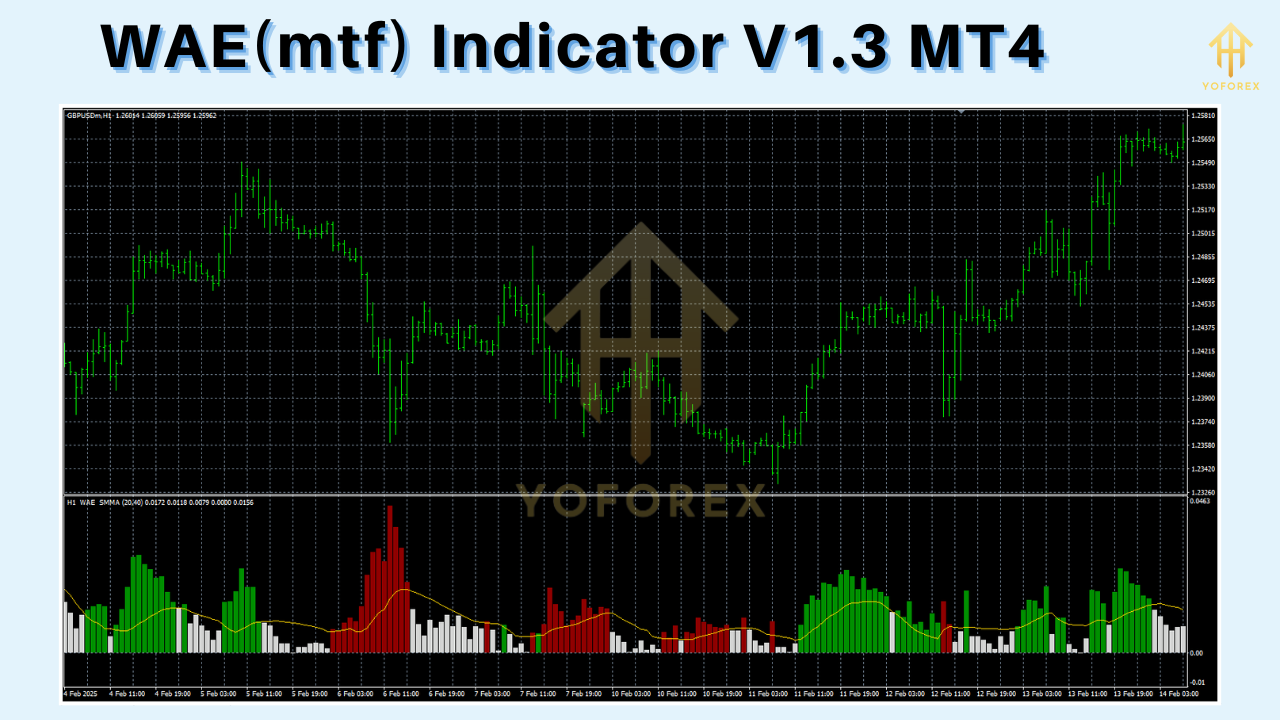
Trend Line (Explosion Line): This is the main histogram that measures the strength of the trend. When the histogram bars grow taller and turn green, it indicates a strong bullish trend. Conversely, red bars signal a bearish trend.
-
Dead Zone Line: This represents a threshold for market noise or low volatility. When the trend line stays below the dead zone, it suggests a lack of momentum, advising traders to avoid entering trades.
-
Signal Line: A secondary line that helps confirm trend direction and potential reversals. Crossovers between the trend line and signal line can indicate entry or exit points.
-
Multi-Time Frame Analysis: The MTF feature allows traders to overlay higher timeframe data (e.g., H4 or D1) on a lower timeframe chart (e.g., M15 or H1). This provides a broader market perspective, helping traders avoid false signals caused by short-term noise.
The indicator calculates the difference between fast and slow moving averages to gauge momentum, while the volatility component (often tied to the Average True Range or ATR) helps filter out periods of low market activity. The MTF functionality ensures that traders can see how the current price action aligns with trends on higher timeframes, making it easier to trade in the direction of the dominant market trend.
Key Features of WAE (MTF) Indicator V1.3
The WAE (MTF) Indicator V1.3 comes with several features that make it a versatile tool for forex traders:
-
Customizable Timeframes: Traders can select any timeframe for the MTF analysis, from M1 to MN1, allowing for flexible integration into various trading strategies.
-
Alerts and Notifications: The indicator supports visual, sound, and email alerts, notifying traders when the trend line crosses the dead zone or when significant trend changes occur.
-
Non-Repainting Signals: Unlike some indicators that redraw past signals, the WAE (MTF) V1.3 provides stable signals, ensuring reliability for backtesting and live trading.
-
User-Friendly Interface: The indicator’s clear histogram and color-coded signals make it easy to interpret, even for beginners.
-
Compatibility with MT4: Designed specifically for MetaTrader 4, it integrates seamlessly with the platform’s charting tools and can be used alongside other indicators.
These features make the WAE (MTF) Indicator V1.3 a robust tool for identifying high-probability trade setups and managing risk effectively.
Installing the WAE (MTF) Indicator V1.3 on MT4
To use the WAE (MTF) Indicator V1.3, you first need to install it on your MetaTrader 4 platform. Here’s a step-by-step guide:
-
Download the Indicator: Obtain the wae.mq4 or wae.ex4 file from a reputable source, such as MTDownloads or Forex Factory.
-
Open MT4 Data Folder: In MT4, go to File > Open Data Folder.
-
Navigate to Indicators Folder: Open the MQL4 folder, then the Indicators folder.
-
Copy the File: Paste the downloaded wae.mq4 or wae.ex4 file into the Indicators folder.
-
Restart MT4: Close and reopen MetaTrader 4 to refresh the indicator list.
-
Add to Chart: In the MT4 Navigator window, locate the WAE (MTF) Indicator under Custom Indicators. Drag it onto your desired chart.
-
Configure Settings: Adjust the indicator’s parameters, such as timeframe, sensitivity, and alert settings, to suit your trading style.
Once installed, the indicator will display its histogram and lines on the chart, ready for analysis.
How to Use the WAE (MTF) Indicator in Trading
The WAE (MTF) Indicator V1.3 is highly versatile and can be used in various trading strategies, including trend following, scalping, and swing trading. Below are some practical ways to incorporate it into your trading:
1. Trend Identification
The primary use of the WAE (MTF) Indicator is to identify the direction and strength of the market trend. When the trend line (histogram) rises above the dead zone and turns green, it signals a strong bullish trend, suggesting potential buy opportunities. Conversely, red bars below the dead zone indicate a bearish trend, signaling sell opportunities. By using a higher timeframe (e.g., H4) on a lower timeframe chart (e.g., M15), traders can ensure they are trading in the direction of the dominant trend, reducing the risk of false signals.
2. Entry and Exit Signals
The WAE (MTF) Indicator provides clear entry and exit signals based on the interaction between the trend line, signal line, and dead zone:
-
Buy Signal: Enter a long position when the green histogram crosses above the dead zone and the signal line confirms the upward momentum.
-
Sell Signal: Enter a short position when the red histogram crosses below the dead zone, supported by the signal line.
-
Exit Signal: Close the position when the histogram retreats back toward the dead zone or when the signal line indicates a potential reversal.
Traders can enhance these signals by combining the WAE (MTF) Indicator with other tools, such as support and resistance levels or candlestick patterns.
3. Filtering Low-Volatility Periods
The dead zone line is a unique feature that helps traders avoid choppy or low-momentum markets. When the trend line remains within the dead zone, it indicates a lack of significant price movement, suggesting that traders should stay out of the market. This feature is particularly useful for avoiding false breakouts and reducing trading losses.
4. Multi-Time Frame Analysis
The MTF functionality allows traders to align their trades with higher timeframe trends. For example, a day trader using the M15 chart can apply the H4 WAE (MTF) Indicator to ensure their trades align with the broader market trend. This approach improves trade accuracy and helps traders avoid counter-trend trades.
5. Risk Management
The WAE (MTF) Indicator can also assist with risk management. By identifying strong trends and potential reversals, traders can set stop-loss levels below recent swing lows (for buy trades) or above swing highs (for sell trades). Additionally, the indicator’s alerts can help traders stay disciplined by notifying them of key market developments.
Trading Strategies with WAE (MTF) Indicator
Here are two example trading strategies using the WAE (MTF) Indicator V1.3:
Strategy 1: Trend-Following Strategy
-
Timeframe: H1 chart with H4 MTF settings.
-
Setup: Apply the WAE (MTF) Indicator and set the MTF timeframe to H4. Add a 50-period EMA to confirm the trend direction.
-
Entry: Enter a buy trade when the H1 chart shows a green histogram above the dead zone, and the price is above the 50 EMA. Enter a sell trade when the histogram is red, below the dead zone, and the price is below the 50 EMA.
-
Exit: Close the trade when the histogram retreats to the dead zone or the signal line indicates a reversal.
-
Stop-Loss: Place the stop-loss below the recent swing low (for buys) or above the swing high (for sells).
-
Take-Profit: Target a 2:1 reward-to-risk ratio or use pivot points as profit targets.
Strategy 2: Scalping Strategy
-
Timeframe: M5 chart with M15 MTF settings.
-
Setup: Apply the WAE (MTF) Indicator with M15 timeframe settings. Use a stochastic oscillator to confirm overbought/oversold conditions.
-
Entry: Enter a buy trade when the M5 chart shows a green histogram above the dead zone, and the stochastic oscillator exits the oversold zone. Enter a sell trade when the histogram is red, below the dead zone, and the stochastic exits the overbought zone.
-
Exit: Close the trade when the histogram approaches the dead zone or the stochastic indicates a reversal.
-
Stop-Loss: Set a tight stop-loss (e.g., 5-10 pips) to manage risk.
-
Take-Profit: Aim for small profits (e.g., 10-15 pips) to capitalize on quick price movements.
Advantages and Limitations
Advantages
-
Clear Signals: The histogram and color-coded signals are easy to interpret, even for beginners.
-
MTF Functionality: Aligning trades with higher timeframe trends improves accuracy.
-
Versatility: Suitable for various trading styles, including scalping, day trading, and swing trading.
-
Free Availability: The indicator is freely downloadable, making it accessible to all traders.
Limitations
-
Lagging Nature: Like many momentum-based indicators, the WAE (MTF) may lag behind real-time price action, leading to delayed signals.
-
False Signals in Choppy Markets: While the dead zone helps filter noise, false signals can still occur in highly volatile or ranging markets.
-
Requires Complementary Tools: For best results, the indicator should be used alongside other tools like support/resistance levels or price action analysis.
Tips for Maximizing the WAE (MTF) Indicator
-
Combine with Price Action: Use candlestick patterns or support/resistance levels to confirm WAE signals.
-
Backtest Thoroughly: Test the indicator on a demo account to understand its behavior in different market conditions.
-
Adjust Settings: Experiment with the indicator’s sensitivity and timeframe settings to match your trading style.
-
Avoid Overtrading: Focus on high-probability setups where the trend line clearly crosses the dead zone.
-
Stay Disciplined: Use the indicator’s alerts to stay informed, but avoid impulsive trades based on unconfirmed signals.
Conclusion
The WAE (MTF) Indicator V1.3 for MT4 is a powerful and versatile tool that can significantly enhance a trader’s ability to identify trends, momentum, and high-probability trade setups. Its multi-time frame functionality, clear visual signals, and customizable features make it a valuable addition to any trader’s toolkit. By combining the indicator with sound risk management and complementary tools, traders can improve their decision-making and achieve better trading outcomes.
Whether you’re a scalper, day trader, or swing trader, the WAE (MTF) Indicator V1.3 offers a reliable way to navigate the complexities of the forex market. Download it today, test it on a demo account, and discover how it can elevate your trading strategy to the next level.