The RenkoBlastTrend Indicator for MT4 is an innovative tool designed to help traders navigate the complexities of the market by combining the power of Renko charts with advanced trend analysis. This blog explores the features, benefits, and practical applications of the RenkoBlastTrend Indicator, offering insights into how it can elevate your trading strategy in 2025.
What is the RenkoBlastTrend Indicator?
The RenkoBlastTrend Indicator is a custom technical analysis tool developed for the MetaTrader 4 (MT4) platform. It integrates the unique properties of Renko charts—known for filtering out market noise by focusing solely on price movements—with a sophisticated trend identification algorithm. Unlike traditional candlestick charts, Renko charts form bricks based on a fixed price movement, ignoring time, which provides a cleaner view of market trends. The RenkoBlastTrend Indicator enhances this by overlaying trend signals, helping traders spot bullish and bearish movements with greater accuracy.
This indicator is particularly appealing to trend-following traders, as it simplifies price action analysis and reduces false signals in volatile markets. By combining Renko bricks with dynamic trend detection, the RenkoBlastTrend Indicator offers a robust solution for both novice and experienced traders.
Key Features of the RenkoBlastTrend Indicator
- Renko Chart Integration: The indicator generates Renko bricks based on user-defined box sizes, allowing traders to customize the sensitivity of price movements. Smaller box sizes suit scalpers, while larger ones are ideal for swing traders.
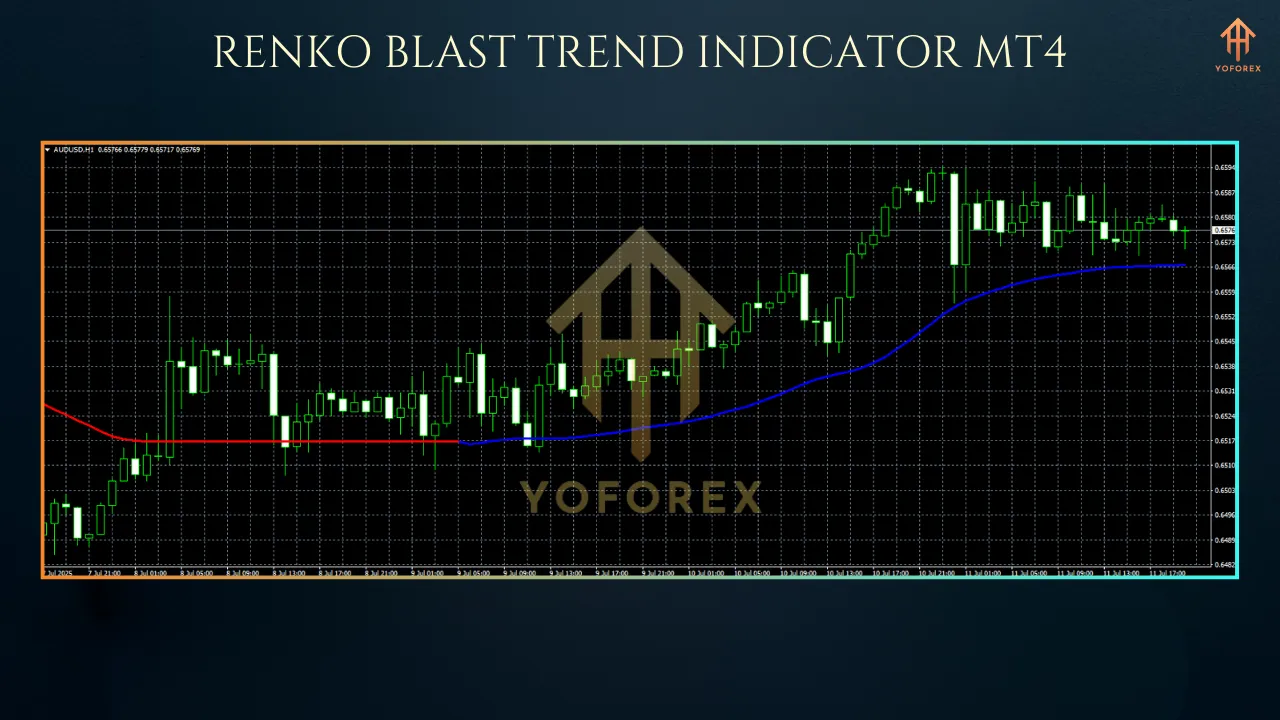
- Trend Signal Generation: The RenkoBlastTrend Indicator uses a proprietary algorithm to identify trend direction, marking bullish trends with green arrows and bearish trends with red arrows. This visual clarity helps traders make quick decisions.
- Customizable Alerts: Traders can enable real-time alerts (sound, email, or push notifications) when a new Renko brick forms or a trend signal is generated, ensuring they never miss a trading opportunity.
- ATR-Based Flexibility: Unlike older Renko indicators like RenkoLiveChart_v3.0, which rely on fixed box sizes, the RenkoBlastTrend Indicator supports Average True Range (ATR) settings. This allows for dynamic brick sizing that adapts to market volatility, enhancing accuracy in trend detection.
- User-Friendly Interface: The indicator is easy to install and configure, with settings like box size, chart offset, and color customization, making it accessible for beginners while offering depth for advanced users.
How to Install the RenkoBlastTrend Indicator on MT4
- Download the Indicator: Obtain the RenkoBlastTrend Indicator file (typically with an .ex4 or .mq4 extension) from a reputable source.
- Locate the Indicators Folder: Open your MT4 platform, navigate to File > Open Data Folder > MQL4 > Indicators.
- Copy the File: Paste the downloaded indicator file into the Indicators folder.
- Restart MT4: Close and reopen the MT4 platform to load the indicator.
- Apply to Chart: Open an M1 chart for your chosen instrument, zoom out, and drag the RenkoBlastTrend Indicator from the Navigator panel onto the chart. Configure settings like box size and ATR.
- Open Offline Chart: Go to File > Open Offline, select the custom timeframe (e.g., M2 or M9), and the Renko chart with trend signals will appear.
Benefits of Using the RenkoBlastTrend Indicator
- Noise Reduction: By focusing on price movements, Renko charts eliminate minor fluctuations, making it easier to identify true trends. The RenkoBlastTrend Indicator enhances this by providing clear trend signals.
- Improved Trend Recognition: The indicator’s arrows and color-coded bricks help traders spot trend beginnings and reversals early, enabling timely entries and exits.
- Versatility Across Markets: Whether trading forex, stocks, or cryptocurrencies, the indicator performs well across various asset classes and timeframes.
- Enhanced Risk Management: The ATR-based brick sizing ensures the indicator adapts to market conditions, helping traders set appropriate stop-loss and take-profit levels.
- Time Efficiency: Alerts and automated trend detection save traders from constantly monitoring charts, allowing them to focus on strategy development.
Trading Strategies with the RenkoBlastTrend Indicator
1. Trend-Following Strategy
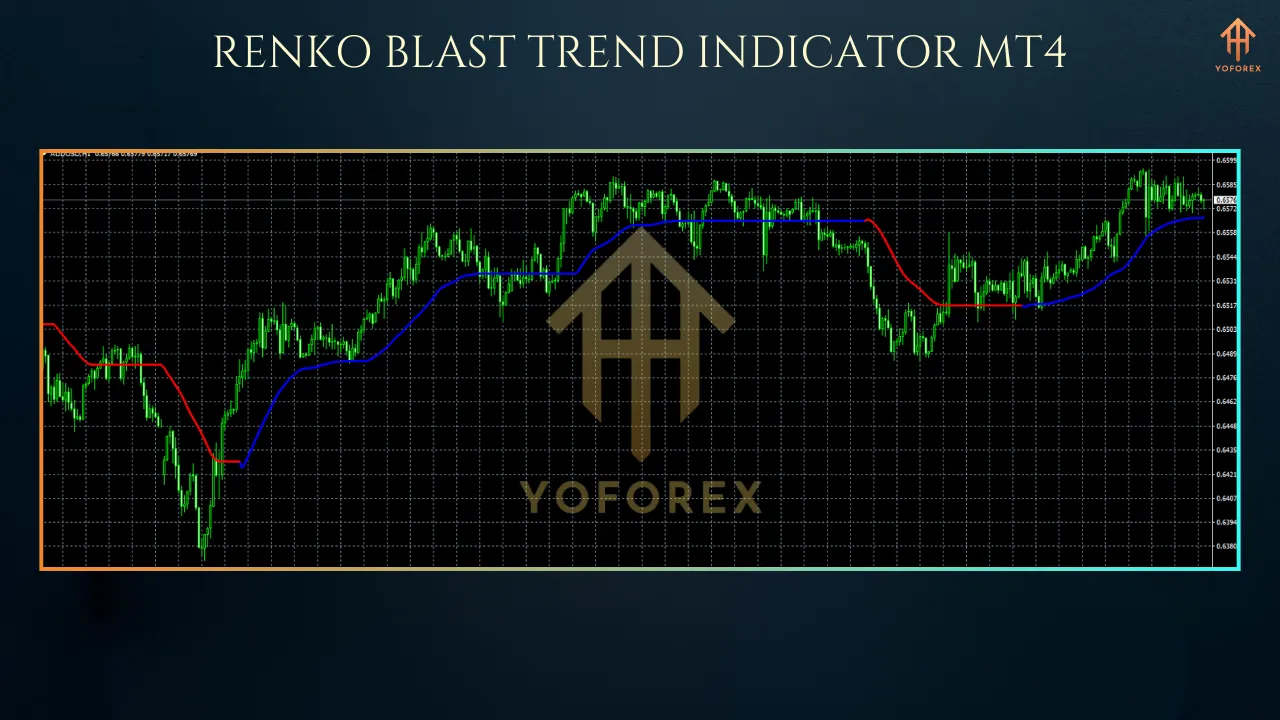
The RenkoBlastTrend Indicator excels in trend-following setups. When a green arrow appears with consecutive bullish bricks, enter a buy position. Conversely, a red arrow with bearish bricks signals a sell. To confirm the trend, ensure the price is trading above (for buys) or below (for sells) a key moving average, such as the 50-period SMA. Set stop-losses below the recent swing low for buys or above the swing high for sells, targeting a risk-reward ratio of at least 1:2.
2. Reversal Trading
For reversal strategies, wait for a trend signal (e.g., a red arrow after a series of green bricks) and confirm with additional indicators like the Relative Strength Index (RSI). For instance, a bearish reversal signal is stronger if the RSI is in the overbought zone (above 70). Enter trades only when multiple signals align to avoid false reversals.
3. Breakout Strategy
The indicator’s clean price action view makes it ideal for breakout trading. Monitor key support and resistance levels on the Renko chart. When a brick breaks through a level with a corresponding trend signal, enter in the breakout direction. Use ATR-based stop-losses to account for volatility.
Tips for Optimizing the RenkoBlastTrend Indicator
- Experiment with Box Size: Test different box sizes to match your trading style. For volatile pairs like GBP/JPY, use smaller boxes (e.g., 5-10 pips); for stocks, larger boxes (e.g., 0.5-1 point) may work better.
- Combine with Other Indicators: Pair the RenkoBlastTrend Indicator with tools like RSI, MACD, or Bollinger Bands for stronger confirmation signals.
- Backtest Thoroughly: Before using the indicator in live trading, backtest it on historical data to understand its performance in different market conditions.
- Use on M1 Charts: For optimal performance, apply the indicator to M1 charts, as higher timeframes may cause compatibility issues.
Limitations to Consider
While powerful, the RenkoBlastTrend Indicator has some limitations. It may lag in extremely fast-moving markets, as Renko bricks form only after a specified price movement. Additionally, ATR-based charts require recalculation when volatility changes, which can disrupt prior analysis. Traders should also be cautious of over-reliance on the indicator and always use it in conjunction with sound risk management.
Conclusion
The RenkoBlastTrend Indicator for MT4 is a versatile and powerful tool for traders seeking to capitalize on market trends with minimal noise. Its integration of Renko charts with advanced trend detection, customizable settings, and ATR-based flexibility makes it suitable for various trading styles, from scalping to swing trading. By providing clear signals and reducing the complexity of price action analysis, the indicator empowers traders to make informed decisions with confidence.
Whether you’re a beginner looking for a user-friendly tool or an experienced trader aiming to refine your strategy, the RenkoBlastTrend Indicator offers a compelling solution. Download it today, experiment with its settings, and combine it with other technical tools to unlock its full potential. With proper use, this indicator could be the key to mastering trend trading in the dynamic forex market of 2025.