
Mastering Forex Scalping with the JJN Scalper Indicator for MT4
Introduction: What Makes the JJN Scalper Stand Out?
Scalping in forex trading is a high-speed strategy focused on capturing small price movements within very short timeframes, usually from 1 to 30 minutes. For such rapid trades, traders need accurate and fast indicators. That’s where the JJN Scalper Indicator for MetaTrader 4 (MT4) becomes invaluable.
Designed to assist traders in executing precise entries and exits, the JJN Scalper provides clear buy and sell signals, dynamically calculated stop-loss and take-profit levels, and built-in candlestick pattern recognition. Whether you’re a beginner or an advanced trader, the JJN Scalper helps eliminate guesswork in your scalping strategy.
What is the JJN Scalper Indicator?
The JJN Scalper Indicator is a custom-built technical tool for MT4 that merges volatility-based logic with price action. It primarily uses the Average True Range (ATR) to calculate optimal stop-loss and take-profit zones while signaling entry points based on price behavior and candlestick patterns.
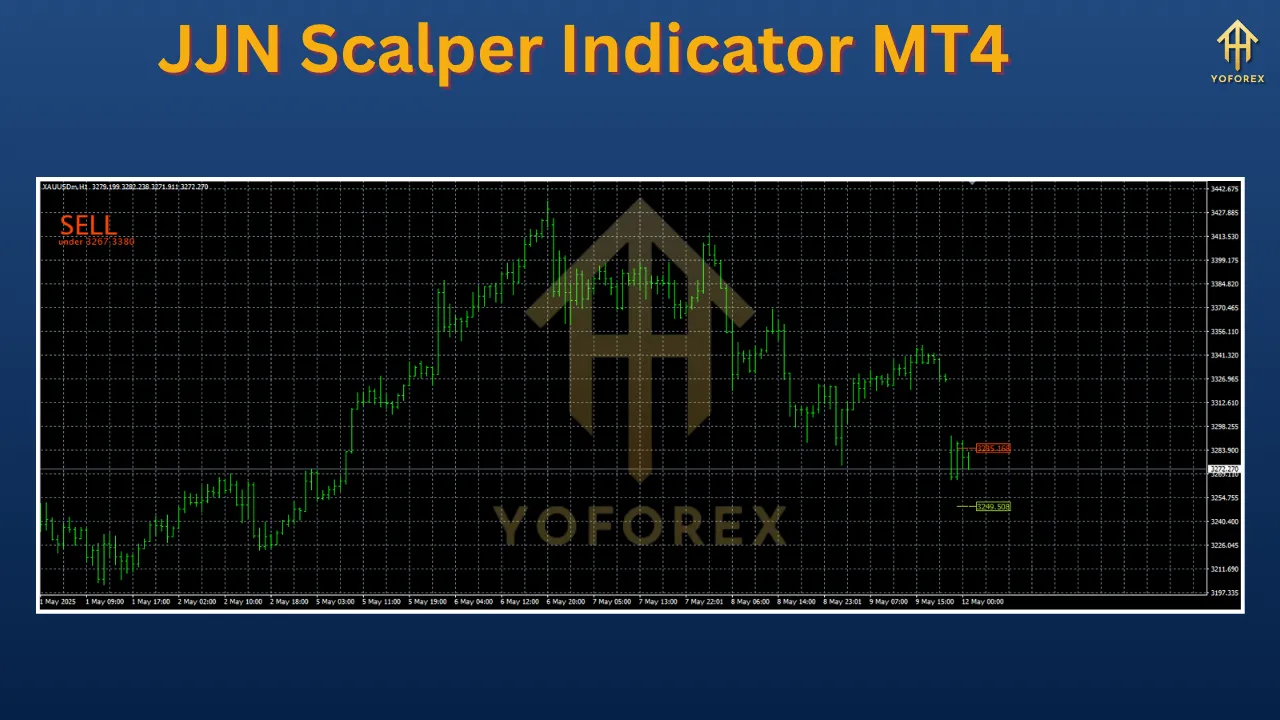
The indicator displays:
-
A bold “BUY,” “SELL,” or “WAIT” label in the top-left corner.
-
Entry, Stop-Loss, and Take-Profit boxes directly on the chart.
-
Colors: black for entry, red for stop-loss, and green for take-profit.
Its biggest advantage? All signals are non-repainting, meaning once generated, they do not change—a critical feature for live trading and backtesting accuracy.
Key Features
Here are the standout features that make this indicator a powerful ally for forex scalpers:
-
Clear Trading Signals
-
Displays “BUY,” “SELL,” or “WAIT” prompts clearly.
-
Helps traders act quickly in fast-moving markets.
-
-
ATR-Based Volatility Adjustments
-
Uses Average True Range to adjust SL and TP levels based on current market volatility.
-
Adjustable AtrPeriod lets traders fine-tune sensitivity.
-
-
Candlestick Pattern Recognition
-
Recognizes Doji, bullish engulfing, and bearish candles to confirm trade setups.
-
-
Flexible Display Options
-
PosX and PosY let users reposition labels.
-
Buy/Sell label colors are fully customizable.
-
-
Non-Repainting
-
Signals remain static once plotted, allowing dependable trade planning.
-
-
Timeframe and Pair Versatility
-
Works best on M1–M30 charts.
-
Supports major, minor, and even exotic forex pairs.
-
How to Install the JJN Scalper Indicator on MT4
Setting up the JJN Scalper Indicator is quick and simple. Here’s how:
-
Download the Indicator
-
Get the
.mq4or.ex4files from trusted sources such as ForexMT4Indicators.com or PerfectTrendSystem.com.
-
-
Extract the Files
-
If downloaded as a ZIP or RAR file, extract it to access the indicator scripts.
-
-
Access the MT4 Data Folder
-
Open MT4 > Click
File>Open Data Folder.
-
-
Navigate to the Indicators Folder
-
Go to
MQL4>Indicators.
-
-
Copy the Indicator Files
-
Paste the
.mq4and/or.ex4files into theIndicatorsfolder.
-
-
Restart MT4
-
Close and reopen the platform so MT4 can load the new indicator.
-
-
Attach the Indicator to a Chart
-
From the Navigator panel, find “JJN Scalper” under “Indicators.”
-
Drag and drop it onto your preferred currency chart.
-
-
Allow DLLs (Optional)
-
If prompted, enable DLL imports only if you’re confident about the indicator’s source.
-
How to Trade Using the JJN Scalper Indicator
Basic Entry Strategy
Follow these fundamental rules to maximize your results:
-
Enter on Price Cross
-
Only place a trade when the price breaks the entry level box.
-
For a BUY signal, price must close above the black box.
-
For a SELL signal, price must fall below it.
-
-
Use Higher Timeframe Confirmation
-
Confirm the overall trend on M15 or H1 using tools like moving averages.
-
Trade only in the direction of the trend to increase accuracy.
-
Example Trade Setup
Let’s assume you are trading EUR/USD on the M5 chart during the London session.
-
The JJN Scalper displays a BUY signal at 1.0850.
-
Stop-loss is shown at 1.0830.
-
Take-profit is marked at 1.0870.
Check the M15 chart and confirm an uptrend using a 20-period SMA. Once price breaks above 1.0850, enter a long trade. If successful, you gain 20 pips.
Advanced Trading Strategy: JJN Scalper with ATR Confirmation
Take your scalping to the next level with the JJN Scalper ATR variant. Here’s how:
-
Determine Market Trend
-
Use a 20-period SMA on the M15 chart.
-
Only look for buy signals in an uptrend, and sell signals in a downtrend.
-
-
Switch to M5 for Entry
-
Apply the JJN Scalper ATR indicator to the M5 chart.
-
-
Wait for Signal Confirmation
-
Match the buy/sell signals with your trend analysis.
-
-
Execute the Trade
-
Enter once the price crosses the entry level in the indicated direction.
-
-
Set Risk Management Levels
-
Use the stop-loss and take-profit boxes provided.
-
Alternatively, apply a 1:3 risk-reward ratio for manual settings.
-
-
Monitor Using Secondary Indicators
-
Consider the JJN Promise Oscillator for confirmation or early exit signals.
-
Customizing the JJN Scalper for Better Results
To tailor the JJN Scalper Indicator to your style:
-
AtrPeriod
-
Default: 8.
-
Lower values increase signal frequency but reduce accuracy.
-
Higher values reduce noise but may result in fewer signals.
-
-
Doji Diff
-
Controls how sensitive the indicator is to spotting Doji candles.
-
-
Color Options
-
Customize BuyColor and SellColor for better visibility.
-
Adjust FontColor if the text is hard to read on your chart background.
-
-
Display Settings
-
Use PosX and PosY to change label position.
-
DisplayDecimals adjusts how many decimal places are shown in prices.
-
To access these settings:
Right-click your chart > Indicator List > Select JJN Scalper > Click “Properties.”
Best Practices for Maximizing Success with JJN Scalper
-
Practice on a Demo Account
-
Get comfortable with the signals and settings before trading live.
-
-
Trade During Peak Hours
-
Use the indicator during high-volume sessions like London and New York.
-
-
Pair with Trend Indicators
-
Confirm signals using indicators like:
-
RSI + CCI combo
-
Moving Average (e.g., Non-Lag MA)
-
JJN Promise Oscillator
-
-
-
Apply Risk Management
-
Never risk more than 1–2% of your account per trade.
-
Maintain a healthy risk-to-reward ratio, preferably 1:2 or better.
-
-
Avoid Overtrading
-
Not every signal is worth trading.
-
Stick to those aligned with the trend and supported by additional confirmation.
-
-
Understand Limitations
-
The indicator’s claimed 95% win rate should be treated cautiously.
-
Real results depend on strategy, execution, and market conditions.
-
Pros and Cons of Using the JJN Scalper Indicator
Advantages
-
Beginner-Friendly
-
Visual signals and simple logic make it easy for new traders.
-
-
High Precision
-
Entry, stop-loss, and take-profit are clearly marked.
-
-
Free Access
-
Can be downloaded from several reputable forex sites.
-
-
Customizable Settings
-
Tailor inputs to fit different styles and timeframes.
-
Limitations
-
Risk of False Signals
-
In sideways or choppy markets, signals may be misleading.
-
-
Requires Trend Confirmation
-
Best used with trend analysis; not reliable as a standalone strategy.
-
-
Practice Needed
-
Like any tool, it takes time to master its strengths and weaknesses.
-
Enhancing Results: Combining JJN Scalper with Other Tools
For optimal outcomes, integrate the JJN Scalper with:
-
Non-Lag Moving Average
-
Smooths out trend direction and reduces lag.
-
-
JJN Promise Oscillator
-
Confirms trend reversals and filters weak signals.
-
-
Standard Deviation Average
-
Measures volatility and helps avoid trading during market noise.
-
-
Candlestick and Price Action
-
Look for engulfing patterns, pin bars, or inside bars for confirmation.
-
Final Thoughts
The JJN Scalper Indicator for MT4 is a powerful scalping companion when used with the right strategy, market awareness, and risk control. It provides everything a scalper needs—fast signals, clear targets, and flexibility. However, like any trading tool, it is not a magic bullet. Combine it with solid technical analysis and good risk management to increase your odds of success.
Whether you’re just starting in forex or want to sharpen your scalping edge, the JJN Scalper is a smart addition to your MT4 toolkit.
Support Channels:
- WhatsApp: https://wa.me/+443300272265
- Telegram Group: https://t.me/yoforexrobot
If you run into installation issues or need help optimizing your settings, don’t hesitate to reach out. The support team is available and eager to assist.