Hull Suite Indicator V1.82 MT5: Your Ultimate Guide to Smoother, Faster Trading Signals
In the fast-paced world of financial trading, having the right tools at your disposal can make the difference between capturing a profitable move and missing out entirely. Technical indicators are the compass and map for many traders, helping them navigate the complex currents of price action. Among the vast array of indicators available for the MetaTrader 5 (MT5) platform, the Hull Suite Indicator V1.82 MT5 stands out as a powerful, versatile, and highly sought-after tool designed to provide smoother, more responsive signals. This comprehensive guide delves deep into what makes this indicator a must-have for serious traders, exploring its features, benefits, strategies, and how to leverage it effectively in your trading arsenal.
What is the Hull Moving Average (HMA)? The Foundation of the Suite
Before diving into the specifics of the “Suite,” it’s crucial to understand the core technology it’s built upon: the Hull Moving Average (HMA). Developed by Alan Hull, the HMA was designed to address two common shortcomings of traditional moving averages (like Simple Moving Averages – SMA, or Exponential Moving Averages – EMA):
- Lag: Traditional moving averages inherently lag behind current price action. The longer the period, the greater the lag, potentially causing traders to enter or exit trades too late.
- Choppiness: Shorter-period moving averages react quickly but are prone to whipsaws – false signals generated by minor price fluctuations, leading to frustrating losses.
The HMA’s Ingenious Solution:
Alan Hull’s innovation was to combine weighted moving averages (WMA) in a unique way to minimize lag while significantly reducing noise. The calculation involves:
- Calculating a WMA with a period of
n/2and multiplying it by 2. - Calculating a WMA with the full period
n. - Subtracting the second WMA from the first.
- Calculating a WMA with a period of the square root of
napplied to the result from step 3.
Why HMA is Superior:
- Dramatically Reduced Lag: The HMA achieves responsiveness comparable to a much shorter-period EMA but with the smoothness of a longer-period average. This allows traders to see trend changes faster.
- Enhanced Smoothness: By filtering out minor price fluctuations, the HMA provides a clearer, less erratic view of the underlying trend direction.
- Improved Signal Clarity: The combination of speed and smoothness results in more reliable and timely crossover signals and trend identification.
The Hull Suite Indicator V1.82 MT5 takes this powerful HMA concept and elevates it to a new level of customization and functionality.
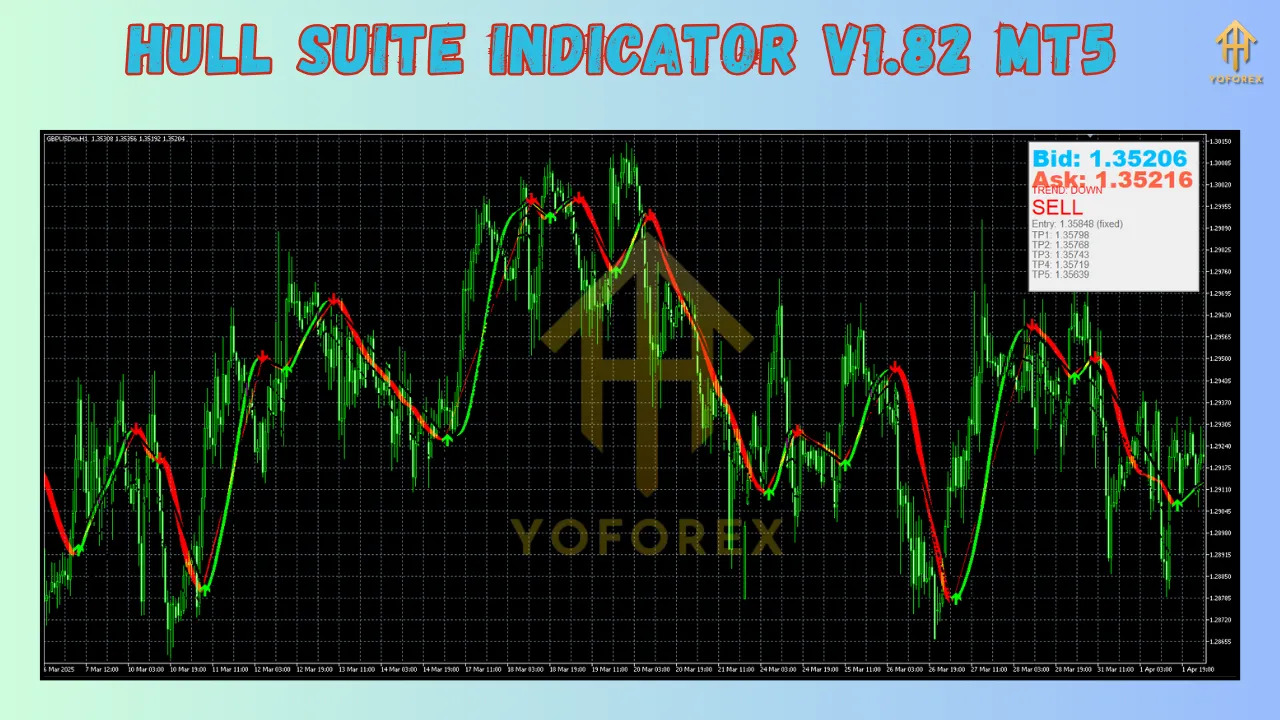
Unpacking the Hull Suite Indicator V1.82 MT5: Features Galore
The “Suite” aspect is what transforms the basic HMA into a comprehensive trading toolkit. Version 1.86 represents a mature, feature-rich iteration specifically optimized for the MT5 platform. Here’s a breakdown of its key features:
- Multiple HMA Types: While built on the core HMA, the suite often includes variations or allows selection of different HMA calculation styles (e.g., standard HMA, HMA with different weighting schemes) to suit specific market conditions or trader preferences.
- Highly Customizable Parameters: This is where the Suite truly shines. Traders have granular control over:
- HMA Period: The fundamental lookback period. Shorter periods (e.g., 9-21) for scalping/swing trading, longer periods (e.g., 50-200) for trend identification.
- HMA Price Type: Choose which price point the HMA is calculated on (Close, Open, High, Low, Median Price, Typical Price, Weighted Close). This allows adaptation to different trading styles.
- HMA Method: While primarily HMA, some suites might offer alternatives like EMA or SMA for comparison within the same indicator.
- Visual Customization: Extensive options for colors, line thickness, line style (solid, dashed, dotted), and opacity for both the HMA line and any associated signal lines or clouds. This is crucial for creating clean, readable charts.
- Integrated Signal Systems: The Suite goes beyond just plotting a line. V1.86 typically includes built-in signal generators:
- Arrows: Clear visual arrows (often color-coded for buy/sell) appearing directly on the chart when specific conditions are met (e.g., price crossing the HMA, HMA direction change, HMA crossover with another MA).
- Alerts: A critical feature for active traders. The indicator can generate:
- Pop-up Alerts: Notifications directly on the MT5 terminal.
- Sound Alerts: Audible cues to grab attention.
- Push Notifications: Alerts sent directly to your mobile device via the MetaTrader app, ensuring you never miss a signal, even away from your desk.
- Email Alerts: Notifications sent to a specified email address.
- Signal Lines: Often includes a faster HMA and a slower HMA plotted together. Crossovers between these lines provide clear trading signals (e.g., fast HMA crossing above slow HMA = Buy signal).
- Multi-Timeframe (MTF) Capability: A standout feature for serious traders. The Hull Suite V1.86 can display the HMA calculated from a different timeframe directly on your current chart. For example, you can see the daily HMA trend while trading on the 1-hour chart, providing crucial higher-timeframe context for your entries and exits. This is invaluable for aligning trades with the dominant trend.
- Color-Coded Trends: Many versions implement dynamic coloring of the HMA line itself. For instance, the line might turn green when sloping upwards (indicating bullish momentum) and red when sloping downwards (indicating bearish momentum), offering an instant visual cue of the current trend state.
- Cloud/Fill Options: Some advanced Suite versions might include a “cloud” or filled area between two HMAs (e.g., fast and slow), making trend identification and potential support/resistance zones even more visually apparent.
- User-Friendly Interface: Despite its power, the Hull Suite V1.86 is designed for ease of use. Parameters are logically grouped within the MT5 indicator settings window, making customization intuitive even for less experienced traders.
Why Choose Hull Suite Indicator V1.82 MT5? Key Benefits
Incorporating this indicator into your MT5 trading strategy offers numerous advantages:
- Reduced Lag, Faster Entries/Exits: The core HMA technology means you get signals significantly faster than with traditional MAs, allowing you to capture more of a move’s potential.
- Noise Reduction, Fewer Whipsaws: The inherent smoothness of the HMA filters out market noise, leading to fewer false signals and potentially higher win rates, especially in choppy markets.
- Enhanced Trend Identification: The clear, smooth line and optional color-coding make it exceptionally easy to spot the prevailing trend direction (up, down, or sideways) at a glance.
- Versatility Across Markets & Timeframes: Whether you trade Forex, indices, commodities, or cryptocurrencies, and whether you scalp, day trade, swing trade, or position trade, the Hull Suite’s customizable parameters allow you to tailor it precisely to your needs.
- Powerful MTF Analysis: The ability to overlay higher-timeframe HMAs onto your trading chart provides invaluable context, helping you avoid trading against the major trend and significantly improving the probability of success.
- Comprehensive Alert System: The multi-channel alerting ensures you stay informed about potential trading opportunities without needing to constantly stare at your screen, freeing up your time and reducing screen fatigue.
- Visual Clarity & Customization: Create a chart setup that is uniquely yours and optimized for your visual preferences. Clear signals reduce cognitive load and decision-making time.
- Seamless MT5 Integration: Built specifically for MetaTrader 5, it leverages the platform’s robust features, including backtesting capabilities (though thorough strategy testing is always recommended).
How to Install and Use Hull Suite Indicator V1.82 MT5: A Step-by-Step Guide
Getting started is straightforward:
- Acquire the Indicator: Hull Suite V1.86 is typically available through the MetaTrader Market (within MT5) or from reputable third-party developer websites. Ensure you download it from a trusted source.
- Installation in MT5:
- Open your MetaTrader 5 terminal.
- Go to
File->Open Data Folder. - Navigate to the
MQL5folder ->Indicators. - Copy the downloaded
.ex5file for the Hull Suite Indicator into theIndicatorsfolder. - Restart MT5 or right-click on the
Navigatorwindow and selectRefresh. The indicator should now appear underIndicatorsin theNavigator.
- Applying to a Chart:
- Open the chart (instrument and timeframe) you want to analyze.
- Drag the
Hull Suite Indicator V1.86from theNavigatorwindow onto your chart. - The
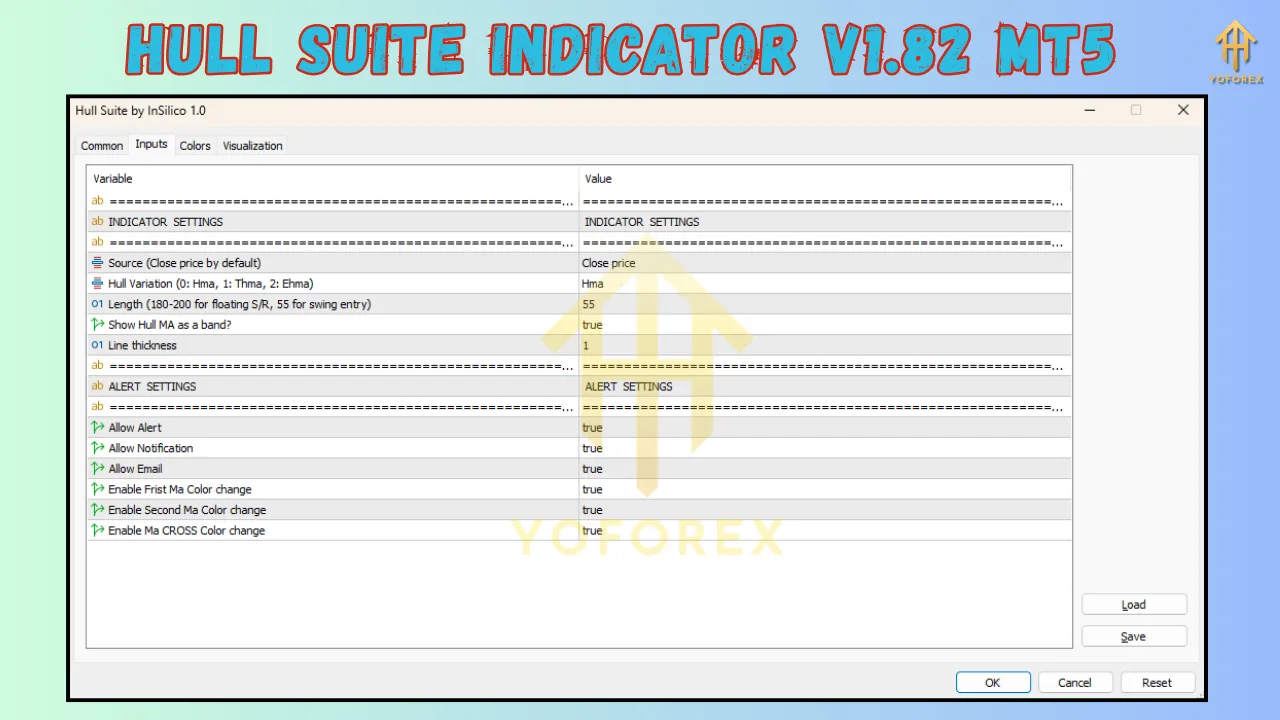
Inputstab will appear. This is where you customize the settings.
- Customizing Settings (Inputs Tab):
- HMA Period: Set your desired lookback period (e.g., 21 for a common medium-term setting).
- HMA Price: Choose
Closefor standard use, or experiment with others. - HMA Method: Ensure
HMAis selected. - Signal Periods (if applicable): Set periods for fast and slow HMAs if using crossover signals.
- MTF Settings: If using MTF, select the higher timeframe you want displayed (e.g.,
D1for Daily). - Colors & Styles: Switch to the
Colorstab to set colors, line styles, and thickness for the HMA line(s), signal lines, arrows, and clouds. Make them visually distinct and easy to read. - Alerts: Configure which alerts you want enabled (Pop-up, Sound, Push, Email) under the
Inputstab (often grouped under an “Alerts” section).
- Using the Indicator on the Chart:
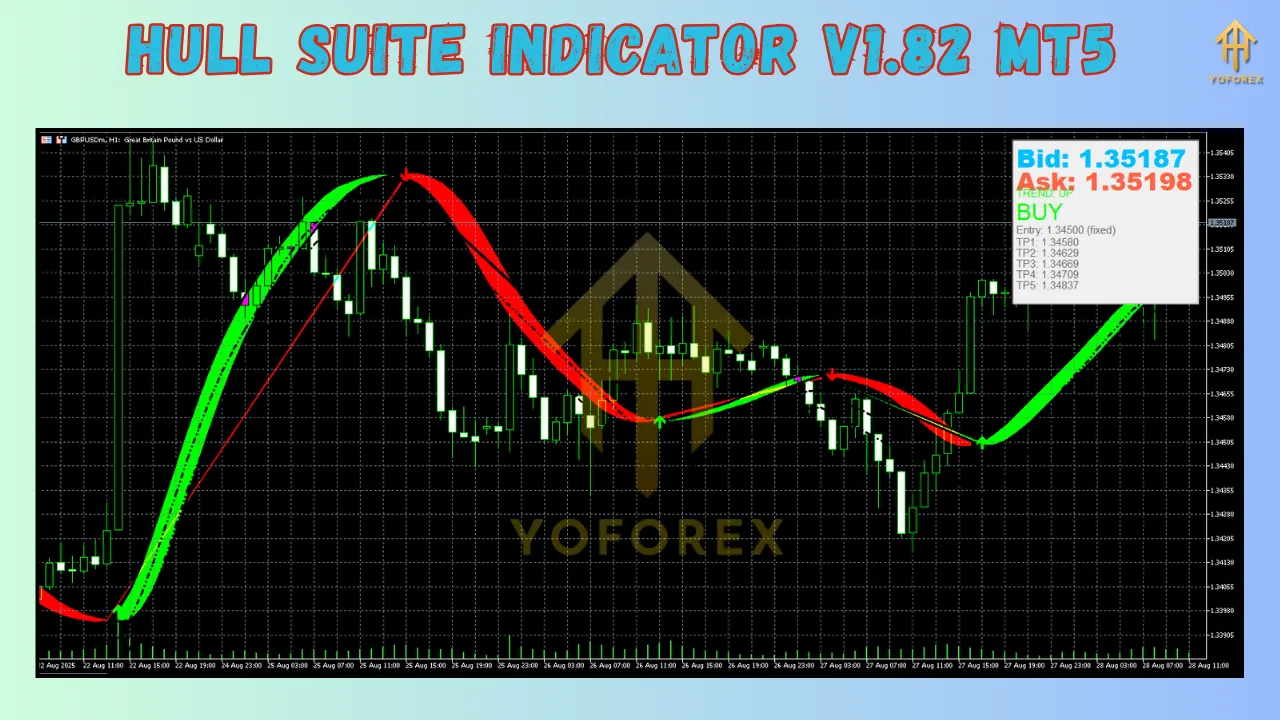
- Trend Direction: Look at the slope and color of the HMA line. Upward slope/green = Bullish. Downward slope/red = Bearish. Flat = Ranging.
- Crossover Signals: If using two HMAs, a buy signal occurs when the faster HMA crosses above the slower HMA. A sell signal occurs when the faster HMA crosses below the slower HMA. Arrows often mark these points.
- Price Crosses: Some traders use the price crossing the HMA as a signal (e.g., price closing above the HMA = potential buy).
- MTF Confirmation: Use the higher-timeframe HMA displayed on your chart as a filter. Only take trades in the direction of the MTF HMA trend. For example, if the Daily HMA is sloping up (green), prioritize buy signals on your 1-hour chart.
- Support/Resistance: In strong trends, the HMA line itself can act as dynamic support (in an uptrend) or resistance (in a downtrend).
Effective Trading Strategies with Hull Suite Indicator V1.82 MT5
Here are a few practical ways to integrate the Hull Suite into your trading:
-
Trend-Following with MTF Filter:
- Setup: Apply Hull Suite V1.86 to your trading chart (e.g., H1). Configure it to show the HMA for a higher timeframe (e.g., D1) and also plot two HMAs on the H1 (e.g., Fast HMA 9, Slow HMA 21).
- Rules:
- Identify MTF Trend: Is the D1 HMA sloping up (green) or down (red)? Only trade in this direction.
- Entry Signal (Bullish Example): D1 HMA is green. On H1, wait for the Fast HMA (9) to cross above the Slow HMA (21). Consider entering long on the candle close or on a pullback near the HMA.
- Exit Signal: Exit when the Fast HMA crosses below the Slow HMA on H1, or if the D1 HMA changes color/slope.
- Benefit: High-probability trades aligned with the dominant trend.
-
HMA Pullback Strategy:
- Setup: Apply a single HMA (e.g., period 21) to your chart (e.g., M15). Enable color-coding.
- Rules:
- Identify Trend: HMA is green (uptrend) or red (downtrend).
- Entry Signal (Bullish Example): HMA is green. Wait for price to pull back towards or slightly below the HMA line. Look for bullish price action confirmation (e.g., bullish engulfing candle, pin bar, RSI oversold bounce) near the HMA. Enter long.
- Exit Signal: Target previous swing high, use a trailing stop below the HMA, or exit if price closes strongly below the HMA.
- Benefit: Entering trends at better risk/reward levels during retracements.
-
HMA Breakout Strategy:
- Setup: Apply a medium-period HMA (e.g., 50) to your chart (e.g., M5 for scalping, M30 for swings).
- Rules:
- Identify Consolidation: Price is consolidating tightly around the relatively flat HMA.
- Entry Signal: Wait for a strong candle (e.g., large range, closing near its high/low) to break out of the consolidation and close clearly above (for long) or below (for short) the HMA line. Enter in the direction of the breakout.
- Exit Signal: Initial target could be the width of the consolidation projected. Use a stop-loss on the opposite side of the consolidation. Trail stop using the HMA.
- Benefit: Capturing volatility expansions after periods of low activity.
Important Considerations & Limitations:
- Not a Holy Grail: No indicator is perfect. The Hull Suite, like all tools, can generate false signals, especially in highly volatile or news-driven markets, or during strong reversals against the dominant trend.
- Requires Confirmation: Always use the Hull Suite signals in conjunction with other forms of analysis. This includes:
- Price Action: Candlestick patterns, support/resistance levels, chart patterns.
- Other Indicators: Volume, RSI, MACD, Stochastics for momentum or divergence confirmation.
- Fundamental Analysis: Especially for longer-term trades.
- Parameter Sensitivity: Performance can vary significantly based on the chosen HMA period and price type. What works brilliantly on one instrument or timeframe might not on another. Backtesting and forward-testing are absolutely essential to find optimal settings for your specific trading style and markets.
- Whipsaws in Ranging Markets: While smoother than many MAs, the HMA can still produce whipsaws in choppy, sideways markets. Use range-bound strategies or avoid trading during these periods if possible. The MTF filter helps mitigate this.
- Lag Still Exists: Although minimized, lag is an inherent property of all moving averages. You will never catch the absolute top or bottom.
Conclusion: Elevate Your MT5 Trading with Hull Suite V1.86
The Hull Suite Indicator V1.82 MT5 is far more than just another moving average. It’s a sophisticated, feature-packed trading toolkit that harnesses the power of Alan Hull’s innovative HMA formula to deliver smoother, faster, and more reliable signals. Its strengths lie in its exceptional ability to reduce lag and noise, its extensive customization options, the invaluable Multi-Timeframe analysis capability, and its robust alert system.
Whether you are a scalper seeking quick entries, a day trader navigating intraday swings, or a swing trader riding multi-day trends, the Hull Suite can be adapted to fit your methodology. By providing clearer trend identification and timely crossover signals, it empowers traders to make more informed decisions with greater confidence.
However, remember that mastery comes not just from the tool itself, but from how you wield it. Combine the Hull Suite’s signals with sound risk management, thorough testing to find your optimal settings, and confirmation from other analytical methods. Used wisely, the Hull Suite Indicator V1.82 MT5 can become an indispensable component of your trading strategy, helping you cut through market noise and capture opportunities with enhanced precision. Download it, explore its features, test it rigorously, and discover how it can transform your trading experience on the MetaTrader 5 platform.
Support & Disclaimer
Got questions or need help? Reach out anytime:
- WhatsApp: https://wa.me/+443300272265
- Telegram: https://t.me/yoforexrobot
Disclaimer: Past performance is no guarantee of future results. All trading carries risk. Always demo-test the Hull Suite Indicator V1.82 MT5 in a risk-free environment before deploying on a live account.