
EWO Squeeze Indicator V1.1 MT5 – The Ultimate Tool for Spotting Explosive Market Moves
In the fast-paced world of forex and crypto trading, identifying profitable setups before they explode is every trader’s dream. The EWO Squeeze Indicator V1.1 MT5 is a powerful momentum-based trading tool designed to help traders spot market compression zones and prepare for upcoming breakouts. Whether you’re a seasoned trader or a beginner, this MetaTrader 5 (MT5) indicator could be your new secret weapon.
In this blog post, we’ll explore what the EWO Squeeze Indicator V1.1 is, how it works, its features, benefits, recommended settings, and how to use it effectively in your trading strategy.
🔍 What is the EWO Squeeze Indicator V1.1?
The EWO Squeeze Indicator V1.1 is a technical analysis tool for the MetaTrader 5 trading platform that merges two popular concepts: the Elliott Wave Oscillator (EWO) and the Squeeze Momentum Strategy (inspired by John Carter’s TTM Squeeze). It detects when the market is consolidating (squeeze phase) and provides signals when it’s about to break out.
The “squeeze” happens when volatility decreases and Bollinger Bands move inside the Keltner Channels, indicating market compression. When the squeeze is released, volatility surges, often leading to strong price movement. The EWO element helps determine the direction of that movement by analyzing momentum.
🧠 How Does EWO Squeeze Indicator Work?
The EWO Squeeze Indicator combines multiple indicators to deliver one clear signal:
-
Bollinger Bands vs. Keltner Channels: Identifies low volatility conditions (squeeze zones).
-
EWO (Elliott Wave Oscillator): Measures the strength of price waves by calculating the difference between a fast and a slow moving average (commonly 5 and 35).
-
Momentum Histogram: Indicates whether bulls or bears are dominating.
-
Color-Coded Signals: Visual representation to highlight squeeze conditions and breakout signals.
The indicator displays a histogram that changes color based on momentum and volatility conditions. When a squeeze is active, the indicator shows a distinct color (often red or black), warning the trader that a breakout is imminent.
🌟 Key Features of EWO Squeeze Indicator V1.1 MT5
Here’s why this version stands out from other squeeze or momentum indicators:
-
Real-Time Squeeze Detection
It accurately identifies squeeze periods using Bollinger Band and Keltner Channel relationships. -
Enhanced Momentum Detection
EWO is used to determine the strength and direction of market momentum, helping you enter trades in the right direction. -
Color-Coded Histogram
Easy-to-read interface with different colors for squeeze mode, bullish breakout, bearish breakout, and neutral conditions. -
Alerts & Notifications
Optional push notifications, email alerts, and pop-up messages when a squeeze begins or ends. -
Customizable Settings
Traders can tweak the moving averages, standard deviations, and other parameters based on their strategy. -
Works on All Timeframes & Assets
Whether you trade Forex, stocks, crypto, or indices – this indicator can be used across all timeframes.
⚙️ Recommended Settings
For optimal performance, here are the commonly used settings:
| Parameter | Suggested Value |
|---|---|
| Fast EMA | 5 |
| Slow EMA | 35 |
| Bollinger Band Period | 20 |
| Bollinger Deviation | 2 |
| Keltner Channel Period | 20 |
| Keltner ATR Multiplier | 1.5 |
| Alert Settings | On (Push, Email, Popup) |
You can adjust these values based on the market you’re trading and your personal preference.
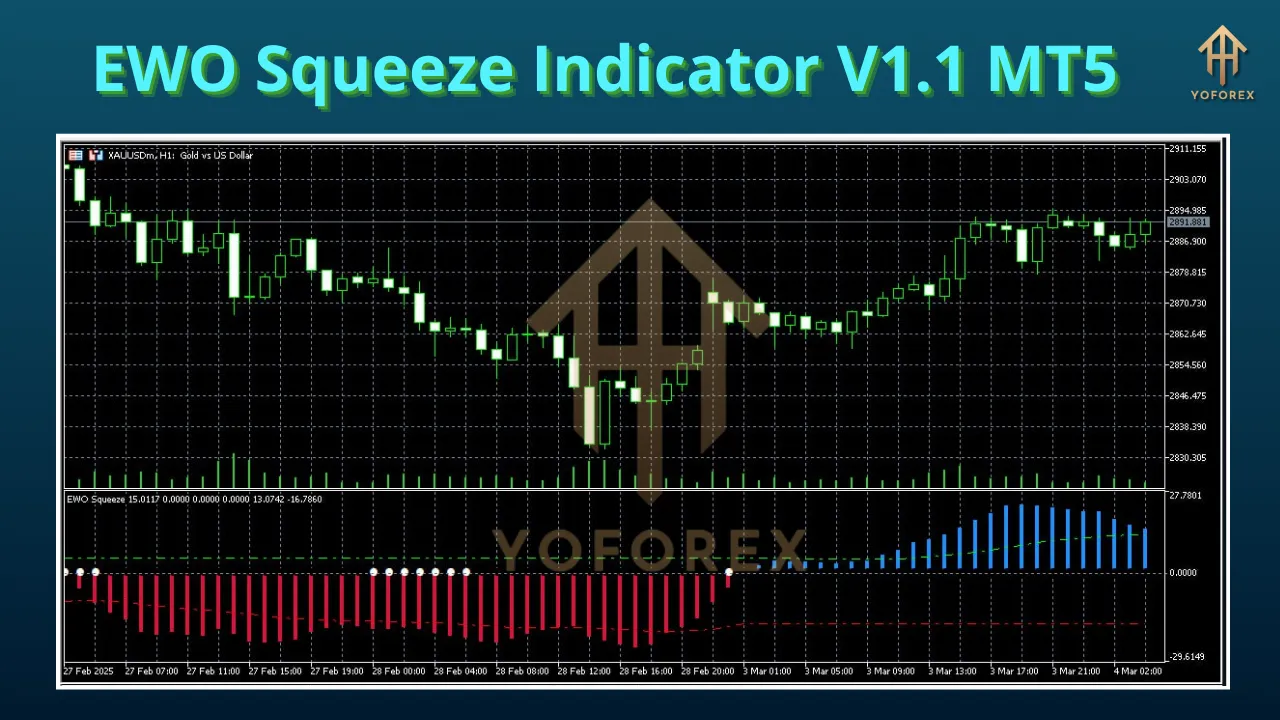
📈 Trading Strategy Using EWO Squeeze Indicator
Here’s a simple yet powerful strategy using the EWO Squeeze Indicator:
Step 1: Identify Squeeze Phase
Watch for periods where the histogram changes color (often black or gray), indicating low volatility and a potential squeeze.
Step 2: Wait for Breakout Signal
When the squeeze ends, the histogram color changes (green for bullish, red for bearish), suggesting a breakout.
Step 3: Confirm with Price Action
Use candlestick patterns or additional confirmation tools like RSI or MACD to validate the direction.
Step 4: Enter Trade
Enter long if the breakout is bullish or short if the breakout is bearish.
Step 5: Manage Risk
Always use stop-loss and take-profit levels. Consider placing SL just below/above the squeeze range.
📥 How to Install EWO Squeeze Indicator V1.1 on MT5
Follow these simple steps:
-
Download the EWO Squeeze Indicator V1.1 file (usually
.ex5). -
Open your MetaTrader 5 platform.
-
Go to File > Open Data Folder.
-
Navigate to MQL5 > Indicators and paste the indicator file.
-
Restart MT5 or refresh your navigator window.
-
Drag and drop the indicator on your desired chart.
✅ Benefits of Using EWO Squeeze Indicator
Let’s summarize the main benefits:
-
Early Breakout Detection – No more entering late or missing opportunities.
-
Directional Bias – Helps filter out false breakouts by showing momentum direction.
-
All-in-One Tool – No need to load multiple indicators for squeeze and momentum analysis.
-
Custom Alerts – Stay ahead even when you’re not on the charts.
-
Beginner-Friendly – Easy visual cues for all levels of traders.
💡 Pro Tips for Traders
-
Combine with Moving Averages: Use 50 or 200 EMA as trend filters to avoid trading against the major trend.
-
Backtest Your Settings: Before going live, test the indicator with historical data and adjust parameters accordingly.
-
Avoid During Major News: Volatility spikes due to news can create false signals.
-
Multi-Timeframe Analysis: Use higher timeframe for trend confirmation and lower timeframe for entries.
⚠️ Limitations to Be Aware Of
While powerful, the EWO Squeeze Indicator isn’t foolproof:
-
Lagging Nature – Like all indicators, it reacts to price, not predicts it.
-
False Breakouts – Some signals may still result in failed trades.
-
Requires Confirmation – Best used with other technical tools or price action.
🛒 Where to Get EWO Squeeze Indicator V1.1
You can find this indicator on reputable trading marketplaces such as:
-
MQL5 Market
-
Third-party indicator sites like fxcracked.org or forexfactory.cc (ensure authenticity)
-
Trading forums where developers share custom tools
Make sure you download from a trusted source to avoid malware or incorrect versions.
🧾 Final Thoughts
The EWO Squeeze Indicator V1.1 for MT5 is a robust, visually intuitive, and effective tool for identifying squeeze zones and momentum-based breakouts. If you’re looking to simplify your charts while gaining deeper insights into upcoming price movements, this indicator is worth considering.
While no indicator guarantees 100% accuracy, combining EWO Squeeze with proper risk management and confirmation techniques can significantly enhance your trading performance.
So, whether you scalp the lower timeframes or swing trade longer positions, the EWO Squeeze V1.1 MT5 deserves a spot in your trading arsenal.