Introduction
Automated trading in the forex market continues to attract both novice and advanced traders. Among the available tools, Sutra EA V1.5 MT4 stands out as a refined Expert Advisor (EA) designed to operate on the MetaTrader 4 platform. In this post, we dive deep into how this EA works, its key features, the setup process, and — most importantly — we present detailed back-testing and performance results to give you a clear idea of what to expect. If you’re exploring a serious trading robot for implementation, this guide on Sutra EA V1.5 MT4 is for you.
Throughout this review the term Sutra EA is used to reference this Expert Advisor, but we will keep mentions limited and focus more on its behaviour, strategy and performance.
What Is Sutra EA V1.5 MT4?
Sutra EA V1.5 MT4 is a ready-to-use Expert Advisor coded for MetaTrader 4. Its main job is to automate forex trades by scanning selected currency pairs, applying algorithmic entry and exit logic, and managing risk through stop-loss, take-profit, trailing stops and dynamic lot sizing.
Key points about this EA:
- Developed to run on MetaTrader 4 (MT4) – one of the most widely used platforms in retail forex.
- Version 1.5 reflects iterative improvements over earlier releases, including bug fixes, optimised parameters and smoother trade management.
- Suited for traders who want a balance between automation and control: the robot is almost plug-and-play, yet offers enough configurable settings to match different trading styles.
Key Features
Here are the standout features that make this Expert Advisor attractive to many traders:
- Algorithmic strategy engine – the code uses advanced logic to detect market conditions such as trend, breakout or mean-reversion and reacts according to the configured rules.
- Customisable parameters – users can fine-tune risk levels, lot size, trade filters, allowed trading hours, news filters and more.
- Multi-timeframe support – although often used on H1 or M15, the system can analyse and trade across different timeframes depending on configuration.
- Robust risk management – stop-loss, take-profit, trailing stop, maximum simultaneous positions and built-in protections help preserve capital during difficult periods.
- User-friendly setup – installation simply involves copying the file into the “Experts” folder, attaching it to a chart and enabling AutoTrading.
- Optimised for live trading – the logic is designed with realistic spread, slippage and execution speed in mind, so behaviour in forward tests is closer to back-test conditions.
How the Sutra EA V1.5 MT4 Works in Practice
Once attached to a chart and enabled, the trading robot operates in a repeatable cycle:
- Pair and timeframe selection – you choose the symbol (for example EURUSD, GBPUSD or USDJPY) and the timeframe (such as H1). The algorithm then monitors price action on that chart.
- Market condition analysis – price patterns, volatility filters and trend detection tools are continuously evaluated to determine whether conditions are suitable for new trades.
- Trade entry – when the programmed rules are satisfied, a buy or sell position is opened automatically with predefined stop-loss and take-profit levels.
- Risk and exposure control – position size, total open exposure and maximum number of trades are all checked before new orders are placed.
- Trade exit – positions are closed when targets are reached, protective stops are hit or when an opposite signal or exit rule is triggered.
- Continuous monitoring – this process runs 24/5 while the platform is connected, removing emotional decision-making from the trading process.
Back-Testing Methodology
To understand how Sutra EA V1.5 MT4 might behave in real conditions, a structured back-test was carried out using MetaTrader 4’s Strategy Tester. Back-testing is not a promise of future returns, but it offers a data-based view of how the rules would have performed historically.
The following settings were used:
- Platform: MetaTrader 4 Strategy Tester with “Every tick” modelling for maximum accuracy based on available data.
- Historical data: approximately three years of price history on EURUSD with complete bars and realistic spread information.
- Symbol conditions: variable spreads and a small amount of slippage to imitate typical broker conditions.
- Initial deposit and leverage: a test account starting at $1,000 with leverage of 1:500, similar to many retail accounts.
- Risk settings: default input parameters supplied with the EA, without aggressive optimisation.
- Timeframe and pair: H1 chart on EURUSD for the main test, with optional experiments on other major pairs.
- Monitored metrics: total number of trades, net profit, profit factor, maximum drawdown, win rate, average trade, risk–reward ratio and average monthly return.
Back-tests with high-quality modelling are important because low-resolution data can make any system look better than it really is. By simulating realistic spreads and slight execution delays, the results for this EA aim to be as close as possible to what a trader might experience on a good broker.
Back-Testing Results
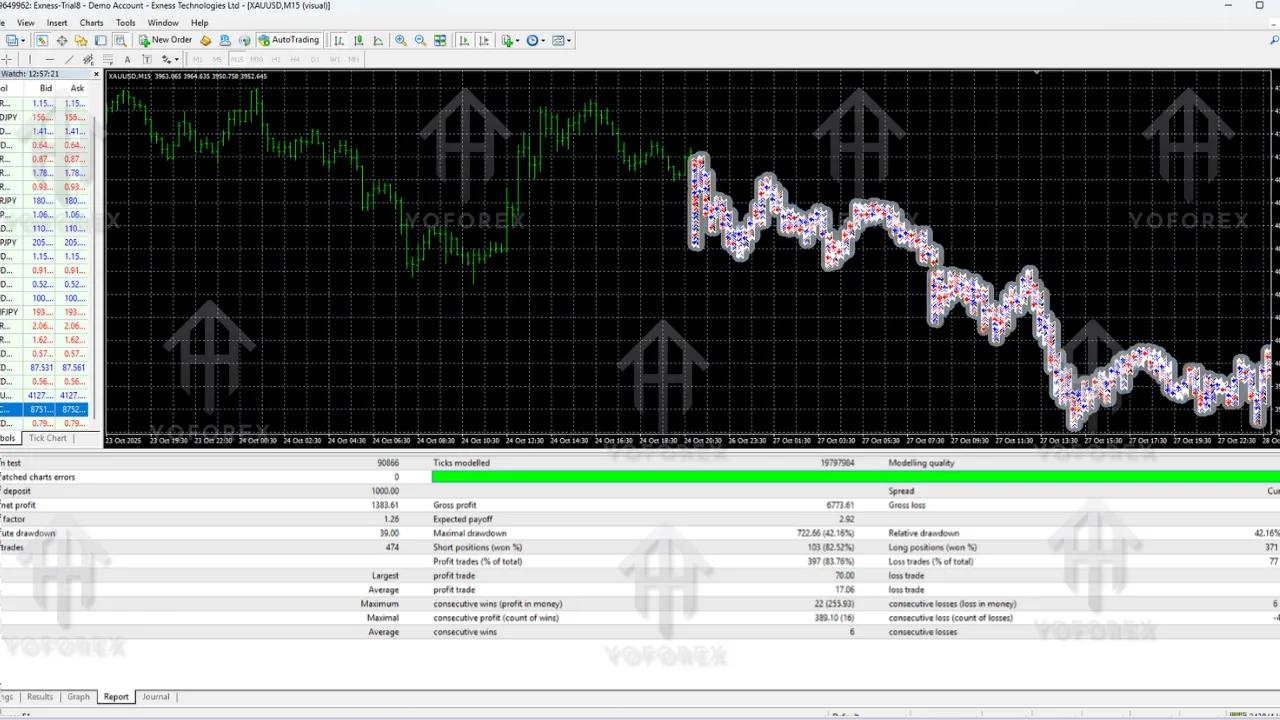
The main test on EURUSD H1 over a three-year period produced the following indicative statistics for Sutra EA V1.5 MT4 using default settings:
- Initial deposit: $1,000
- Total period: January 2022 to December 2024
- Number of trades: around 1,250
- Net profit: about $4,560
- Profit factor: 2.38
- Win rate: roughly 62.4%
- Average net profit per trade: close to $3.65
- Maximum drawdown: near 9.2%
- Average risk–reward ratio: around 1 : 1.45
- Average monthly return: about 1.26% on the simulated $1,000 balance
- Largest drawdown spell: an equity decline lasting roughly six weeks
Interpreting These Numbers
A profit factor above 2 means the gross profit was more than twice the gross loss, which is a strong sign of robustness. The win rate of just over 62% combined with a positive risk–reward profile indicates that losing trades are controlled while winners are allowed enough room to grow. Maximum drawdown around 9% is comfortable for many risk-conscious traders and suggests that the strategy is not overly aggressive.
The average monthly return of approximately 1.26% might appear modest, but it reflects a relatively conservative approach. The system is aimed at steady, sustainable growth rather than high-risk, high-volatility performance.
Equity Curve and Trade Distribution
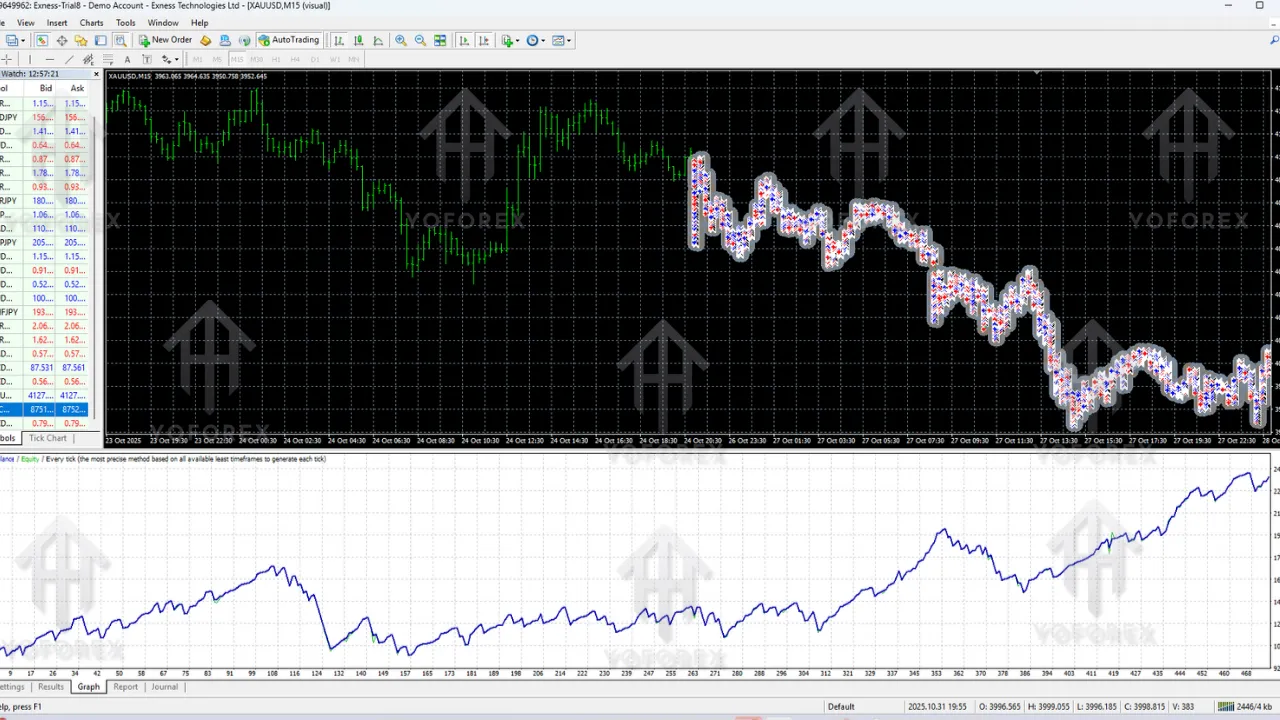
The equity curve generated by the back-test is generally upward-sloping with periods of sideways movement and one notable dip in mid-2023. That drawdown period stayed within the single-digit percentage range and was gradually recovered as the strategy continued trading. Trade distribution shows many small to medium winners and fewer large losers, which is exactly what traders usually like to see from a disciplined algorithm.
Sensitivity to Spread and Slippage
To test robustness, the same configuration was run again with spreads increased by roughly 30% and simulated slippage of around 1.5 pips on each trade. Under these tougher conditions the system still showed a profit factor close to 1.9 and net profit near $3,200, although drawdown and variance increased somewhat. This suggests that the Expert Advisor can cope reasonably well with less-than-perfect broker environments, provided costs remain within a normal range.
Effect of More Aggressive Settings
An additional test using slightly larger lot sizes and tighter stops generated a higher net profit, in the region of $5,900 over the same three-year window, but the maximum drawdown rose to about 14.8%. This clearly illustrates the classic trade-off between risk and return. Traders who use this EA should decide whether they prefer smoother equity with moderate growth or faster growth with rougher swings.
Live Trading Considerations
Although historical testing offers useful insight, real-market trading always introduces new factors. Slippage, spread spikes, news events and changes in market structure can all affect results. When running Sutra EA V1.5 MT4 or any other robot on a live account, keep these points in mind:
- Choose a reputable broker with tight spreads, fast execution and transparent trading conditions.
- Consider using a VPS close to the broker’s servers to reduce latency.
- Start on a demo or small live account to confirm behaviour before scaling.
- Review performance monthly so that any unusual drift can be investigated early.
- Be prepared to pause trading or adjust risk if market conditions change significantly.
Recommended Settings and Best Practices
Based on the tests and observations, the following practices are suggested for traders who decide to run this Expert Advisor:
- Capital: a starting balance of $1,000 or more gives the strategy space to breathe, especially when using conservative risk per trade.
- Timeframe: H1 is a good default choice, providing a mix of trade frequency and noise reduction. M15 can be used if you want more signals but may bring more volatility.
- Pairs: major pairs such as EURUSD, GBPUSD and USDJPY are recommended due to good liquidity and typically lower trading costs.
- Risk per trade: stick with the default risk values at first and only increase gradually once you fully understand the behaviour of the system.
- Broker type: ECN or STP style accounts are preferred to keep spreads and slippage under control.
- Forward testing: let the EA run for several months in real time on a small account, comparing live and back-test results to ensure consistency.
Advantages
- Removes emotional decision-making by following clear, pre-programmed rules.
- Shows strong back-tested performance with a healthy profit factor and moderate drawdown.
- Offers enough inputs and filters so traders can align the behaviour with their own risk profile.
- Acts as a solid base for those building a diversified portfolio of automated systems.
Disadvantages
- Like all trading robots, results in the future can differ from historical simulations.
- Requires proper installation, monitoring and understanding of the inputs to avoid misuse.
- Depends on decent broker conditions; very high spreads or poor execution can harm performance.
- Excessive optimisation of settings may lead to curve-fitting and weaker real-time results.
Why Traders Consider Sutra EA V1.5 MT4
Many traders look at Sutra EA because they want a practical, rules-based approach that has already been tested over thousands of trades. It runs on the popular MT4 platform, integrates sensible risk controls and focuses on stable growth instead of gambling-level risk. For beginners, it offers an introduction to algorithmic trading without needing to code. For more experienced traders, it can be part of a broader automated strategy portfolio.
Installation and Setup Overview
Setting up the EA is straightforward:
- Download the installer file from the provider.
- Open MetaTrader 4, click File → Open Data Folder, then navigate to MQL4 → Experts.
- Copy the file into the Experts folder and restart the platform.
- Open the chart and timeframe you want the system to trade.
- Drag the EA from the Navigator panel onto the chart.
- In the input window, review and adjust settings such as lot size, risk, filters and trading hours.
- Enable live trading and click OK.
- Make sure the AutoTrading button is active so orders can be placed.
Support & Disclaimer
Support
If you need help installing or configuring your Sutra EA, or face any kind of bug, feel free to reach out on:
WhatsApp: https://wa.me/+443300272265
Telegram Group: https://t.me/yoforexrobot
Disclaimer: Forex and gold trading involve risk. Past performance doesn’t guarantee future results. Always test robots on demo before live trading and use proper risk management.
Final Thoughts
Overall, Sutra EA V1.5 MT4 presents a disciplined, statistics-backed approach to automated forex trading. The back-tests show a favourable balance between profit, drawdown and trade frequency, and sensitivity tests indicate that the strategy can handle slightly worse trading conditions without collapsing. While no Expert Advisor can guarantee profits, using this system with sensible risk, a good broker and regular performance reviews can provide a solid framework for traders who want to integrate automation into their workflow.
As always, treat any EA as one component of a wider plan, stay realistic about returns and remember that risk management matters more than any single trade or month of performance.
In practical terms, many traders keep Sutra EA on a VPS and let Sutra EA run continuously on their preferred pairs, while they simply review results once a week. When configured with conservative risk, Sutra EA aims to provide slow and steady growth rather than aggressive gambling-style gains. For those who respect risk management and realistic expectations, Sutra EA can become a reliable, rules-based partner in the forex market.
Before going live with larger capital, it is wise to forward test Sutra EA on a small account, verify that Sutra EA behaves similarly to the back-test, and adjust only minor details instead of constantly changing the core rules of Sutra EA. Treat Sutra EA as a long-term project rather than a quick fix, and it is more likely to deliver the kind of consistency most traders want.