
EWP Price Action EA V1.0 MT4
Introduction
In the dynamic world of forex trading, staying ahead of market trends is essential. This is where EWP Price Action EA V1.0 MT4 comes into play. With its advanced algorithms and price action strategies, this expert advisor (EA) automates trading on the MetaTrader 4 platform, enabling traders to make informed decisions in real-time.
In this comprehensive review, we’ll explore the features, benefits, installation, and setup of EWP Price Action EA V1.0 MT4. By the end of this article, you’ll understand why this EA is becoming a go-to tool for many forex traders.
What is EWP Price Action EA V1.0 MT4?
EWP Price Action EA V1.0 MT4 is an automated forex trading solution designed to analyze price movements and execute trades based on advanced price action strategies. It’s built to work on the MetaTrader 4 (MT4) platform, making it accessible to a wide range of traders.
Price action trading is a strategy that focuses on historical price movements to forecast future market trends. This EA leverages the power of price action to identify key levels of support, resistance, and market trends, ensuring precise trade executions.
Key Features of EWP Price Action EA V1.0 MT4
- Automated Price Action Strategy: The EA automatically identifies price action setups and executes trades with minimal human intervention.
- Real-Time Market Analysis: Continuously analyzes market conditions and identifies potential trading opportunities.
- Customizable Parameters: Allows users to customize settings such as trade size, stop-loss, take-profit, and more.
- Optimized for MT4: Fully compatible with the MT4 platform, making it easy for users to integrate it into their existing trading setups.
- Risk Management Tools: Built-in features like stop-loss and take-profit levels to manage trading risks effectively.
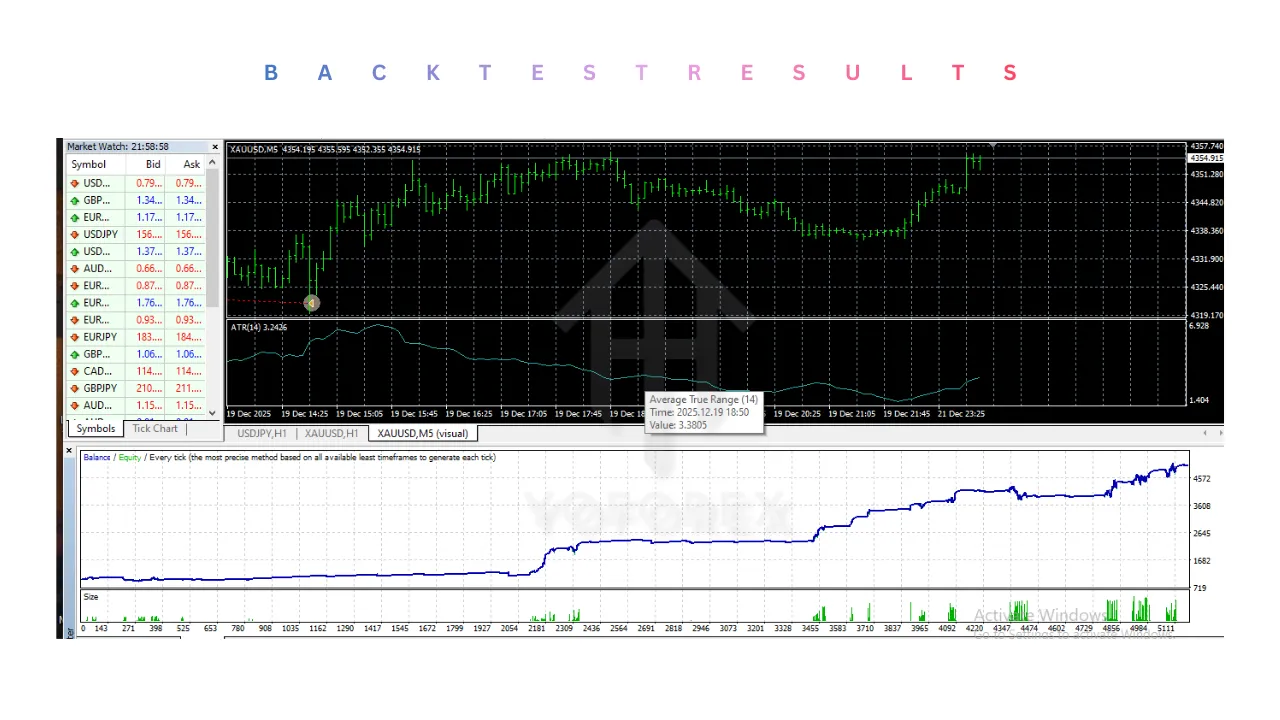
How Does EWP Price Action EA V1.0 MT4 Work?
The EWP Price Action EA V1.0 MT4 is an advanced automated trading system built for the MetaTrader 4 platform that relies on price action strategies to make trading decisions. Here’s a detailed explanation of how it works:
1. Price Action Analysis
At its core, EWP Price Action EA V1.0 MT4 uses price action, which is the study of historical price movements on a chart, to identify potential trade setups. Unlike many EAs that rely on indicators like Moving Averages or RSI, price action-based strategies focus purely on the price itself, such as candlestick patterns, market structure, and price levels (support and resistance).
The EA scans the chart for specific price action patterns that indicate high-probability trade opportunities. These patterns may include:
- Engulfing Candles
- Pin Bars
- Inside Bars
- Doji Patterns
- Breakouts
It looks for these formations at critical levels of support or resistance, which are often the points where the market is more likely to reverse or continue in the same direction.
2. Trade Entry
Once a valid price action pattern is identified, the EA automatically places an order. It considers several factors before entering a trade, including the direction of the trend, support/resistance levels, and price patterns. The EA will then decide whether to enter a buy or sell trade based on the market’s behavior.
For example, if the EA detects a bullish engulfing pattern at a support level, it will likely trigger a buy order. Similarly, if a bearish engulfing pattern appears at a resistance level, the EA will open a sell order.
3. Risk Management
EWP Price Action EA V1.0 MT4 includes robust risk management features to protect your capital and minimize losses. The EA allows users to set:
- Stop Loss: A predefined price level where the trade will automatically close if the market moves against the position. This is set to limit potential losses.
- Take Profit: A price level where the trade will be automatically closed when the market moves in favor of the position. This ensures profits are locked in.
- Trailing Stop: An option that moves the stop loss as the trade becomes profitable, allowing for further profit if the market continues in the trader’s favor.
These features help prevent large losses and ensure that profits are secured as the trade progresses.
4. Trade Management
After the trade is initiated, EWP Price Action EA V1.0 MT4 will continuously monitor market conditions and adjust the trade parameters if necessary. It can dynamically adjust stop losses, take profits, or close trades early based on the evolving price action.
This ensures that the EA adapts to changing market conditions, locking in profits when possible and limiting losses when needed.
5. Trade Exit
Once the price action confirms that a trend is either exhausted or reversing, EWP Price Action EA V1.0 MT4 will automatically exit the trade. The exit can be triggered by:
- A change in the price action pattern (e.g., a reversal pattern forming).
- The price reaching the set take profit level.
- The price hitting the stop loss.
If the EA is using a trailing stop, it will exit the trade if the price moves against the position after the trailing stop has been triggered.
6. Customizable Settings
The EWP Price Action EA V1.0 MT4 is highly customizable, allowing traders to fine-tune it to their specific trading preferences. Some of the adjustable settings include:
- Timeframe: The EA works on multiple timeframes (e.g., M15, H1, H4, etc.), and you can choose the one that fits your trading strategy.
- Risk Management: Traders can customize their stop loss, take profit, and risk per trade, giving them full control over the risk exposure.
- Trade Frequency: The EA can be set to trade more conservatively or more frequently, depending on your preferred trading style.
The EWP Price Action EA V1.0 MT4 doesn’t rely on indicators or lagging data, making it one of the most effective price action-based trading tools available.
How to Install and Set Up EWP Price Action EA V1.0 MT4
Setting up the EWP Price Action EA V1.0 MT4 is straightforward. Here’s a step-by-step guide to get started:
Step 1: Download and Install MetaTrader 4 (MT4)
If you don’t already have MT4 installed, download and install it from your broker’s website.
Step 2: Download EWP Price Action EA V1.0 MT4
Visit the official website or your trusted EA provider to download EWP Price Action EA V1.0 MT4. Ensure you’re downloading from a reputable source to avoid any malware or security issues.
Step 3: Add the EA to MT4
- Open MT4 and click on “File” in the top menu.
- Select “Open Data Folder.”
- Navigate to the “MQL4” folder and then to the “Experts” folder.
- Copy and paste the downloaded EWP Price Action EA V1.0 MT4 file into the “Experts” folder.
- Restart MT4 to load the EA.
Step 4: Attach the EA to a Chart
- In MT4, go to the “Navigator” panel and find EWP Price Action EA V1.0 MT4 under the “Experts” section.
- Drag and drop the EA onto a chart of your choice.
- A settings window will appear where you can customize the EA’s parameters.
Step 5: Start Trading
Once everything is set up, the EA will begin analyzing the market and executing trades based on price action signals. You can monitor its performance in real-time and adjust settings as needed.
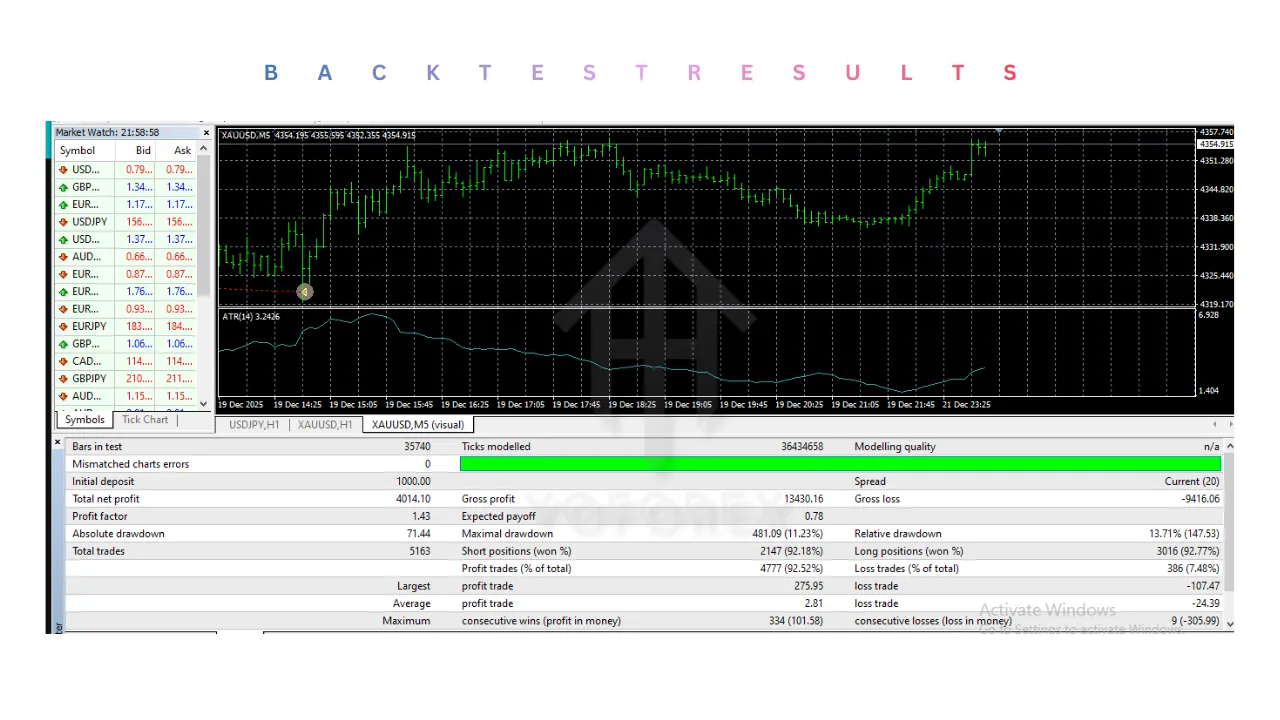
Backtest EWP Price Action EA V1.0 MT4:
1. Install the EA in MT4
- First, ensure that you have downloaded and installed the EWP Price Action EA V1.0 MT4 onto your MetaTrader 4 platform.
- Follow the steps I outlined previously for installing the EA into the MQL4/Experts folder of your MT4 platform.
2. Open the Strategy Tester in MT4
- Open your MetaTrader 4 platform.
- From the main screen, go to the View menu and select Strategy Tester (or simply press Ctrl + R).
- The Strategy Tester window will open at the bottom of your screen.
3. Select the EA
-
In the Strategy Tester window, under the Expert Advisor dropdown, select EWP Price Action EA V1.0 MT4 (which you installed earlier).
4. Select a Trading Pair
-
Choose the trading pair you want to backtest (e.g., EUR/USD, GBP/USD, etc.).
5. Choose a Timeframe
- Select the timeframe you want to test the EA on (e.g., M1, M15, H1, H4, etc.).
- The EWP Price Action EA works best on timeframes like H1 or H4, but you can test it on lower timeframes for scalping or higher timeframes for longer-term strategies.
6. Set the Date Range
- Set the From and To date to define the period for the backtest. Choose a period that represents different market conditions (e.g., trending, choppy, volatile).
- Ideally, the period should be at least a few months to get a robust understanding of how the EA performs in different market conditions.
7. Configure the Modeling Settings
- Under Model, select Every tick for the most accurate results. This will ensure that the backtest is performed based on every market tick (price change).
- If your system is slow, you can select Open prices only, but this is less precise.
8. Set the Deposit and Account Settings
- Select the initial deposit amount for the backtest (e.g., $1,000).
- Choose the currency and leverage settings that are aligned with your trading preferences.
- Select “Use current spread” or set a fixed spread if desired.
9. Enable or Disable Optimization (Optional)
-
If you wish to optimize the EA’s parameters (e.g., adjusting stop loss, take profit, risk percentage, etc.), you can select Optimization. This allows the EA to test various combinations of parameter settings.
10. Start the Backtest
- Click on the Start button in the Strategy Tester window.
- The test will begin, and you will see the progress of the backtest as it runs.
11. View the Results
-
Once the backtest is complete, you can view the results in three main sections:
-
Graph: A graphical representation of the account balance over time, showing drawdowns, profits, and trades.
-
Results: A detailed list of all trades made during the backtest, including entry and exit times, prices, profits, and any slippage.
-
Report: A detailed report of the EA’s performance metrics, including net profit, win rate, drawdown, profit factor, etc.
-
12. Analyze the Backtest Results
Key metrics you should analyze in the backtest include:
- Net Profit: The total profit after all trades.
- Profit Factor: The ratio of gross profit to gross loss. A profit factor greater than 1 indicates a profitable strategy.
- Drawdown: The maximum loss from the peak to the trough during the backtest period.
- Winning Percentage: The percentage of winning trades.
- Average Trade Duration: The average length of each trade (this is important if you’re using a scalping strategy).
Advantages of Using EWP Price Action EA V1.0 MT4
Advantages of EWP Price Action EA V1.0 MT4:
-
Automated Price Action Trading:
-
EWP Price Action EA V1.0 MT4 automates the process of identifying and executing trades based on price action patterns, removing emotional decision-making and reducing the chance of human error in trading.
-
-
No Reliance on Indicators:
-
Unlike many other EAs that depend on traditional indicators like moving averages, RSI, or MACD, EWP Price Action EA uses pure price action. This means it adapts to market conditions without relying on lagging data, offering a more direct approach to forecasting price movements.
-
-
Customizable Settings:
-
The EA offers a high level of customization. Traders can adjust settings such as lot size, stop loss, take profit, risk percentage, and other parameters to tailor the EA to their specific trading style and risk tolerance.
-
-
Works on Multiple Timeframes:
-
EWP Price Action EA V1.0 MT4 works efficiently on various timeframes, making it flexible for traders who prefer to scalp on lower timeframes or use it for longer-term trading on higher timeframes like H1 or H4.
-
-
Continuous Market Monitoring:
-
The EA can operate 24/7, continuously analyzing the market for potential trading setups, ensuring that opportunities aren’t missed even when the trader is offline or away from the screen.
-
-
Real-Time Trade Execution:
-
Once a suitable price action setup is identified, the EA executes trades in real time, ensuring that the order is placed without delays and at the best possible price, improving trade execution speed.
-
-
Risk Management Features:
-
The EA includes essential risk management tools like adjustable stop loss, take profit, and trailing stop to help manage trades and reduce the risk of large drawdowns. These features provide additional peace of mind and control over trading decisions.
-
-
Backtesting and Optimization:
-
Traders can backtest the EA on historical data to evaluate its performance and optimize its settings for the best possible results. This feature is crucial for testing different parameters before live trading.
-
-
Adaptable to Different Market Conditions:
-
The EWP Price Action EA V1.0 MT4 adapts to both trending and ranging markets, making it suitable for various market conditions. It can capture trend-following setups and also identify reversal patterns in choppy or sideways markets.
-
-
Increased Trading Efficiency:
-
By automating the trading process, the EA eliminates the need for manual monitoring of the market and placing of trades. This increases trading efficiency and allows traders to focus on strategy refinement or other areas of interest.
-
No Over-Reliance on News:
-
Unlike fundamental strategies that depend on economic news releases, the EWP Price Action EA focuses purely on price behavior. This makes it immune to sudden news-driven market volatility and offers more stability in volatile environments.
-
Supports Multiple Currency Pairs:
-
The EA is compatible with a variety of major currency pairs such as EUR/USD, GBP/USD, and USD/JPY. It can be customized to trade minor pairs or commodities if desired, providing more flexibility.
-
Simple to Set Up:
-
EWP Price Action EA V1.0 MT4 is easy to install and set up, even for traders with limited experience with automated systems. The setup process involves copying the EA to the Experts folder in MT4 and configuring it to suit your preferences.
-
Backtest and Forward Test Available:
-
Traders can run the EA in both backtesting and forward-testing environments. This allows them to analyze its performance under historical conditions as well as in live, real-time market conditions.
-
No Complex Technical Knowledge Required:
-
Even though the EA uses complex price action strategies, the user interface is designed to be intuitive, meaning that even beginner traders can utilize it without needing in-depth knowledge of technical analysis.
Disadvantages of EWP Price Action EA V1.0 MT4:
-
Market Condition Dependency:
-
EWP Price Action EA V1.0 MT4 heavily relies on price action patterns, which work well in trending markets. However, in choppy or sideways markets, the EA might produce false signals or enter unprofitable trades.
-
-
Requires Active Monitoring:
-
Although it automates trading, the EA still requires regular monitoring to ensure that the settings are adjusted based on changing market conditions. There’s always a possibility of the EA misbehaving due to unusual market events or volatility.
-
-
Customization Complexity:
-
While the EA is customizable, beginners might find it difficult to configure the settings (e.g., stop loss, take profit, lot size). It may require trial and error to find the right configuration that suits their trading style.
-
-
Risk of Over-Optimization:
-
Over-optimizing the EA’s parameters during backtesting may lead to overfitting, where the EA performs well in the historical data but fails in live trading. Traders must ensure the EA is tested across different market conditions and not just historical data.
-
-
No Guarantee of Profit:
-
Like all automated trading systems, the EWP Price Action EA V1.0 MT4 does not guarantee profits. It can experience losing streaks, especially during volatile market events or black swan events, leading to significant drawdowns.
-
-
Dependency on Accurate Data:
-
The EA depends on the accuracy of market data. If there is any delay, slippage, or incorrect pricing data, the EA’s decisions could be flawed, leading to poor performance.
-
- Limited to MT4 Platform:
-
The EWP Price Action EA V1.0 MT4 is designed specifically for the MetaTrader 4 platform. Traders looking for a solution on other platforms like MetaTrader 5 (MT5) or cTrader won’t be able to use this EA unless a specific version is developed for those platforms.
-
-
Inability to Adapt to Fundamental News:
-
The EA only relies on technical analysis and price action patterns. It does not account for fundamental events like economic news, geopolitical events, or market sentiment, which can significantly impact price movements.
-
-
Initial Learning Curve:
-
While EWP Price Action EA V1.0 MT4 simplifies trading, traders still need to understand the basics of price action trading to use the EA effectively. It may be difficult for those unfamiliar with price action to fully grasp how the EA works or interpret its signals.
-
-
Over-Trading Risk:
-
If not properly configured, the EA might over-trade or take unnecessary positions. This can increase exposure and risk, especially if the user has not properly set risk management parameters like lot size, drawdown limits, or maximum trades.
-
-
Vulnerable to Broker Execution Delays:
-
The EA’s performance is heavily dependent on how fast your broker executes orders. If there are delays in order execution, slippage, or high spreads, it can affect the accuracy and profitability of trades.
-
-
Potential for False Signals in Range-bound Markets:
-
The EA might generate false signals when the market is in a tight range without clear trends. Price action patterns like reversals or breakouts can be misleading during periods of low volatility.
-
Who Should Use EWP Price Action EA V1.0 MT4?
-
Price Action Traders:
-
Traders who follow price action strategies and prefer to trade based on historical price movements and market structure will benefit the most from this EA. It eliminates the need for manual chart analysis by automating the process of identifying key price action patterns.
-
-
Beginners in Automated Trading:
-
EWP Price Action EA V1.0 MT4 is designed to be easy to set up and use, making it ideal for beginners who are new to automated trading. It provides an accessible entry point into algorithmic trading, especially for those who are already familiar with price action concepts.
-
-
Busy Traders:
-
This EA is perfect for traders who don’t have the time to monitor the markets constantly. It can run 24/7, ensuring that trading opportunities aren’t missed, even when the trader is away or unavailable.
-
-
Scalpers and Short-Term Traders:
-
The EA works effectively on shorter timeframes like M1, M5, and M15, making it suitable for scalpers or traders who prefer quick, smaller trades. Price action setups can be identified even in fast-moving markets, enabling timely entries and exits.
-
-
Long-Term Traders:
-
Even for those who prefer swing trading or longer-term positions (like H1 or H4 timeframes), EWP Price Action EA V1.0 MT4 can adapt to different market conditions. It can identify price action signals that indicate trend continuations or reversals, which are ideal for longer-term strategies.
-
-
Risk-Averse Traders:
-
Traders who prioritize risk management will find this EA valuable, as it includes features like stop loss, take profit, and trailing stop. These tools help protect capital and lock in profits, ensuring that risks are minimized and trading is disciplined.
-
-
Traders Looking for Consistency:
-
For those who want to eliminate emotional decision-making and achieve more consistent results, this EA is ideal. Since the trades are executed based on predefined price action patterns and rules, it reduces human error and emotional biases like fear and greed.
-
-
Traders with Limited Time or Experience:
-
Traders with limited experience in technical analysis or those who don’t have the time to analyze charts manually can benefit from the automation that EWP Price Action EA V1.0 MT4 offers. The bot simplifies the trading process, providing an easy-to-use solution without the need for extensive market knowledge.
-
Why Should You Use EWP Price Action EA V1.0 MT4?
-
Automates Price Action Trading:
-
EWP Price Action EA V1.0 MT4 automates the process of identifying price action setups and executing trades, making it an excellent choice for traders who want to automate their strategy without relying on traditional indicators or lagging data.
-
-
Increases Trading Efficiency:
-
By automating trade entries, exits, and risk management, this EA saves time and ensures that trades are executed without delay. This is particularly important for traders who don’t have the time to monitor the markets around the clock.
-
-
Eliminates Emotional Trading:
-
Emotions like fear and greed can cloud judgment and lead to poor decision-making. EWP Price Action EA V1.0 MT4 operates strictly according to predefined rules based on price action, removing emotional bias from the equation and leading to more disciplined, systematic trading.
-
-
Provides Consistent Results:
-
The EA trades based on clear, mechanical price action rules, which reduces the inconsistency seen in manual trading. Traders can expect a more reliable and predictable performance from the EA, as it doesn’t react to emotions or external influences.
-
-
Customizable to Individual Preferences:
-
The EWP Price Action EA V1.0 MT4 is highly customizable, allowing traders to fine-tune the settings according to their risk appetite, trading style, and goals. Whether you’re a conservative trader or an aggressive one, the EA can be adapted to meet your specific needs.
-
-
Works Across Multiple Timeframes:
-
This EA can be used on different timeframes, making it versatile for various trading strategies. Whether you’re a scalper, day trader, or swing trader, the EA can help identify price action signals on multiple timeframes for a wide range of trading styles.
-
-
Reliable Risk Management:
-
With built-in risk management tools like stop loss, take profit, and trailing stop, this EA helps traders protect their capital while locking in profits. Proper risk management is crucial for long-term profitability, and the EA ensures that trades are executed with risk in mind.
-
-
Works Well in Trending and Ranging Markets:
-
The EA is designed to adapt to both trending and range-bound market conditions. It can identify trend-following price action setups and reversal patterns, allowing it to perform well across different market environments.
-
-
Freeing Up Time for Other Activities:
-
Since the EA operates 24/7 and executes trades automatically, it frees up time for traders to focus on other aspects of their trading or personal life. This is especially useful for those who want to trade without being glued to their screens.
-
-
Backtesting and Optimization:
-
Traders can backtest the EWP Price Action EA V1.0 MT4 on historical data to assess its performance under various market conditions. This helps in fine-tuning the settings and improving performance before trading with real capital.
-
-
Suitable for Various Currency Pairs:
-
The EA is compatible with a wide range of currency pairs, including major pairs like EUR/USD, GBP/USD, and USD/JPY, as well as minor and exotic pairs. This provides flexibility for traders looking to diversify their trading portfolio.
-
-
Leverage on the Power of Price Action:
-
Price action trading is one of the most reliable and well-established strategies in forex trading. EWP Price Action EA V1.0 MT4 uses this strategy to deliver accurate trade signals based on market movements, rather than relying on lagging indicators that might not always reflect real-time market conditions.
-