OB ADX EA V1.0 MT5
Introduction to OB ADX EA V1.0 MT5
OB ADX EA V1.0 MT5 is a professionally designed automated trading robot developed for traders who want to follow structured, logic-based market behavior instead of emotional or impulsive trading. The core idea behind this Expert Advisor is to combine institutional order block trading with ADX trend strength confirmation, allowing trades only when price location and momentum align. Most retail traders fail because they enter trades randomly, overtrade, or trade against the dominant market trend. OB ADX EA solves this problem by enforcing strict rules. It does not chase price, does not scalp randomly, and does not rely on dangerous recovery systems. Instead, it waits for price to react at key order block zones and confirms whether the market has enough strength to continue in that direction. By automating this process, OB ADX EA removes emotional decision-making and brings discipline, consistency, and structure into trading.
Overview of OB ADX EA V1.0 MT5
OB ADX EA V1.0 MT5 is built for MetaTrader 5 and operates as a fully automated system. The EA continuously analyzes price behavior to identify institutional order blocks—areas where large buy or sell orders are likely placed by professional market participants. Once an order block is identified, the EA does not enter trades immediately. It waits for price to revisit that zone and then checks the ADX indicator to ensure the market is trending with sufficient strength. Only when both conditions are satisfied does the EA execute a trade. This layered confirmation approach significantly improves trade quality and reduces unnecessary losses caused by ranging or low-momentum markets. OB ADX EA is designed for traders who value quality trades over quantity and prefer steady growth over aggressive risk.
How OB ADX EA V1.0 MT5 Works ?
-
1) It detects Order Blocks (institutional zones)
- OB ADX EA scans recent market structure to find areas where strong buying or selling happened suddenly (often where big players entered). These zones are treated as “order blocks.”
- Instead of entering in the middle of movement, the EA prefers to wait for price to return back into these zones, because that’s where reactions and reversals or continuations often start.
-
2) It waits for price to revisit the order block
- The EA does not chase candles after a big move. It keeps patience and monitors price until it comes back to the order block zone.
- This approach is important because entries near order blocks can provide better risk-to-reward compared to late entries.
-
3) It confirms trend strength using ADX
- ADX is used to check whether the market has enough strength to move.
- If ADX shows weak momentum (sideways market), OB ADX EA reduces or avoids entries. This helps avoid many random losses caused by choppy markets.
-
4) It enters trades only when both conditions match
-
Entry happens only when:
-
- Price is at/near a valid order block, AND
- ADX confirms the market strength (trend environment)
-
This double confirmation is a big reason why the EA aims for cleaner setups.
-
-
5) It automatically sets Stop Loss and Take Profit
- OB ADX EA places stop loss and take profit based on its internal logic (usually around structure and safe distances).
- This prevents emotional closing and gives consistent risk control.
-
6) It manages the trade without emotions
- Once a trade is placed, the EA sticks to the plan. No panic exits, no revenge trading, no random re-entry.
- This is very useful for traders who often make mistakes after a loss.
Key Features of OB ADX EA V1.0 MT5
-
1) Order Block Based Entries
- The EA uses order blocks as the main entry zones rather than random signals.
- This makes entries more “location-based,” which is generally stronger than indicator-only entries.
-
2) ADX Trend Strength Filter
-
ADX helps the EA avoid weak market periods.
-
Many EAs fail because they trade 24/7 even when the market is dead. This filter improves trade quality.
-
-
3) Fully Automated Execution
-
The EA handles analysis, entries, exits, and trade management automatically.
-
Best for traders who don’t want to sit and monitor charts all day.
-
-
4) Risk Management Controls
-
Users can control lot size or use risk-based sizing (depending on settings).
-
This is important because even a good strategy fails without proper risk control.
-
-
5) No Martingale / No Dangerous Recovery
-
OB ADX EA is not designed to keep doubling lots after losses.
-
This reduces the risk of account blow-ups which happens a lot with grid/martingale bots.
-
-
6) MT5 Platform Optimized
-
It’s made for MetaTrader 5, so execution and compatibility are smooth for MT5 traders.
-
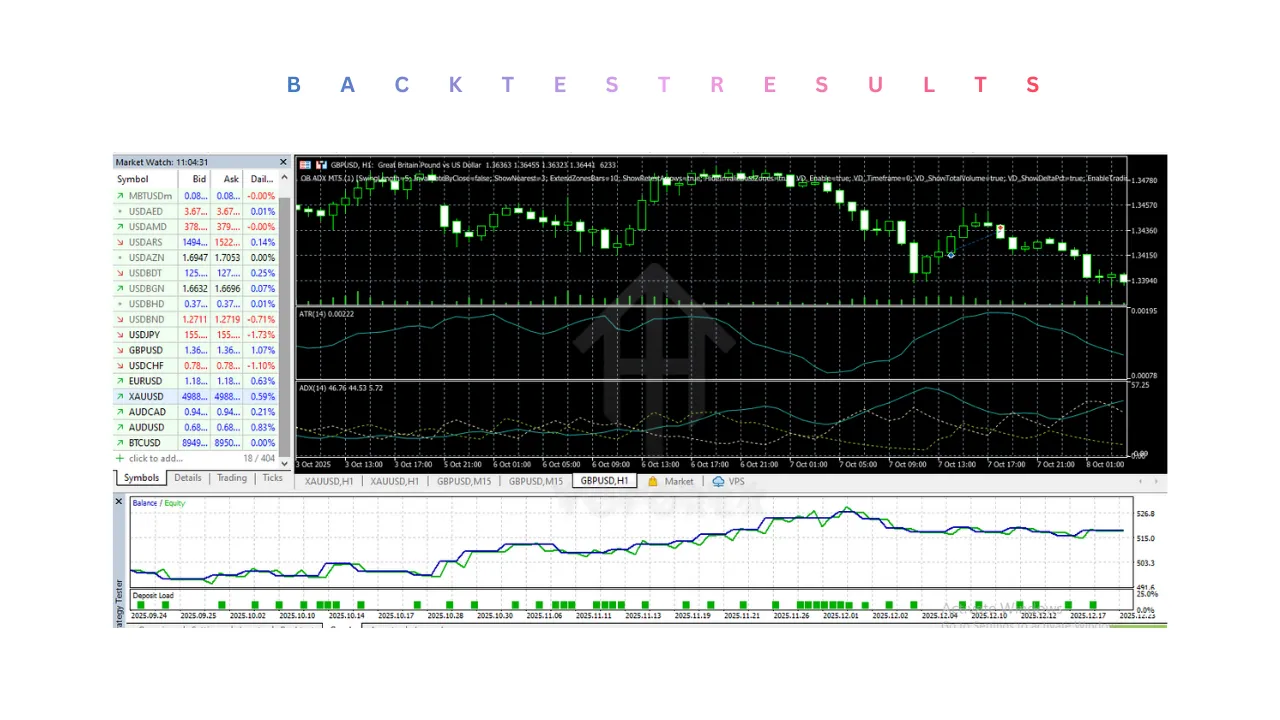
Installation & Setup Guide for OB ADX EA V1.0 MT5
1) Download the Expert Advisor File
- First, make sure you have the OB ADX EA V1.0 MT5 file saved on your computer.
- The file format should be compatible with MetaTrader 5 (usually
.ex5). - Keep the file in a known location such as Desktop or Downloads so it’s easy to find during installation.
2) Open MetaTrader 5 Platform
- Launch your MetaTrader 5 (MT5) trading platform.
- Ensure that your platform is fully loaded and connected to your trading account (demo or live).
- A stable internet connection is important so the platform can synchronize market data correctly.
3) Open the MT5 Data Folder
- Inside MT5, click on File in the top-left corner.
- Select Open Data Folder from the menu.
- This folder contains all system files used by MetaTrader 5, including Expert Advisors, indicators, scripts, and logs.
4) Place the EA in the Correct Folder
- In the Data Folder, open the MQL5 directory.
- Inside it, open the Experts folder.
- Copy and paste the OB ADX EA V1.0 MT5 file into this Experts folder.
- This step is important because MT5 only recognizes Expert Advisors placed in this directory.
5) Restart MetaTrader 5
- Close MetaTrader 5 completely after placing the file.
- Reopen the platform.
- Restarting allows MT5 to refresh and load the newly added Expert Advisor into the system.
6) Confirm EA Is Loaded Successfully
- In MT5, open the Navigator panel (shortcut:
Ctrl + N). - Expand the Expert Advisors section.
- You should now see OB ADX EA V1.0 MT5 listed there.
- If you don’t see it, repeat the previous steps and ensure the file is placed in the correct folder.
7) Open a Trading Chart
- Choose the currency pair or instrument you want to trade.
- Right-click on the symbol in the Market Watch window and click Chart Window.
- Select the recommended timeframe (such as M15, M30, H1, or H4) depending on your trading preference.
8) Attach the EA to the Chart
- Drag OB ADX EA V1.0 MT5 from the Navigator panel onto the chart.
- Alternatively, double-click the EA name.
- A settings window will appear where you can configure parameters.
9) Allow Required Permissions
- In the EA settings window, go to the Common tab.
- Make sure Allow Algo Trading is checked.
- If available, also enable Allow modification of Signals settings.
- These permissions are necessary for the EA to place and manage trades automatically.
10) Configure Input Settings Carefully
- Open the Inputs tab in the EA settings window.
- Set your lot size or risk percentage according to your account balance.
- Adjust stop loss, take profit, and ADX parameters only if you understand them.
- Beginners are advised to start with default or conservative settings.
11) Enable AutoTrading in MT5
- At the top of the MT5 platform, ensure the Algo Trading / AutoTrading button is turned ON (green).
- If this is disabled, the EA will not place any trades even if it is attached correctly.
12) Check Smiley Face / EA Status
- Once attached properly, you should see a smiley face or active icon in the top-right corner of the chart.
- This indicates that OB ADX EA V1.0 MT5 is active and ready to trade.
- If you see a sad face or cross mark, recheck permissions and AutoTrading settings.
13) Use VPS for Best Performance (Recommended)
- For uninterrupted trading, use a VPS (Virtual Private Server).
- A VPS keeps MT5 running 24/7 even when your computer is off.
- This is especially important for automated trading systems like OB ADX EA.
14) Monitor the First Few Trades
- After setup, allow the EA to trade naturally based on its logic.
- Avoid interfering manually with trades unless necessary.
- Monitor performance for a few days on a demo or small account before scaling up.
15) Avoid Frequent Parameter Changes
- Do not change settings daily or after every trade.
- OB ADX EA is designed to work over a series of trades, not instant results.
- Frequent changes can disrupt the strategy logic and affect consistency.
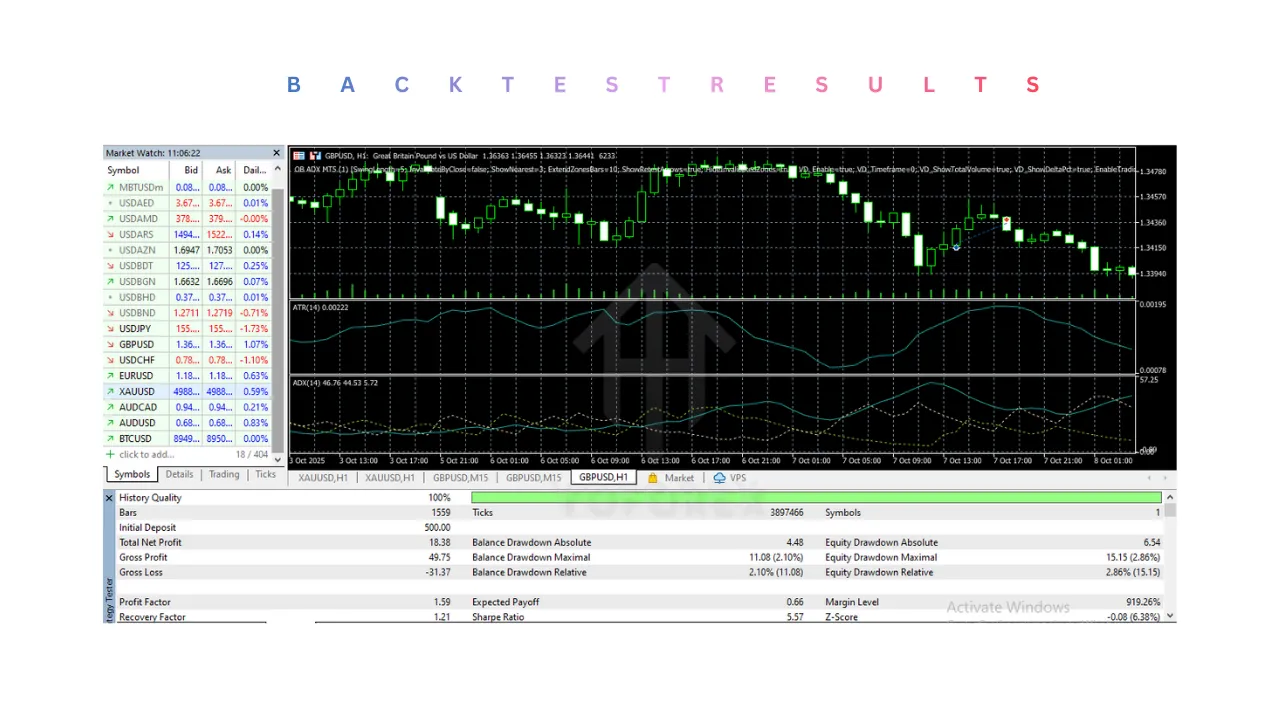
Advantages of OB ADX EA V1.0 MT5
-
1) Better Trade Quality (Not Overtrading)
-
Because it waits for order blocks + ADX confirmation, it avoids many low-quality trades.
-
This usually leads to more stable performance compared to bots that trade every small movement.
-
-
2) Trades With Market Strength
-
ADX ensures the market has momentum.
-
That means trades are more likely to move toward take profit instead of reversing randomly.
-
-
3) Emotion-Free Trading
-
No fear, no greed, no “close now” panic.
-
This is a huge advantage especially for beginners.
-
-
4) Cleaner Risk Control
-
Uses stop loss and take profit automatically, so risk stays controlled.
-
Helps traders maintain discipline even if they are not experienced.
-
-
5) Works Well for Trend-Based Market Phases
-
When markets trend strongly, order blocks often act as powerful re-entry zones.
-
That’s where this EA can shine.
-
Disadvantages of OB ADX EA V1.0 MT5
-
1) Fewer Trades
-
Because of strict filters, the EA may not trade daily.
-
Some traders get impatient and think “bot is not working,” but actually it’s avoiding bad conditions.
-
-
2) Sideways Markets Can Reduce Performance
-
If markets are ranging for long periods, order block reactions may be weaker and ADX may keep the EA out.
-
This means slower profit during choppy phases.
-
-
3) Not for “Fast Profit” Mindset
-
Traders expecting instant high returns may not like it.
-
This EA is designed for steady, logical trading rather than aggressive gambling.
-
-
4) Broker Conditions Matter
-
Spread, slippage, and execution speed affect results.
-
Even a good EA can suffer if the broker is unstable or has high spreads.
-
Who Should Use OB ADX EA V1.0 MT5
-
1) Traders who want disciplined automation
-
If you struggle with emotions or inconsistent manual trading, this EA helps you trade by rules.
-
-
2) Traders who like Smart Money / Order Block concept
-
If you believe in institutional zones and structure-based trading, OB ADX EA matches that style.
-
-
3) Traders who prefer controlled drawdown
-
Since it avoids martingale and focuses on filtering, it suits people who want safety and stability.
-
-
4) Busy traders
-
If you can’t watch charts daily, this EA can handle the process automatically (best with VPS).
-
-
5) Beginners who need structure
-
Beginners often overtrade or trade without confirmation. This EA teaches discipline through automation.
-
Why Use OB ADX EA V1.0 MT5?
-
1) It combines “location + momentum”
-
Order blocks provide location (where to trade)
-
ADX provides momentum (when to trade)
-
This combo makes trading decisions more logical.
-
-
2) It reduces unnecessary entries
-
Many bots lose because they trade too much. OB ADX EA aims to trade only good setups.
-
-
3) It brings consistency
-
Same rules applied every time, no emotional mistakes.
-
Over long periods, consistency is what builds results.
-
-
4) It’s safer than grid/martingale bots
-
No doubling lots after losses.
-
That’s a major reason it’s preferred by traders who care about account survival.
-
-
5) Works as a “system” not a guess
-
It’s structured like a strategy, not random signals.
-
This makes it easier to trust and run long-term.
-