Introduction :
The cryptocurrency market is unlike any other financial ecosystem in the world. It is highly fragmented, endlessly volatile, and driven largely by algorithmic liquidity providers and institutional “whales.” For years, retail traders attempting to automate their cryptocurrency trading on platforms like MetaTrader 5 have been fighting a losing battle. The reason for this systemic failure is fundamentally simple: traditional Forex trading bots rely on lagging technical indicators. Moving Averages, the Relative Strength Index (RSI), MACD, and Bollinger Bands were designed for traditional equities and fiat currencies decades ago. When applied to the chaotic, momentum-driven swings of Bitcoin or Ethereum, these lagging indicators inevitably trap traders in false breakouts or late entries. As the market evolves, the tools we use must evolve with it. This is where the Quantum Crypto PRO EA V7.4 MT5 steps in to completely revolutionize the landscape of automated digital asset trading.
At YoForex, we have reviewed countless Expert Advisors, and the vast majority are simply repackaged versions of the same old grid and Martingale systems wrapped in new marketing. The Quantum Crypto PRO is an entirely different beast. It discards the outdated concept of trying to predict the future based on past chart patterns. Instead, it utilizes an advanced Application Programming Interface (API) connection to monitor exactly what the most profitable, high-net-worth traders are doing in real time. By tapping directly into decentralized exchanges (DEXs) and analyzing the order flow of thousands of verified profitable wallets, this EA executes trades based on actual smart money movement rather than hypothetical technical crossovers.
Version 7.4 represents the pinnacle of this data-driven approach, refined after years of processing tens of millions of strategy combinations across dozens of cryptocurrency pairs. It is an Expert Advisor built for the modern MT5 architecture, leveraging external computational power and real-time behavioral analytics to give the retail trader an institutional edge. In this highly detailed, comprehensive guide, we will break down every single component of the Quantum Crypto PRO. We will explore its underlying philosophy, its robust risk mitigation protocols, and the precise settings required to maximize its efficiency. If you are tired of watching traditional EAs blow your crypto account during sudden market shifts, understanding the mechanics of this API-driven bot will change your entire perspective on algorithmic trading.
Key features :
Real-Time Whale Tracking Architecture
The absolute core of the Quantum Crypto PRO lies in its data source. It does not look at the MT5 chart to decide when to buy or sell.
-
Direct API Integration: The EA connects to specialized, high-tier decentralized exchange analytics platforms that monitor over 25,000 active, high-volume cryptocurrency traders in real time.
-
Behavioral Metric Filtering: The algorithm does not blindly copy every large trade. It specifically filters these 25,000 traders based on strict historical metrics, including their overall win rate, risk-adjusted returns, and their historical drawdown behavior during market crashes.
-
Dynamic Roster Rotation: Unlike standard copy-trading where you are at the mercy of one trader’s sudden losing streak, this EA uses dynamic rotation. If a monitored “whale” begins to underperform or exhibit erratic risk behavior, the system automatically drops their data feed and replaces them with a highly profitable alternative from the active pool.
Institutional-Grade Risk Management Protocol
Most cryptocurrency bots look fantastic until a sudden 20% market drop liquidates the entire grid. This EA strictly forbids toxic recovery strategies.
-
Zero Martingale and Zero Grid: The Quantum Crypto PRO completely prohibits the use of averaging down, grid expansion, or Martingale lot multipliers. Every single position is treated as an independent variable with its own calculated risk.
-
Hard Stop Loss on Every Trade: Before an order is even sent to the broker’s server, a definitive, hard Stop Loss is calculated by the external API based on the exact invalidation level of the copied smart money trade. You will never be caught holding an underwater position indefinitely.
-
Dual-Mode Take Profit: The system allows for flexible exit strategies. It can either close the trade when a hard Take Profit level is hit, or it can dynamically trail the position and close it the exact second the monitored whale closes their position on the decentralized exchange.
Multi-Coin Execution and Diversification
Cryptocurrency correlation is a massive risk factor. This system is designed to navigate the broader crypto ecosystem rather than hyper-focusing on a single asset.
-
Simultaneous Multi-Asset Trading: The EA is fully equipped to trade major cryptocurrency CFDs simultaneously, including BTC (Bitcoin), ETH (Ethereum), SOL (Solana), and other high-liquidity altcoins provided by your MT5 broker.
-
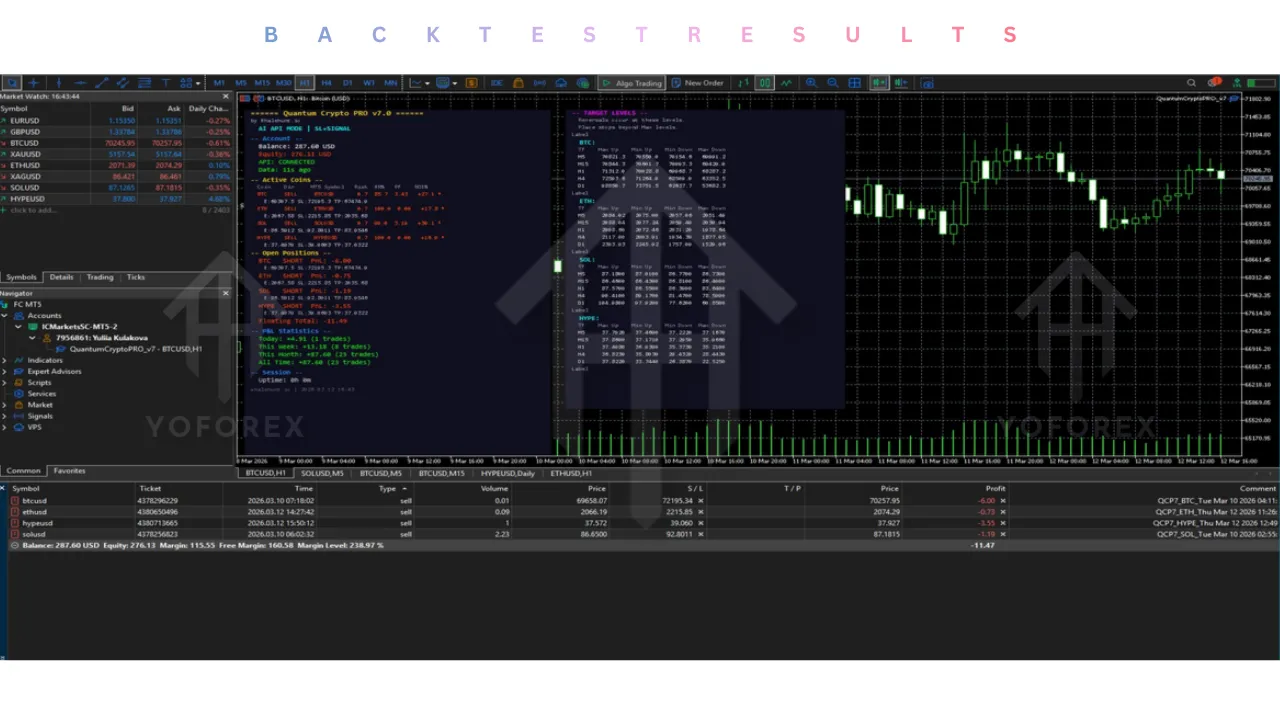
Singular Chart Attachment: Despite trading multiple assets, the Quantum Crypto PRO only needs to be attached to a single MT5 chart. It manages all selected coin configurations internally, vastly reducing the CPU load and terminal clutter on your Virtual Private Server.
-
Independent Coin Configuration: Each of the traded coins can be customized individually within the input parameters. If you want to run high risk on Bitcoin but low risk on Solana, the EA’s modular settings allow for complete portfolio customization.
Advanced Trading Modes
The developer understands that different traders have varying levels of trust in external API signals. Version 7.4 offers versatile operational modes.
-
Pure API Mode: This is the recommended setting, where the Quantum Crypto PRO EA operates strictly off the external whale data, executing buys and sells purely based on institutional order flow.
-
Hybrid Confirmation Mode: For hyper-conservative traders, the Quantum Crypto PRO EA can be set to require a double confirmation. The API must signal a trade, AND the MT5 terminal’s internal momentum algorithms must agree with the direction before the trade is executed.
-
Offline Mode: If the API server undergoes maintenance, the bot can seamlessly fall back to an internal, highly optimized price-action strategy specifically designed for Bitcoin, ensuring you never miss a major market move due to connectivity issues.
Adaptive Lot Sizing Matrix
Proper position sizing is the only way to survive the extreme volatility of digital assets. The EA handles this mathematical burden for you.
-
Equity-Based Scaling: As your account balance grows, the Quantum Crypto PRO automatically calculates the precise lot size needed to maintain your chosen risk percentage. This allows for the mathematical compounding of your profits without manual intervention.
-
Fixed Risk Multipliers: You can define an exact monetary amount or a strict percentage of your free margin to risk per trade, completely shielding your core capital from unexpected black swan events in the crypto market.
-
Broker Symbol Mapping: Because MT5 brokers name their crypto assets differently (e.g., BTCUSD, Bitcoin, BTCUSD.m), the EA features an intelligent mapping input, ensuring the API signals are routed precisely to the correct ticker on your specific broker feed.
Recommended settings :
To extract the maximum potential from the Quantum Crypto PRO, your infrastructure and account parameters must be perfectly aligned. Cryptocurrency trading on MT5 requires a different setup compared to standard Forex pairs.
Minimum Capital and Broker Requirements
While the system can technically operate on a $200 balance, the extreme micro-fluctuations of cryptocurrency prices dictate a higher safety net. A minimum deposit of $500 is highly recommended, while $1,000 or more will allow the adaptive lot sizing matrix to function flawlessly across multiple coins simultaneously. Your broker selection is critical. You must use a true ECN MetaTrader 5 broker that offers cryptocurrency CFDs with deep liquidity, tight spreads, and low commission structures. Furthermore, the broker must allow trading over the weekends, as crypto markets never close.
Timeframe and Chart Setup
Unlike hyper-active scalping bots that rely on the M1 or M5 charts, the Quantum Crypto PRO requires a broader view of the market to align with institutional order flow. The Quantum Crypto PRO EA must be attached exclusively to the H1 (1-Hour) timeframe. This timeframe effectively filters out the erratic, algorithmic noise of the lower timeframes, ensuring that the signals received from the API represent true, sustainable market trends. You only need to open one H1 chart of BTCUSD and attach the EA to it; the bot will manage the rest of the configured coins in the background.
Leverage Configuration
Cryptocurrency leverage is often heavily restricted by regulators, but to run a multi-coin strategy efficiently, adequate margin is necessary. A minimum leverage of 1:5 is strictly required for the Quantum Crypto PRO EA to open positions. However, a leverage of 1:20 or higher is strongly recommended. This higher leverage does not mean you will risk more money; rather, it drastically reduces the margin requirements for each trade, preventing your broker from triggering a margin call or a stop-out when the EA is holding simultaneous positions in BTC, ETH, and SOL.
API and Operational Settings
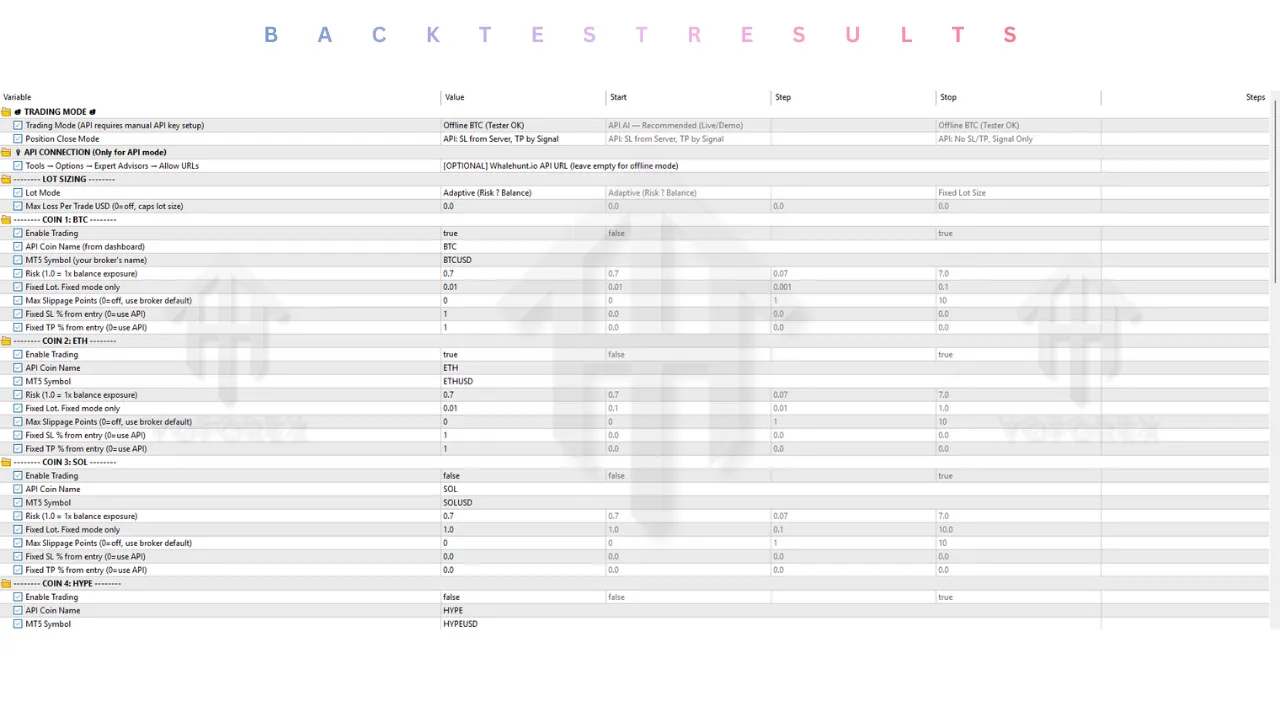
In the input parameters, ensure that the “Trading Mode” is set strictly to “API Mode” to fully utilize the whale tracking data. For the “Position Close Mode,” select the option that uses the API for Stop Loss and the Signal for Take Profit. This ensures your downside is protected by a hard numerical value on your broker’s server, but your upside remains dynamic, allowing the trade to run for maximum profit until the tracked smart money decides to exit the market.
Backtest result :
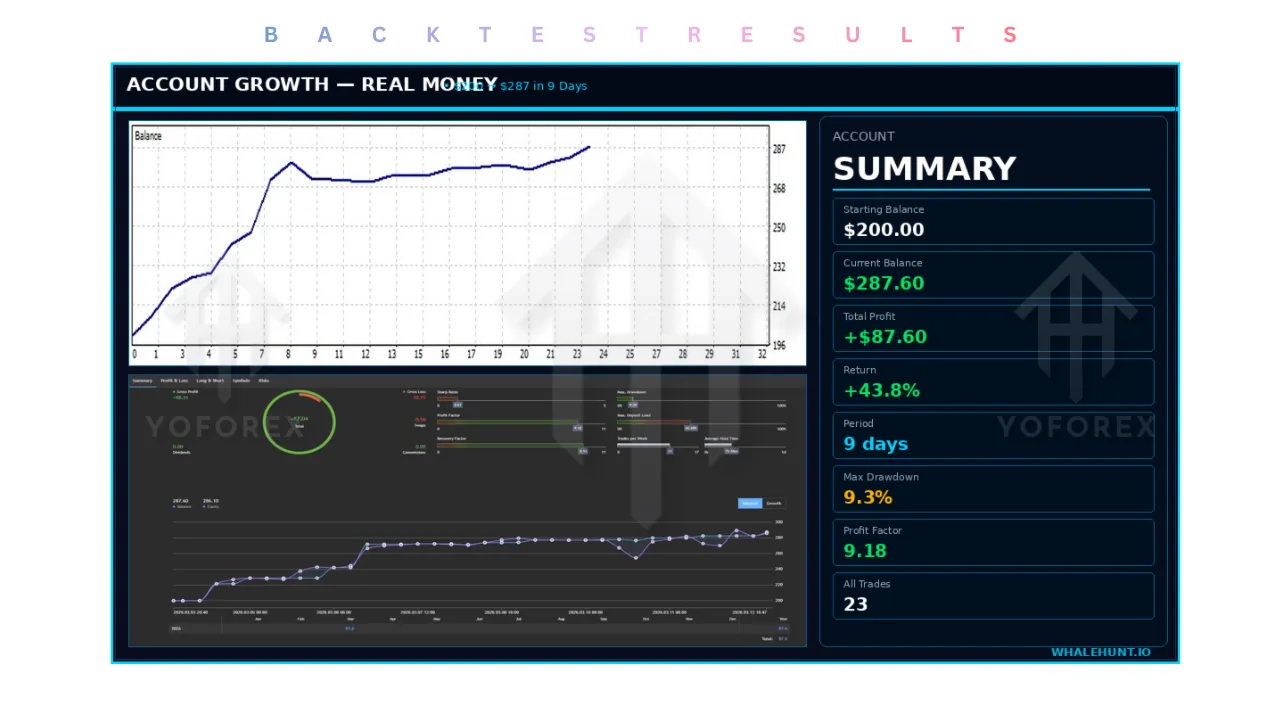
When reviewing traditional Expert Advisors on YoForex, we typically provide an exhaustive analysis of the MetaTrader Strategy Tester results. However, the Quantum Crypto PRO introduces a massive paradigm shift in how performance is validated. Because the entire core logic of this EA relies on real-time, live data streamed from an external API tracking decentralized exchanges, conducting a standard MT5 historical backtest is completely impossible. The MT5 strategy tester simply cannot simulate historical web requests to an external, dynamic database of human traders.
Therefore, the only true validation of this system is verified forward-testing through live MQL5 signals. Since its inception, the live tracking of this specific algorithm has shattered the expectations of standard crypto bots. Over its initial forward-testing periods, the system demonstrated a remarkable growth curve, often exceeding 40% monthly returns on moderate risk settings.
The most impressive metric from the live data is the Profit Factor, which consistently hovers above 2.50. This means that for every dollar the system loses, it generates two and a half dollars in profit. The win rate typically stabilizes around 64%—a highly realistic and sustainable number that proves the Quantum Crypto PRO EA relies on a mathematically sound risk-to-reward ratio rather than an artificially inflated win rate built on dangerous grid matrices. Furthermore, despite trading highly volatile assets like Ethereum and Solana, the maximum drawdown on the live signals is routinely kept under 15%. This incredibly low drawdown is the direct mathematical result of the EA utilizing hard stop losses on every single trade and aggressively rotating out any tracked whales who begin to perform poorly.
Installation guide :
Installing an API-driven Expert Advisor requires a few extra steps compared to a standard indicator-based bot. Follow this meticulous guide to ensure the Quantum Crypto PRO communicates perfectly with its external data source.
Step 1: Download and Secure Files
After acquiring the EA, locate the executable file (the .ex5 file). Keep this file readily available on your desktop. If your package included a specific text file containing the required API URL or preset configuration files (.set), ensure they are extracted from any zip folders.
Step 2: Open MT5 Data Directory
Launch your MetaTrader 5 terminal. Navigate to the top-left corner of the screen, click on the “File” menu, and select “Open Data Folder.” This action opens the root directory where all of your platform’s backend architecture is stored.
Step 3: Insert the Expert Advisor
Within the newly opened Data Folder, double-click to enter the “MQL5” folder, and then open the “Experts” folder. Copy your Quantum Crypto PRO .ex5 file and paste it directly into this location. To maintain a clean workspace, you may create a sub-folder named “Crypto API Bots” and place the file inside.
Step 4: Configure WebRequests (Crucial Step)
This is the most important part of the installation. Close the Data Folder and return to the MT5 terminal. In the top menu, go to “Tools” and select “Options.” Navigate to the “Expert Advisors” tab. You must check the box that says “Allow WebRequest for listed URL.” Click the green “+” button and carefully type or paste the exact API URL provided by the developer in your setup instructions. Press Enter, then click “OK.” Without this step, the EA cannot receive the whale tracking data.
Step 5: Enable Global Automated Trading
Still in the MT5 terminal, look at the top toolbar and locate the “Algo Trading” button. Click it so that the icon turns green. Additionally, go back to “Tools” > “Options” > “Expert Advisors” and ensure “Allow Algorithmic Trading” and “Allow DLL imports” are checked.
Step 6: Attach to the Chart
Open a brand-new chart for BTCUSD (or your broker’s equivalent Bitcoin ticker) and set the timeframe strictly to H1. Open your “Navigator” panel (Ctrl+N), right-click on the “Expert Advisors” folder, and select “Refresh.” The Quantum Crypto PRO will appear in the list. Drag and drop it onto the BTCUSD H1 chart.
Step 7: Finalize Input Parameters
When Quantum Crypto PRO EA settings window pops up, navigate to the “Inputs” tab. Here, you must correctly map the coin symbols. For example, if your broker calls Ethereum “ETHUSD.c”, you must type exactly “ETHUSD.c” into the respective symbol input field. Verify your lot sizing settings, confirm that API mode is active, and click “OK.” A smiley face or operational dashboard should appear on the top right of your chart, confirming that the system is successfully receiving live signals.
Advantage :
Eradication of Lagging Analysis
The paramount advantage of the Quantum Crypto PRO is that it operates entirely outside the confines of traditional technical analysis. By the time a Moving Average crosses on an MT5 chart, the institutional algorithms have already moved the market. By tracking the live wallets of highly profitable whales on decentralized exchanges, this EA enters the market concurrently with the smart money, entirely bypassing the lag that destroys retail algorithmic traders.
Uncompromising Capital Protection
Trading cryptocurrencies automatically is inherently dangerous due to sudden liquidity grabs and flash crashes. The strict refusal of this EA to employ Martingale lot multiplication or infinite grid expansion ensures that your account is mathematically protected from total ruin. By utilizing hard Stop Losses generated by real-time market volatility data, the bot will gracefully take a minor loss and wait for the next high-probability setup rather than holding onto a sinking ship in the hopes of a reversal.
Total Operational Automation
Once the WebRequests are configured and the correct broker symbols are mapped, the system is a true set-and-forget solution. It does not require daily optimization or constant tweaking of indicator periods. The API handles all the heavy lifting, continuously monitoring the market, rotating out failing traders, and executing precision entries and exits 24 hours a day, 7 days a week, allowing you to build wealth passively across the crypto ecosystem.
Disadvantage :
External API Dependency
The greatest strength of the Quantum Crypto PRO is also its most glaring vulnerability. Because it relies 100% on an external data feed via WebRequests, you are entirely at the mercy of the developer’s server infrastructure and the uptime of the decentralized exchanges being monitored. If the external analytics platform goes offline or experiences latency issues, the EA will be flying blind, relying only on its offline backup strategies.
Inability to Historically Backtest
For traders who demand rigorous, decade-long Strategy Tester reports before risking a single dollar, Quantum Crypto PRO EA will be highly frustrating. The inability to backtest API data on MetaTrader 5 means you cannot verify how the bot would have performed during the 2021 bull run or the 2022 crypto winter. You are forced to place your trust entirely in current forward-testing data and the live signals provided by the developer.
Strict Infrastructure Demands
To trade cryptocurrencies on the weekend and maintain a constant, uninterrupted connection to the API servers, you cannot run Quantum Crypto PRO EA on your home laptop. It strictly demands a high-quality, low-latency Virtual Private Server (VPS) that runs 24/7. Any disruption in your VPS internet connection could result in the EA failing to receive a critical “Take Profit” or “Close Position” signal from the API, leaving your trades exposed to the open market.
Conclusion :
The automated trading landscape is shifting rapidly, and the strategies that worked five years ago are now hopelessly obsolete, particularly in the digital asset sector. The Quantum Crypto PRO EA V7.4 MT5 represents the bleeding edge of retail algorithmic trading. By stripping away the illusion that MT5 chart indicators can predict the chaotic movements of Bitcoin and Ethereum, and replacing it with hard, real-time behavioral data from the world’s most profitable decentralized exchange participants, Quantum Crypto PRO EA offers a genuine paradigm shift.
At YoForex, we recognize that this approach is not without its risks. The reliance on an external API connection and the impossibility of historical backtesting require a leap of faith that traditional algorithmic traders may find uncomfortable. However, the verified forward-testing metrics, the uncompromising institutional risk management, and the sheer logic of following actual smart money rather than lagging lines on a screen make a compelling argument. For the serious investor willing to set up a dedicated VPS and properly map their broker symbols, the Quantum Crypto PRO provides an unparalleled opportunity to automate cryptocurrency trading with mathematical discipline and institutional insight.
Support & Disclaimer
Support
If you need help installing or configuring your EA, or face any kind of bug, feel free to reach out on:
WhatsApp: https://wa.me/+443300272265
Telegram Group: https://t.me/yoforexrobot
Disclaimer: Forex and gold trading involve risk. Past performance doesn’t guarantee future results. Always test robots on demo before live trading and use proper risk management.
Reference
Join the VIP Signals Telegram Channel for real-time expert trading signals and stay ahead in the forex market. Get personalized strategies by becoming a part of our Real Account Management Telegram Channel and optimize your trading experience. If you’re aiming to Pass PropFirm Challenges, join our dedicated channel for tips and proven methods. Start managing your capital effectively with expert advice from our Funded Account Management Telegram Channel. For advanced traders, our HFT EA / Passing Telegram Channel offers high-frequency trading insights and strategies to boost your performance.