
Introduction
In today’s fast-paced Forex market, automation has become a key component for traders aiming to improve efficiency and consistency. Manual trading often involves emotional decisions, delayed execution, and the need for constant monitoring. To overcome these challenges, many traders are turning to automated trading systems that can execute trades based on predefined strategies.APEX EA V1.0 MT4 is designed as a modern solution for traders seeking a structured and disciplined approach to trading. Built specifically for the MetaTrader 4 platform, APEX EA V1.0 MT4 focuses on combining technical analysis with automated execution to simplify trading operations. This system is aimed at both beginners looking to enter automated trading and experienced traders who want to optimize their workflow.
Overview
APEX EA V1.0 MT4 is an automated trading system developed for MT4, one of the most widely used trading platforms in the Forex industry. It operates by continuously analyzing market data and executing trades based on predefined algorithmic rules.
The system is designed to:
- Identify potential trade opportunities
- Execute trades automatically
- Manage open positions
- Apply risk control measures
Unlike manual trading, where decisions can vary depending on mood or experience, this system follows a fixed logic. APEX EA V1.0 MT4 eliminates guesswork and ensures that trades are executed consistently according to its programmed strategy.
Core Functionality:
- Real-time market analysis
- Automated trade execution
- Risk management integration
- Continuous operation with minimal manual input.
How APEX EA V1.0 MT4 works?
1. It runs inside MetaTrader 4
This system works as an Expert Advisor on MT4. After you install APEX EA V1.0 MT4 in the Experts folder, attach it to a chart, and enable AutoTrading, it starts operating from within the MetaTrader 4 platform.
It depends on:
- MT4 being open
- broker price feed being active
- AutoTrading being enabled
- the chart staying attached
It does not work as a separate app outside MT4.
2. It scans the market in real time
Once active, APEX EA V1.0 MT4 continuously reads live price data from the chart. Every market tick gives it new information to process.
It usually checks:
- current bid and ask price
- recent candle movement
- trend direction
- volatility
- spread
- indicator values
- whether any trades are already open
This constant scanning helps it react faster than manual trading.
3. It follows coded trading logic
It does not guess and it does not trade emotionally. APEX EA V1.0 MT4 follows a fixed set of programmed rules.
Those rules may include:
- trend confirmation
- momentum strength
- breakout conditions
- price action confirmation
- entry filters
- risk filters
So instead of a trader manually deciding when to buy or sell, APEX EA V1.0 MT4 waits until all required conditions match its internal setup.
4. It looks for valid entry opportunities
APEX EA V1.0 MT4‘s main job is to detect when market conditions fit its strategy.
For example, it may check whether:
- price is moving in a strong direction
- momentum supports continuation
- price has broken a key level
- market conditions are clean enough for entry
- spread is within acceptable range
Only when those conditions align does it prepare to open a trade.
5. It decides whether to buy or sell
Once a setup is confirmed, APEX EA V1.0 MT4 determines the direction.
In general:
- it opens a buy trade when bullish conditions match
- it opens a sell trade when bearish conditions match
This decision is not based on emotion or guesswork. It is based on rule-based analysis.
6. It calculates trade size before entering
Before placing an order, APEX EA V1.0 MT4 determines the lot size.
This may be based on:
- fixed lot size
- account balance
- account equity
- risk percentage
- money management settings
Examples:
- conservative users may keep it at 0.01 lots
- others may allow automatic sizing based on account risk
This is important because lot size controls how much profit or loss each trade can generate.
7. It places trades automatically
Once the signal and lot size are ready, APEX EA V1.0 MT4 sends the order through MT4 to the broker.
That order usually includes:
- buy or sell direction
- lot size
- stop loss
- take profit
- magic number
The magic number helps it identify its own trades so it can manage them correctly.
8. It protects trades with stop loss and take profit
A well-structured EA like APEX EA V1.0 MT4 does not just open trades. It also controls how those trades are managed.
It usually sets:
- Stop Loss to limit downside
- Take Profit to secure gains at a target level
This creates discipline and prevents trades from being unmanaged.
Depending on design, these levels may be:
- fixed
- dynamic
- based on volatility or recent price action
9. It manages open trades after entry
Its work continues after opening a trade. APEX EA V1.0 MT4 keeps checking the position until the trade is closed.
Trade management may include:
- leaving the original stop loss and take profit in place
- moving stop loss to breakeven
- trailing stop behind price
- closing early if the setup weakens
- blocking duplicate entries
This is an important part of the strategy because trade management strongly affects overall results.
10. It avoids unnecessary overtrading
Most EAs include rules to stop too many trades from opening at once.
APEX EA V1.0 MT4 may check:
- whether a position is already open
- maximum number of trades allowed
- whether the same pair already has exposure
- whether current drawdown is too high
This helps protect the account from excessive risk.
11. It depends on timeframe
The chart timeframe matters because APEX EA V1.0 MT4 reads the market from that chart.
Examples:
- M15 gives more frequent signals
- H1 gives fewer but more filtered signals
- H4 gives slower, broader setups
So the same EA can behave differently depending on the timeframe you use.
12. It can be used on selected pairs
APEX EA V1.0 MT4 is usually applied to certain recommended instruments, depending on optimization.
Common examples may include:
- EUR/USD
- GBP/USD
- USD/JPY
- XAU/USD
Different pairs behave differently because of:
- volatility
- spread
- trend behavior
- session movement
That is why performance may vary from one pair to another.
13. It depends on broker execution
Even with the same settings, results can differ between brokers.
That is because performance of APEX EA V1.0 MT4 is influenced by:
- spread
- slippage
- execution speed
- server stability
- price feed differences
So two users running the same setup may still see different outcomes.
14. It works best when MT4 stays online
For continuous trading, the platform needs to remain active.
If:
- MT4 is closed
- internet disconnects
- system shuts down
- platform freezes
then APEX EA V1.0 MT4 cannot continue scanning or managing trades properly.
That is why many traders use a VPS, which keeps MT4 running continuously.
15. It is rule-based, not human-intelligent
Even though it may look advanced, it still follows programmed instructions.
It does not:
- think like a human
- interpret news the way a trader would
- improvise outside its coding
- adapt emotionally
APEX EA V1.0 MT4 only acts according to the rules built into it.
16. It performs differently in different market conditions
No trading system performs equally well in all market environments.
It may work better when:
- the market is trending
- execution is stable
- spreads are normal
APEX EA V1.0 MT4 may perform worse when:
- the market is choppy
- spreads widen
- volatility spikes
- major news events hit the market
So even though it is automated, it still needs oversight.
17. It may include safety filters
To reduce bad entries, APEX EA V1.0 MT4 may use extra filters before trading.
These can include:
- spread filter
- session filter
- volatility filter
- trend filter
- drawdown protection
- time restrictions
These help improve trade quality and reduce unnecessary entries.
Key Features
1. Fully Automated Trading
Once activated, APEX EA V1.0 MT4 handles:
- Trade entries
- Trade exits
- Position management
This allows traders to participate in the market without constantly monitoring charts.
2. Hybrid Trading Strategy
APEX EA V1.0 MT4 uses a combination of:
- Trend-following indicators
- Momentum analysis
- Price action signals
This combination allows it to adapt to different market conditions, whether trending or ranging.
3. Built-in Risk Management
Risk control is integrated into APEX EA V1.0 MT4 through:
- Stop Loss
- Take Profit
- Lot size management
- Drawdown control
These features help protect trading capital.
4. Multi-Currency Pair Support
APEX EA V1.0 MT4 can be applied to several pairs, including:
- EUR/USD
- GBP/USD
- USD/JPY
- XAU/USD
This enables diversification and broader market coverage.
5. Customizable Settings
Users can adjust parameters such as:
- Risk level
- Lot size
- Trade frequency
- Indicator sensitivity
This flexibilit of APEX EA V1.0 MT4 allows traders to tailor the system to their preferences.
6. Fast Execution
Optimized for speed, APEX EA V1.0 MT4 ensures:
- Quick trade entries
- Reduced slippage
- Efficient order handling
7. VPS Compatibility
For continuous operation, APEX EA V1.0 MT4 can run on a VPS, providing:
- 24/7 trading
- Stable connectivity
- Improved execution reliability.
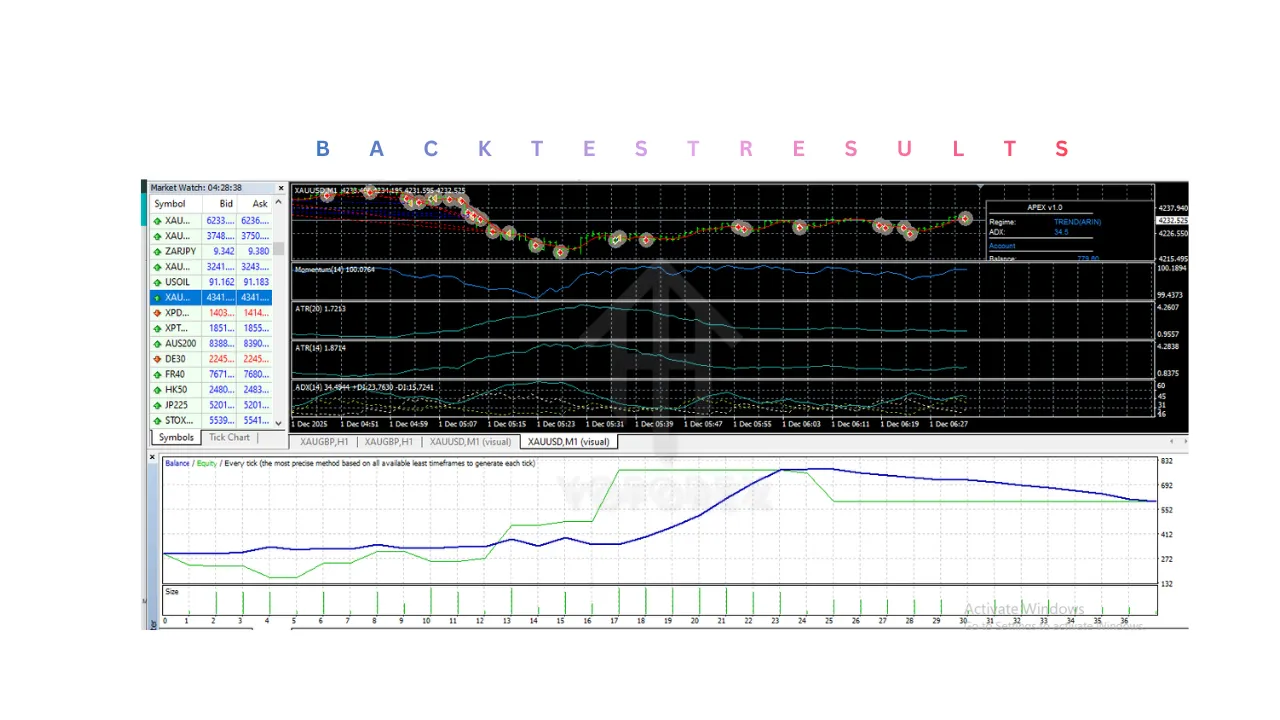
Installation & Setup Guide
Step 1: Download APEX EA V1.0 MT4 File
Obtain the .ex4 or .mq4 file.
Step 2: Open MT4 Data Folder
- Launch MetaTrader 4
- Click on File → Open Data Folder
Step 3: Copy the File
- Navigate to MQL4 → Experts
- Paste the file into this folder
Step 4: Restart MT4
Restart the platform so the system appears in the Navigator panel.
Step 5: Attach to Chart
- Open a preferred currency pair chart
- Drag and drop APEX EA V1.0 MT4 onto the chart
Step 6: Enable Trading Permissions
- Allow Live Trading
- Enable required settings
Step 7: Configure Inputs
Adjust:
- Risk level
- Lot size
- Stop loss and take profit
Step 8: Activate AutoTrading
Turn on AutoTrading to start execution.
Step 9: Monitor Performance
Regularly check performance and adjust settings if necessary.
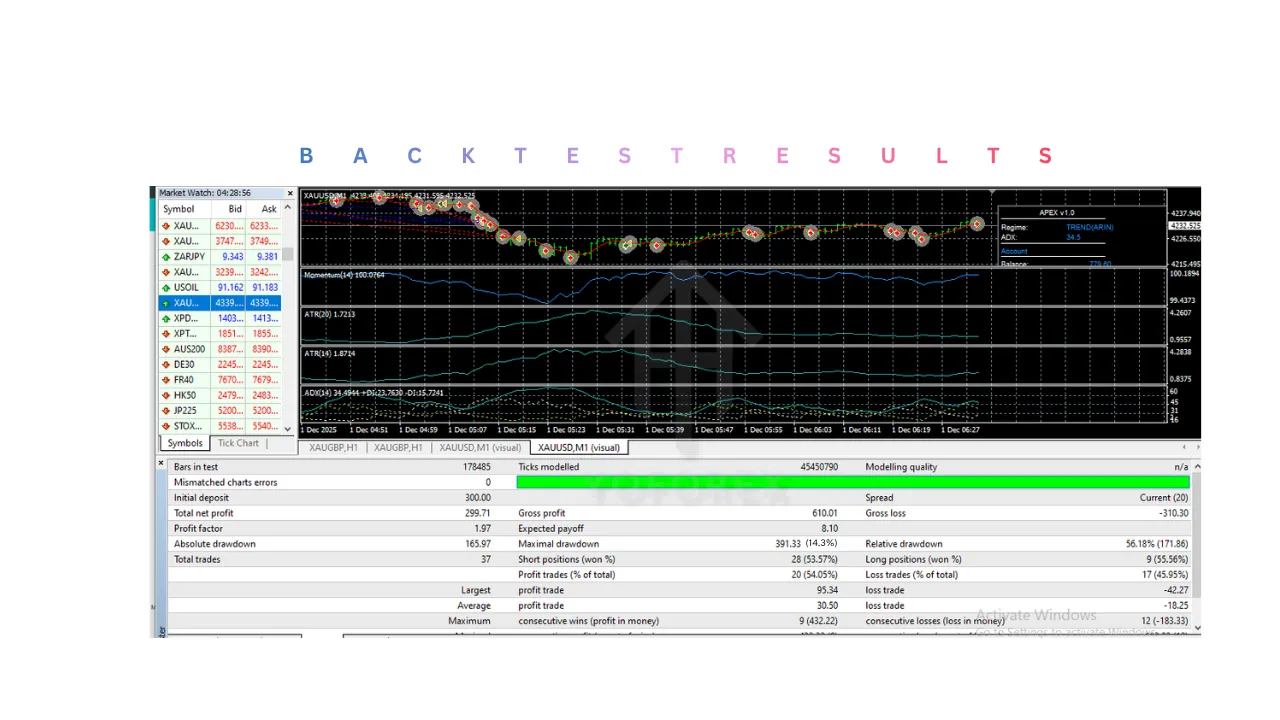
Advantages
1. Time Efficiency
Automation eliminates the need for constant monitoring, saving time.
2. Emotion-Free Trading
Decisions are based on logic rather than fear or greed.
3. Consistent Execution
Trades are executed according to fixed rules without deviation.
4. Beginner Accessibility
Even traders with limited experience can use it effectively.
5. Multi-Pair Trading
Supports trading across different currency pairs simultaneously.
6. Customization Options
Allows traders to adapt settings based on their risk tolerance.
7. Continuous Trading
With VPS support, it can operate 24/7.
8. Improved Discipline
Helps maintain a structured trading approach.
Disadvantages
1. No Guaranteed Profits
Performance depends on market conditions and settings.
2. Requires Proper Configuration
Incorrect settings can lead to losses or high drawdown.
3. VPS Dependency
Best performance requires a VPS, adding extra cost.
4. Sensitivity to Market Conditions
May struggle during:
- High volatility
- News events
- Unstable market phases
5. Broker Dependency
Execution quality varies depending on broker conditions.
6. Requires Monitoring
Despite automation, regular checks are necessary.
7. Not Fully Adaptive
It follows fixed logic and may not adjust instantly to sudden market changes.
Who should use APEX EA V1.0 MT4?
1. Beginners who want a simple entry into trading
APEX EA V1.0 MT4 is suitable for beginners who:
- Do not have strong technical analysis skills yet
- Feel confused by charts, indicators, and strategies
- Want a structured way to start
Why it fits:
- It automates trade decisions
- It reduces the need for deep market analysis initially
- It helps beginners observe how trades are executed
2. Traders with limited time
Ideal for people who cannot monitor charts throughout the day.
Examples:
- full-time employees
- students
- business owners
Why APEX EA V1.0 MT4 helps:
- It scans the market continuously
- It executes trades automatically
- It reduces the need for constant screen time
3. Traders who struggle with emotions
Many traders lose due to emotional decisions such as:
- closing trades too early
- holding losing trades too long
- revenge trading
- overtrading
Why APEX EA V1.0 MT4 is useful:
- It follows strict rules
- No fear or greed
- No impulsive decisions
4. Intermediate traders who want automation
Traders who understand the market but want to improve efficiency.
Why:
- Saves time on execution
- Maintains consistency
- Can monitor multiple pairs simultaneously
5. Traders who want disciplined trading
Discipline is one of the hardest parts of trading.
Why APEX EA V1.0 MT4 helps?
- Executes trades only when conditions match
- Avoids random entries
- Applies the same logic every time
6. Traders using VPS or stable setups
Best suited for users who:
- Use a VPS or stable internet
- Can keep MT4 running continuously
Why:
- Ensures uninterrupted trading
- Prevents missed opportunities
- Maintains consistent performance
7. Traders looking for semi-passive trading
Suitable for people who want reduced involvement, not zero involvement.
Why:
- It automates most trading tasks
- Still allows user control over settings
- Reduces daily workload
8. Traders managing multiple pairs
Useful for traders who want to expand their trading scope.
Why:
- Can monitor several charts at once
- Reduces manual workload
- Helps diversify trading activity
Why use APEX EA V1.0 MT4?
1. To automate trading
APEX EA V1.0 MT4 handles:
- market analysis
- trade execution
- trade management
- exit decisions
Result:
Less manual effort and more efficiency.
2. To remove emotional mistakes
Emotions often lead to losses.
APEX EA V1.0 MT4:
- follows logic, not feelings
- avoids panic and greed
- sticks to rules
Result:
More controlled trading.
3. To improve execution speed
Speed is critical in trading.
Why APEX EA V1.0 MT4 helps:
- reacts instantly to conditions
- enters trades without delay
- avoids missed opportunities
4. To maintain consistency
Manual traders often break their own rules.
APEX EA V1.0 MT4:
- applies the same logic every time
- avoids inconsistency
- helps measure strategy performance better
5. To reduce screen time
Not everyone can watch charts all day.
Why use APEX EA V1.0 MT4:
- monitors market continuously
- trades automatically
- reduces daily workload
6. To capture 24/7 opportunities
Forex runs almost all day.
Why APEX EA V1.0 MT4 helps?
- detects setups at any time
- trades during different market sessions
- avoids missed trades
7. To apply structured risk management
APEX EA V1.0 MT4 can automatically:
- set stop loss
- set take profit
- control lot size
Result:
More consistent risk handling.
8. To improve discipline
Discipline is key in trading success.
Why APEX EA V1.0 MT4 helps:
- prevents random decisions
- follows predefined rules
- avoids overtrading
9. To support trading efficiency
For experienced traders:
Why:
- reduces manual workload
- allows focus on strategy improvement
- acts as an execution assistant
10. To scale trading activity
Manual trading limits how many setups you can manage.
Why use it:
- monitors multiple pairs
- handles multiple conditions
- increases trading efficiency.
Conclusion
APEX EA V1.0 MT4 offers a structured and automation-driven approach to Forex trading, making APEX EA V1.0 MT4 a valuable tool for traders who want to improve efficiency, consistency, and discipline in their trading process. By handling market analysis, trade execution, and position management through predefined logic, APEX EA V1.0 MT4 significantly reduces the impact of emotional decision-making and minimizes the need for constant manual monitoring. This makes it especially useful for traders with limited time or those who struggle with maintaining consistency in their strategy. However, APEX EA V1.0 MT4‘s effectiveness depends on proper setup, realistic risk management, and the overall trading environment, including broker conditions and market behavior. It should not be seen as a guaranteed profit solution or a completely hands-off system, as regular monitoring and adjustments are still necessary. When used responsibly and with a clear understanding of its strengths and limitations, APEX EA V1.0 MT4 can serve as a reliable support tool that enhances trading structure and helps traders maintain a more controlled and systematic approach to the market.
Support & Disclaimer
Support
If you need help installing or configuring your EA, or face any kind of bug, feel free to reach out on:
WhatsApp: Click here
Telegram Group: Join our community
Disclaimer:
Forex and gold trading involve risk. Past performance doesn’t guarantee future results. Always test robots on demo before live trading and use proper risk management.
REFERRAL
Join the VIP Signals Telegram Channel for real-time expert trading signals and stay ahead in the forex market. Get personalized strategies by becoming a part of our Real Account Management Telegram Channel and optimize your trading experience. If you’re aiming to Pass PropFirm Challenges , join our dedicated channel for tips and proven methods. Start managing your capital effectively with expert advice from our Funded Account Management Telegram Channel. For advanced traders, our HFT EA / Passing Telegram Channel offers high-frequency trading insights and strategies to boost your performance.