
Introduction
Automated trading has transformed the way traders participate in financial markets, especially in Forex. With the rise of MetaTrader 4 (MT4), Expert Advisors (EAs) have become an essential tool for traders who want to reduce manual effort and rely on algorithmic strategies. Among the many EAs available, Parabolic Arrow EA V1.0 MT4 stands out as a strategy-driven tool designed to capitalize on trend movements using visual signal cues.Parabolic Arrow EA V1.0 MT4 is built around the concept of parabolic movements in price action, identifying potential entry and exit points through arrow-based signals. It simplifies decision-making by removing emotional bias and enabling consistent execution of trades. Whether you are a beginner looking to automate your trading or an experienced trader seeking efficiency, this EA offers a structured approach.
Overview
Parabolic Arrow EA V1.0 MT4 is an automated trading system developed for the MetaTrader 4 platform. It uses a combination of trend-following logic and signal-based triggers to execute trades automatically. The system identifies potential trade opportunities through arrow indicators plotted on the chart, which typically signal bullish or bearish momentum.The core idea behind Parabolic Arrow EA V1.0 MT4 is to follow market trends rather than predict reversals. It uses predefined rules to enter trades when certain conditions are met and manages those trades using built-in risk management tools like stop loss and take profit.Unlike manual trading strategies that require constant monitoring, Parabolic Arrow EA V1.0 MT4 operates continuously once installed and configured. It scans the market for opportunities and executes trades without requiring user intervention, making it ideal for traders who cannot spend hours in front of charts.Additionally, Parabolic Arrow EA V1.0 MT4 is designed to work across multiple currency pairs and timeframes, providing flexibility to users depending on their trading style.
How Parabolic Arrow EA V1.0 MT4Works?
1. Market Scanning & Data Analysis
Parabolic Arrow EA V1.0 MT4 continuously monitors the market in real time. It processes price data such as Open, High, Low, and Close values of each candle. It also considers spread and volatility. The EA operates based on the timeframe of the chart it is attached to, such as M15, H1, or H4.
2. Indicator-Based Logic (Core Engine)
Parabolic Arrow EA V1.0 MT4 uses a parabolic-style trend detection system. It evaluates:
- Direction of the trend (uptrend or downtrend)
- Strength of momentum
- Speed of price movement (acceleration)
This logic helps determine whether the market conditions are suitable for entering a trade.
3. Arrow Signal Generation
When specific conditions are met, Parabolic Arrow EA V1.0 MT4 generates signals in the form of arrows on the chart:
- Buy signal indicates upward movement potential
- Sell signal indicates downward movement potential
These signals are generated only when multiple internal conditions align, making them more reliable.
4. Trade Entry Execution
Once a valid signal appears, Parabolic Arrow EA V1.0 MT4 automatically opens a trade.
For a buy trade:
- A buy order is placed when a bullish signal is detected
For a sell trade:
- A sell order is placed when a bearish signal is detected
Before executing, the EA may check spread conditions and existing open trades to avoid overtrading.
5. Position Sizing (Lot Management)
Parabolic Arrow EA V1.0 MT4 determines the trade size based on user settings:
- Fixed lot size (manual setting)
- Risk-based lot sizing (if available)
This directly affects the level of risk and potential return for each trade.
6. Stop Loss Placement
Immediately after opening a trade, Parabolic Arrow EA V1.0 MT4 sets a stop loss level. This can be:
- A fixed number of pips
- Dynamically calculated based on recent price movement
The purpose is to limit losses and protect trading capital.
7. Take Profit Target
Parabolic Arrow EA V1.0 MT4 sets a take profit level to automatically close trades in profit. This can be:
- A predefined pip target
- Based on trend strength or market conditions
This ensures profits are secured without manual intervention.
8. Trade Management (Active Monitoring)
After entering a trade, Parabolic Arrow EA V1.0 MT4 continuously manages it.
Trailing Stop:
- Adjusts stop loss as price moves in favor of the trade
Break-even:
- Moves stop loss to entry price after reaching a certain profit level
Exit Conditions:
- Trade closes when stop loss or take profit is hit
- In some cases, trades may close if an opposite signal appears
9. Trend Filtering Mechanism
Parabolic Arrow EA V1.0 MT4 avoids entering trades in poor conditions by filtering:
- Sideways or ranging markets
- Low volatility periods
This improves the overall quality of trades.
10. Continuous Loop Execution
Parabolic Arrow EA V1.0 MT4 runs continuously in a loop:
- Scans the market
- Analyzes conditions
- Detects signals
- Executes trades
- Manages active trades
This process repeats on every price update.
11. Multi-Timeframe Consideration
In some cases, Parabolic Arrow EA V1.0 MT4 may consider trends from higher timeframes to confirm signals. This helps improve accuracy and reduces false entries.
12. Risk Control System
Parabolic Arrow EA V1.0 MT4 includes built-in risk management features such as:
- Limiting the number of open trades
- Avoiding trades during high spreads
- Controlling exposure to the market
These features help reduce overall risk.
13. Rule-Based Execution (No Emotion)
Parabolic Arrow EA V1.0 MT4 strictly follows programmed rules. It does not react emotionally to market conditions, ensuring consistent and disciplined trading.
14. Market Condition Dependency
Parabolic Arrow EA V1.0 MT4 performs best in trending markets where price moves clearly in one direction. It may perform less effectively in:
- Sideways markets
- Highly unpredictable conditions
15. Platform Dependency
Parabolic Arrow EA V1.0 MT4 works only when:
- MT4 platform is running
- Internet connection is active
For continuous operation, many traders use a VPS.
Key Features
1. Arrow-Based Signal System
One of the defining features of Parabolic Arrow EA V1.0 MT4 is its arrow-based signal mechanism. It displays arrows on the chart to indicate potential buy and sell opportunities. These signals are based on internal calculations that analyze price movement and trend direction.
2. Fully Automated Trading
Once activated, Parabolic Arrow EA V1.0 MT4 executes trades automatically based on its programmed logic. This eliminates the need for manual entry and reduces emotional trading decisions.
3. Trend-Following Strategy
Parabolic Arrow EA V1.0 MT4 is designed to identify and follow market trends rather than counter them. This increases the probability of capturing sustained price movements.
4. Customizable Settings
Users can adjust parameters such as:
- Lot size
- Stop loss
- Take profit
- Trailing stop
- Timeframe preferences
This flexibility allows traders to tailor Parabolic Arrow EA V1.0 MT4 to their risk tolerance and trading style.
5. Multi-Timeframe Compatibility
Parabolic Arrow EA V1.0 MT4 can operate on different timeframes, from short-term scalping charts like M5 to longer-term charts like H1 or H4.
6. Risk Management Tools
Built-in risk management ensures that trades are controlled through stop loss and take profit levels. This helps in minimizing potential losses and protecting capital.
7. Low Monitoring Requirement
Once set up, Parabolic Arrow EA V1.0 MT4 requires minimal supervision. Traders can let it run in the background while it continuously scans and trades the market.
8. MT4 Integration
Parabolic Arrow EA V1.0 MT4 is fully compatible with MetaTrader 4, one of the most widely used trading platforms. This ensures stability, ease of use, and accessibility.
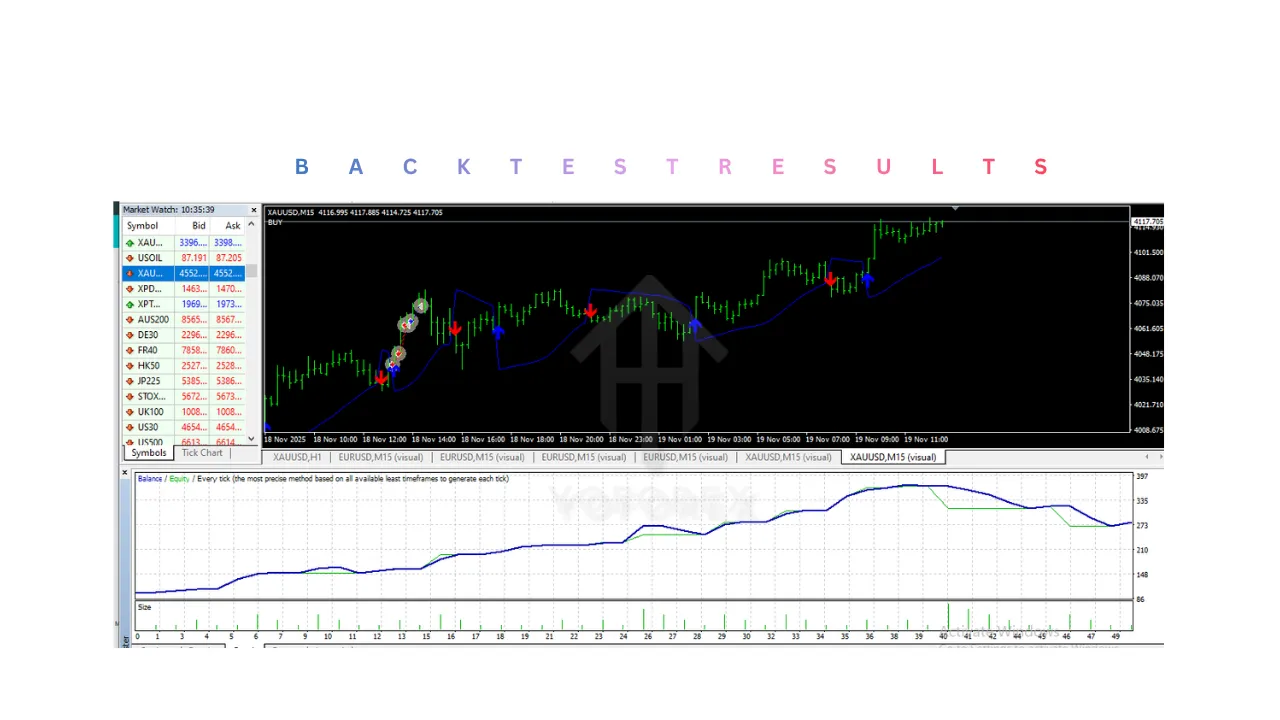
Installation & Setup Guide
Step 1: Download Parabolic Arrow EA V1.0 MT4
- Obtain the EA file (usually in
.ex4or.mq4format). - Save it to your computer.
Step 2: Open MetaTrader 4
- Launch your MT4 platform.
- Ensure your trading account is logged in.
Step 3: Access Data Folder
- Click on File → Open Data Folder.
- Navigate to:
MQL4 → Experts
Step 4: Copy Parabolic Arrow EA V1.0 MT4 File
- Paste the EA file into the Experts folder.
Step 5: Restart MT4
- Close and reopen MT4, or refresh the Navigator panel.
Step 6: Attach EA to Chart
- Open a chart of your preferred currency pair.
- Drag Parabolic Arrow EA V1.0 MT4 from the Navigator → Expert Advisors section onto the chart.
Step 7: Enable Auto Trading
- Click the AutoTrading button on the toolbar.
- Ensure it turns green.
Step 8: Configure Settings
- Adjust parameters according to your preferences:
- Lot size
- Stop loss
- Take profit
- Risk level
Step 9: Allow Permissions
- In the EA settings:
- Enable Allow live trading
- Enable Allow DLL imports (if required)
Step 10: Start Trading
- Once everything is configured, the EA will begin scanning the market and placing trades automatically.
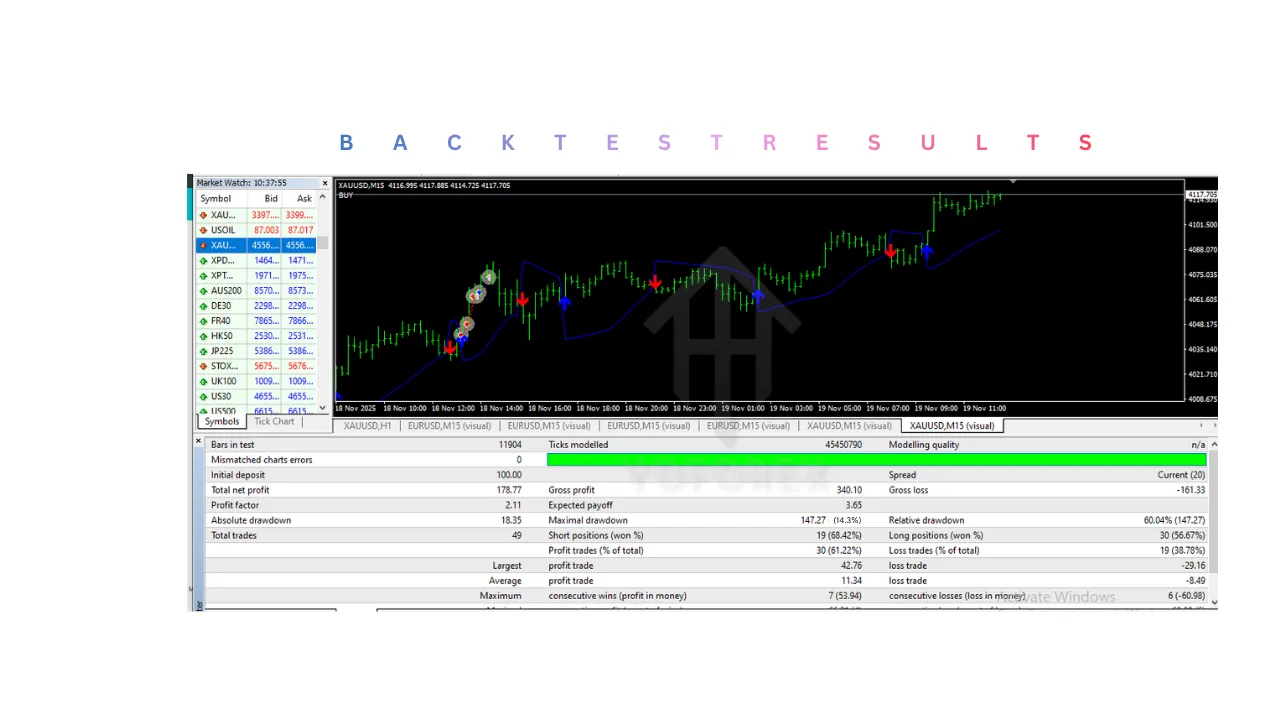
Advantages
1. Eliminates Emotional Trading
One of the biggest strengths of Parabolic Arrow EA V1.0 MT4 is that it removes human emotions from trading. Traders often make mistakes due to fear, greed, or hesitation. This system follows predefined rules and executes trades without emotional interference, leading to more consistent decision-making.
2. Fully Automated Execution
Parabolic Arrow EA V1.0 MT4 handles the entire trading process automatically:
- Identifies trade opportunities
- Opens trades
- Sets stop loss and take profit
- Manages trades
This reduces the need for manual intervention and makes trading more efficient.
3. Saves Time and Effort
Manual trading requires constant chart monitoring. Parabolic Arrow EA V1.0 MT4 operates continuously in the background, allowing traders to:
- Focus on other tasks
- Avoid screen fatigue
- Trade even while sleeping
It is especially useful for people with limited time.
4. Consistent Trading Strategy
Parabolic Arrow EA V1.0 MT4 follows the same logic for every trade. Unlike humans, it does not:
- Change strategy randomly
- Skip valid setups
- Overtrade impulsively
This consistency improves long-term performance stability.
5. Beginner-Friendly
Even traders with limited experience can use Parabolic Arrow EA V1.0 MT4 effectively. It simplifies trading by:
- Providing clear entry signals
- Automating execution
- Reducing the need for deep technical analysis
This lowers the learning curve for new traders.
6. Built-in Risk Management
Parabolic Arrow EA V1.0 MT4 includes important risk control features such as:
- Stop loss
- Take profit
- Trailing stop
These help protect capital and control losses automatically without manual input.
7. Customizable Settings
Users can adjust parameters based on their preferences:
- Lot size
- Risk level
- Stop loss and take profit
- Trading timeframe
This flexibility allows traders to adapt Parabolic Arrow EA V1.0 MT4 to different strategies and risk appetites.
8. Ability to Trade 24/7
Parabolic Arrow EA V1.0 MT4 can monitor and trade the market continuously without breaks. This ensures:
- No missed opportunities
- Faster reaction to market movements
- Continuous market participation
9. Backtesting Capability
Traders can test the EA using historical data in MT4. This allows:
- Performance evaluation
- Strategy optimization
- Better confidence before live trading
10. Works Across Multiple Pairs and Timeframes
Parabolic Arrow EA V1.0 MT4 can be used on different currency pairs and timeframes, allowing diversification. Traders are not limited to a single market or trading style.
11. Faster Trade Execution
Since the EA operates automatically, it can execute trades instantly when conditions are met. This avoids delays that often occur in manual trading.
12. Reduces Human Error
Manual trading can lead to mistakes such as:
- Entering wrong lot size
- Missing stop loss
- Late entries
Parabolic Arrow EA V1.0 MT4 eliminates these errors by following programmed instructions precisely.
Disadvantages
1. Performance Depends on Market Conditions
Parabolic Arrow EA V1.0 MT4 is designed for trending markets. In sideways or choppy conditions:
- Signals may become less reliable
- More false entries may occur
- Profitability can decrease
2. No Guarantee of Profit
Like any trading system, Parabolic Arrow EA V1.0 MT4 does not guarantee profits. Losses are still possible due to:
- Sudden market reversals
- News events
- Unpredictable volatility
3. Requires Proper Configuration
Incorrect settings can negatively impact performance. For example:
- High lot size increases risk
- Tight stop loss may cause frequent losses
- Poor timeframe selection can reduce accuracy
Users must understand basic configuration before using it.
4. Limited Adaptability
Parabolic Arrow EA V1.0 MT4 follows fixed rules and does not adapt dynamically to changing market conditions. It may struggle during:
- Major economic news releases
- Sudden trend reversals
- Unusual market behavior
5. Risk of Over-Optimization
Traders may optimize settings too much during backtesting, resulting in:
- Unrealistic expectations
- Poor real-world performance
This is a common issue with automated systems.
6. Requires Continuous Operation
Parabolic Arrow EA V1.0 MT4 only works when:
- MT4 platform is running
- Internet connection is stable
If the platform stops:
- Trades may not be executed
- Risk management may fail
7. VPS Requirement for Best Performance
To run Parabolic Arrow EA V1.0 MT4 continuously, many traders use a VPS. This adds:
- Extra cost
- Technical setup requirements
8. Potential Drawdowns
During unfavorable conditions, the EA may experience:
- Consecutive losing trades
- Temporary account drawdowns
Without proper risk management, this can impact account balance significantly.
9. Spread and Broker Dependency
Performance can be affected by:
- High spreads
- Broker execution speed
- Slippage
Poor broker conditions can reduce profitability.
10. Lack of Fundamental Analysis
Parabolic Arrow EA V1.0 MT4 is primarily technical and does not consider:
- Economic news
- Interest rate decisions
- Global events
This can lead to trades during high-risk periods.
11. Over-Reliance on Automation
Traders may become too dependent on Parabolic Arrow EA V1.0 MT4 and:
- Stop learning trading concepts
- Ignore market conditions
- Fail to monitor performance
This can be risky in the long run.
12. Not Suitable for All Trading Styles
Parabolic Arrow EA V1.0 MT4 is best suited for trend-following strategies. It may not work well for:
- Scalping in highly volatile markets
- Range trading strategies
- News trading.
Who Should Use Parabolic Arrow EA V1.0 MT4?
1. Beginner Traders
Parabolic Arrow EA V1.0 MT4 is highly suitable for beginners who are new to Forex trading.
- It removes the complexity of manual analysis
- Provides clear entry and exit execution automatically
- Helps beginners understand how trading systems work in real-time
Beginners can use it as a learning tool while minimizing early mistakes.
2. Traders with Limited Time
People who cannot monitor charts all day can benefit significantly.
- Parabolic Arrow EA V1.0 MT4 works continuously without supervision
- Executes trades even when the user is busy or offline
- Ideal for working professionals or students
It allows participation in the market without full-time involvement.
3. Traders Who Struggle with Emotions
Many traders face issues like fear, greed, or overtrading.
- Parabolic Arrow EA V1.0 MT4 follows strict rules without emotional interference
- Prevents impulsive decisions
- Maintains discipline in execution
This makes it suitable for traders who lack consistency due to psychology.
4. Trend-Following Traders
Parabolic Arrow EA V1.0 MT4 is designed specifically for trend-based strategies.
- It performs best in directional markets
- Suitable for traders who prefer riding trends rather than predicting reversals
- Aligns with strategies focused on momentum
5. Part-Time Traders
Traders who cannot dedicate full-time hours to trading can rely on automation.
- No need for constant chart monitoring
- Trades are executed automatically
- Reduces workload while maintaining market participation
6. Traders Looking for Automation
Anyone interested in algorithmic trading can use Parabolic Arrow EA V1.0 MT4.
- Eliminates manual trade execution
- Demonstrates how automated systems operate
- Suitable for transitioning from manual to automated trading
7. Traders Managing Multiple Accounts or Pairs
For traders handling multiple setups:
- The EA can run on multiple charts simultaneously
- Saves time and effort
- Ensures consistent execution across all trades
8. Traders Using VPS for 24/7 Trading
Parabolic Arrow EA V1.0 MT4 is ideal for users who run MT4 on a VPS.
- Ensures uninterrupted trading
- Captures opportunities at all times
- Suitable for global market participation
Why Use Parabolic Arrow EA V1.0 MT4?
1. Automation of the Entire Trading Process
Parabolic Arrow EA V1.0 MT4 handles everything:
- Market analysis
- Signal generation
- Trade execution
- Trade management
This reduces manual workload and increases efficiency.
2. Consistent Strategy Execution
Unlike manual trading, Parabolic Arrow EA V1.0 MT4:
- Follows the same rules every time
- Does not skip valid setups
- Maintains uniform decision-making
Consistency is key to long-term trading success.
3. Removal of Human Errors
Manual trading often leads to mistakes such as:
- Entering wrong lot sizes
- Forgetting stop loss
- Late entries or exits
Parabolic Arrow EA V1.0 MT4 eliminates these issues through precise execution.
4. Time Efficiency
Using this EA allows traders to:
- Save hours of chart analysis
- Avoid constant monitoring
- Focus on other activities
It is ideal for improving productivity.
5. Built-in Risk Management
Parabolic Arrow EA V1.0 MT4 includes:
- Stop loss control
- Take profit targets
- Trade management features
This ensures controlled risk without manual intervention.
6. Ability to Trade Continuously
Markets operate 24 hours, but humans cannot.
- The EA works non-stop
- Captures opportunities at any time
- Does not miss trades due to unavailability
7. Faster Execution Speed
Parabolic Arrow EA V1.0 MT4 reacts instantly to market conditions.
- No delay in entering trades
- Better entry precision
- Improved efficiency compared to manual execution
8. Suitable for Strategy Testing
Traders can use this EA to:
- Test trading conditions
- Evaluate performance using backtesting
- Understand how strategies behave in different markets
9. Reduces Stress and Mental Pressure
Manual trading can be mentally exhausting.
- Parabolic Arrow EA V1.0 MT4 removes the need for constant decision-making
- Reduces stress caused by market fluctuations
- Allows a more relaxed trading experience
10. Helps Maintain Discipline
Discipline is one of the hardest aspects of trading.
- The EA strictly follows predefined rules
- Prevents overtrading
- Maintains structured execution
11. Flexibility and Customization
Users can adjust settings based on their needs:
- Risk level
- Trade size
- Timeframe
This allows personalization according to trading goals.
12. Ideal for Passive Trading Approach
Parabolic Arrow EA V1.0 MT4 supports a more passive trading style.
- Minimal involvement required
- Automated decision-making
- Suitable for long-term use.
Conclusion
Parabolic Arrow EA V1.0 MT4 presents a structured and automated approach to Forex trading, making it a practical tool for traders who value consistency, efficiency, and reduced emotional involvement. By combining trend-following logic with clear signal generation, Parabolic Arrow EA V1.0 MT4 simplifies the trading process and allows users to participate in the market without constant monitoring. Its ability to automatically analyze market conditions, execute trades, and manage risk makes it especially useful for beginners, part-time traders, and those transitioning into algorithmic trading. However, like any automated system, its performance is not guaranteed and depends heavily on market conditions, proper configuration, and disciplined risk management. It performs best in trending environments and may face limitations during sideways or highly volatile markets. Therefore, it is important for users to test Parabolic Arrow EA V1.0 MT4 thoroughly on a demo account, optimize settings carefully, and use it as a supportive tool rather than relying on it entirely. When used with a clear understanding and realistic expectations, this EA can be a valuable addition to a trader’s overall strategy.
Support & Disclaimer
Support
If you need help installing or configuring your EA, or face any kind of bug, feel free to reach out on:
WhatsApp: Click here
Telegram Group: Join our community
Disclaimer:
Forex and gold trading involve risk. Past performance doesn’t guarantee future results. Always test robots on demo before live trading and use proper risk management.
REFERRAL
Join the VIP Signals Telegram Channel for real-time expert trading signals and stay ahead in the forex market. Get personalized strategies by becoming a part of our Real Account Management Telegram Channel and optimize your trading experience. If you’re aiming to Pass PropFirm Challenges , join our dedicated channel for tips and proven methods. Start managing your capital effectively with expert advice from our Funded Account Management Telegram Channel. For advanced traders, our HFT EA / Passing Telegram Channel offers high-frequency trading insights and strategies to boost your performance.