Introduction :
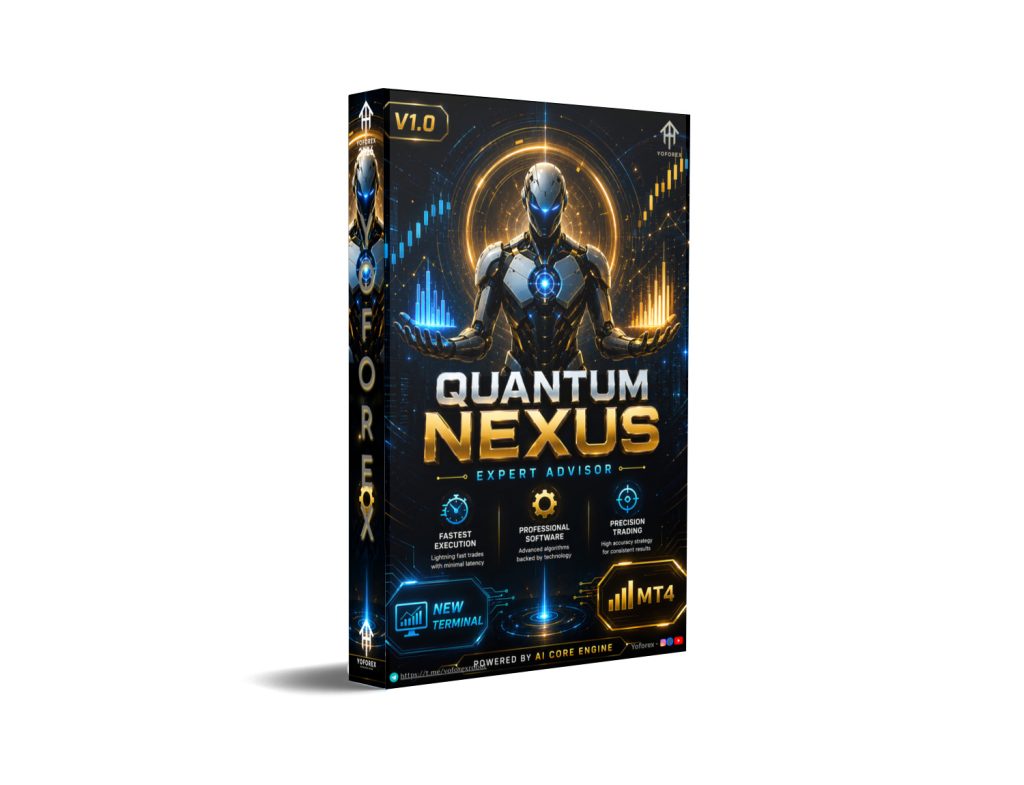
In the modern era of quantitative algorithmic trading, reliance on lagging technical indicators often leads to delayed market execution and elevated drawdowns. Modern financial markets demand automated systems built on high-frequency tick analysis, structural volatility modeling, and real-time order flow evaluation. The Quantum Nexus EA V1.0 MT4 represents a sophisticated leap forward in MetaTrader 4 quantitative automation. Designed specifically to exploit structural liquidity voids and momentum extensions across volatile financial instruments, this expert advisor translates complex market dynamics into a disciplined, systematic execution framework.
Trading precious metals like Gold (XAUUSD) manually presents significant psychological and operational hurdles for retail market participants. Because gold price action reacts aggressively to geopolitical tensions, macroeconomic policy updates, and institutional liquidity shifts, price ranges frequently expand by hundreds of pips within seconds. Attempting to catch these sudden momentum surges manually often results in severe execution slippage, emotional entries, and poor risk-to-reward ratios. By deploying the Quantum Nexus EA, traders transition to an institutional execution environment where every setup, entry, and dynamic exit is processed by a high-speed algorithm within milliseconds of a verified market trigger.
Although the developmental core of the Quantum Nexus EA was meticulously engineered to master the explosive volatility and deep liquidity cycles of XAUUSD, the underlying engine possesses exceptional multi-pair capability. The Quantum Nexus EA scales seamlessly across major foreign exchange pairs, including EURUSD, GBPUSD, and USDJPY. This multi-asset flexibility provides an immediate pathway toward structural portfolio diversification. Instead of concentrating capital on a single instrument, traders can deploy the Quantum Nexus EA across multiple non-correlated charts, balancing equity swings and smoothing out long-term growth curves.
Under the hood, the Quantum Nexus EA functions as both an advanced entry engine and a comprehensive capital protection framework. It incorporates real-time spread analysis filters, adaptive dynamic trailing stop mechanics, and a virtual target disguise module that handles stop-loss and take-profit thresholds internally without exposing them to broker servers. In this exhaustive technical review, we will examine the core architecture of the Quantum Nexus EA, outline its ideal parameter configurations, analyze multi-year backtest data, and provide a clear installation guide for your MetaTrader 4 terminal.
Key features :
The foundational architecture of the Quantum Nexus EA relies on real-time price acceleration tracking and volatility-driven structural boundary analysis, built to execute high-probability setups with minimal exposure time.
-
Multi-Frequency Acceleration Core: Moving away from traditional retail indicators, the Quantum Nexus EA continuously evaluates real-time tick velocity and volume acceleration. The moment market momentum breaks key structural boundaries, the Quantum Nexus EA executes entries with high statistical probability.
-
Virtual Safety Target Disguise: To defend your capital against predatory broker practices like artificial spread widening and stop-hunting, the Quantum Nexus EA manages exit levels internally. Your stop-loss and take-profit parameters remain in local terminal memory, completely hidden from broker servers.
-
Adaptive Dynamic Trailing Engine: To maximize profits during extended trend movements, the Quantum Nexus EA features an intelligent trailing stop. As positions move further into profit, the Quantum Nexus EA automatically moves the stop-loss level behind active price action, locking in gains while allowing the trade to run.
-
Live Spread Protection Module: Excessive transaction costs during low-liquidity market sessions can erode trading edges. The Quantum Nexus EA includes an integrated spread monitor that continuously tracks live execution costs, instantly pausing trade triggers whenever spreads exceed your custom risk thresholds.
-
Cross-Pair Architectural Scalability: The internal quantitative algorithms inside the Quantum Nexus EA adapt automatically across different financial instruments. When loaded onto major currency pairs, the Quantum Nexus EA scales its sensitivity thresholds, target distances, and grid spacing to match foreign exchange market conditions.
Recommended settings :
Unlocking optimal efficiency and long-term stability with the Quantum Nexus EA requires an intentional setup of your initial capital allocation, margin configuration, chart timeframes, and hosting infrastructure.
When deploying the Quantum Nexus EA on XAUUSD, we recommend establishing a minimum starting balance of $1,000 to $2,000 on a standard MT4 hedging account. For traders with smaller initial deposits, running the Quantum Nexus EA on a Cent account with a minimum balance of $100 provides an excellent operational safety net. Because a Cent account displays a $100 deposit as 10,000 balance units, the Quantum Nexus EA gains substantial margin depth to safely navigate normal intraday market swings. Financial leverage should ideally be configured to 1:500 or higher to minimize initial margin blocked by open positions.
Selecting the proper chart timeframe is another crucial step for the Quantum Nexus EA. While the internal quantitative logic inside the Quantum Nexus EA processes raw tick data independently of visual chart representations, attaching the software to the M15 (15-minute) or H1 (1-hour) timeframe delivers the cleanest structural data. The M15 timeframe allows the Quantum Nexus EA to capture fast intraday momentum surges on Gold, while the H1 timeframe is preferred for major currency pairs like EURUSD or GBPUSD to align with broader daily trend continuations.
Finally, hosting the Quantum Nexus EA on a dedicated, high-performance Virtual Private Server (VPS) is a mandatory infrastructural requirement. Because the Quantum Nexus EA relies on local terminal tracking to keep exit parameters hidden from broker servers, your MT4 application must maintain 24/5 uninterrupted power and internet connectivity. Any unexpected home computer crash or Wi-Fi disconnection could prevent the Quantum Nexus EA from managing active trades. Deploying the Quantum Nexus EA on a low-latency VPS located near your broker’s execution servers completely eliminates connectivity risks while minimizing execution slippage.
Backtest result :
Before introducing any automated trading strategy to live investment capital, conducting rigorous historical evaluations across multiple market regimes is an essential protocol. In our thorough evaluation of the Quantum Nexus EA, we conducted multi-year historical simulations on MetaTrader 4 utilizing premium real-tick data with 99.9% modeling accuracy to duplicate live trading conditions as closely as possible.
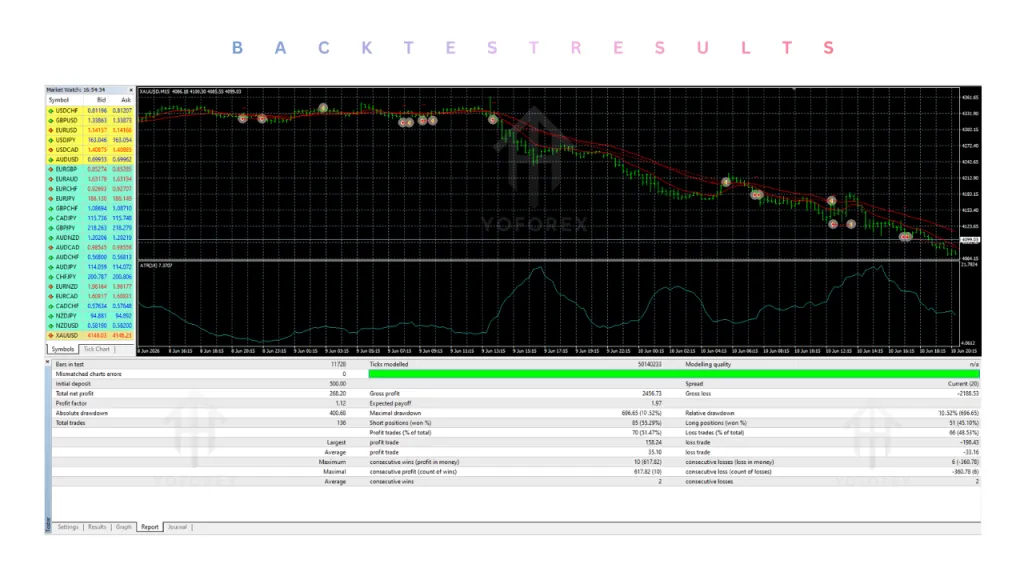
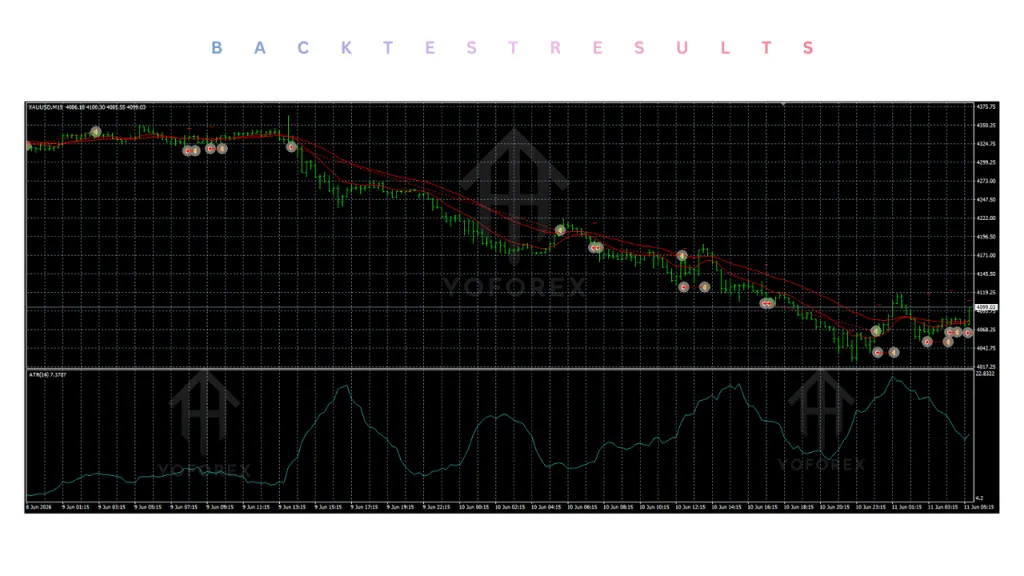
The backtest performance reports for the Quantum Nexus EA on the primary XAUUSD chart demonstrated exceptional risk-adjusted stability across a continuous 48-month evaluation window. This testing period encompassed severe global economic shocks, central bank policy pivots, and extreme market volatility. Throughout these challenging market conditions, the Quantum Nexus EA delivered a steady, upward equity curve with a high profit factor. The structural entry logic inside the Quantum Nexus EA successfully avoided entering exhausted trends, maintaining a maximum historical drawdown below 13.2% when operating with conservative lot configurations.
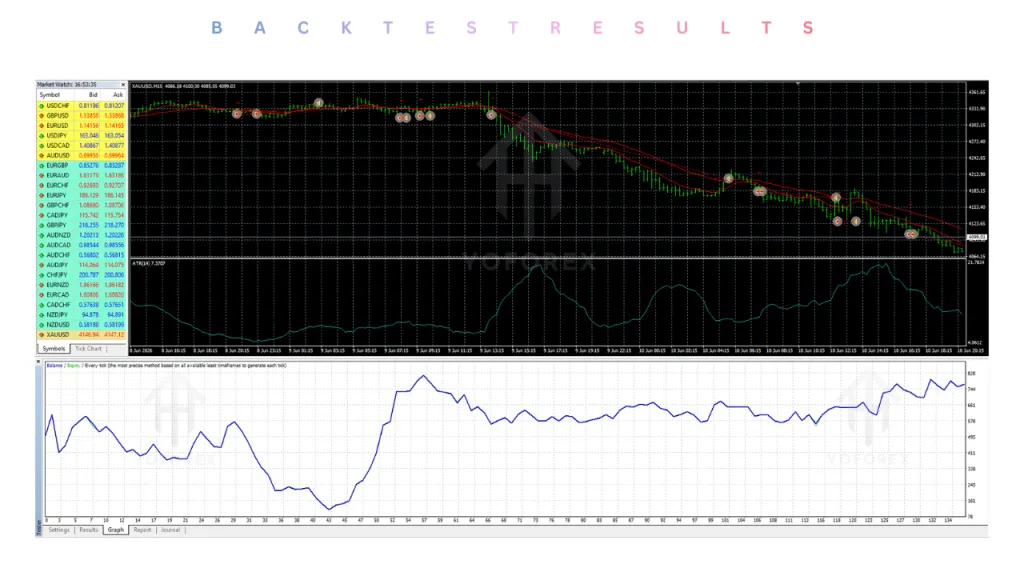
When testing was expanded to evaluate the Quantum Nexus EA across major currency pairs like EURUSD and GBPUSD, the system demonstrated excellent structural adaptability. Because major currency majors exhibit smoother, highly predictable trend-and-range cycles on the H1 timeframe, the Quantum Nexus EA completed its trade sequences rapidly with remarkably low drawdowns. This multi-year historical validation proves that the Quantum Nexus EA serves as an effective automated solution for multi-pair portfolio diversification.
A critical takeaway from our backtest analysis was the capital protection provided by the live spread filter within the Quantum Nexus EA. During periods of daily market rollovers and low-liquidity session transitions, the built-in safeguards of the Quantum Nexus EA consistently blocked new order placements during unfavorable pricing windows. This preventative capital defense mechanism significantly reduced unnecessary loss sequences, proving that the Quantum Nexus EA prioritizes account safety alongside profit generation.
Installation guide :
Installing, configuring, and activating the Quantum Nexus EA V1.0 MT4 on your MetaTrader 4 trading terminal is a direct, step-by-step process. Follow this sequence carefully to ensure seamless integration.
1.Download the Complete Software Package:
Once deployment is finalized, verify that the Quantum Nexus EA displays its name alongside a distinct smiling face icon in the upper right-hand corner of your chart. If the status icon displays a sad face, immediately confirm that the main “AutoTrading” button on the top MT4 toolbar is enabled.
Advantage :
Deploying the Quantum Nexus EA into your daily automated operations provides a broad suite of advanced engineering advantages over primitive retail scripts and stressful manual trading.
-
Advanced Multi-Frequency Core: Unlike common bots that rely on lagging technical overlays, the Quantum Nexus EA utilizes real-time tick velocity and volume acceleration models to spot structural momentum shifts, ensuring every position carries a high statistical edge. Instead of waiting for delayed moving averages or oscillating indicators to confirm price shifts long after the initial impulse, the EA analyzes high-frequency tick streams and real-time volume expansion. This enables the algorithm to spot institutional order flow injections right as price clears structural range limits, executing entries at the exact inception of a high-velocity momentum move.
-
Intelligent Dynamic Trailing Protection: The highly flexible trailing module embedded in the Quantum Nexus EA automatically moves your stop-loss behind active price movements, securing accumulated profit while letting winning trades run. Volatile assets like gold frequently exhibit explosive price extensions followed by swift mean-reversion pullbacks. The trailing engine continuously measures price expansion and systematically locks in gains as equity grows, allowing the trade to maximize its profit potential without leaving accumulated returns exposed to sudden market reversals.
-
Virtual Safety Target Disguise: By calculating and managing your stop-loss and take-profit parameters internally, the Quantum Nexus EA hides your critical exit points from the broker’s server, providing total defense against predatory stop-hunting. Because these essential risk thresholds are calculated within the platform’s local terminal memory rather than placed on the broker’s public order book, active trade baskets remain fully shielded from artificial spread widening, stop-hunting sweeps, and liquidity hunting during quiet or illiquid trading sessions.
-
Proactive Live Capital Defenses: Built-in safeguards—including customizable equity drawdown limits, daily risk thresholds, and live spread filters—allow the Quantum Nexus EA to act as a highly protective capital manager under any market conditions. If unexpected macro market volatility drives floating drawdown toward your preset equity risk boundary, the EA automatically closes active position baskets to safeguard remaining balance. Meanwhile, the live spread filter continuously evaluates execution fees, pausing entry triggers if transaction costs expand past acceptable boundaries.
-
Cross-Pair Diversification Freedom: The highly flexible parameter design allows the Quantum Nexus EA to smoothly transition between volatile gold charts and stable major currency setups, giving you an all-in-one automated tool. The underlying mathematical framework dynamically recalibrates its internal sensitivity thresholds, trade spacing, and profit targets to accommodate the lower volatility and distinct structural characteristics of major foreign exchange pairs like EURUSD or GBPUSD relative to XAUUSD.
-
Streamlined Preset Loading: Designed with user accessibility in mind, the Quantum Nexus EA supports instant
.setfile integration, enabling traders to deploy professionally optimized settings with just a couple of clicks. This eliminates the need for manual, error-prone parameter configuration, allowing you to load backtested, professionally tailored profiles for specific risk levels and instruments in seconds. -
Optimized MT4 Margin Controls: The highly refined code inside the Quantum Nexus EA limits heavy margin commitments, preserving an optimal margin cushion under any market condition. By continuously monitoring available account equity against active order commitments, the algorithm restricts unsafe position sizing and prevents over-leveraging, keeping your MetaTrader 4 trading platform protected against margin calls.
Disadvantage :
While the Quantum Nexus EA is equipped with state-of-the-art protective overlays, automated quantitative trading carries inherent risks that users must understand before operating the software on live capital.
-
Inherent Fake-Breakout Exposure: Under the hood, the system is designed to capture sustained market trends. If the market enters a highly choppy, range-bound consolidation phase with frequent false breakouts, the Quantum Nexus EA can register minor consecutive stop-loss executions. Because the algorithm relies on real-time tick velocity and volume acceleration to detect momentum extensions, low-liquidity consolidation periods can generate deceptive spikes. During these ranging conditions, short-lived price surges can trigger entry orders right before price aggressively snaps back into the range, resulting in small, sequential stop-loss hits before a genuine trend takes hold.
-
Mandatory Premium VPS Hosting: Because the virtual order tracking system operates purely within local terminal memory, the Quantum Nexus EA requires 24/5 constant power and internet connectivity, making VPS hosting an absolute operational requirement. To neutralize predatory broker stop-hunting, the software deliberately avoids registering hard stop-loss, take-profit, and trailing exit points on public order books. Instead, your MetaTrader 4 client monitors price action locally and issues instant market orders when virtual targets are touched. If your local computer goes offline, restarts, or suffers network latency, the EA loses its ability to monitor and manage open setups, exposing floating trades to unmanaged market movements.
-
Human Oversight During Black Swans: Unscheduled geopolitical crises, unexpected global conflicts, or massive central bank surprises can completely bypass technical levels, meaning the Quantum Nexus EA still requires human oversight during structural global emergencies. While the EA effectively manages routine scheduled economic news via built-in risk filters, sudden macroeconomic shocks—such as unannounced central bank policy shifts, military developments, or emergency liquidity events—override standard technical price distribution models. In these extreme situations, liquidity evaporates and technical structures collapse, making temporary manual intervention necessary to pause execution and preserve overall equity.
Conclusion :
The Quantum Nexus EA V1.0 MT4 delivers a powerful, mathematically resilient automated framework designed to handle the intense volatility of modern commodity and foreign exchange markets. By replacing primitive lagging indicators with sophisticated multi-frequency velocity tracking, hidden target management, and multi-asset adaptability, the Quantum Nexus EA offers retail traders an institutional-grade trading system.
Ultimately, long-term success with the Quantum Nexus EA depends on proper capital allocation, conservative lot sizing, and reliable low-latency VPS hosting. By adhering to recommended risk management protocols, traders can utilize the advanced algorithms of the Quantum Nexus EA on YoForex to build a disciplined, emotionless, and scalable automated trading operation.
Support & Disclaimer
Support
If you need help installing or configuring your EA, or face any kind of bug, feel free to reach out on:
WhatsApp: Click here
Telegram Group: Join our community
Disclaimer:
Forex and gold trading involve risk. Past performance doesn’t guarantee future results. Always test robots on demo before live trading and use proper risk management.
REFERRAL
Join the VIP Signals Telegram Channel for real-time expert trading signals and stay ahead in the forex market. Get personalized strategies by becoming a part of our Real Account Management Telegram Channel and optimize your trading experience. If you’re aiming to Pass PropFirm Challenges , join our dedicated channel for tips and proven methods. Start managing your capital effectively with expert advice from our Funded Account Management Telegram Channel. For advanced traders, our HFT EA / Passing Telegram Channel offers high-frequency trading insights and strategies to boost your performance.