Mooca Suicide EA V1.00 MT5: Automated XAUUSD Trading on M5 and M15
Many traders want to automate gold trading on lower timeframes but struggle with constant chart watching, emotional decisions during volatile moves, and inconsistent execution. XAUUSD on M5 or M15 moves quickly. Missing entries or mismanaging risk is common when trading manually.
Mooca Suicide EA V1.00 MT5 is an Expert Advisor designed for the MetaTrader 5 platform that aims to handle automated trading on XAUUSD using the M5 or M15 timeframe. The name is attention-grabbing, but the focus should stay on understanding what the bot actually does, how it fits a trader’s style, and what realistic expectations look like.
This article explains the bot in practical terms so you can decide if it matches your needs.
What Is Mooca Suicide EA V1.00 MT5?
Mooca Suicide EA V1.00 is an MT5 Expert Advisor built for automated trade execution. It is intended to run on XAUUSD charts, primarily on the M5 or M15 timeframe.
It operates as a fully automated system once attached to a chart and enabled. Traders configure inputs, allow AutoTrading, and let the EA manage entries and exits according to its internal logic. The brand associated with availability and related resources is YoForex (yoforex.org / yoforexea.com).
Like any EA, results depend heavily on broker conditions, settings, account size, and market behavior. It is not a set-and-forget profit machine.
How Does Mooca Suicide EA V1.00 Work?
The EA attaches to an XAUUSD chart on M5 or M15. Once AutoTrading is enabled and parameters are set, it monitors price action and places trades based on its programmed rules.
Typical flow:
- Monitors the selected timeframe for conditions that match its entry criteria.
- Opens positions automatically when those conditions appear.
- Manages open trades according to its exit and risk rules.
- Continues operating as long as the terminal (or VPS) stays connected and AutoTrading remains active.
Because it targets XAUUSD on relatively short timeframes, it is oriented toward capturing shorter-term moves in gold rather than multi-day swings. Exact internal logic is not publicly detailed beyond the platform and recommended pair/timeframe focus, so independent testing is essential.
Key Features
- Designed specifically for MetaTrader 5
- Focused on XAUUSD
- Supports M5 and M15 timeframes
- Fully automated trade execution once configured
- Configurable inputs for risk and trading parameters
- Runs on a single chart (typical for most EAs of this type)
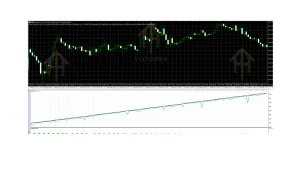
Quick Features Table
| Feature | Details |
|---|---|
| Platform | MT5 |
| Strategy | Automated (details proprietary) |
| Trading Style | Lower-timeframe focused |
| Pairs | XAUUSD |
| Timeframe | M5 or M15 |
| Risk Management | Configurable via inputs |
| Automation | Full once enabled |
| Best For | Traders seeking XAUUSD automation on M5/M15 |
Main Benefits
Removes the need for constant screen time Traders who cannot watch M5/M15 charts all day can still participate in gold’s shorter-term moves.
Consistent rule-based execution Emotions are taken out of individual trade decisions once the EA is running with chosen settings.
Focused instrument and timeframe Clear targeting of XAUUSD on M5 or M15 reduces the complexity of multi-pair, multi-timeframe setups.
Configurable risk parameters Users can adjust lot sizing, risk levels, and other inputs to match their account size and tolerance.
These are practical advantages of automation. They do not guarantee profitable outcomes. Gold is volatile; slippage, spreads, and sudden news spikes remain real factors.
Who Is Mooca Suicide EA V1.00 For?
- MT5 users who specifically want to automate XAUUSD
- Traders comfortable with M5 or M15 timeframes
- Busy traders looking to reduce manual chart monitoring
- Intermediate or experienced traders who understand how to test and adjust EA settings
- Algorithmic trading users who already run EAs on VPS and monitor performance
- Those willing to start on demo and accept that results vary by broker and market conditions
It can suit both newer automated-trading users (if they treat it as a learning tool) and more experienced ones who already know how to evaluate drawdown and parameter sensitivity.
Who Should Avoid It?
- Traders who need or prefer higher timeframes (H1 and above) or multi-day holds
- Anyone uncomfortable with gold’s volatility or lower-timeframe noise
- Traders expecting zero intervention or “set and forget forever” performance
- Those who cannot or will not run proper backtests and forward tests
- Accounts that cannot support the minimum recommended capital or risk settings the user chooses
- Anyone seeking guaranteed returns or risk-free systems (no EA delivers that)
The name itself should prompt extra caution around risk settings. Aggressive configuration on XAUUSD can lead to significant drawdowns.
Mooca Suicide EA V1.00 vs Manual Trading
| Aspect | Mooca Suicide EA (MT5) | Manual Trading on XAUUSD M5/M15 |
|---|---|---|
| Execution speed | Instant once signal criteria met | Depends on trader reaction time |
| Emotional control | Rules-based | Subject to fear/greed |
| Screen time | Minimal after setup | High on lower timeframes |
| Flexibility | Limited to programmed logic | Full discretion |
| Consistency | Same rules every trade | Varies with trader state |
| Monitoring needed | Settings, equity, connection | Continuous chart watching |
What To Check Before Buying
Use this practical checklist:
- Strategy fit — Confirm it aligns with how you want to trade XAUUSD (M5/M15 focus).
- Risk settings — Review all risk-related inputs. Understand maximum exposure.
- Drawdown tolerance — Test how the EA behaves in high-volatility gold periods.
- MT5 compatibility — Ensure your terminal build supports the EA file.
- Broker compatibility — Prefer low-spread ECN/raw accounts with reliable gold execution. Check for EA restrictions.
- VPS — Strongly recommended for 24/5 operation and low latency.
- Settings — Look for any provided presets (e.g., for 15-minute charts) and test them.
- Support — Clarify update policy and contact options via the seller (YoForex-related channels).
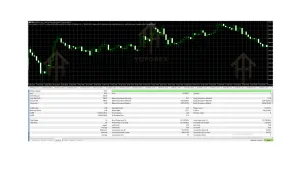
- Testing — Run your own Strategy Tester backtests on XAUUSD M5 and M15, then forward-test on demo with realistic spreads and slippage.
Never skip independent testing. Past results (if any are shown elsewhere) do not predict future performance.
How To Get Started
- Obtain the Mooca Suicide EA V1.00 MT5 file from the official source linked on yoforex.org or yoforexea.com.
- Open MT5 → File → Open Data Folder → MQL5 → Experts and place the .ex5 file there.
- Restart MT5 or refresh the Navigator.
- Open an XAUUSD chart on M5 or M15.
- Drag the EA onto the chart.
- Configure inputs carefully (lot size, risk parameters, any filters).
- Enable AutoTrading.
- Start on a demo account. Monitor for several days or weeks under live market conditions before considering a live account.
- Use a VPS for stable connection if moving to live.
Always begin with the smallest possible risk.
FAQs
Does Mooca Suicide EA V1.00 work only on XAUUSD?
It is presented for XAUUSD on M5 or M15. Other pairs are not the stated focus.
Can beginners use it?
Yes, but only if they treat it as a tool that still requires testing, monitoring, and risk understanding. Jumping straight to live with high risk is not advisable.
Is a VPS required?
Highly recommended for reliable operation, especially on lower timeframes.
What timeframe should I use?
M5 or M15 as indicated for this EA.
How much capital do I need?
Depends on the risk settings you choose. Start small and scale only after proven forward results on demo.
Does the name mean it is high-risk?
The name is bold. Risk level is determined by your settings and market conditions. Configure conservatively and test thoroughly.
Where can I get support or updates?
Through the channels associated with the YoForex brand that distributes or lists the EA.
Should I expect consistent profits?
No. No EA guarantees profits. Focus on process, risk control, and realistic evaluation.
Conclusion
Mooca Suicide EA V1.00 MT5 offers a focused way to automate XAUUSD trading on the M5 or M15 timeframe inside MetaTrader 5. It addresses the practical problem of needing to watch fast gold charts constantly while keeping execution rule-based.
Success still depends on proper configuration, broker quality, risk management, and ongoing oversight. Test thoroughly on demo, understand the risks of lower-timeframe gold trading, and only risk capital you can afford to lose.
If the combination of MT5 automation, XAUUSD focus, and M5/M15 timeframes matches what you are looking for, review the current offering and available resources at yoforex.org or the related blog at yoforexea.com/blog, then proceed with careful testing.
Support & Disclaimer
Support
If you need help installing or configuring your EA, or face any kind of bug, feel free to reach out on:
WhatsApp: Click here
Telegram Group: Join our community
Disclaimer:
Forex and gold trading involve risk. Past performance doesn’t guarantee future results. Always test robots on demo before live trading and use proper risk management.
REFERRAL
Join the VIP Signals Telegram Channel for real-time expert trading signals and stay ahead in the forex market. Get personalized strategies by becoming a part of our Real Account Management Telegram Channel and optimize your trading experience. If you’re aiming to Pass PropFirm Challenges , join our dedicated channel for tips and proven methods. Start managing your capital effectively with expert advice from our Funded Account Management Telegram Channel. For advanced traders, our HFT EA / Passing Telegram Channel offers high-frequency trading insights and strategies to boost your performance.