
INTRODUCTION
Many gold traders struggle with the same practical problem: XAUUSD moves fast on the lower timeframes, opportunities appear and disappear quickly, and sitting in front of the charts all day is exhausting. Manual monitoring leaves room for hesitation, late entries, and emotional exits.
Akali EA V1.41 MT5 is built as an automated response to that exact challenge. It is a MetaTrader 5 Expert Advisor designed specifically for gold scalping on the M1 chart, using a tight trailing-stop approach to lock in moves during periods of volatility.
This guide walks through what the bot actually is, how it works, who it suits, the real risks, and the practical checklist you should complete before deciding to buy.
What Is Akali EA V1.41 MT5?
Akali EA is a high-precision scalping Expert Advisor for MetaTrader 5, focused exclusively on XAUUSD (Gold).
It places orders around defined levels of interest and relies on an extremely tight trailing stop algorithm to secure profits quickly when price moves in the trade’s favor. The goal is accuracy and rapid profit locking rather than holding positions for large swings.
Version 1.41 includes stability updates, improved news-filter timing, better Exness compatibility, and general refinements. The EA is available on the MQL5 Market and is also discussed on sites such as Yoforexorg for traders researching MT5 gold bots.
It is not a martingale or grid system. It uses stop-loss protection and risk-based position sizing.
How Does Akali EA Work?
The core flow is straightforward:
- Signal / Level Identification – The EA identifies levels of interest (commonly linked to prior day high/low structure for breakout-style entries).
- Entry – It can place pending Buy Stop and Sell Stop orders, or switch to market execution mode that monitors price and enters when the level is reached. Market mode includes max-spread and max-slippage filters.
- Position Management – Once in a trade, an extremely tight trailing stop begins locking profit as soon as price moves favorably. Two modes exist: Tighter Trailing (recommended for maximum locking) and Wider Trailing.
- Exit – Trailing stop or stop-loss closes the position. Opposite pending orders can be deleted automatically once one side is triggered.
- Risk Management – Lot size can be calculated as a percentage of balance, fixed lot, or scaled per balance. A news filter can pause trading, close positions, and cancel pending orders around high-impact USD events.
VPS is strongly recommended so the EA can run continuously without interruption.
Akali EA Strategy Explained
Akali is a precision scalping system built for gold’s fast micro-moves on the M1 timeframe.
It capitalizes on rapid price action by entering around breakout levels and immediately protecting gains with a very tight trailing stop. The design prioritizes a high proportion of winning trades while accepting that individual losses can be larger than individual wins. The developer describes it as a high-win-rate approach that aims for long winning streaks between losses.
Two strategy modes give flexibility:
- Tighter Trailing – locks profit faster (best with ultra-low spreads).
- Wider Trailing – allows a bit more room for the trade to develop.
Additional options include long-only mode, skip-breached-levels logic, and slippage correction that adjusts SL/TP after actual fill price.
Key Features
- Designed exclusively for XAUUSD on M1
- Extremely tight trailing-stop algorithm
- Pending-order or market-execution modes
- Max-spread and max-slippage filters (market mode)
- Tighter / Wider trailing strategy modes
- News filter for high-impact USD events (Forex Factory data)
- Risk percent, fixed lot, or balance-scaled lot sizing
- Delete opposite pending order option
- Skip breached levels / state recovery
- Exness compatibility improvements in recent versions
- Visual news lines on chart when enabled
Quick Specifications
| Feature | Details |
|---|---|
| Platform | MetaTrader 5 |
| Strategy | Precision scalping with tight trailing stop |
| Trading Style | Scalping / breakout-style entries |
| Instruments/Pairs | XAUUSD (Gold) only |
| Timeframe | M1 |
| Risk Management | Risk % of balance, fixed lot, or scaled; stop-loss + trailing |
| Automation | Fully automated |
| VPS | Necessary for 24/5 operation |
| Best For | Traders seeking automated gold scalping with low-spread brokers |
Main Benefits
Automation removes the need to watch M1 charts constantly. The EA applies the same entry and trailing rules every time, reducing emotional interference. Tight trailing aims to protect small gains before price can reverse. Built-in risk calculation and news filtering give structured control over exposure. Once installed correctly on a suitable broker and VPS, the system runs systematically without constant manual input.
Limitations & Risks
- Broker and spread sensitivity: Tight trailing stops are easily triggered by wide spreads or slippage. Raw ECN / low-spread accounts are mandatory. High-spread or poor-execution brokers will degrade results.
- Market conditions: Performance depends on volatility and clean price action. Quiet or highly erratic periods can produce fewer or less favorable trades.
- Drawdown: Even high-win-rate systems experience losing streaks. Individual losses can be larger than average wins.
- Settings and installation: Incorrect risk percentage, wrong server time alignment, or missing news-filter URL can cause problems.
- VPS / connectivity: Any downtime means missed or unmanaged trades.
- Backtest limitations: Scalping systems are highly sensitive to tick quality and modeling. Live results can differ.
- Strategy-specific: Breakout-style entries around fixed levels can fail in ranging or news-driven spikes.
Always test thoroughly on demo with the exact broker you plan to use live.
Who Is Akali EA For?
Ideal for traders who:
- Want automated XAUUSD scalping on MT5
- Already use or can open a Raw ECN / low-spread account
- Are comfortable running a VPS
- Prefer systems with clear stop-loss and trailing logic rather than grid/martingale
- Are willing to follow the official setup guide and monitor performance
Who Should Avoid It?
- Traders who cannot access low-spread gold accounts
- Those unwilling or unable to run a reliable VPS
- Beginners who have never tested an EA on demo
- Anyone seeking a “set-and-forget” system with no monitoring or risk review
- Traders who prefer longer-term positions or multi-pair diversification
Akali EA vs Manual Trading
| Aspect | Akali EA | Manual Trading |
|---|---|---|
| Execution | Instant, rule-based | Dependent on trader reaction |
| Screen time | Minimal once running | High on M1 |
| Consistency | Same rules every trade | Varies with fatigue/mood |
| Emotional interference | Low | High |
| Speed | Milliseconds | Human reaction time |
| Flexibility | Limited to coded logic | Can adapt on the fly |
| Monitoring | Occasional checks + VPS | Continuous |
| Risk management | Pre-defined % or fixed | Discretionary |
What To Check Before Buying
- Confirm the strategy (tight-trailing gold scalper on M1) matches your style
- Review risk and expected drawdown characteristics
- Verify MT5 compatibility and version 1.41
- Check broker requirements (Raw ECN, low spread, recommended names such as Vantage, FP Markets, Axi, Blackbull; caution with high-slippage brokers)
- Plan for a quality VPS
- Study the official input settings and strategy modes
- Run your own backtests and forward demo tests
- Confirm support channels and license activations (MQL5 typically provides a set number of activations)
- Compare current price (listed at 199 USD on MQL5) and any update policy
Akali EA Settings
Key controllable inputs include:
- Execution Mode (Pending or Market)
- Strategy Mode (Tighter or Wider Trailing)
- Risk calculation method and percentage / lot size
- News filter on/off + minutes before/after
- Trading days filter
- Magic number, trade comment, long-only option
- Delete opposite pending, skip breached levels, slippage correction
Always start with the developer’s recommended set files and adjust risk conservatively.
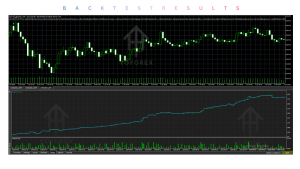
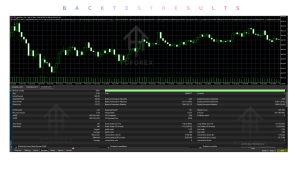
Akali EA Backtesting & Performance
Official product pages and the developer’s live signal provide performance visibility, but these are historical results only.
Backtests on M1 scalping systems are sensitive to data quality. Live results can differ due to spreads, slippage, and real-market microstructure. Version 1.41 includes fixes for news timing and broker compatibility that may improve live stability compared with earlier builds.
Never treat past growth figures or win rates as predictions of future results. Conduct your own tests on the broker and account type you will actually use.
How To Get Started
- Confirm your broker offers low-spread XAUUSD and matches recommended conditions.
- Review the official Akali EA guide for server time, set files, and news-filter URL setup.
- Purchase and install the EA in MT5 (Experts folder).
- Attach to an XAUUSD M1 chart on a demo account with the same broker/server as your intended live account.
- Enable the news filter if desired and set conservative risk.
- Monitor for several weeks, noting trade frequency, trailing behavior, and any issues.
- Only consider live use after you understand the system’s behavior under real conditions.
Is Akali EA Worth Buying?
It can be worth considering if you specifically want a gold-only M1 scalper with tight trailing stops, you have access to a suitable low-spread broker and VPS, and you are prepared to test thoroughly.
Strengths lie in the focused design, clear risk controls, news filter, and dual execution modes. Limitations center on broker dependency, the need for continuous operation, and the inherent risks of any scalping system.
The decision is personal: match the strategy to your capital, risk tolerance, and infrastructure. Demo testing remains the most important step.
FAQs
What is Akali EA V1.41 MT5?
A MetaTrader 5 Expert Advisor designed for precision scalping of XAUUSD on the M1 timeframe using tight trailing stops.
Is it MT4 or MT5?
MT5 only.
How does it work?
It identifies levels of interest, enters via pending or market orders, and manages positions with an extremely tight trailing stop while applying risk and news filters.
What strategy does it use?
Gold scalping focused on rapid moves and quick profit locking, not grid or martingale.
Can it be backtested?
Yes, on MT5 Strategy Tester. Use high-quality tick data and understand modeling limitations for scalpers.
Is it suitable for beginners?
Only if the beginner is willing to study the guide, test extensively on demo, and understand risk. It is not a plug-and-play beginner tool.
What broker is required?
Raw ECN / low-spread accounts are mandatory. Developer recommendations include Vantage and several others; high-slippage brokers should be avoided.
How do I buy and install it?
Available on the MQL5 Market. After purchase, download the .ex5 file, place it in the MT5 Experts folder, restart the terminal, and attach to an XAUUSD M1 chart.
Conclusion
Akali EA V1.41 MT5 is a focused gold scalping tool for traders who want systematic M1 execution on XAUUSD with tight trailing-stop management. Its main strengths are the clear strategy design, risk options, news filter, and updates for broker compatibility.
Important considerations remain broker quality, VPS reliability, proper settings, and realistic expectations about drawdowns and market dependency.
If the profile matches your needs and you complete thorough demo testing, it is one option among MT5 gold EAs worth evaluating.
View the official product details, review the setup guide, and run your own tests before making any purchase decision. You can find related MT5 EA resources and installation guidance on platforms such as Yoforexorg when researching further.
Support & Disclaimer
Support:
If you need help installing or configuring your EA, or face any kind of bug, feel free to reach out on:
Telegram Group: Join our community
Disclaimer:
Forex and gold trading involve risk. Past performance doesn’t guarantee future results. Always test robots on demo before live trading and use proper risk management.
REFERRAL
Join the VIP Signals Telegram Channel for real-time expert trading signals and stay ahead in the forex market. Get personalized strategies by becoming a part of our Real Account Management Telegram Channel and optimize your trading experience. If you’re aiming to Pass PropFirm Challenges , join our dedicated channel for tips and proven methods. Start managing your capital effectively with expert advice from our Funded Account Management Telegram Channel. For advanced traders, our HFT EA / Passing Telegram Channel offers high-frequency trading insights and strategies to boost your performance.