Infinite Trend Indicator V5.1 MT4 – The Ultimate Trend-Following Tool for Consistent Profits
In the world of forex trading, following the trend is often touted as one of the most reliable strategies. While the concept sounds simple, accurately identifying a trend—and more importantly, knowing when it’s about to reverse—requires more than just guesswork. This is where the Infinite Trend Indicator V5.1 for MT4 becomes a powerful addition to any trader’s toolkit.
In this blog, we will deep dive into what the Infinite Trend Indicator V5.1 is, how it works, its features, advantages, optimal settings, compatible trading strategies, and how it can be used to gain a competitive edge in the financial markets.
What is the Infinite Trend Indicator V5.1 for MT4?
The Infinite Trend Indicator V5.1 is a custom technical analysis tool developed for the MetaTrader 4 (MT4) trading platform. It is designed to help traders determine the direction of the market trend with high accuracy. This indicator applies a combination of price action, moving averages, and custom-coded algorithms to generate trend signals with minimal lag and noise.
Unlike standard MT4 indicators like the Moving Average or MACD, the Infinite Trend Indicator V5.1 filters out minor market fluctuations and focuses on the core trend, making it suitable for swing traders, day traders, and even scalpers.
Key Features of Infinite Trend Indicator V5.1
Here are some standout features that make this indicator popular among both novice and professional traders:
✅ Accurate Trend Direction
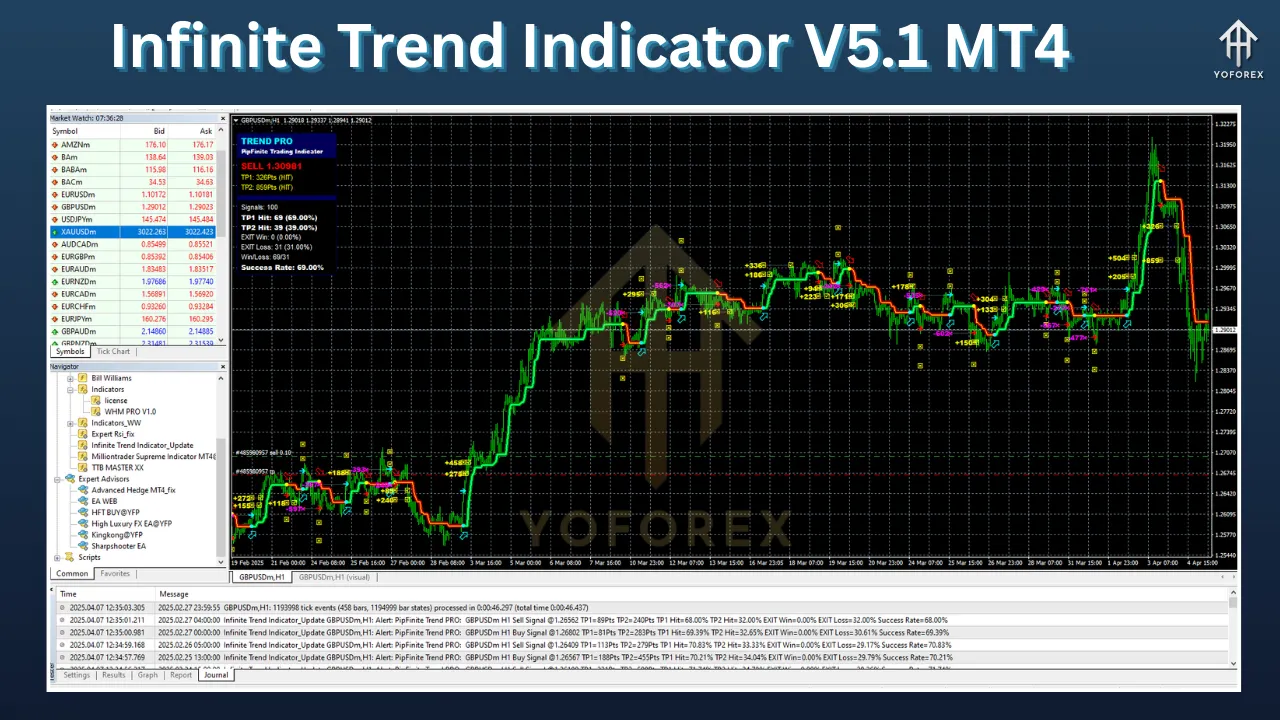
The indicator uses color-coded lines or arrows to indicate bullish or bearish market trends. When the market is bullish, it shows green or upward arrows; when it’s bearish, red or downward arrows appear.
✅ Non-Repainting Signals
One of the biggest issues with many MT4 indicators is repainting—where the signals change after a few candles, leading to false entries. The Infinite Trend Indicator V5.1 offers non-repainting signals, providing more confidence and reliability in your trades.
✅ Multi-Timeframe Compatibility
Whether you’re trading on the M5, M15, H1, or D1 chart, this indicator performs consistently across all timeframes. It even supports multi-timeframe analysis to allow traders to align trends across different chart periods.
✅ Visual Simplicity
It offers a clean and uncluttered visual representation, making it easy to use even for beginners. You won’t have to deal with complex graphs or overloaded data—just trend signals and confirmations.
✅ Sound & Alert Notifications
Traders can enable pop-up alerts, sound notifications, or even email alerts when a new trend signal appears. This feature is especially helpful for those who don’t want to monitor charts constantly.
How Does the Infinite Trend Indicator V5.1 Work?
At its core, the indicator tracks momentum, volatility, and trend strength using a combination of moving average filters, volatility algorithms, and custom smoothing techniques. Once the conditions align with its coded parameters, it signals a BUY or SELL arrow based on trend confirmation.
It also adjusts dynamically to market conditions, avoiding whipsaws during sideways movements and emphasizing stronger signals during trending phases.
Recommended Timeframes and Currency Pairs
The Infinite Trend Indicator V5.1 is incredibly versatile and works across multiple instruments and timeframes. However, to get the best results:
📌 Best Timeframes:
-
M15 (15 Minutes)
-
H1 (1 Hour)
-
H4 (4 Hours)
-
D1 (Daily)
💱 Recommended Pairs:
-
EUR/USD
-
GBP/USD
-
USD/JPY
-
USD/CHF
-
GBP/JPY
-
Gold (XAU/USD)
-
US30 / NAS100 (for indices traders)
It also works well with exotic pairs and cryptocurrencies like BTC/USD, provided the market is not too volatile.
Ideal Settings for Maximum Accuracy
Though the indicator comes with default settings optimized for general use, advanced traders can tweak a few variables to suit their trading style:
-
Signal Sensitivity – Adjusts how responsive the indicator is to price movements.
-
Smoothing Factor – Controls the filtering of minor fluctuations.
-
Alert Settings – Choose how and when you receive notifications.
For beginners, it’s best to stick with the default settings until you’re more familiar with how the signals behave in live markets.
How to Use Infinite Trend Indicator V5.1 in Your Strategy
Here’s a step-by-step guide to using the indicator effectively:
Step 1: Identify the Trend
Wait for a clear signal from the indicator. A green arrow or line suggests a bullish trend, while a red arrow signals a bearish trend.
Step 2: Confirm With Price Action
Although the indicator is powerful on its own, confirming it with support/resistance levels, candlestick patterns, or volume analysis can increase accuracy.
Step 3: Enter the Trade
Open a buy trade on a bullish signal and a sell trade on a bearish signal. Always wait for the current candle to close before entering to avoid false signals.
Step 4: Place Stop-Loss and Take-Profit
-
Place your stop-loss just below the signal candle for a BUY or above the signal candle for a SELL.
-
Use recent support/resistance levels or ATR-based TP/SL levels for better risk management.
Step 5: Exit the Trade
Either exit at your take-profit or when the opposite signal appears, depending on your strategy.
Advantages of Using Infinite Trend Indicator V5.1
-
Improved Accuracy – Reduces noise and gives reliable signals.
-
No Guesswork – Clear arrows and visual cues make trading straightforward.
-
Beginner-Friendly – Even new traders can follow signals easily.
-
Time-Saving – Alerts let you trade without staring at charts all day.
-
Low Risk of False Entries – Non-repainting behavior prevents rethinking trades.
Disadvantages (To Keep in Mind)
No indicator is perfect. Here are a few limitations:
-
Lag in Signal: Like most trend-following indicators, it may lag slightly in fast-moving markets.
-
False Signals During Ranges: Avoid using this indicator in sideways markets or add a filter like RSI/Stochastic to improve entry quality.
-
Over-Dependency Risk: Don’t rely solely on the indicator; always include risk management and other confirmations.
Combining With Other Indicators
The Infinite Trend Indicator V5.1 works well when paired with:
-
RSI (Relative Strength Index) – Helps confirm overbought/oversold conditions.
-
MACD – For divergence confirmation and additional trend validation.
-
Support/Resistance Levels – For identifying key zones where trend changes may occur.
-
Volume Indicators – Confirm strength behind a trend.
Who Should Use This Indicator?
✅ Day Traders – For identifying short-term trends with fast entries.
✅ Swing Traders – For medium-term trades based on H1-H4 charts.
✅ Scalpers – When paired with other confirmations, the indicator performs well even on M1-M5 charts.
✅ Beginner Traders – With its visual simplicity and straightforward signals, beginners can confidently start using this indicator.
Installation Guide – How to Install Infinite Trend Indicator V5.1 on MT4
-
Download the indicator file in
.ex4or.mq4format. -
Open your MetaTrader 4 platform.
-
Go to File > Open Data Folder > MQL4 > Indicators.
-
Paste the indicator file into the Indicators folder.
-
Restart your MT4 terminal.
-
Go to Navigator > Indicators and drag Infinite Trend Indicator V5.1 onto your chart.
Final Thoughts – Is It Worth It?
The Infinite Trend Indicator V5.1 for MT4 is a powerful, visually intuitive, and highly effective trend-following tool that suits nearly every trading style. Whether you’re a beginner trying to avoid false signals or an experienced trader looking for consistent entries, this indicator provides a reliable foundation for profitable trading.
However, always remember: No tool guarantees 100% accuracy. Combine it with proper risk management, a sound trading plan, and ongoing market education for the best results.
FAQs – Infinite Trend Indicator V5.1 MT4
❓ Is the Infinite Trend Indicator V5.1 free?
Some websites offer it for free, while others charge for premium access. Always ensure you’re downloading from a reputable source to avoid malware.
❓ Does it repaint?
No, it provides non-repainting signals, making it suitable for live and real-time trading.
❓ Can I use it on MetaTrader 5?
This version is made for MT4. For MT5, a different build or conversion would be required.
❓ Is it suitable for binary options?
Yes, many traders use it for binary options due to its clear entry signals, but always backtest first.
If you’re serious about trend trading and want a dependable, clean-cut indicator, Infinite Trend Indicator V5.1 could be your next game-changer.