
Introduction to ACCURATE SR ZONES Indicator V1.0 MT4
Support and resistance are among the most fundamental concepts in technical analysis. Markets move in waves, and price frequently reacts at certain levels where buying or selling pressure becomes significant. These levels represent areas where traders previously made strong decisions — entering, exiting, or defending positions. Over time, these reaction points form what traders call support and resistance zones.However, manually identifying these zones can be subjective. Two traders may draw completely different levels on the same chart. This inconsistency often leads to confusion, late entries, and poor risk management. ACCURATE SR ZONES Indicator V1.0 MT4 is designed to eliminate much of that subjectivity by automatically detecting and marking structured support and resistance zones directly on the MetaTrader 4 platform.Instead of relying on lagging indicators, it focuses on price structure, historical reaction points, and volatility-based movement to highlight meaningful zones where price may react again in the future. This blog provides a detailed overview of how it works, its features, setup process, advantages, disadvantages, and overall usability within a structured trading plan.
Overview of ACCURATE SR ZONES Indicator V1.0 MT4
ACCURATE SR ZONES Indicator V1.0 MT4 is a technical analysis tool that automatically identifies and highlights key support and resistance areas based on price structure and historical reaction behavior.
Unlike single-line support and resistance tools, this indicator typically marks zones rather than exact price points. This reflects the reality of the market: institutional activity often occurs across price ranges, not precise single-pip levels.
ACCURATE SR ZONES Indicator V1.0 MT4 analyzes:
- Historical highs and lows
- Strong rejection candles
- Consolidation areas before breakouts
- Volatility expansion points
- Repeated price reaction areas
Once detected, these zones are displayed visually on the chart as structured rectangles or highlighted areas. Traders can then use these zones for:
- Entry planning
- Stop-loss placement
- Take-profit targeting
- Breakout confirmation
- Retest setups
It does not execute trades automatically. It is a structured decision-support tool for manual traders.
How ACCURATE SR ZONES Indicator V1.0 MT4 Works?
1. Reads Historical Price Structure Continuously
After you attach it to a chart, it starts scanning historical candles and keeps updating with live price. It evaluates how price has behaved in the past—where it repeatedly reversed, paused, or broke out—so it can mark meaningful zones instead of random lines.
2. Finds Swing Highs and Swing Lows (Key Turning Points)
ACCURATE SR ZONES Indicator V1.0 MT4 identifies pivot areas where the market previously changed direction:
- Swing highs (areas where price rose and then rejected down)
- Swing lows (areas where price dropped and then bounced up)
These swing points are the foundation of most support/resistance logic because they show where buyers or sellers previously dominated.
3. Detects Rejection and Strong Reaction Candles
Support and resistance become stronger when price reacts sharply. ACCURATE SR ZONES Indicator V1.0 MT4typically looks for patterns like:
- Long wicks (strong rejection)
- Strong impulsive candles away from a level
- Multiple failed attempts to break a level
This helpsACCURATE SR ZONES Indicator V1.0 MT4 prioritize zones where there is real pressure, not weak noise.
4. Builds Zones (Not Thin Lines)
Instead of drawing a single exact price line, it creates a zone range. This is important because:
- Real market support/resistance is rarely one exact pip
- Institutions buy/sell across ranges
- Spread and volatility can cause slight overshoots
So it marks a zone boundary (upper/lower area) rather than a single point.
5. Checks Repeated Touches to Rank Zone Strength
Zones become more meaningful when price respects them multiple times. ACCURATE SR ZONES Indicator V1.0 MT4 often increases zone importance when it sees:
- Multiple touches and rejections
- Repeated reversals from the same area
- Consolidations forming at that level
This helps highlight zones with stronger market memory.
6. Tracks Breakouts and “Role Reversal” Behavior
When price breaks above resistance, that zone can later become support (and vice versa). ACCURATE SR ZONES Indicator V1.0 MT4 helps you visually spot:
- Break and close above a zone
- Retest of the broken zone
- Continuation after confirmation
This is one of the most common price-action setups: breakout → retest → continuation.
7. Uses Lookback Depth to Control How Far It Scans
ACCURATE SR ZONES Indicator V1.0 MT4 generally uses a history window (lookback period). Bigger lookback:
- Finds major long-term zones
- Produces fewer but stronger zones
Smaller lookback:
- Finds more intraday zones
- Can produce more zones (sometimes clutter)
This is why sensitivity/lookback settings matter.
8. Updates Zones as New Market Data Comes In
As new highs/lows form and price creates fresh reaction areas, the indicator can add new zones. Good indicators keep older zones that remain valid while also updating when the market structure changes.
9. Helps You Plan Trades Around Zones
ACCURATE SR ZONES Indicator V1.0 MT4 supports decision-making by showing where price is likely to react. Traders typically use it for:
- Entries near support in an uptrend
- Sells near resistance in a downtrend
- Breakout trades when zones fail
- Retest trades after breakout
But ACCURATE SR ZONES Indicator V1.0 MT4 itself does not “confirm” entries—your confirmation method is still needed.
10. Requires Confirmation (Indicator Is Not a Signal Generator)
The best use is to combine zones with confirmation such as:
- Rejection candles (pin bar, engulfing)
- Trend direction (higher timeframe bias)
- Momentum confirmation
- Break-and-retest structure
Zones show “where to watch,” confirmation tells “when to enter.”
Key Features of ACCURATE SR ZONES Indicator V1.0 MT4
1. Automatic Support Zone Detection
ACCURATE SR ZONES Indicator V1.0 MT4 automatically identifies price areas where strong buying pressure previously caused upward reactions. These zones are marked as support areas and may act as potential bounce points when price revisits them.
ACCURATE SR ZONES Indicator V1.0 MT4 analyzes:
- Swing lows
- Strong bullish rejection candles
- Consolidation before upward breakouts
2. Automatic Resistance Zone Detection
ACCURATE SR ZONES Indicator V1.0 MT4 detects areas where strong selling pressure pushed price downward. These zones are marked as resistance areas and may act as rejection levels when price retraces upward.
It evaluates:
- Swing highs
- Bearish rejection candles
- Impulsive downward movements
3. Zone-Based Structure (Not Single Lines)
Instead of drawing thin support/resistance lines, ACCURATE SR ZONES Indicator V1.0 MT4 marks price ranges. This reflects real market behavior where price reacts within areas rather than exact price points.
This improves:
- Stop-loss placement
- Reaction anticipation
- Realistic entry planning
4. Historical Reaction Analysis
ACCURATE SR ZONES Indicator V1.0 MT4 scans past price behavior to find levels where price repeatedly reacted. The more times price respects a level, the stronger the zone becomes.
5. Breakout and Retest Identification
When price breaks through a resistance zone, it can later act as support (and vice versa). ACCURATE SR ZONES Indicator V1.0 MT4 visually helps identify these structural flips for breakout-retake setups.
6. Multi-Timeframe Compatibility
Works on all timeframes including:
- M15 and M30 for intraday traders
- H1 for day trading
- H4 and D1 for swing traders
Higher timeframes generally produce stronger zones.
7. Adjustable Sensitivity Settings
Users can customize:
- Minimum reaction strength
- Historical lookback depth
- Zone width
- Number of displayed zones
This helps ACCURATE SR ZONES Indicator V1.0 MT4 control chart clutter.
8. Non-Repainting Structure
Once a zone is formed and confirmed, it remains fixed. ACCURATE SR ZONES Indicator V1.0 MT4 does not modify historical zones retroactively.
9. Lightweight Performance
Runs efficiently within MT4 without significantly slowing the platform.
10. Strategy Compatibility
Can be combined with:
- Trend-following strategies
- Breakout trading
- Candlestick confirmation
- RSI/MACD filters
- Risk-to-reward structured setups.
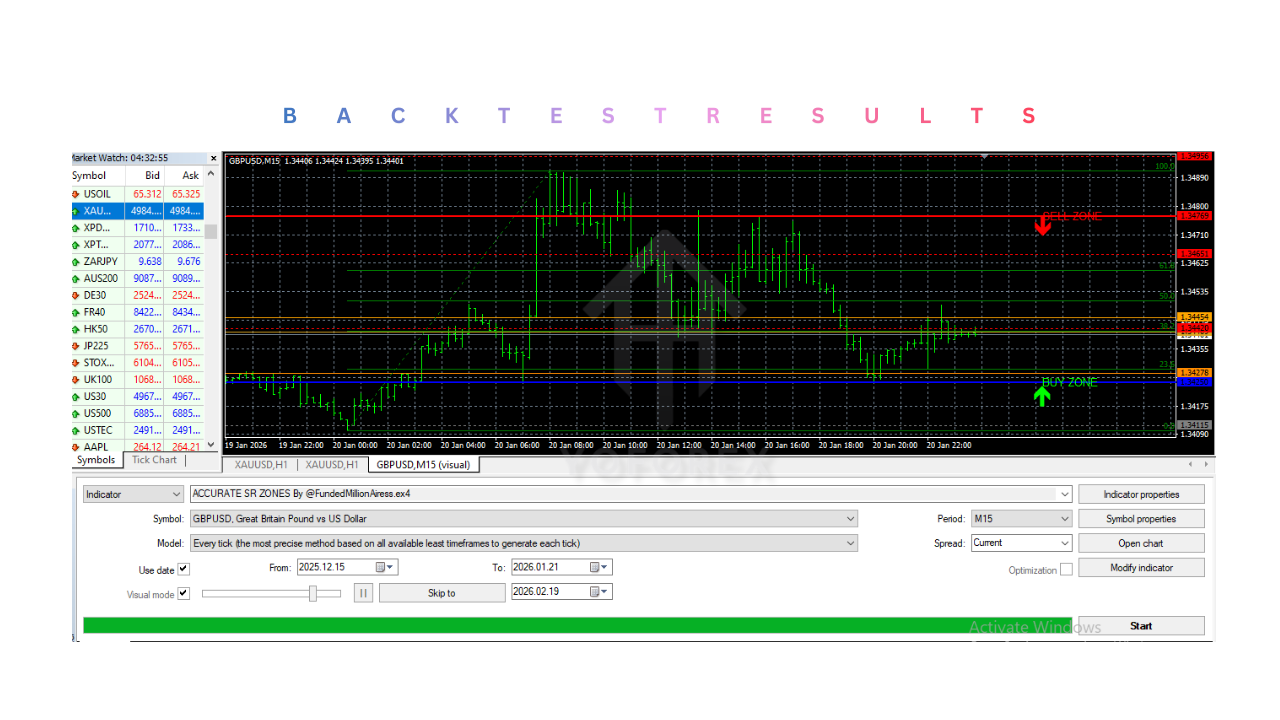
Installation & Setup Guide for ACCURATE SR ZONES Indicator V1.0 MT4
Step 1: Download ACCURATE SR ZONES Indicator V1.0 MT4 File
Ensure the file format is:
- .ex4 (compiled) or
- .mq4 (source)
Confirm it is compatible with MetaTrader 4.
Step 2: Open MetaTrader 4
Launch MT4 and log into your trading account.
Step 3: Open Data Folder
In MT4:
- Click File
- Select Open Data Folder
This opens the internal directory.
Step 4: Navigate to Indicators Folder
Open:
MQL4 → Indicators
This is where all custom indicators must be stored.
Step 5: Paste the Indicator File
Copy the downloaded file into the Indicators folder.
Make sure it is not placed inside another subfolder unless intentionally organized.
Step 6: Restart MetaTrader 4
Close and reopen MT4 to refresh and load the indicator.
Step 7: Confirm Installation
Open the Navigator panel.
Expand Indicators and confirm the indicator appears in the list.
If not visible:
- Right-click inside Navigator
- Click Refresh
Step 8: Attach to Chart
Open your preferred currency pair.
Choose your desired timeframe.
Drag ACCURATE SR ZONES Indicator V1.0 MT4 from Navigator → Indicators onto the chart.
Step 9: Configure Settings
Adjust parameters such as:
- Sensitivity level
- Lookback period
- Zone strength filter
- Display colors
For beginners:
- Use default settings
- Start on H1 timeframe
Step 10: Apply Structured Trading Rules
For best results:
- Identify higher timeframe trend bias.
- Trade demand zones in uptrends.
- Trade resistance zones in downtrends.
- Wait for confirmation candles before entry.
- Place stop loss beyond zone boundaries.
- Risk no more than 1–2% per trade.
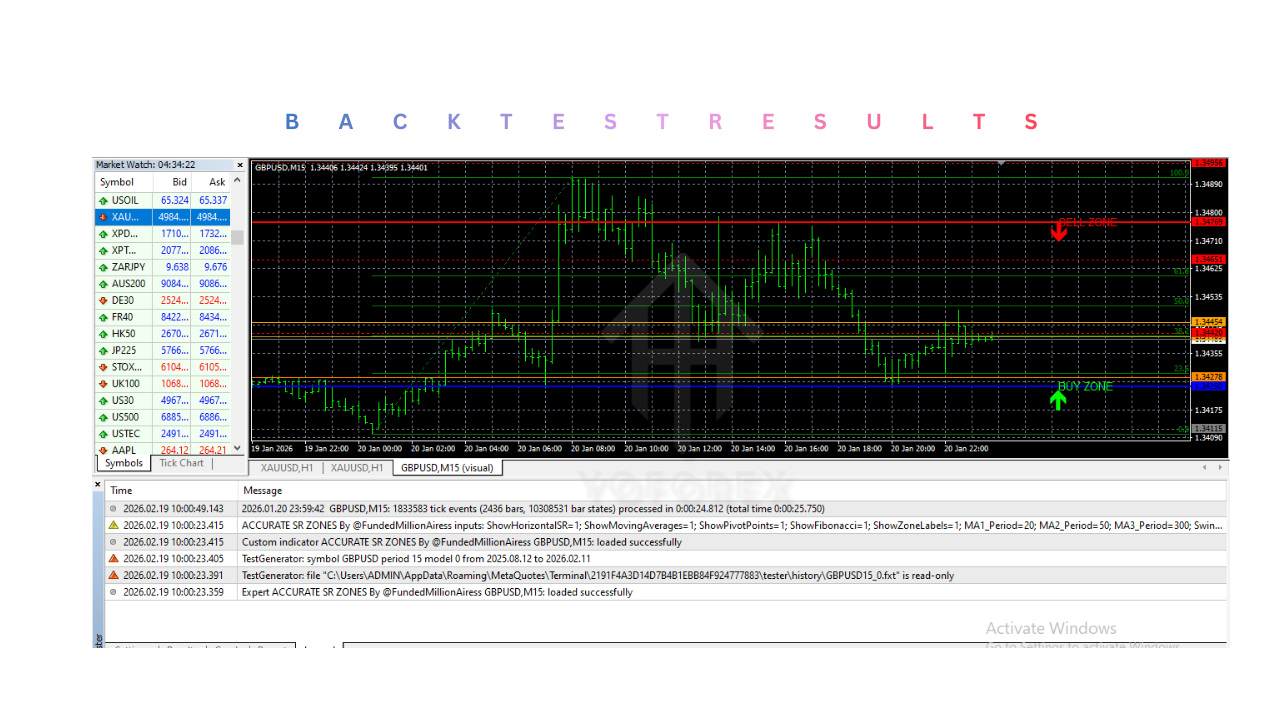
Advantages of ACCURATE SR ZONES Indicator V1.0 MT4
1. Removes Subjectivity from Manual Drawing
One of the biggest challenges in support and resistance trading is inconsistency. Different traders may draw different levels on the same chart. ACCURATE SR ZONES Indicator V1.0 MT4 standardizes zone detection by using predefined logic to mark structured price areas automatically.
2. Improves Entry Timing
Instead of entering trades randomly or chasing price, traders can wait for price to reach clearly defined zones. This improves patience and encourages structured setups.
3. Enhances Risk Management
Support and resistance zones provide logical technical boundaries for:
- Stop-loss placement (beyond the zone)
- Take-profit targeting (opposing zone)
- Calculating risk-to-reward ratios
This helps create disciplined trade planning.
4. Uses Zone-Based Structure Instead of Single Lines
Markets often react within ranges rather than exact levels. By marking zones instead of thin lines, the indicator reflects realistic price behavior and reduces premature stop-outs.
5. Works Across All Timeframes
ACCURATE SR ZONES Indicator V1.0 MT4 can be used for:
- Scalping (M15)
- Intraday trading (M30–H1)
- Swing trading (H4–D1)
Higher timeframe zones typically provide stronger structural levels.
6. Non-Repainting Zones
Once a zone is confirmed, ACCURATE SR ZONES Indicator V1.0 MT4 remains fixed on the chart. This improves trust in historical structure and avoids misleading back-adjustments.
7. Supports Breakout and Retest Strategies
When a resistance zone breaks, it may later act as support (and vice versa). ACCURATE SR ZONES Indicator V1.0 MT4 helps visualize this structural shift clearly.
8. Compatible With Other Tools
It integrates well with:
- Trend analysis
- Candlestick confirmation
- RSI/MACD
- Moving averages
- Risk-to-reward systems
This flexibility enhances strategy building.
9. Reduces Emotional Overtrading
By focusing only on meaningful structural areas, traders are less likely to overtrade in the middle of ranges.
10. Lightweight and Easy to Use
ACCURATE SR ZONES Indicator V1.0 MT4 operates efficiently within MT4 and requires minimal technical knowledge to install and apply.
Disadvantages of ACCURATE SR ZONES Indicator V1.0 MT4
1. No Automatic Trade Execution
ACCURATE SR ZONES Indicator V1.0 MT4 does not place trades. Traders must apply confirmation and execute positions manually.
2. False Breakouts Can Occur
Support and resistance zones are not guaranteed reversal points. Strong trends may break through zones without reacting.
3. Market Condition Sensitivity
In trending markets, zones may fail more frequently. In ranging markets, too many minor zones may form.
4. Requires Confirmation Strategy
Using zones alone without confirmation (such as rejection candles or trend alignment) increases risk.
5. Overcrowding Risk with High Sensitivity
If sensitivity settings are too aggressive, the chart may display too many zones, leading to confusion.
6. Not a Complete Trading System
ACCURATE SR ZONES Indicator V1.0 MT4 is a structural tool, not a standalone strategy. It must be integrated into a broader trading plan.
7. Strong News Events Can Invalidate Zones
High-impact economic releases can cause price to break through support or resistance unexpectedly.
8. Learning Curve for Beginners
Traders unfamiliar with price structure concepts may initially struggle to determine which zones are strongest.
Who Should Use ACCURATE SR ZONES Indicator V1.0 MT4?
1. Price Action Traders
Traders who rely on price structure rather than lagging indicators will benefit the most. Support and resistance are foundational elements of price action trading, and ACCURATE SR ZONES Indicator V1.0 MT4 helps visually structure those areas without subjective drawing.
2. Traders Who Struggle With Drawing Accurate Levels
Many traders draw support and resistance incorrectly or inconsistently. This tool automates zone detection, helping reduce bias and improving chart clarity.
3. Swing Traders
Swing traders operating on H1, H4, or D1 timeframes can use higher timeframe zones to identify strong reaction areas for pullbacks and reversals.
4. Intraday and Day Traders
Intraday traders can use M15 or H1 zones to identify structured entry points within the daily market movement.
5. Traders Focused on Risk-to-Reward Planning
Because zones provide clear structural boundaries, they help traders:
- Place stop-loss beyond the zone
- Target the next opposing zone
- Maintain favorable risk-to-reward ratios
This suits disciplined traders who prioritize capital preservation.
6. Traders Using Breakout Strategies
Those who trade break-and-retest setups can use ACCURATE SR ZONES Indicator V1.0 MT4 to identify structural flips where resistance becomes support or vice versa.
7. Traders Learning Market Structure
Beginners who want to understand how price reacts at historical levels can use ACCURATE SR ZONES Indicator V1.0 MT4 as a learning tool to visualize structure more clearly.
8. Traders Who Prefer Manual Control
Since ACCURATE SR ZONES Indicator V1.0 MT4 does not auto-execute trades, it is ideal for traders who want full control over:
- Entry confirmation
- Position sizing
- Trade management
Why Use ACCURATE SR ZONES Indicator V1.0 MT4?
1. To Improve Entry Precision
Instead of chasing price in the middle of a move, traders can wait for pullbacks into clearly defined zones.
2. To Reduce Subjectivity
Manual support/resistance drawing can vary from trader to trader. This tool standardizes zone detection using structured logic.
3. To Improve Stop-Loss Placement
Zones provide logical technical areas for stop-loss placement rather than arbitrary pip distances.
4. To Improve Take-Profit Targeting
Opposing zones can serve as structured and realistic profit targets.
5. To Trade With Market Structure
ACCURATE SR ZONES Indicator V1.0 MT4 helps align trades with structural turning points, not random price fluctuations.
6. To Reduce Emotional Overtrading
By focusing only on meaningful structural areas, traders avoid unnecessary entries in low-probability zones.
7. To Combine With Confirmation Methods
ACCURATE SR ZONES Indicator V1.0 MT4 works well alongside:
- Candlestick patterns
- Trend analysis
- Momentum indicators
- Volume confirmation
This layered approach increases setup quality.
8. To Enhance Multi-Timeframe Analysis
Higher timeframe zones provide bias, while lower timeframe zones refine entries. This structured alignment improves consistency.
9. To Build a Structured Trading Plan
ACCURATE SR ZONES Indicator V1.0 MT4 supports rule-based approaches such as:
- Buy at support in uptrend
- Sell at resistance in downtrend
- Trade breakout-retest structures