Unlocking Gold Profits: The Complete Guide to the Arrow Indicator V1.0 on MT4
The quest for the perfect entry signal in the Forex market is endless, especially when trading a asset as dynamic as Gold (XAUUSD). In the world of MetaTrader 4, visual tools that cut through the noise are invaluable. Enter the Arrow Indicator V1.0—a sophisticated tool designed to do just that. Unlike simple moving average crosses, this Arrow Indicator combines the power of multiple technical analysis powerhouses to plot clear buy and sell signals directly on your chart.
If you are a trader looking for an edge on the M15 timeframe, this comprehensive guide is for you. We will dissect the inner workings of the Arrow Indicator V1.0, explore its optimal configuration for Gold, and provide you with a roadmap to integrate it into your trading arsenal. Whether you are a day trader or a scalper, understanding this Arrow Indicator could be the pivotal step in your trading journey.
Overview: What is the Arrow Indicator V1.0?
The Arrow Indicator V1.0 for MetaTrader 4 is a custom technical analysis tool that falls under the category of signal and forecast indicators . Its primary function is to identify potential pivot points and trend reversals by aggregating data from a suite of built-in indicators. The Arrow Indicator processes real-time market data and when specific confluence criteria are met, it prints a green arrow (for a potential buy) or a red arrow (for a potential sell) on the chart.
What sets this Arrow Indicator apart is its multi-layered confirmation system. Instead of relying on a single source, it utilizes a blend of trend, momentum, and volatility filters. This design philosophy aims to filter out the “noise” and false signals that are common in the volatile Gold market, presenting the trader with only high-probability trading opportunities.
How This Arrow Indicator Works: The Logic Behind the Signals
To use the Arrow Indicator V1.0 effectively, one must appreciate the confluence of factors required to generate a signal. It is not a “black box”; it is a transparent aggregation of classic trading tools. The Arrow Indicator evaluates the market based on the following components:
- Trend Detection (Moving Averages): At its core, the indicator uses two Moving Averages (Fast and Slow) to establish the short-term trend direction. This ensures that the signals align with the prevailing momentum.
- Momentum Confirmation (RSI): The Relative Strength Index (RSI) is employed to gauge the speed and change of price movements. The indicator likely looks for conditions that are not excessively overbought or oversold to confirm a move has room to run, or alternatively, uses it to spot divergences .
- Volatility Envelopes (Bollinger Bands): Bollinger Bands help the Arrow Indicator V1.0 understand market volatility and price position. Signals that occur when price touches or breaches a band can be significant.
- Power Shifts (Bulls/Bears Power): These oscillators measure the strength of buying and selling pressure. The indicator uses these to confirm whether bulls or bears are truly in control of the move.
- The “Magic Filter”: This component acts as a final gatekeeper. It is likely designed to smooth the overall output, ensuring that only signals meeting the strictest criteria make it to the chart .
When a green arrow appears, it signifies that the indicator has detected a convergence of bullish conditions: the trend is up, momentum is positive, and buyers are in control. Conversely, a red arrow signals bearish alignment.
Key Features of the Arrow Indicator V1.0
Why should you consider adding the Arrow Indicator to your MT4 platform? Here are its standout features:
- Non-Repainting Signals (When confirmed): A critical feature of a quality Arrow Indicator V1.0 is signal stability. While you should always wait for the candle to close (especially on M15), the V1.0 is designed to print arrows at the open of a new candle based on closed data, minimizing repainting risks .
- Multi-Factor Confirmation: As detailed above, the indicator rarely fires based on a single data point. This reduces the likelihood of false breakouts.
- Customizable Input Parameters: The Arrow Indicator V1.0 comes with a wide array of inputs. You are not stuck with default settings; you can adjust the periods of the Moving Averages, RSI, and Bollinger Bands to suit your trading style .
- Visual Clarity: The chart remains clean. The indicator only prints arrows at the relevant price levels, accompanied by small labels (like B3 or S3 in similar systems) indicating the strength of the signal .
- Alert Functionality: The Arrow Indicator V1.0 includes built-in alerts. You can set it to notify you via pop-up, email, or push notification when a new arrow appears, so you never miss a trade .
Trading Strategy: Using the Arrow Indicator V1.0 on XAUUSD M15
Gold (XAUUSD) is known for its strong trends and sharp retracements, making the M15 timeframe an ideal battleground for the Arrow Indicator V1.0. Here is a robust strategy to implement.
Timeframe: M15
Currency Pair: XAUUSD (Gold)
Signal Interpretation
- Buy Signal: A green arrow appears on the chart. Ideally, this arrow is accompanied by a score label indicating strong confluence (e.g., a “B3” signal if the indicator is coded to show strength, implying all conditions were met).
- Sell Signal: A red arrow appears on the chart.
Entry Rules
- Trend Alignment (Higher Timeframe Filter): Before taking a signal from the Arrow Indicator on M15, check the H1 chart. If H1 is in an uptrend (e.g., price above a 50 EMA), only take long signals from the Arrow Indicator.
- Signal Confirmation: Wait for the M15 candle to close with the indicator signal. This ensures the signal is locked in and reduces the chance of repaint.
- Entry: Enter a market order at the open of the next candle.
Exit and Risk Management
- Stop Loss (SL): Place your stop loss below the recent swing low (for a buy) or above the recent swing high (for a sell). Alternatively, you can use a fixed ATR-based stop. Given the Arrow Indicator‘s design, a 10-15 pip stop on M15 Gold might be too tight; look for structural levels.
- Take Profit (TP): Aim for a Risk-to-Reward ratio of 1:2 or 1:2.5. You can also use the indicator for exits: close the trade when an opposite arrow appears.
Recommended Settings for XAUUSD M15
Based on the input parameters you provided, optimizing the indicator for Gold’s volatility on M15 is crucial. Here is a recommended configuration:
| Parameter | Recommended Setting | Why? |
|---|---|---|
| FasterMovingAverage | 5 | Captures immediate short-term price action. |
| SlowerMovingAverage | 12 | Provides the trend direction for the entry trigger. |
| RSIPeriod | 12 | Slightly faster than default to react to Gold’s moves. |
| BollingerBandsPeriod | 10 | Makes the bands sensitive to volatility shifts. |
| BollingerBandsShift | 0.5 | Keeps the bands tight to act as dynamic support/resistance. |
| Bulls/Bears Power Period | 50 | Smooths out the power oscillators to show genuine buying/selling pressure rather than short-term fluctuations. |
| Alerts | true | Essential for catching signals in real-time. |
| Ustup | 10 | Likely a trailing stop or filter parameter; keeping at 10 is a balanced starting point. |
Disclaimer: Always test these settings in a demo account before going live.
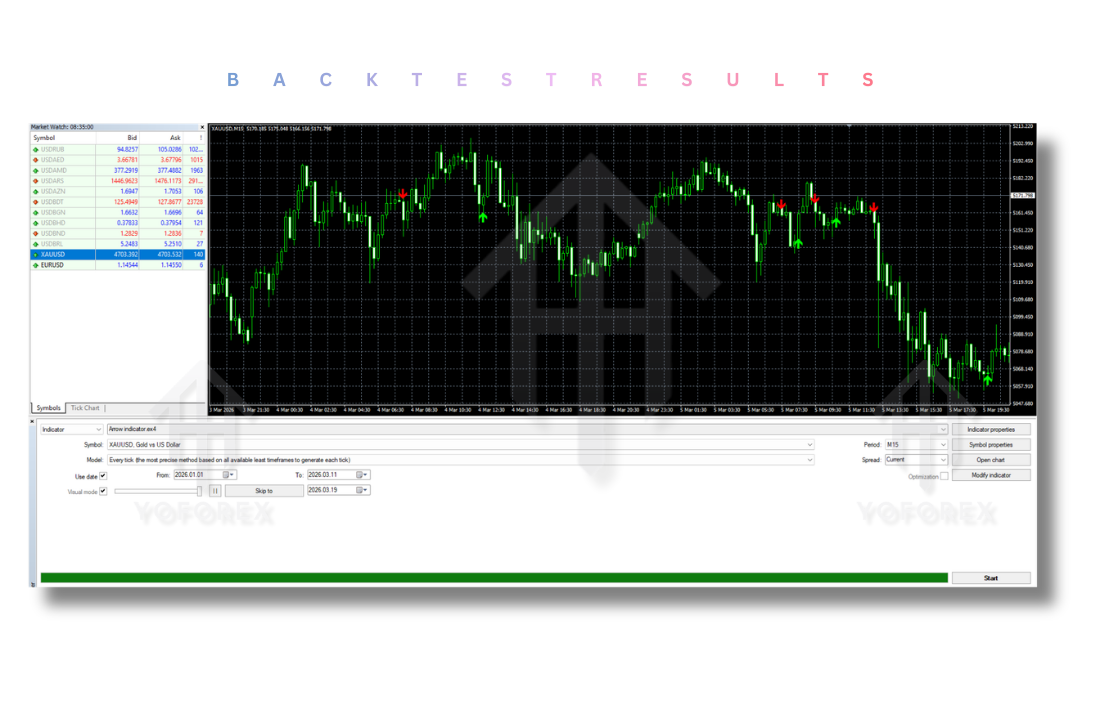
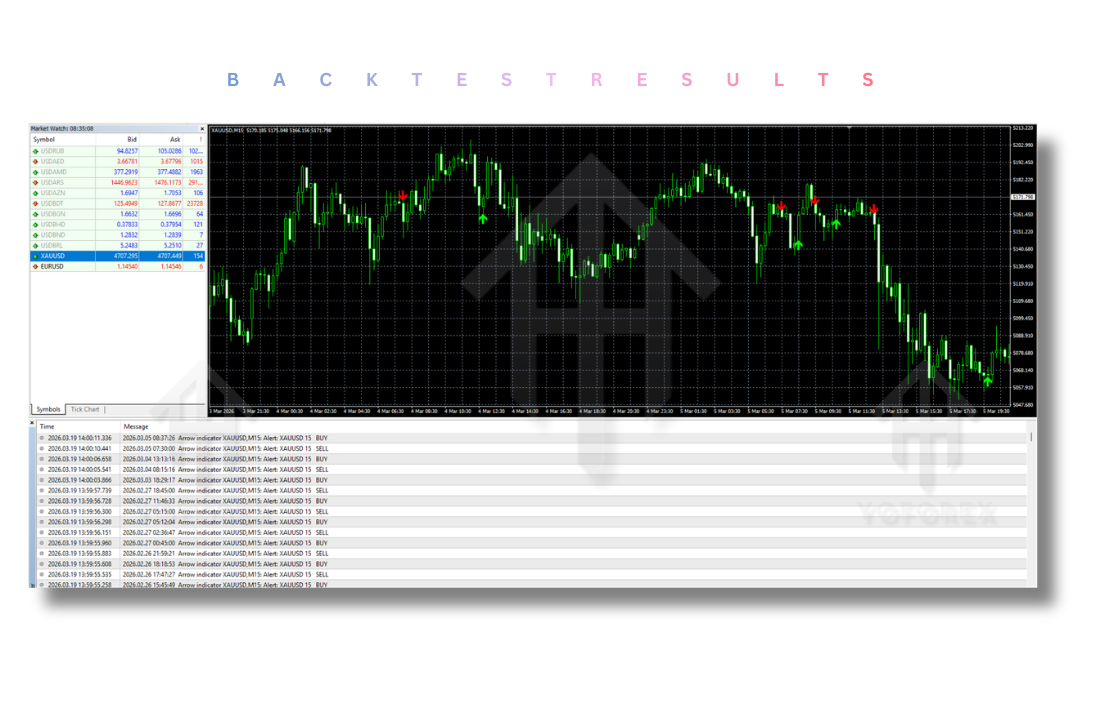
Backtesting and Performance Expectations
While specific backtesting results for your version of the Arrow Indicator V1.0 would require running tests in your MT4 Strategy Tester, we can infer performance characteristics.
Because the Arrow Indicator relies on a confluence of factors, it is likely to excel in trending environments on XAUUSD. During the London or New York sessions, when Gold makes its big moves, the Arrow Indicator should capture substantial trends.
However, be aware that during low-volatility periods or ranging markets, even the best Arrow Indicator V1.0 may produce whipsaws. The “Magic Filter” helps, but no indicator is 100% accurate. Historical data suggests that multi-filter Arrow Indicator systems can achieve win rates north of 60% when properly optimized for a specific pair like XAUUSD .
Installation Guide for the Arrow Indicator V1.0
Getting the Arrow Indicator onto your MT4 chart is a straightforward process. Follow these steps to install your Arrow Indicator correctly :
- Download the File: Ensure you have the Arrow Indicator file. It will usually have the extension
.ex4(compiled) or.mq4(source code). - Open MT4 Data Folder: Launch your MetaTrader 4 platform. At the top menu, click File -> Open Data Folder.
- Navigate to Indicators: In the folder that opens, double-click MQL4, then double-click Indicators.
- Copy the File: Drag and drop your Arrow Indicator file (the
.ex4or.mq4file) into this Indicators folder. - Refresh: Go back to MT4. In the Navigator window (Ctrl+N), right-click anywhere and select Refresh. Your Arrow Indicator V1.0 should now appear in the list.
- Apply to Chart: Simply drag the Arrow Indicator from the Navigator onto your XAUUSD M15 chart.
Advantages and Disadvantages of the Arrow Indicator V1.0 MT4
Like any tool, the Arrow Indicator V1.0 has its strengths and limitations.
Advantages
- Objectivity: It removes the guesswork. You either have a green indicator or you don’t.
- Time-Saving: The indicator does the heavy lifting of analyzing multiple indicators simultaneously .
- Beginner-Friendly: The visual nature of the indicator makes it easy for new traders to identify potential setups .
- Versatility: While optimized for Gold, the indicator can be adapted for Forex majors and indices .
Disadvantages
- Lagging Nature: Because the indicator relies on multiple lagging indicators (MAs, RSI), the signal might come slightly after the initial price move.
- Parameter Sensitivity: The indicator is highly sensitive to its input settings. Using the wrong settings for the market conditions can lead to poor performance.
- Requires Confluence: It is best practice not to trade the indicator blindly; using it with support/resistance levels increases success rates .
Who Should Use the Arrow Indicator?
The Arrow Indicator V1.0 is suitable for a wide range of traders. If you are a scalper or day trader focusing on the M15 chart, this tool can help you pinpoint quick entries during volatile sessions . If you are a swing trader, you can use the Arrow Indicator on higher timeframes to catch major reversal points .
Furthermore, if you are a trader who struggles with analysis paralysis—staring at multiple indicators without a clear plan—the Arrow Indicator provides a consolidated, clear signal to build your strategy around.
Why Choose This Arrow Indicator Over Other Forex Tools?
The market is flooded with forex robots and indicators. However, the Arrow Indicator V1.0 distinguishes itself through its holistic approach. Many arrow indicators might simply plot signals based on an RSI crossover . This Arrow Indicator, however, synthesizes data from price action (Bollinger Bands), momentum (RSI), trend (MAs), and market power (Bulls/Bears Power).
This means you aren’t just buying a red or green dot; you are buying a consensus view of the market. This layered approach makes the Arrow Indicator more resilient to market noise compared to simpler systems. It serves not just as a trigger, but as a confirmation tool, giving you the confidence to execute trades in the fast-moving XAUUSD market.
Conclusion
The Arrow Indicator V1.0 for MT4 is more than just a pretty face on your chart; it is a comprehensive trading system compressed into a single visual tool. By understanding its components—the moving averages, the RSI, the Bollinger Bands, and the unique Magic Filter—you can harness its full potential.
For trading XAUUSD on the M15 timeframe, this Arrow Indicator offers a disciplined approach to capturing Gold’s price swings. Remember, the Arrow Indicator is a tool to aid your decision-making, not a guarantee of profit. Combine its signals with sound risk management and a solid understanding of market structure. Download the Arrow Indicator V1.0, install it on your MT4, and start practicing on your demo account today. Your journey to mastering Gold trading could very well begin with the next arrow your Indicator draws on the chart.
Frequently Asked Questions (FAQ)
Q1: Is the Arrow Indicator V1.0 a repainting indicator?
A: A well-coded Arrow Indicator like V1.0 typically prints signals at the opening of a new candle based on the previous closed candle’s data. However, to be safe, always ensure your version relies on closed candle data. You can test this by watching the Arrow Indicator in real-time and checking if an arrow disappears after the candle closes .
Q2: Can I use the Arrow Indicator for currencies other than XAUUSD?
A: Absolutely. While this guide focuses on XAUUSD M15 due to its volatility and trend characteristics, the Arrow Indicator V1.0 is versatile. It works well on major pairs like EURUSD and GBPUSD, though you may need to adjust the input parameters to suit the lower volatility of these pairs .
Q3: What is the “Magic Filter Period” in the settings?
A: The Magic Filter is a unique component of this Arrow Indicator. It acts as a smoothing mechanism to reduce noise. A setting of “1” (as per your input image) usually means the filter is at its most sensitive, reacting to the slightest changes. Increasing this period would require more significant confirmation, thus filtering out more signals but potentially missing some entries
Support & Disclaimer
Support
If you need help installing or configuring your EA, or face any kind of bug, feel free to reach out on:
WhatsApp: https://wa.me/+443300272265
Telegram Group: https://t.me/yoforexrobot
Disclaimer: Forex and gold trading involve risk. Past performance doesn’t guarantee future results. Always test robots on demo before live trading and use proper risk management.
Reference
Join the VIP Signals Telegram Channel for real-time expert trading signals and stay ahead in the forex market. Get personalized strategies by becoming a part of our Real Account Management Telegram Channel and optimize your trading experience. If you’re aiming to Pass PropFirm Challenges, join our dedicated channel for tips and proven methods. Start managing your capital effectively with expert advice from our Funded Account Management Telegram Channel. For advanced traders, our HFT EA / Passing Telegram Channel offers high-frequency trading insights and strategies to boost your performance.