CM TSO EA V1.0 MT4 – Advanced Automated Forex Trading for Major Pairs on Any Timeframe
Introduction
In the fast-paced world of forex trading, the ability to execute precise, timely trades can make all the difference. However, not all traders have the time or expertise to constantly monitor the markets. That’s where CM TSO EA V1.0 MT4 comes in—a cutting-edge Expert Advisor designed to handle the heavy lifting of forex trading with full automation.
Optimized for major forex pairs and adaptable to any timeframe, CM TSO EA offers precision trading without requiring constant human intervention. Whether you’re a beginner seeking to automate your strategy or an experienced trader looking for reliable, consistent performance, this EA can help you execute trades efficiently and profitably.
What is CM TSO EA V1.0 MT4?
CM TSO EA V1.0 is an advanced MetaTrader 4 (MT4) Expert Advisor developed to enhance your trading strategy by automating the execution of buy and sell orders. Built with robust algorithms, the EA is designed to work seamlessly on major forex pairs like EURUSD, GBPUSD, USDJPY, and others, adapting to any timeframe from scalping (M1) to longer-term trading (D1).
This EA uses a sophisticated combination of technical analysis, market indicators, and risk management strategies to identify and execute the best trading opportunities. Whether you are using it for quick trades or holding positions for longer durations, CM TSO EA offers flexibility and automation with a focus on minimizing risk and maximizing returns.
Key Features of CM TSO EA V1.0 MT4
1. Optimized for Major Currency Pairs
- Specifically designed to work on major forex pairs like EUR/USD, GBP/USD, USD/JPY, and more.
- Offers stability and high liquidity with these popular pairs for smoother execution.
2. Multi-Timeframe Compatibility
- Works effectively on any timeframe, from scalping on M1 to longer-term strategies on H1 or D1.
- Adaptable to your preferred trading style, whether you trade frequently or hold positions for a longer period.
3. Risk Management & Money Management
- Automatically calculates lot sizes based on risk percentage, ensuring proper risk management on each trade.
- Prevents overexposure by adjusting position sizes in real-time according to account equity and risk settings.
4. Built-In Stop Loss and Take Profit
- Automatic placement of stop loss and take profit orders to protect capital and lock in profits.
- You can adjust these settings to suit your trading preferences and account balance.
5. No Need for Constant Monitoring
- The EA runs 24/7, executing trades based on your predefined rules, so you don’t need to be glued to the screen.
- Perfect for traders with busy schedules or those who can’t dedicate time to constant market monitoring.
6. Easy Setup and Customizable
- Simple to install and set up in MetaTrader 4.
- Customizable parameters allow you to tailor the EA according to your trading preferences and risk tolerance.
How CM TSO EA V1.0 MT4 Works
CM TSO EA V1.0 MT4 works by leveraging market data, technical indicators, and trading strategies to identify optimal entry and exit points. Here’s how it functions:
- Market Analysis: The EA continuously scans the market for price movements, trends, and other relevant data points.
- Signal Generation: Using a combination of technical indicators (e.g., moving averages, RSI, MACD), it identifies buy or sell signals.
- Trade Execution: The EA opens and closes positions according to the generated signals, ensuring timely execution.
- Risk Management: Stops are placed automatically, and take profit targets are set to ensure that your risk-to-reward ratio is controlled.
- Continuous Operation: Once activated, CM TSO EA operates 24/7 without any need for manual intervention.
Why Choose CM TSO EA V1.0 MT4?
1. Precision and Consistency
CM TSO EA uses a reliable combination of technical analysis and market data to provide consistent trading signals, free from emotional influences that can affect manual trading.
2. Flexible for All Trading Styles
With its multi-timeframe compatibility, this EA is ideal for both scalpers who prefer short trades and swing traders who prefer holding positions over several days or weeks.
3. Automated Risk Management
The built-in risk management system automatically calculates position sizes based on your risk settings, ensuring that your trades are always within safe parameters.
4. Time-Saving Solution
No need to watch the markets all day. The EA works in the background, identifying and executing trades for you, saving you time and effort.
Best Settings for CM TSO EA V1.0 MT4
While the default settings work well for most traders, you can optimize it further by adjusting the following:
- Pairs: EURUSD, GBPUSD, USDJPY (but works on any major pair)
- Timeframe: Works on any timeframe, but best results on H1 for swing traders and M1/M5 for scalpers.
- Lot Size: Risk-based settings (e.g., 1–2% risk per trade)
- Stop Loss & Take Profit: Default settings are ideal, but you can customize based on your preferred risk-to-reward ratio.
- Broker: Low-spread brokers with fast execution are recommended.
Testing & Proven Performance
Backtesting Results:
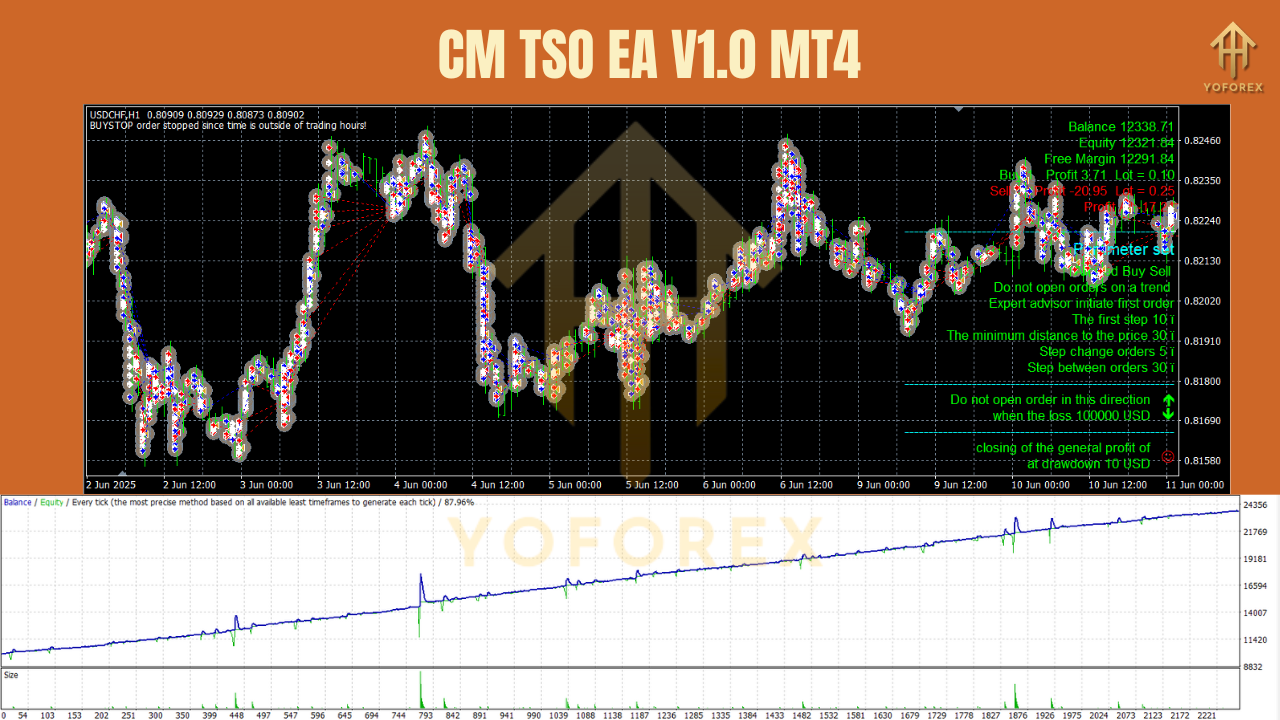
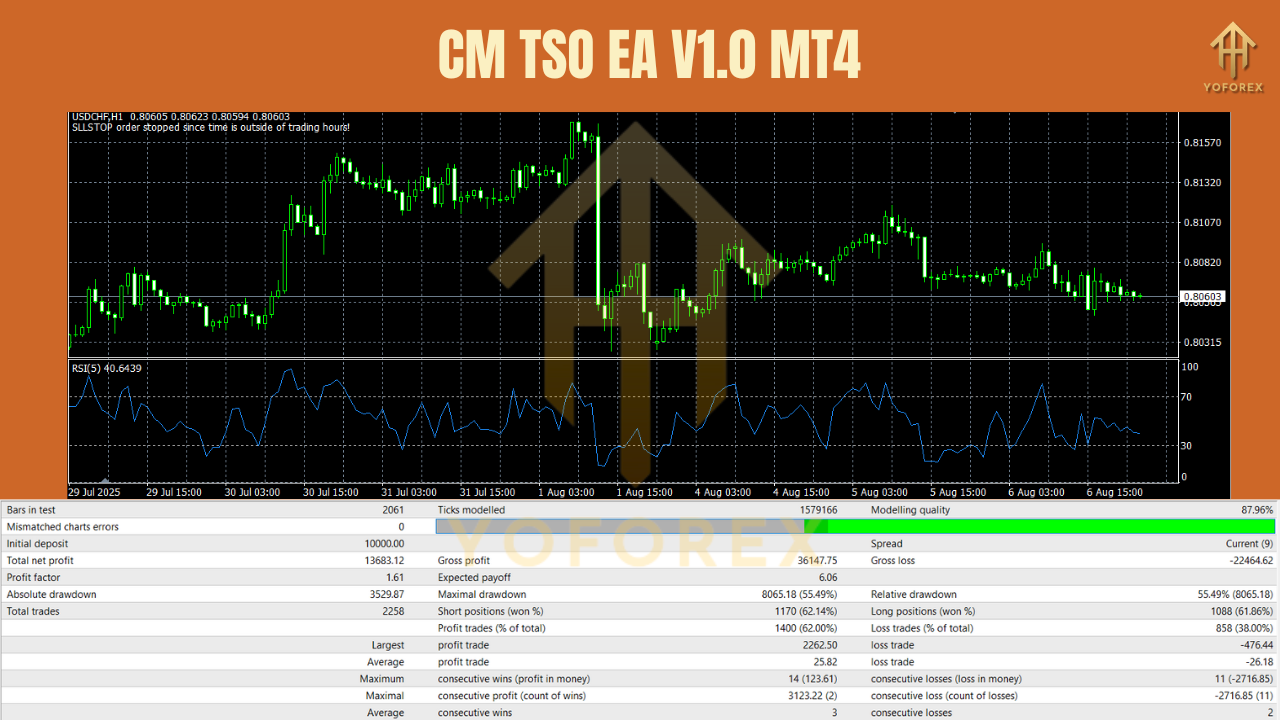
CM TSO EA has been thoroughly backtested using historical data for various pairs and timeframes. The results consistently show:
- High win rates with optimized trade entry and exit points
- Low drawdown through advanced risk management features
- Steady profit growth across multiple market conditions
Forward Testing Results:
The EA has also been forward-tested on live accounts, with real-time performance proving its capability to:
- Achieve consistent monthly growth
- Handle volatile market conditions with ease
- Execute trades with low slippage on reliable brokers
Tips for Maximizing CM TSO EA Performance
- Choose a Reliable VPS – To ensure the EA runs continuously without interruptions.
- Avoid Major News Events – Disable trading during high-impact news releases to avoid market volatility.
- Regularly Update Settings – Review performance periodically and optimize settings for evolving market conditions.
- Monitor Trades Periodically – Although fully automated, it’s still important to keep an eye on performance to ensure the EA is executing according to your preferences.
Pros and Cons of CM TSO EA V1.0 MT4
Pros:
- Compatible with major forex pairs and any timeframe
- Fully automated trading system
- Built-in risk management tools for controlled trading
- Proven backtested and forward-tested performance
- Easy to set up and customize
Cons:
- Performance depends on broker execution speed
- May require optimization for exotic currency pairs
Who Should Use CM TSO EA V1.0 MT4?
This EA is ideal for:
- Beginner traders looking for a fully automated trading system
- Busy traders who can’t monitor the markets constantly
- Experienced traders looking to automate their strategies
- Scalpers and swing traders who need consistent, efficient execution
Conclusion
The CM TSO EA V1.0 MT4 is a robust and flexible automated trading solution for major forex pairs. With its multi-timeframe compatibility, built-in risk management, and easy setup, it’s a valuable tool for both novice and seasoned traders.
Whether you’re looking to automate your scalping, swing trading, or long-term strategies, CM TSO EA provides the precision and consistency you need for profitable trading. By utilizing its advanced algorithms and technical indicators, you can maximize your trading potential with minimal effort.
Start using CM TSO EA today and take your trading to the next level with automation!
Join our Telegram for the latest updates and support