
Gecko EA V1.2 MT4
Introduction to Gecko EA V1.2 MT4
The Forex market operates twenty-four hours a day and reacts instantly to global economic events, liquidity shifts, and institutional activity. For many traders, consistently analyzing these conditions in real time can be challenging, especially when emotions such as fear and greed interfere with decision-making. This is where automated trading systems have become increasingly valuable. Gecko EA is designed to address these challenges by offering a structured, rule-based approach to Forex trading on the MetaTrader 4 platform. Instead of relying on manual entries or impulsive decisions, the system executes trades automatically based on predefined market conditions, risk parameters, and price behavior analysis. By removing emotional bias and enforcing disciplined execution, Gecko EA aims to help traders participate in the market with greater consistency, control, and efficiency. The Expert Advisor is built for traders who prioritize stability, risk awareness, and long-term sustainability rather than short-lived aggressive gains.
Overview of Gecko EA V1.2 MT4
Gecko EA V1.2 MT4 is a fully automated Forex Expert Advisor developed to operate within a controlled and systematic trading framework. The EA continuously monitors market conditions, evaluates trend direction, volatility levels, and price structure, and executes trades only when predefined criteria are met. Rather than depending on high-risk techniques such as martingale or grid recovery, Gecko EA focuses on precision-based entries and disciplined exits, ensuring that each trade carries a calculated level of risk. Version 1.2 introduces refinements in execution logic, stability, and internal filtering mechanisms, making the system more adaptable to varying market environments. Designed to work seamlessly on the MetaTrader 4 platform, Gecko EA is suitable for traders seeking automation that emphasizes capital protection, structured decision-making, and consistent performance across different market phases. The system is not intended to replace sound risk management but to complement it through automation and strategic discipline.
How Gecko EA V1.2 MT4 Works?
-
Continuous Market Scanning
The bot constantly monitors live Forex price data in real time once it is attached to a chart. It does not wait for a single indicator signal; instead, it evaluates overall market behavior, including price direction, momentum strength, and volatility conditions. This continuous scanning allows the bot to stay alert for valid trading opportunities while ignoring random price movements that do not meet its internal criteria. -
Trend & Market Structure Evaluation
Before placing any trade, the bot evaluates whether the market is showing directional clarity or ranging behavior. This step helps the system avoid entries during unclear or choppy conditions where false signals are common. By focusing on structured price movement, the bot increases the probability that trades align with broader market intent rather than noise. -
Volatility-Based Trade Filtering
Volatility plays a major role in the bot’s decision-making process. If the market is too volatile, such as during unexpected news or sudden spikes, the bot may avoid trading to reduce risk. If volatility is too low, it may also stay inactive to avoid weak price movement. This balance helps maintain stable execution quality. -
High-Probability Entry Identification
The bot does not enter trades immediately after detecting market direction. It waits for price to reach predefined zones that match its internal logic. This patience-based approach helps avoid premature entries and improves overall trade accuracy. -
Predefined Risk Allocation
Each trade is opened with calculated position sizing based on user-defined risk settings. This ensures that no single trade can cause disproportionate damage to the account. Risk remains consistent regardless of account growth or drawdown. -
Automated Trade Management
Once a trade is opened, the bot actively manages it without user intervention. Stop loss and take profit levels are set automatically, and the trade is closed when either the profit objective is reached or the market invalidates the setup. -
Strict Non-Recovery Policy
The bot does not attempt to recover losses by increasing lot size or stacking trades. Losing trades are treated as part of normal trading activity, helping preserve long-term account stability.
Key Features of Gecko EA V1.2 MT4
-
Complete Automation from Entry to Exit
The bot removes the need for manual trade execution entirely. From market analysis to trade closure, everything is handled automatically. This is especially beneficial for traders who struggle with emotional decision-making or inconsistent execution. -
Advanced Internal Risk Controls
Risk management is not optional or external; it is built directly into the system. Users can define conservative or moderate risk parameters, ensuring that exposure remains controlled even during losing streaks. -
Emotion-Free Trading Environment
Human emotions such as fear, greed, revenge trading, and hesitation are completely eliminated. The bot executes trades strictly according to logic, regardless of previous wins or losses. -
Adaptive Logic for Different Market Conditions
The bot adjusts its behavior based on market volatility and structure. This adaptability helps it remain functional across trending, consolidating, and transitioning market phases. -
Stable MT4 Integration
Built specifically for the MetaTrader 4 platform, ensuring reliable execution, wide broker compatibility, and low system overhead.
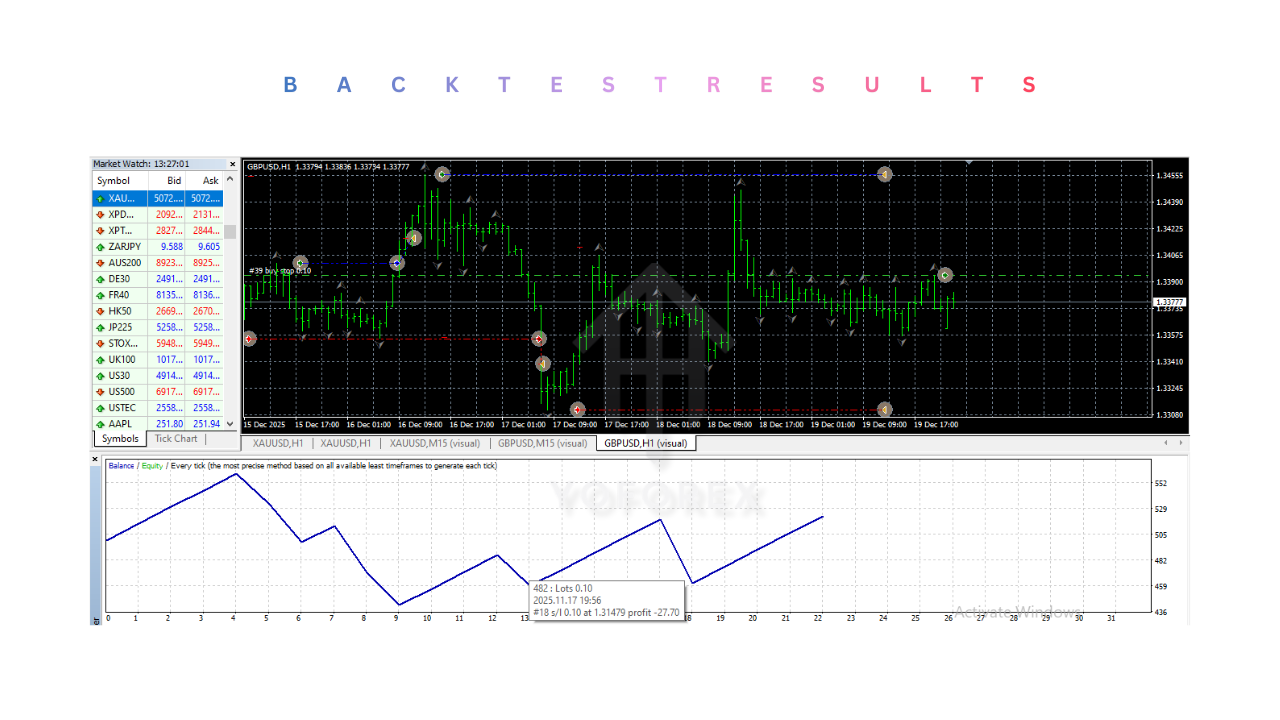
Installation & Setup Guide for Gecko EA V1.2 MT4
-
Downloading the EA
The Expert Advisor file must be downloaded from a secure and trusted source. Ensure the file is compatible with MetaTrader 4 before proceeding. -
Accessing the MT4 Data Folder
Inside MetaTrader 4, navigate to the “File” menu and select “Open Data Folder.” This opens the internal directory where platform files are stored. -
Correct File Placement
Place the EA file inside theMQL4 → Expertsfolder. Incorrect placement may prevent the EA from appearing in the platform. -
Restarting the Platform
Restarting MT4 refreshes the system and allows the platform to recognize the new Expert Advisor. -
Chart Attachment
Attach the EA to a suitable currency pair chart and timeframe. Ensure that AutoTrading is enabled at the top of the platform. -
Parameter Configuration
Adjust lot size, risk percentage, and other parameters carefully. Conservative settings are recommended for beginners and long-term traders. -
Demo Testing Phase
Running the EA on a demo account helps users understand its behavior, trade frequency, and drawdown characteristics before risking real funds. -
VPS Deployment
A VPS ensures uninterrupted operation, stable internet connection, and consistent trade execution even when the user’s computer is offline.
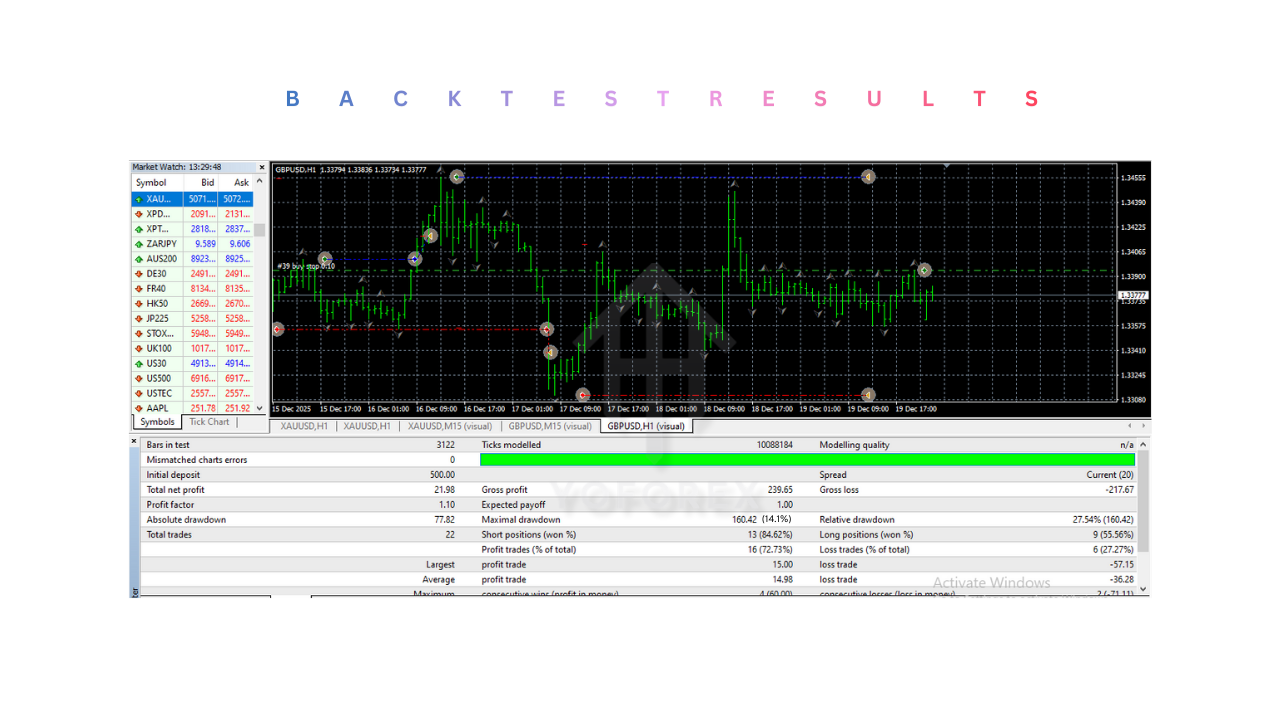
Advantages of Gecko EA V1.2 MT4
-
Strong Discipline Enforcement
The bot strictly follows predefined rules, preventing impulsive trades that often lead to losses. -
Capital Preservation Focus
Losses are controlled and predefined, helping traders survive unfavorable market periods. -
Consistency Over Time
The same logic is applied to every trade, which is critical for evaluating performance and maintaining stability. -
Reduced Time Commitment
Traders do not need to monitor charts continuously, making it ideal for working professionals. -
Suitable for Portfolio Diversification
The bot can be used alongside manual strategies or other automated systems.
Disadvantages of Gecko EA V1.2 MT4
-
Lower Trade Frequency
Because the bot avoids poor-quality setups, trade frequency may be lower than aggressive systems. -
Requires Market Patience
Users must accept periods of inactivity when market conditions are not favorable. -
Dependent on Broker Conditions
High spreads, slippage, or poor execution can negatively impact performance. -
Additional VPS Cost
While optional, VPS usage is strongly recommended and adds to overall trading expenses.
Who Should Use Gecko EA V1.2 MT4?
-
Beginner Traders
Beginners benefit from structured execution and built-in risk controls that reduce common mistakes. -
Intermediate Traders
Traders with some experience can use the bot to automate part of their strategy or diversify trading methods. -
Professional Traders
Professionals may integrate the bot into a broader portfolio as a low-maintenance automated component. -
Busy Individuals
Ideal for traders who cannot actively monitor the market throughout the day.
Why Use Gecko EA V1.2 MT4?
-
Consistency Beats Emotion
Long-term success in Forex depends on consistent execution, which the bot enforces automatically. -
Time-Saving Automation
Market analysis and trade execution are handled without manual effort. -
Risk-Aware Trading Philosophy
The system prioritizes survival and sustainability rather than aggressive profit chasing. -
Structured Trading Approach
Traders who value logic, discipline, and repeatable processes will benefit most from this bot.