
HiLo Indicator V2.0 MT4

HiLo Indicator V2.0 MT4

Introduction

Technical indicators play an important role in modern forex trading. Traders use indicators to analyze market trends, identify entry and exit points, and understand the overall direction of price movements. Among the many indicators available for MetaTrader platforms, trend-following indicators are widely used because they help traders recognize the direction of the market quickly.Many traders struggle with identifying trend direction and optimal entry points when relying solely on raw price action. Market noise, false breakouts, and sudden volatility often make it difficult to determine whether the market is trending upward or downward. This is where specialized technical indicators can help simplify the trading process.A popular tool used by traders for trend identification is HiLo Indicator V2.0 MT4, designed for the MetaTrader 4 platform. The indicator is built to highlight market trends by plotting dynamic levels based on recent highs and lows. By doing so, it provides traders with visual guidance regarding possible trend direction and potential trade signals.Instead of manually analyzing market highs and lows, this indicator automatically calculates and plots the information directly on the chart. This allows traders to quickly identify bullish and bearish market conditions. HiLo Indicator V2.0 MT4 helps reduce confusion and provides a clearer view of the trend structure.Trend-following indicators are commonly used by both beginner and experienced traders because they simplify market analysis. They are especially helpful for traders who prefer structured trading strategies that rely on objective signals rather than subjective interpretation.


Overview

Trend analysis is one of the most fundamental aspects of trading. Traders often attempt to determine whether the market is moving upward, downward, or sideways before making trading decisions.HiLo Indicator V2.0 MT4 works by analyzing recent price highs and lows and plotting dynamic levels on the chart. These levels help traders understand whether the market is currently in an uptrend or a downtrend.When the market price moves above the plotted line, it may indicate bullish momentum. Conversely, when price moves below the indicator line, it may signal bearish market conditions. By visually highlighting these trend changes, the indicator helps traders quickly identify possible entry and exit opportunities.Unlike complex trading systems that rely on multiple indicators, the HiLo Indicator HiLo Indicator V2.0 MT4 primarily on trend direction. This simplicity makes it easy to interpret and apply to various trading strategies.

The indicator can be used across different trading styles, including:

  • Scalping
  • Intraday trading
  • Swing trading
  • Trend-following strategies

Because it is compatible with MetaTrader 4, traders can easily add the indicator to their existing charts and use it alongside other technical tools.Another advantage of HiLo Indicator V2.0 MT4 is its flexibility. Traders can apply it to different currency pairs, commodities, or indices depending on their trading preferences.However, like all technical indicators, it works best when used alongside proper risk management and additional confirmation tools such as support and resistance levels or momentum indicators.

How HiLo Indicator V2.0 MT4 Works?

  1. Analyzes Recent Price Highs and Lows
    HiLo Indicator V2.0 MT4 continuously studies the most recent high and low price levels on the chart. By analyzing these values, the indicator calculates a dynamic line that reflects the current market direction.

  2. Plots Dynamic Trend Levels on the Chart
    HiLo Indicator V2.0 MT4 automatically plots lines on the chart based on the calculated highs and lows. These lines act as dynamic support and resistance levels, helping traders visualize market direction.

  3. Identifies Market Trend Direction
    HiLo Indicator V2.0 MT4 helps traders determine whether the market is in an uptrend or downtrend.

  • When the price moves above the indicator line, the market may be in a bullish trend.

  • When the price moves below the indicator line, the market may be in a bearish trend.

  1. Provides Visual Trading Signals
    HiLo Indicator V2.0 visually displays signals directly on the chart. The plotted lines help traders quickly identify potential trend changes and possible trading opportunities.

  2. Acts as Dynamic Support and Resistance
    The lines generated by HiLo Indicator V2.0 MT4 often behave like dynamic support and resistance zones. Price reactions near these levels can provide important clues about potential market reversals or trend continuation.

  3. Helps Identify Entry Opportunities
    HiLo Indicator V2.0 MT4 can assist traders in finding possible trade entries.

  • Buy opportunities may appear when price crosses above the indicator line.

  • Sell opportunities may appear when price moves below the indicator line.

  1. Works Across Multiple Timeframes
    HiLo Indicator V2.0 MT4 can be applied to different timeframes such as M5, M15, H1, or H4. This flexibility allows traders to use the indicator for scalping, intraday trading, or swing trading.

  2. Filters Market Noise
    By focusing on significant highs and lows, HiLo Indicator V2.0 helps reduce short-term market noise and makes it easier to identify the underlying trend.

  3. Updates in Real Time
    HiLo Indicator V2.0 updates its calculations as new price data appears. This allows the indicator to adjust dynamically as market conditions change.

  4. Works with Other Technical Indicators
    HiLo Indicator V2.0 MT4 can be combined with other tools such as RSI, MACD, Moving Averages, or support and resistance levels to confirm trading signals and improve trading accuracy.

Key Features

  • Automatic Trend Detection
    HiLo Indicator V2.0 MT4 is designed to automatically detect the direction of the market trend. By analyzing recent price highs and lows, the indicator helps traders quickly determine whether the market is trending upward or downward.

  • Dynamic High and Low Calculation
    HiLo Indicator V2.0 MT4 continuously calculates the highest and lowest price levels within a specific period. These values are used to generate indicator lines that represent the current market structure.

  • Clear Visual Trend Lines
    HiLo Indicator V2.0 plots clear lines directly on the trading chart. These lines visually display the trend direction, allowing traders to identify potential trading opportunities quickly.

  • Simple and Easy to Understand
    HiLo Indicator V2.0 MT4 is designed to be user-friendly. The indicator provides straightforward signals that are easy for both beginner and experienced traders to interpret.

  • Works on Multiple Timeframes
    HiLo Indicator V2.0 can be used across different chart timeframes such as M5, M15, H1, and H4. This flexibility allows traders to apply the indicator to various trading styles including scalping, day trading, and swing trading.

  • Supports Trend-Following Strategies
    HiLo Indicator V2.0 MT4 works well with trend-following trading strategies. Traders can use the indicator to identify the direction of the trend and enter trades in alignment with the prevailing market momentum.

  • Dynamic Support and Resistance Levels
    The lines generated by HiLo Indicator V2.0 often act as dynamic support and resistance zones. Traders can use these levels to anticipate possible price reactions and potential reversals.

  • Real-Time Chart Updates
    HiLo Indicator V2.0 updates automatically as new price data becomes available. This real-time adjustment ensures that the indicator reflects the most recent market conditions.

  • Compatible with Other Technical Tools
    HiLo Indicator V2.0 MT4 can be used alongside other technical indicators such as Moving Averages, RSI, MACD, and support/resistance analysis. Combining multiple indicators can help confirm trading signals.

  • Lightweight and Efficient
    HiLo Indicator V2.0 is designed to run efficiently on the MetaTrader 4 platform. The indicator does not consume excessive system resources and can be applied to multiple charts simultaneously.

  • Customizable Settings
    HiLo Indicator V2.0 allows traders to modify certain parameters according to their trading preferences. Adjusting the settings helps traders adapt the indicator to different market conditions.

  • Helpful for Entry and Exit Timing
    HiLo Indicator V2.0 MT4 assists traders in identifying potential entry and exit points. The indicator’s trend signals can help traders determine when to open or close positions based on market direction.
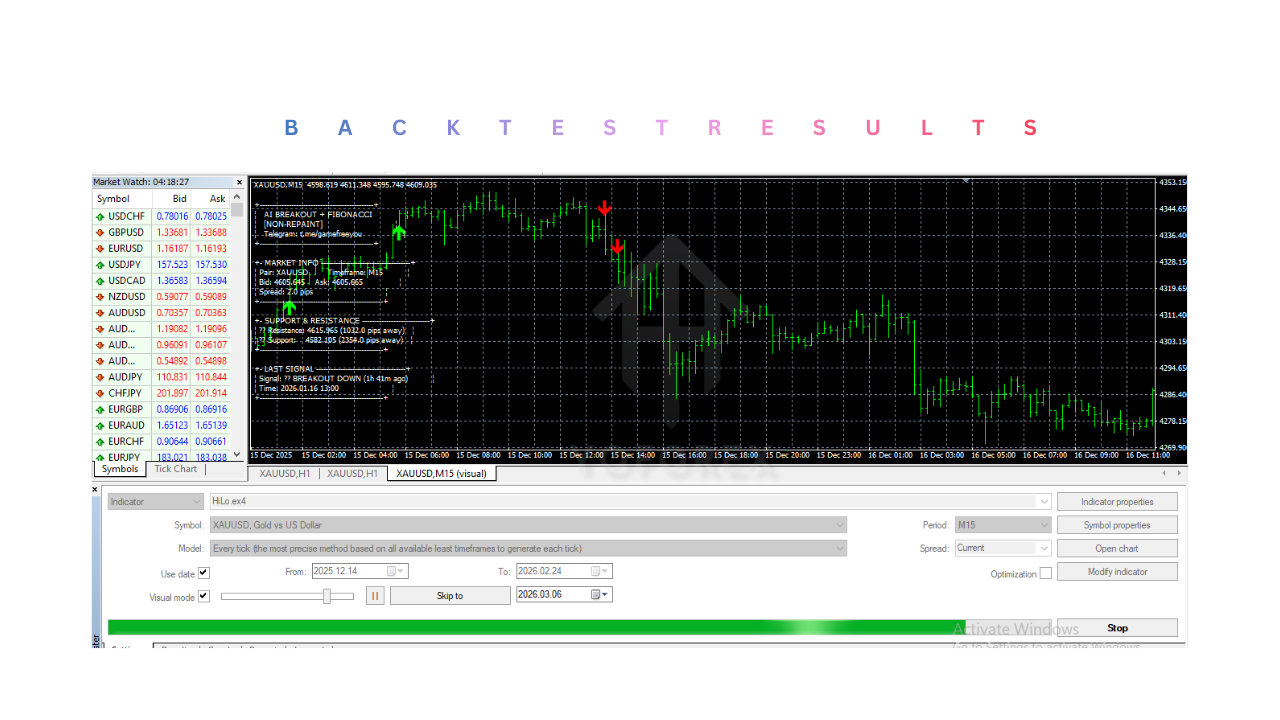
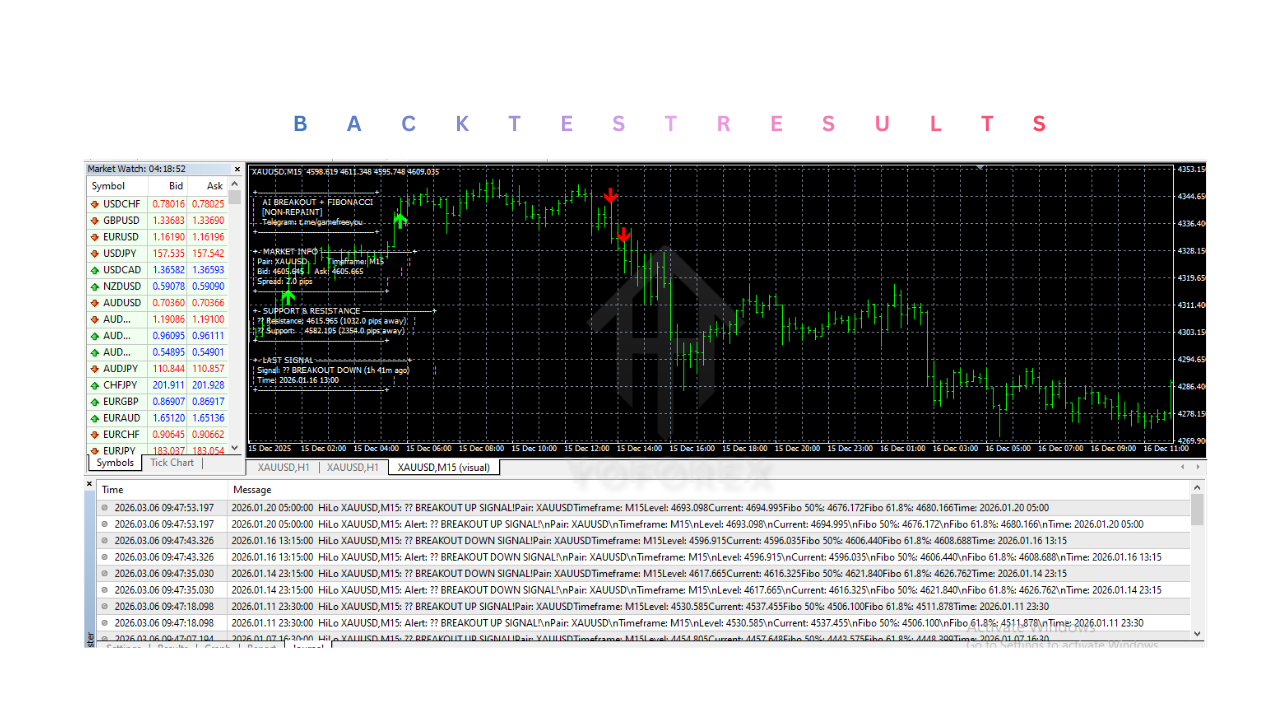
HiLo Indicator V2.0 MT4

Installation & Setup Guide

  1. Download the Indicator File
    Download the HiLo Indicator V2.0 MT4 file from the source where the indicator is provided. The file is typically available in .ex4 or .mq4 format, which is compatible with the MetaTrader 4 platform.

  2. Open the MetaTrader 4 Platform
    Launch the MetaTrader 4 (MT4) trading platform on your computer. Ensure that your trading account is logged in and the platform is connected to the broker server.

  3. Open the MT4 Data Folder
    In the MetaTrader 4 platform, click File in the top menu and select Open Data Folder. This will open the directory where all platform files are stored.

  4. Navigate to the Indicators Folder
    Inside the data folder, open the MQL4 folder, then locate and open the Indicators folder. This folder is used to store all custom indicators.

  5. Copy the Indicator File
    Copy the HiLo Indicator V2.0 file and paste it into the Indicators folder. This step installs the indicator into the MetaTrader 4 platform.

  6. Restart or Refresh MetaTrader 4
    Restart the MetaTrader 4 platform so the indicator loads properly. Alternatively, open the Navigator panel, right-click inside it, and select Refresh to update the list of indicators.

  7. Locate the Indicator in the Navigator Panel
    Open the Navigator window on the left side of the MetaTrader 4 platform. Under the Indicators section, find HiLo Indicator V2.0 MT4

  8. Open a Trading Chart
    Open a chart for the currency pair or instrument you want to analyze. HiLo Indicator V2.0 MT4 can be applied to any chart within the MT4 platform.

  9. Attach the Indicator to the Chart
    Drag the indicator from the Navigator panel onto the chart or double-click the indicator name. A settings window will appear before the indicator is applied.

  10. Configure Indicator Settings
    Adjust the indicator parameters according to your trading preferences. Settings may include period values, display style, or other customizable options.

  11. Confirm Indicator Activation
    After applying the indicator, the trend lines or signals generated by HiLo Indicator V2.0 MT4 will appear on the chart. This confirms that the indicator is active and functioning.

  12. Monitor the Chart for Signals
    Observe the chart as the indicator updates in real time. HiLo Indicator V2.0 MT4 will continuously analyze price highs and lows and display trend signals as new market data becomes available.

HiLo Indicator V2.0 MT4

Advantages

1. Clear Trend Identification

HiLo Indicator V2.0 MT4 helps traders quickly identify the current market trend by analyzing recent highs and lows. The indicator visually shows whether the market is moving upward or downward, making it easier to understand market direction.

2. Simple and Easy to Use

HiLo Indicator V2.0 MT4 is designed with simplicity in mind. The signals are easy to interpret, which makes the indicator suitable for both beginner and experienced traders.

3. Automatic High and Low Calculation

HiLo Indicator V2.0 automatically calculates the highest and lowest prices within a selected period. This eliminates the need for traders to manually identify these levels on the chart.

4. Supports Trend-Following Strategies

HiLo Indicator V2.0 MT4 works effectively with trend-following trading strategies. Traders can use the indicator to enter trades in the direction of the prevailing market trend.

5. Works on Multiple Timeframes

HiLo Indicator V2.0 can be applied to various timeframes such as M5, M15, H1, and H4. This flexibility allows traders to use the indicator for scalping, intraday trading, or swing trading.

6. Provides Dynamic Support and Resistance Levels

The lines plotted by HiLo Indicator V2.0 often act as dynamic support and resistance zones. These levels help traders identify potential reversal areas or continuation points.

7. Real-Time Market Updates

HiLo Indicator V2.0 updates automatically as new price data appears on the chart. This ensures that the indicator reflects the most recent market conditions.

8. Compatible With Other Indicators

HiLo Indicator V2.0 MT4 can easily be combined with other technical indicators such as RSI, MACD, or Moving Averages. Using multiple indicators can help confirm trading signals.

9. Lightweight and Efficient

HiLo Indicator V2.0 is a lightweight tool that runs smoothly on the MetaTrader 4 platform. It does not require high system resources and can be used on multiple charts simultaneously.

10. Improves Trading Discipline

By providing structured signals based on market highs and lows, HiLo Indicator V2.0 helps traders maintain a disciplined trading approach.

Disadvantages

1. Lagging Indicator

HiLo Indicator V2.0 MT4 is based on historical price data, which means it may produce lagging signals. The indicator may confirm a trend only after the movement has already begun.

2. False Signals in Ranging Markets

HiLo Indicator V2.0 MT4 can generate false signals when the market is moving sideways or ranging. In such conditions, trend-following indicators may not perform well.

3. Cannot Predict Future Price Movements

HiLo Indicator V2.0 MT4 analyzes past price behavior to identify trends, but it cannot guarantee future market direction.

4. Should Not Be Used Alone

HiLo Indicator V2.0 works best when combined with other technical analysis tools. Using the indicator alone may increase the risk of incorrect trade decisions.

5. Sensitive to Market Volatility

During high volatility events such as major economic news releases, HiLo Indicator V2.0 signals may become less reliable.

6. Requires Proper Strategy Integration

Traders must incorporate the indicator into a well-planned trading strategy. Without a structured approach, the indicator alone may not provide consistent trading results.

7. Limited Market Context

HiLo Indicator V2.0 MT4 focuses mainly on trend direction and does not consider fundamental analysis or broader market conditions.

8. Requires Experience for Best Use

Although the indicator is simple to understand, traders still need experience to interpret signals properly and avoid false entries.

9. Not a Complete Trading System

HiLo Indicator V2.0 is only a technical analysis tool and not a full trading system. Traders must combine it with risk management and additional analysis.

10. Performance Depends on Market Conditions

The effectiveness of  HiLo Indicator V2.0 MT4 can vary depending on market conditions. Trending markets usually produce better results than choppy or unstable market environments.

Who Should Use HiLo Indicator V2.0 MT4?

1. Beginner Forex Traders

HiLo Indicator V2.0 MT4 is suitable for beginners who are learning how to identify market trends. The indicator provides clear visual signals that make it easier for new traders to understand whether the market is moving upward or downward.

2. Traders Who Prefer Simple Technical Tools

Some traders prefer simple indicators instead of complex trading systems. HiLo Indicator V2.0 MT4 offers straightforward trend signals, making it ideal for traders who want a clean and easy-to-read chart.

3. Trend-Following Traders

Traders who follow trend-based strategies can benefit from HiLo Indicator V2.0. The indicator helps identify the direction of the market so traders can enter trades that align with the prevailing trend.

4. Scalpers and Intraday Traders

HiLo Indicator V2.0 MT4 can be used on lower timeframes such as M5 or M15, making it useful for scalpers and intraday traders who look for short-term trading opportunities.

5. Swing Traders

Swing traders who hold positions for several hours or days can use HiLo Indicator V2.0 on higher timeframes like H1 or H4 to identify larger market trends.

6. Traders Using MetaTrader 4 Platform

HiLo Indicator V2.0 is designed specifically for the MetaTrader 4 platform. Traders already using MT4 can easily integrate the indicator into their existing trading setup.

7. Traders Who Combine Multiple Indicators

HiLo Indicator V2.0 MT4 works well when combined with other technical tools such as RSI, MACD, Moving Averages, or support and resistance analysis. Traders who prefer multi-indicator strategies may find this indicator useful.

Why Use HiLo Indicator V2.0 MT4?

1. Easy Trend Identification

HiLo Indicator V2.0 MT4 simplifies the process of identifying market trends. By analyzing price highs and lows, the indicator provides clear visual signals that help traders understand market direction quickly.

2. Saves Time in Market Analysis

Instead of manually analyzing price highs and lows, HiLo Indicator V2.0 automatically calculates these values and displays them on the chart.

3. Improves Trading Decisions

HiLo Indicator V2.0 MT4 helps traders avoid trading against the market trend. Following the trend often improves the probability of successful trades.

4. Provides Dynamic Support and Resistance Levels

The indicator’s plotted lines often act as dynamic support and resistance zones, helping traders identify possible price reaction levels.

5. Works Across Multiple Timeframes

HiLo Indicator V2.0 MT4 can be applied to different timeframes, allowing traders to adapt it to their trading style, whether they are scalping, day trading, or swing trading.

6. Reduces Chart Complexity

HiLo Indicator V2.0 provides a clean and simple visual representation of the market trend. This helps traders avoid overcrowding charts with too many indicators.

7. Compatible With Other Trading Tools

HiLo Indicator V2.0 MT4 can easily be used alongside other technical indicators or price action strategies to confirm trading signals.

8. Real-Time Market Updates

HiLo Indicator V2.0 MT4 updates automatically as new price data appears, ensuring that traders always see the latest trend information.

9. Helps Maintain Trading Discipline

Using a structured indicator like HiLo Indicator V2.0 can help traders follow consistent trading rules instead of making impulsive decisions.

10. Flexible for Different Markets

HiLo Indicator V2.0 MT4 can be used not only for forex pairs but also for commodities, indices, and other financial instruments available on the MetaTrader 4 platform.

Conclusion

HiLo Indicator V2.0 MT4 for MetaTrader 4 is a practical technical analysis tool designed to help traders identify market trends by analyzing recent price highs and lows. By plotting dynamic levels directly on the chart, HiLo Indicator V2.0 MT4 provides a clear visual representation of market direction, allowing traders to quickly determine whether the market is trending upward or downward. This simplicity makes the indicator particularly useful for traders who prefer straightforward trading tools that reduce chart complexity while still providing valuable market insights. The ability to automatically calculate highs and lows also saves time and minimizes the need for manual analysis.Another important advantage of HiLo Indicator V2.0 is its flexibility. HiLo Indicator V2.0 MT4 can be applied across multiple timeframes and trading styles, including scalping, intraday trading, and swing trading. Traders can also combine it with other technical tools such as momentum indicators, support and resistance analysis, or moving averages to confirm signals and improve trading accuracy. However, like all technical indicators, HiLo Indicator V2.0 MT4 should not be used as a standalone trading system. Market conditions such as sideways trends or high volatility can sometimes produce false signals, which makes proper risk management and additional confirmation tools essential.Overall, HiLo Indicator V2.0 MT4 can serve as a valuable addition to a trader’s technical analysis toolkit. When used as part of a well-structured trading strategy and combined with disciplined risk management, HiLo Indicator V2.0 MT4 can help traders better understand market trends, identify potential trading opportunities, and make more informed trading decisions within the MetaTrader 4 trading environment.

Support & Disclaimer

Support

If you need help installing or configuring your EA, or face any kind of bug, feel free to reach out on:

WhatsApp: Click here

Telegram Group: Join our community

Disclaimer: 

Forex and gold trading involve risk. Past performance doesn’t guarantee future results. Always test robots on demo before live trading and use proper risk management.

REFERRAL

Join the VIP Signals Telegram Channel for real-time expert trading signals and stay ahead in the forex market. Get personalized strategies by becoming a part of our Real Account Management Telegram Channel and optimize your trading experience. If you’re aiming to Pass PropFirm Challenges , join our dedicated channel for tips and proven methods. Start managing your capital effectively with expert advice from our Funded Account Management Telegram Channel. For advanced traders, our HFT EA / Passing Telegram Channel offers high-frequency trading insights and strategies to boost your performance.

DOWNLOAD NOW


Comments

No comments yet. Why don’t you start the discussion?

Leave a Reply

Your email address will not be published. Required fields are marked *