
Indicement EA V6.0 for MetaTrader 4 is designed for traders who want disciplined, rules-based execution without micromanaging every candle. It combines session-aware range detection, volatility filters, and dynamic risk to capture clean breakouts and momentum continuations while filtering out most noise. This post explains how the EA works, best-practice settings, risk control, backtest guidance, and a simple setup checklist so you can get started confidently.
What Is Indicement EA V6.0 MT4?
Indicement EA is an automated trading system that monitors recent price structure to define a “decision box” (the inducement/range). When price shows intent—confirmed by candle body strength and volatility thresholds—the EA places pending or market orders with pre-defined stop loss and adaptive take-profit logic. Version 5.2 refines entry precision, improves trade management, and adds session/time filters for better alignment with liquidity windows.
How It Works (Core Workflow)
- Range Mapping: The EA builds a short-term range from recent highs/lows, ignoring wicks outside a configurable tolerance.
- Intent & Inducement Filter: Momentum and body-to-wick ratios confirm that the breakout has genuine participation, not just a stop hunt.
- Volatility Guard: ATR-based filters prevent entries during abnormal spikes or during ultra-low volatility.
- Order Placement: On confirmation, the EA uses either stop or market execution based on your setting, attaching SL/TP automatically.
- Trade Management: Breakeven moves, partials, and trailing rules reduce risk and lock in gains when momentum follows through.
Key Features (V6.0)
- Session Filters: Trade only during London, New York, or custom windows.
- ATR-Adaptive Stops: SL size scales with current volatility for consistent risk.
- Multi-TP Laddering: Realize partial profits at TP1/TP2 while letting a runner trail.
- Smart Breakeven: Move to breakeven on structure breaks or after TP1 hit.
- News Pause (Manual Time Blocks): Block trading around releases by setting time windows.
- Drawdown Guard: Optional daily stop and max-open-trades cap to protect equity.
- Error Handling & Logs: Clear comments and alerts for transparency.
Recommended Instruments & Timeframes
- Pairs: XAUUSD, EURUSD, GBPUSD, USDJPY, US30/GER40 (if broker supports CFDs on MT4).
- Timeframes: M15–H1 for balanced signal quality and manageable noise.
- Market Conditions: Works best in sessions with clean directional pushes (London open, NY overlap).
Minimum Deposit & Risk Profile
- Minimum Deposit: $200+ for majors; $500+ recommended for gold/indices due to volatility.
- Leverage: 1:100 or higher preferred; always align with your broker’s risk policies.
- Position Sizing: Risk 0.5%–1.0% per trade for evaluation accounts; up to 2% for personal accounts if you accept higher drawdowns.
Suggested Settings (Starter Template)
- Lot Mode: Risk-percent (0.8% per trade).
- ATR Period: 14; ATR Multiplier: 1.5–2.2 (instrument-dependent).
- Entry Type: Stop orders on breakout; confirm candle close beyond range.
- TP Structure: TP1 at 1R, TP2 at 2R; leave runner with trailing step = 0.8×ATR.
- Breakeven: Activate after price reaches 0.8R or structure break in your favor.
- Session: Enable London + NY overlap; disable during illiquid hours.
- Daily Guard: Max daily loss = 3R; max trades/day = 3.
Tip: For XAUUSD on M15, start with ATR Multiplier ~2.0, TP1 at 1R, TP2 at 2R, runner trail 1.0×ATR. For EURUSD on M30, consider ATR Multiplier ~1.6 with slightly tighter breakeven rules.
Backtesting & Optimization Notes
- Data Quality: Use high-quality tick data with variable spread for realistic results.
- Periods to Test: At least 12 months including different regimes (trends, ranges, high-vol days).
- Walk-Forward: Optimize on one quarter, validate on the next to avoid curve-fit.
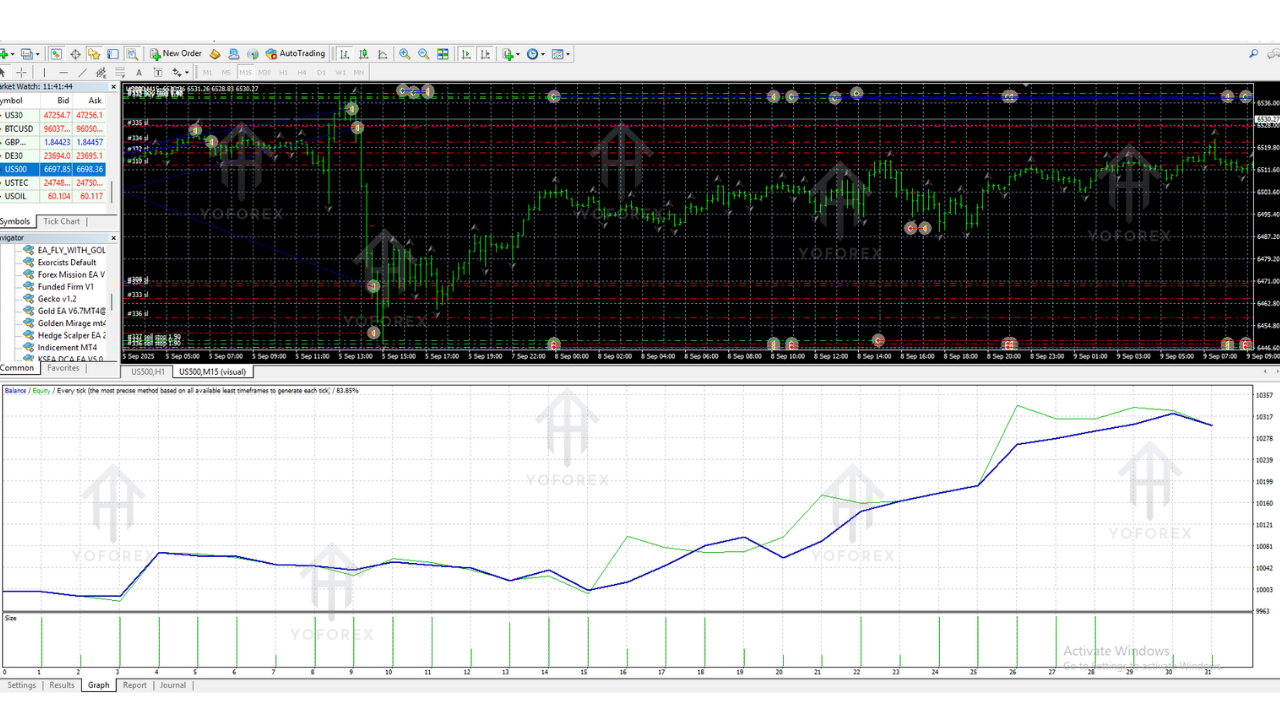
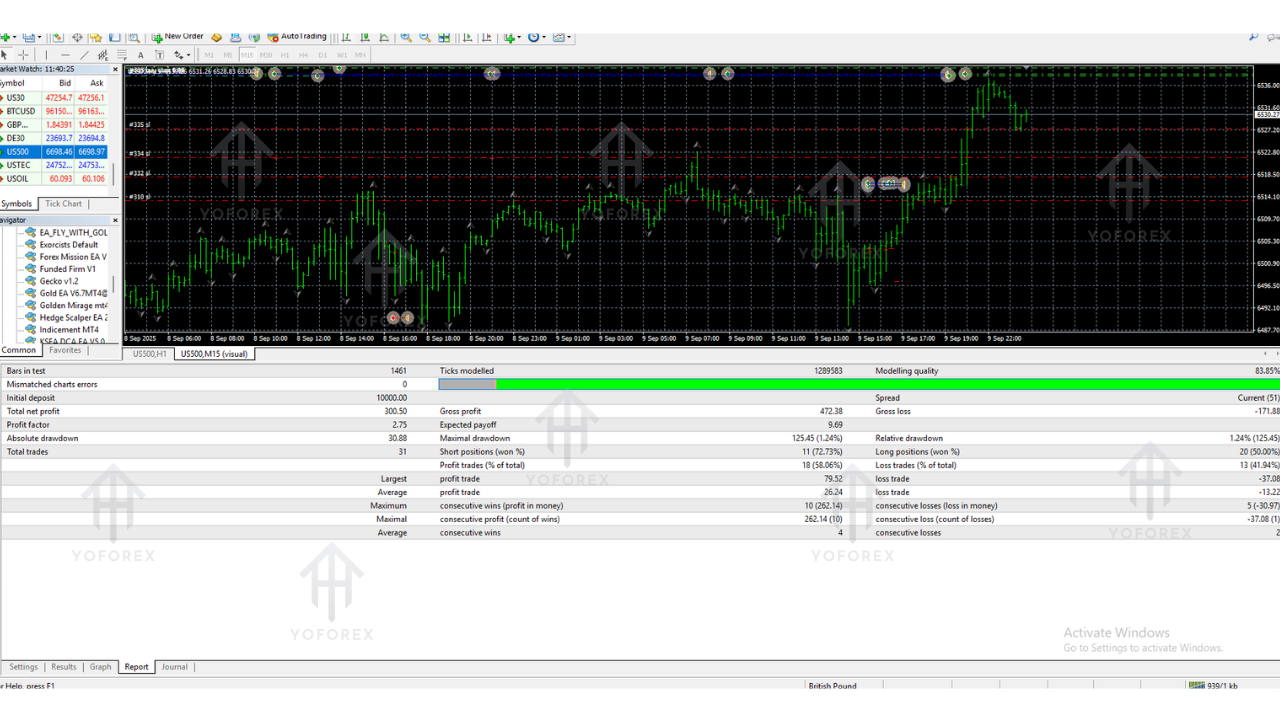
- KPIs to Watch: Profit factor (>1.4), sharpe-like stability, max drawdown (<15% for conservative risk), average trade duration, and percent of trades hitting TP1 vs full TP.
Installation & Setup (MT4)
- Copy the .ex4 file to
MQL4/Experts/. - Restart MT4 and refresh the Navigator.
- Attach the EA to your chosen chart and timeframe.
- Enable Algo Trading and set your inputs (risk %, ATR, session, TP/SL).
- Run on a VPS for stable connectivity and low latency.
Risk Management Best Practices
- Keep risk per position steady; let the strategy’s edge play out over a series of trades.
- Use the daily stop to prevent emotional spiral after a losing streak.
- Avoid overlapping correlated positions (e.g., EURUSD & GBPUSD simultaneously) unless you scale risk.
- Review monthly metrics; minor parameter nudges can improve stability without over-optimization.
Frequently Asked Questions
Q: Can I run it on multiple pairs at once?
Yes, but cap total risk. For example, if risking 1% per trade, limit simultaneous exposure to 2–3%.
Q: Does it martingale or grid?
No. The EA uses fixed risk per setup with ATR-based stops—no dangerous averaging.
Q: Prop-firm friendly?
Settings can be aligned with strict daily loss and max lot rules. Use conservative risk and enable daily guard.
Q: VPS required?
Strongly recommended for reliability and consistent execution during session opens.
Conclusion
Indicement EA V5.2 MT4 focuses on high-quality breakout entries, disciplined risk, and calm trade management. Set it up with conservative risk, trade during liquid sessions, and let the statistics compound over time. With clean inputs and a structured routine, it can become a dependable piece of your automated toolkit.