
Introduction
In the modern forex market, automation has become a key tool for traders seeking efficiency, precision, and consistency. MetaTrader 4 (MT4) Expert Advisors (EAs) have transformed how traders interact with the market, eliminating the need for constant manual oversight while executing strategies systematically.Jio EA V1.1 MT4 is designed as an advanced scalping-focused Expert Advisor, aimed at taking advantage of small price movements in short timeframes. Scalping strategies are particularly effective for traders who prefer frequent trades with quick entries and exits, aiming to accumulate profits gradually over time. Jio EA V1.1 MT4 has been optimized to work with major currency pairs and provides a mix of automated trade execution, built-in risk management, and customizable parameters, making it suitable for both beginners and experienced traders.
Overview
Jio EA V1.1 MT4 is an automated trading tool designed for scalping on short-term charts, typically M1, M5, or M15. The EA is built for high-frequency trading environments, enabling it to capitalize on minor market fluctuations and generate consistent trading opportunities.It relies on a combination of technical indicators, such as EMA (Exponential Moving Average), RSI (Relative Strength Index), and price action patterns, to determine precise entry and exit points. The system executes trades automatically, reducing emotional interference and human error while ensuring consistent strategy implementation.Jio EA V1.1 MT4 works best with brokers offering tight spreads and fast execution, as its scalping strategy relies on small price movements to achieve profitability. Additionally, Jio EA V1.1 includes optional risk management features, such as stop-loss, take-profit, and maximum drawdown controls, providing an extra layer of protection for traders’ capital.
How Jio EA V1.1 MT4 Works?
-
Integration with MT4 Platform
- Jio EA V1.1 MT4 is designed for MetaTrader 4 (MT4) and runs as a plugin within the platform.
- Once installed in the
Expertsfolder and attached to a chart, it becomes active and can execute trades automatically. - It relies on MT4’s market data feeds to access real-time price quotes, indicators, and account information.
-
Continuous Market Monitoring
- Jio EA V1.1 MT4 constantly scans selected currency pairs and timeframes.
- It monitors price movements, candlestick patterns, and technical indicators to detect potential trading signals.
- The monitoring is real-time and automated 24/5, eliminating the need for the trader to watch the charts constantly.
-
Signal Generation Using Algorithmic Logic
- Jio EA V1.1 MT4 uses a pre-programmed algorithm to decide when to enter a trade.
- Although proprietary, it likely relies on standard technical indicators like:
- Moving Averages (EMA/SMA) for trend direction
- Relative Strength Index (RSI) for overbought/oversold conditions
- Volatility filters to avoid trading during unpredictable market spikes
- When the conditions defined in the algorithm are met, the EA generates a trade signal automatically.
-
Automatic Trade Execution
- Once a signal is confirmed, Jio EA V1.1 MT4 opens the trade immediately at the current market price.
- The EA can open multiple trades if allowed by the configuration, depending on market conditions.
- This automation removes latency and emotional hesitation that can occur in manual trading.
-
Risk Management
- Jio EA V1.1 MT4 integrates built-in risk management rules to control potential losses:
- Lot Size Control: Determines the trade size based on account balance or fixed value.
- Stop Loss (SL): Automatically sets a maximum loss per trade.
- Take Profit (TP): Automatically closes trades when a predefined profit target is reached.
- Maximum Open Trades: Limits the number of simultaneous trades to avoid overexposure.
- Jio EA V1.1 MT4 integrates built-in risk management rules to control potential losses:
-
Trade Monitoring and Management
- After entering a trade, Jio EA V1.1 MT4 monitors it continuously.
- It can adjust positions automatically using trailing stops, breakeven levels, or partial exits (if programmed).
- Trades are closed based on the algorithm’s exit logic, which could be indicator reversal, trend confirmation, or profit target.
-
Multi-Timeframe and Multi-Pair Functionality
- Jio EA V1.1 MT4 can work on different timeframes (M1, M5, H1, etc.), analyzing short-term or long-term trends.
- It can also trade multiple currency pairs simultaneously, depending on the setup, to diversify potential opportunities.
-
Automation of Human Decisions
- Jio EA V1.1 MT4 removes emotional factors such as fear and greed from trading decisions.
- All actions follow the pre-programmed rules strictly, ensuring disciplined trade execution.
-
Logging and Reporting
- Most EAs, including Jio EA V1.1 MT4, log trades, errors, and events in MT4’s “Experts” and “Journal” tabs.
- This allows traders to review performance, understand decision points, and optimize strategy parameters if necessary.
-
Requires Minimal Supervision
- While fully automated, it still requires the trader to check for connectivity issues, updates, or extreme market events.
- Jio EA V1.1 MT4 will stop functioning if MT4 is closed, disconnected from the broker, or if AutoTrading is disabled.
Key Features
-
Fully Automated Trading
- Jio EA V1.1 MT4 executes trades automatically without manual intervention.
- It continuously monitors the market, identifies trade opportunities, opens and closes positions, and manages trades according to predefined rules.
- Traders don’t need to sit in front of the screen, which reduces emotional decision-making and human errors.
-
Compatibility with MT4 Builds
- Designed to work with MT4 versions 1443 and above.
- Ensures smooth functioning across brokers and MT4 updates.
- Provides stability and reduces the chances of errors due to platform incompatibility.
-
Algorithm-Based Decision Making
- Uses a coded algorithm to analyze price movements and market conditions.
- Likely relies on technical indicators like Moving Averages (EMA/SMA), Relative Strength Index (RSI), and volatility filters.
- Trades are opened and closed only when specific conditions are met, following a disciplined and consistent strategy.
-
Risk & Money Management Tools
- Includes configurable settings for lot sizes, stop-loss (SL), take-profit (TP), and maximum trades.
- Helps prevent large losses and ensures proper risk allocation per trade.
- The EA can adjust trade sizes automatically based on account balance or trader-defined parameters.
-
Multi-Pair & Multi-Timeframe Support
- Can be applied to multiple currency pairs at the same time.
- Supports various timeframes (M1, M5, H1, etc.), allowing traders to optimize strategies for short-term or long-term trading.
- Enables diversification and better risk distribution across the market.
-
24/5 Market Scanning
- Operates continuously during forex trading hours.
- Detects opportunities and reacts faster than human traders.
- Can identify trends and reversals that might be missed manually.
-
Minimal Manual Intervention Required
- Once installed and configured, the EA runs independently.
- Traders only need to monitor for unusual events, platform updates, or connectivity issues.
- Reduces stress and workload, allowing traders to focus on other tasks.
Installation & Setup Guide
-
Download Jio EA V1.1 MT4 File
- After purchase or acquisition, you will receive files such as
.ex4or.mq4. - Save these files in an accessible location on your computer.
- After purchase or acquisition, you will receive files such as
-
Open MT4 Data Folder
- Launch MetaTrader 4.
- Navigate to File → Open Data Folder.
- This opens the directory where MT4 stores scripts, indicators, and EAs.
-
Copy Jio EA V1.1 MT4 Files to Experts Folder
- Inside the data folder, go to
MQL4 → Experts. - Paste your EA files into this folder.
- This allows MT4 to recognize the EA and display it in the Navigator panel.
- Inside the data folder, go to
-
Restart MetaTrader 4
- Close and reopen MT4.
- Restarting ensures the platform detects the new EA and loads it properly.
-
Attach Jio EA V1.1 MT4 to a Chart
- Open the Navigator panel (Ctrl+N).
- Locate Jio EA V1.1 MT4 under Expert Advisors.
- Drag and drop it onto your preferred currency chart.
- Select the timeframe for operation (e.g., M5, H1, or H4).
-
Enable AutoTrading
- Click the AutoTrading button on MT4 toolbar.
- Jio EA V1.1 MT4 will only execute trades if AutoTrading is active.
-
Configure EA Settings
- Adjust parameters according to your risk preference:
- Lot size: Set the trade size per position.
- Stop Loss (SL) and Take Profit (TP): Define maximum risk and profit targets.
- Maximum open trades: Avoid overexposure by limiting simultaneous positions.
- Time filters: Restrict trading to specific sessions if desired.
- Adjust parameters according to your risk preference:
-
Test on Demo Account
- Before live deployment, run the EA on a demo account.
- This ensures proper setup and allows you to understand performance in real market conditions.
Advantages
-
Automation Saves Time
- Jio EA V1.1 MT4 eliminates the need to monitor charts constantly.
- Trades are executed automatically, allowing the trader to focus on other activities.
-
Fast Trade Execution
- Automated trading removes human delays.
- Orders are executed instantly when conditions are met, which can be critical during high-volatility events.
-
Consistent and Disciplined Trading
- Follows pre-programmed rules without emotion.
- Avoids mistakes caused by fear, greed, or indecision.
-
Round-the-Clock Market Monitoring
- Operates continuously during market hours (24/5).
- Can detect trends, reversals, and breakouts that a human trader may miss.
-
Customizable Risk Settings
- Allows traders to define their own lot sizes, stop-loss, and take-profit levels.
- Helps control risk exposure and ensures alignment with individual trading strategies.
-
Multi-Currency and Multi-Timeframe Capability
- Can trade several currency pairs and multiple timeframes simultaneously.
- Increases market coverage and potential opportunities.
-
Reduces Stress
- Automated systems remove the psychological burden of trading.
- Traders no longer need to worry about missing trades or making impulsive decisions.
Disadvantages
-
No Guarantee of Profitability
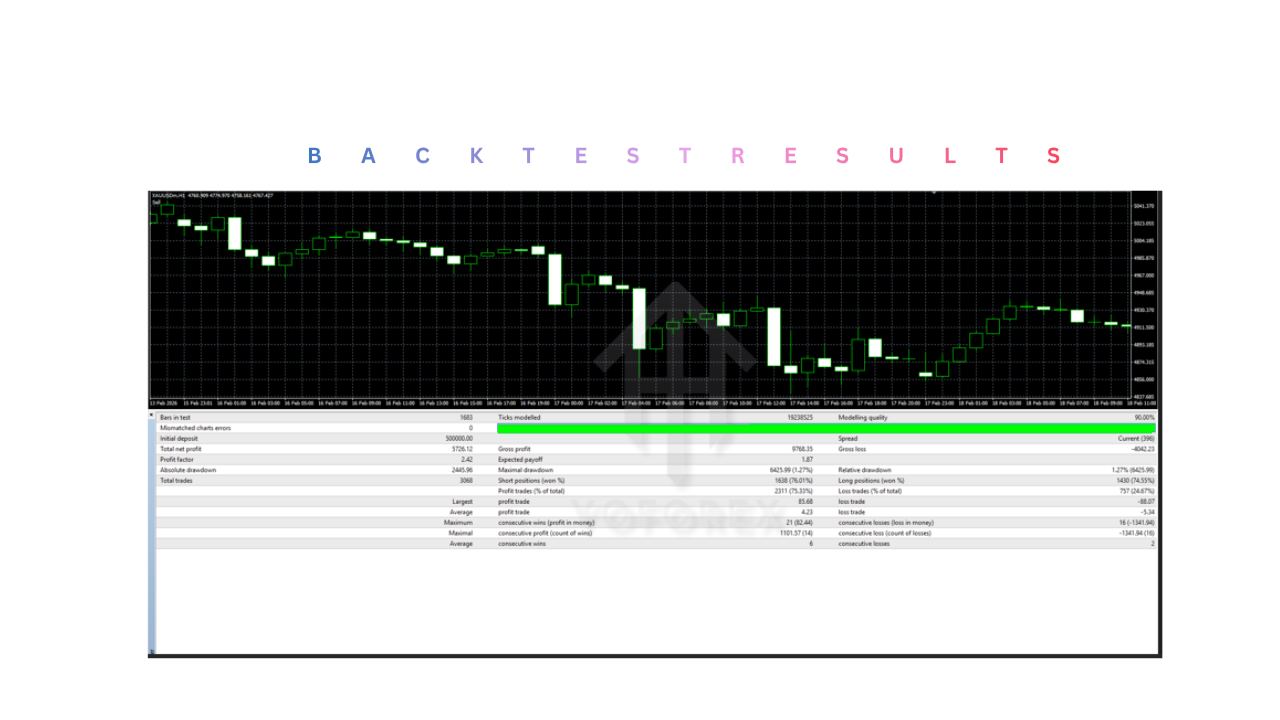
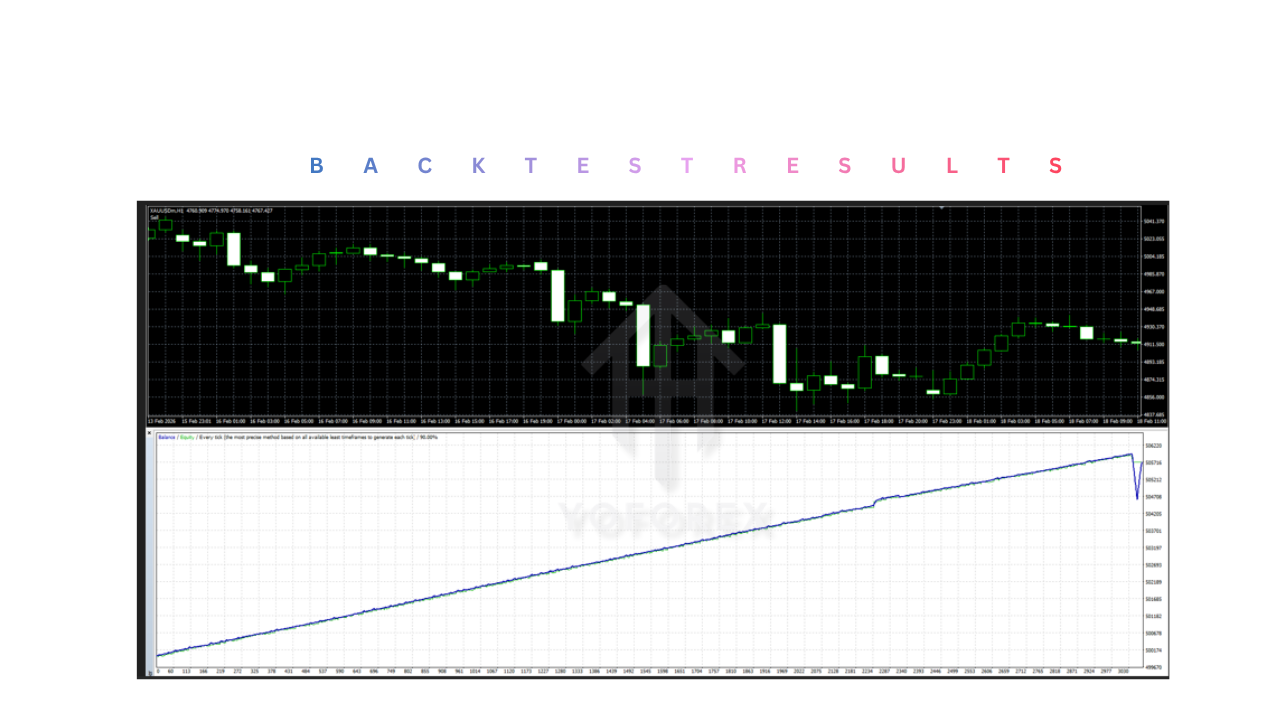
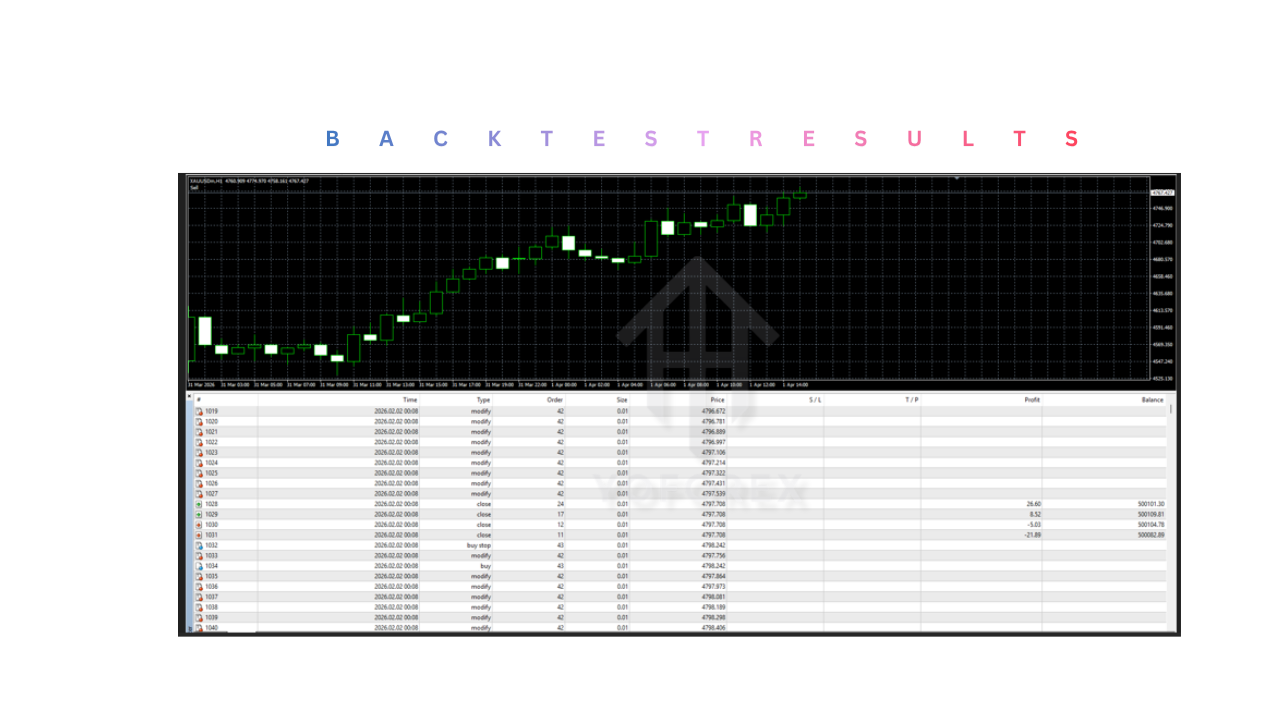
- Past performance or backtests do not guarantee future results.
- Jio EA V1.1 MT4 may underperform in certain market conditions or during unexpected volatility.
-
Risk of Drawdowns
- Losses are possible, especially if the market moves against Jio EA V1.1 MT4’s strategy.
- Large drawdowns can occur if risk settings are too aggressive.
-
Monitoring Still Required
- While automated, it is still necessary to monitor for platform errors, connectivity issues, or extreme market events.
-
Dependency on MT4 Platform
- The EA relies on MT4; if the platform crashes, disconnects, or AutoTrading is disabled, trading will stop.
-
Proprietary Logic Can Be Opaque
- The internal strategy of Jio EA V1.1 MT4 is often not disclosed.
- Traders may not fully understand why the EA opens or closes positions in certain conditions.
-
Over-Optimization Risk
- Some EAs perform exceptionally in backtests but fail in live markets due to overfitting to historical data.
- Strategy may not adapt to changing market dynamics.
Who Should Use Jio EA V1.1 MT4?
-
Beginner Traders
- New traders often struggle with market analysis, entry timing, and emotional control.
- Jio EA V1.1 MT4 helps beginners by automating trading decisions based on predefined logic.
- It reduces the learning curve by allowing them to observe how trades are executed in real-time without needing advanced technical knowledge.
- It can also serve as a practical learning tool to understand market behavior and trading flow.
-
Busy Professionals
- Individuals with full-time jobs or limited time cannot monitor charts throughout the day.
- Jio EA V1.1 MT4 operates automatically, allowing them to participate in the forex market without constant supervision.
- It eliminates the need to track price movements manually and ensures no trading opportunities are missed due to time constraints.
-
Traders Seeking Automation
- Traders who prefer systematic trading over manual execution benefit from this EA.
- Jio EA V1.1 MT4 follows a rule-based approach, executing trades consistently without deviation.
- Ideal for those who want to remove emotional decision-making from their trading strategy.
-
Scalpers and Short-Term Traders
- Jio EA V1.1 MT4 can operate on lower timeframes (like M1 or M5), making it suitable for scalping strategies.
- It reacts faster than humans, which is critical for capturing small price movements in short durations.
- Automated execution ensures quick entries and exits, which is essential in fast-moving markets.
-
Multi-Pair Traders
- Traders who want exposure to multiple currency pairs simultaneously can use this EA efficiently.
- Managing multiple charts manually is difficult, but the EA can monitor and trade across several pairs at once.
- This helps in diversification and spreading risk.
-
Emotionally Affected Traders
- Traders who struggle with fear, greed, or overtrading can benefit significantly.
- Jio EA V1.1 MT4 strictly follows programmed rules, eliminating impulsive decisions.
- It enforces discipline, which is often a major challenge in manual trading.
-
Traders Using VPS (Virtual Private Server)
- Those running MT4 on a VPS can maximize the EA’s performance.
- A VPS ensures uninterrupted operation, stable connectivity, and 24/5 execution.
- This is ideal for traders who want continuous trading without system interruptions.
Why Use Jio EA V1.1 MT4?
-
To Automate Trading
- Jio EA V1.1 MT4 handles the entire trading process: analysis, entry, management, and exit.
- This reduces manual workload and allows traders to focus on strategy rather than execution.
- It ensures trades are executed even when the trader is offline.
-
To Achieve Consistency in Trading
- Human traders often deviate from their strategy due to emotions or hesitation.
- The EA follows the same rules every time, ensuring consistent execution.
- This consistency is crucial for long-term trading performance.
-
To Eliminate Emotional Trading
- Emotions like fear and greed can lead to poor decisions such as closing trades early or overtrading.
- Jio EA V1.1 MT4 removes emotional influence completely, executing trades purely based on logic.
- This leads to more disciplined and objective trading.
-
To Improve Execution Speed
- Jio EA V1.1 MT4 executes trades instantly when conditions are met.
- This is especially important in volatile markets where price movements happen quickly.
- Faster execution can improve entry accuracy and reduce slippage.
-
To Monitor Markets 24/5
- Forex markets operate around the clock during weekdays.
- Jio EA V1.1 MT4 continuously scans for opportunities even when the trader is asleep or busy.
- This ensures no potential trade setups are missed.
-
To Apply a Structured Trading Strategy
- The EA is based on a predefined algorithm, which ensures a systematic approach to trading.
- It removes guesswork and random decision-making.
- Traders can rely on a structured methodology instead of inconsistent manual strategies.
-
To Manage Risk Efficiently
- Built-in risk management features help control losses and protect capital.
- Automatic stop-loss and take-profit levels ensure trades are managed properly.
- Traders can define their risk tolerance through configurable settings.
-
To Trade Multiple Markets Simultaneously
- Jio EA V1.1 MT4 can run on several charts and currency pairs at the same time.
- This increases trading opportunities without increasing workload.
- It enables diversification, which can reduce overall risk.
-
To Reduce Trading Stress
- Constant monitoring and decision-making can be mentally exhausting.
- The EA handles the workload, reducing stress and pressure.
- Traders can maintain a more balanced approach without being glued to charts.
-
To Backtest and Optimize Strategies
- Jio EA V1.1 MT4 can be tested on historical data within MT4.
- Traders can evaluate performance and optimize settings before using it on a live account.
- This helps in refining the strategy and improving confidence.