
LiQuidity Hunter EA V2.21 MT5
Introduction to LiQuidity Hunter EA V2.21 MT5
In today’s highly competitive forex market, success is no longer determined by basic indicators or random trade entries. Modern price movement is driven by liquidity, institutional order flow, and smart money activity. Retail traders who fail to understand this concept often become the liquidity for larger market participants. This is exactly where LiQuidity Hunter EA V2.21 MT5 positions itself differently. Designed with a deep understanding of how banks and institutions operate, this advanced Expert Advisor focuses on identifying and exploiting liquidity zones where high-probability reversals and continuations occur.Unlike conventional trading robots that blindly follow indicators, LiQuidity Hunter EA uses a rule-based algorithm aligned with smart money concepts. It patiently waits for price to reach key liquidity areas—such as equal highs, equal lows, previous session extremes, and stop-loss clusters—before executing trades. This disciplined approach helps avoid overtrading, reduces emotional decision-making, and enhances trade accuracy. By combining automation with institutional logic, LiQuidity Hunter EA V2.21 MT5 aims to deliver consistent and controlled performance suitable for traders who prioritize long-term growth over short-term gambling.
Overview of LiQuidity Hunter EA V2.21 MT5
LiQuidity Hunter EA V2.21 MT5 is a fully automated forex trading robot built exclusively for the MetaTrader 5 platform, engineered to trade based on liquidity behavior rather than lagging technical indicators. The EA continuously scans the market to locate zones where liquidity is likely to be resting—areas where retail traders typically place stop losses or pending orders. Once price interacts with these zones, the system waits for confirmation through market structure shifts and momentum validation before executing a trade.The core philosophy behind LiQuidity Hunter EA is precision and patience. It does not aim to trade frequently; instead, it focuses on high-quality setups with favorable risk-to-reward ratios. This makes it particularly suitable for traders who want a professional-grade algorithm that mimics institutional trading behavior. Version 2.21 introduces improved execution logic, refined risk controls, and better adaptability to varying market conditions. Whether the market is trending, ranging, or experiencing volatility spikes, LiQuidity Hunter EA V2.21 MT5 is structured to respond intelligently while maintaining strict capital protection rules.
How LiQuidity Hunter EA V2.21 MT5 Works?
1. Market Structure Analysis
LiQuidity Hunter EA V2.21 MT5 first analyzes the overall market structure to understand whether price is trending, ranging, or transitioning. This step is critical because liquidity behaves differently in each condition. In trending markets, liquidity is often collected during pullbacks, while in ranging markets, liquidity accumulates at range highs and lows. By identifying structure early, the EA avoids random entries and aligns its logic with current market behavior.
2. Liquidity Zone Identification
The EA scans historical and recent price action to locate zones where liquidity is likely resting. These include equal highs, equal lows, previous day highs and lows, session highs and lows, and consolidation boundaries. These areas are important because retail traders often place stop losses and pending orders there. Institutions target these zones to execute large positions efficiently, making them high-probability reaction points.
3. Liquidity Sweep Detection
When price reaches a liquidity zone, the EA does not enter immediately. Instead, it waits for a liquidity sweep. A sweep occurs when price briefly breaks above or below a key level, triggering stop losses and collecting liquidity. This behavior signals that large players have likely completed their accumulation or distribution phase. Entering after the sweep reduces the risk of being trapped in false breakouts.
4. Confirmation Logic
After a liquidity sweep, the EA looks for confirmation before placing a trade. Confirmation may include a short-term market structure shift, strong directional momentum, or failure of price to continue beyond the liquidity zone. This step filters out weak setups and ensures that trades are placed only when price behavior confirms institutional intent.
5. Trade Execution and Management
Once all conditions align, the EA executes trades automatically. Stop loss levels are placed beyond the liquidity zone rather than at random pip distances. Take profit targets are set toward the next logical liquidity area. The EA manages trades systematically, ensuring controlled risk and consistent execution without emotional interference.
Key Features of LiQuidity Hunter EA V2.21 MT5
1. Liquidity-Based Trading Framework
This EA is built around liquidity rather than indicators. Indicators react after price moves, while liquidity zones exist before price reacts. By focusing on liquidity, the EA positions itself ahead of potential market reactions instead of chasing momentum late.
2. Smart Money Confirmation System
The EA does not trade every liquidity touch. It waits for confirmation after liquidity is taken. This significantly reduces false entries and improves trade quality, especially during volatile market conditions.
3. Advanced Risk Management
The EA supports both fixed lot sizing and percentage-based risk. Percentage-based risk automatically adjusts position size according to account balance, helping maintain consistent exposure. Additional safeguards such as trade limits and equity protection reduce the risk of excessive drawdowns.
4. Session-Aware Trading Behavior
Liquidity events are more reliable during high-volume trading sessions such as London and New York. The EA can be configured to focus on these sessions while avoiding low-liquidity periods when price behavior becomes unpredictable.
5. Execution Safety Filters
The EA includes internal checks for abnormal spreads and execution conditions. These filters help prevent trades during unstable market environments, reducing slippage-related losses.
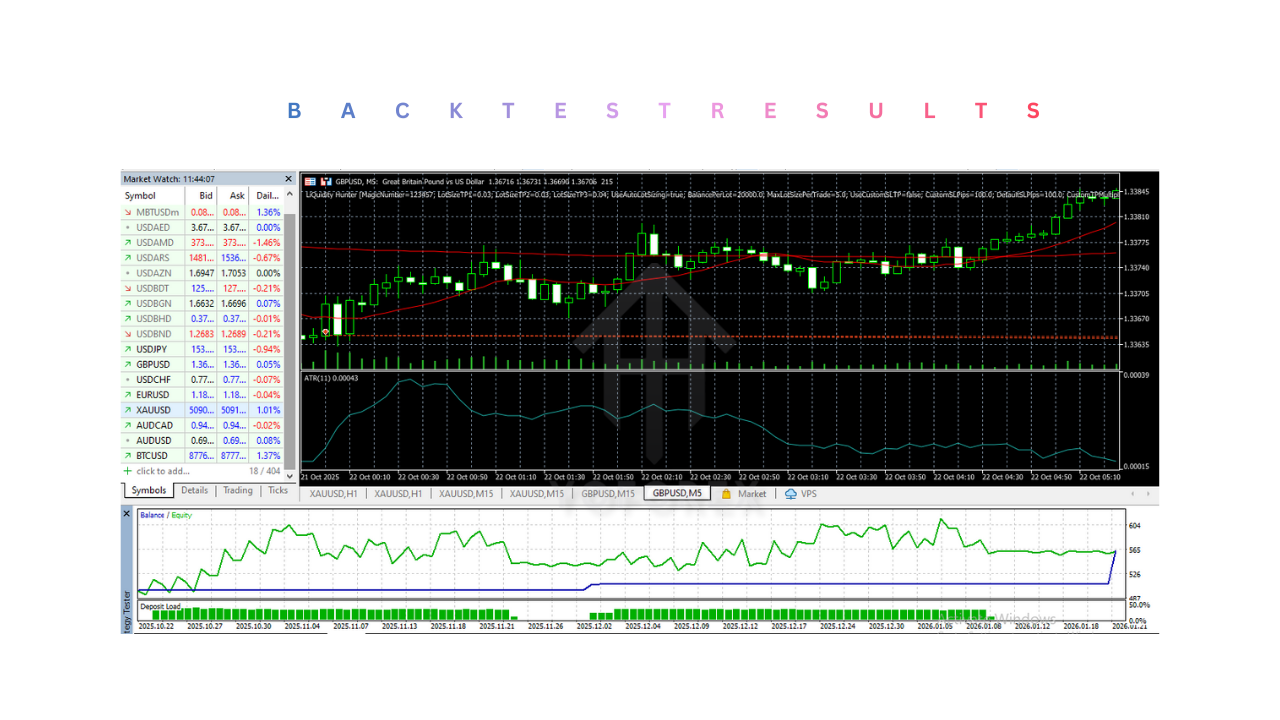
Installation and Setup Guide for LiQuidity Hunter EA V2.21 MT5
1. Broker and Environment Preparation
Choose a low-spread broker with fast execution. Ensure MetaTrader 5 is updated to the latest version. A VPS is recommended to maintain uninterrupted operation and reduce latency.
2. EA Installation
Open MetaTrader 5, go to File, then Open Data Folder. Navigate to MQL5 and then Experts. Paste the EA file into this folder and restart MetaTrader 5.
3. Chart Setup
Open the desired currency pair and select the recommended timeframe. Keep the chart clean by removing unnecessary indicators. Attach the EA to the chart.
4. EA Configuration
Enable automated trading from the platform toolbar. In the EA settings, allow algo trading and apply recommended risk parameters. Configure trade limits, drawdown protection, and session filters if available.
5. Testing Before Live Use
Run the EA on a demo account for several weeks. Observe how it behaves during different market sessions and volatility conditions before moving to a live account.
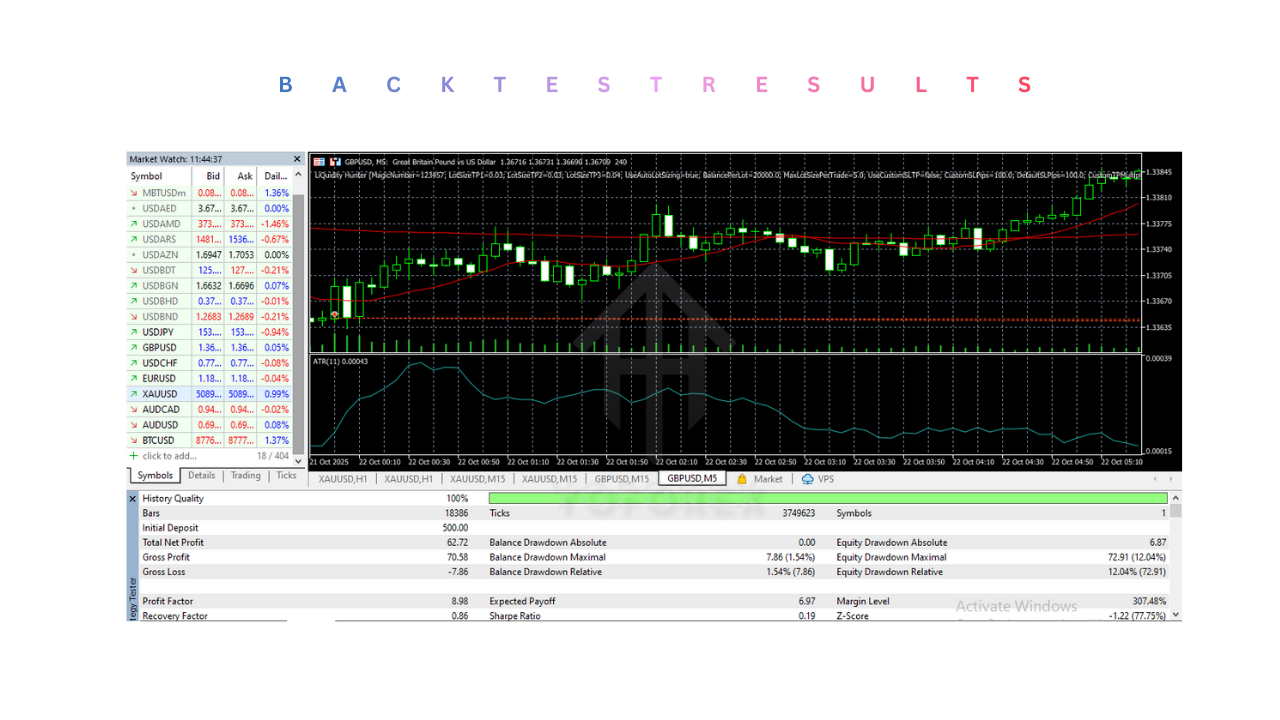
Advantages of LiQuidity Hunter EA V2.21 MT5
1. Trades Based on Real Market Mechanics
The EA trades based on how institutions interact with liquidity, not on lagging indicators. This improves alignment with actual price behavior.
2. Reduced Overtrading
Because the EA waits for liquidity interaction and confirmation, it trades less frequently but with higher accuracy. This helps preserve capital and reduce unnecessary losses.
3. Strong Risk Control
Built-in risk management tools help limit drawdowns and protect account equity, making the EA suitable for long-term use.
4. Consistent Execution
Automation ensures that trades are executed consistently according to predefined rules, eliminating emotional decision-making.
Disadvantages of LiQuidity Hunter EA V2.21 MT5
1. Fewer Trade Opportunities
Liquidity-based setups are selective. Traders expecting frequent daily trades may experience periods of inactivity.
2. Broker Sensitivity
Performance depends heavily on broker quality. High spreads or slow execution can negatively impact results.
3. Requires Proper Configuration
Incorrect settings, unsuitable pairs, or wrong timeframes can reduce effectiveness. Testing and optimization are necessary.
4. Not Suitable for Aggressive Strategies
The EA is not designed for martingale, grid, or high-risk trading approaches.
Who Should use LiQuidity Hunter EA V2.21 MT5?
1. Traders Focused on Consistency
Best suited for traders who value steady performance over rapid account growth.
2. Smart Money and Liquidity Traders
Ideal for users who understand or want to trade based on liquidity and institutional behavior.
3. Medium to Large Account Holders
More suitable for accounts that can handle normal drawdowns without emotional pressure.
4. Disciplined Traders
Works best for traders willing to test, optimize, and follow structured risk management.
Why Use LiQuidity Hunter EA V2.21 MT5?
1. Institutional Trading Logic
The EA aligns trading decisions with how large market participants operate, rather than fighting against them.
2. Emotion-Free Automation
Automated execution removes fear, greed, and revenge trading, ensuring consistent rule-based behavior.
3. Built-In Risk Management
Risk control is integrated into the system, helping traders survive losing streaks and protect capital.
4. Adaptability to Modern Markets
Liquidity-based strategies remain effective in changing market conditions where traditional indicator systems struggle.