


Maximize Your Forex Trading with MACD Expert EA V1.0 MT4: A Comprehensive Guide
Are you looking to elevate your forex trading game with a reliable automated tool? The MACD Expert EA V1.0 MT4 might just be the solution you need. Designed to simplify trading while maximizing profitability, this expert advisor (EA) leverages the power of the Moving Average Convergence Divergence (MACD) indicator to execute trades with precision. In this blog post, we’ll dive deep into the strategy behind this EA, its key specifications—like minimum deposit, timeframes, and currency pair—and how it can work for you. Whether you’re a beginner or a seasoned trader, this guide will provide valuable insights to help you get started.
What is the MACD Expert EA V1.0 MT4?
The MACD Expert EA V1.0 MT4 is an automated trading robot built for the MetaTrader 4 (MT4) platform. It uses the MACD indicator—a popular technical analysis tool—to identify trading opportunities in the forex market. The EA is specifically optimized for the GBPUSD currency pair and operates efficiently on the H1 (1-hour) and M1 (1-minute) timeframes. With a modest minimum deposit of $200, it’s accessible to traders of all levels who want to automate their strategies without breaking the bank.
This EA takes the guesswork out of trading by analyzing market trends and executing trades based on predefined MACD signals. Its strategy is straightforward yet effective, making it a valuable addition to any trader’s toolkit. Let’s break down its key specifications and trading strategy in detail.
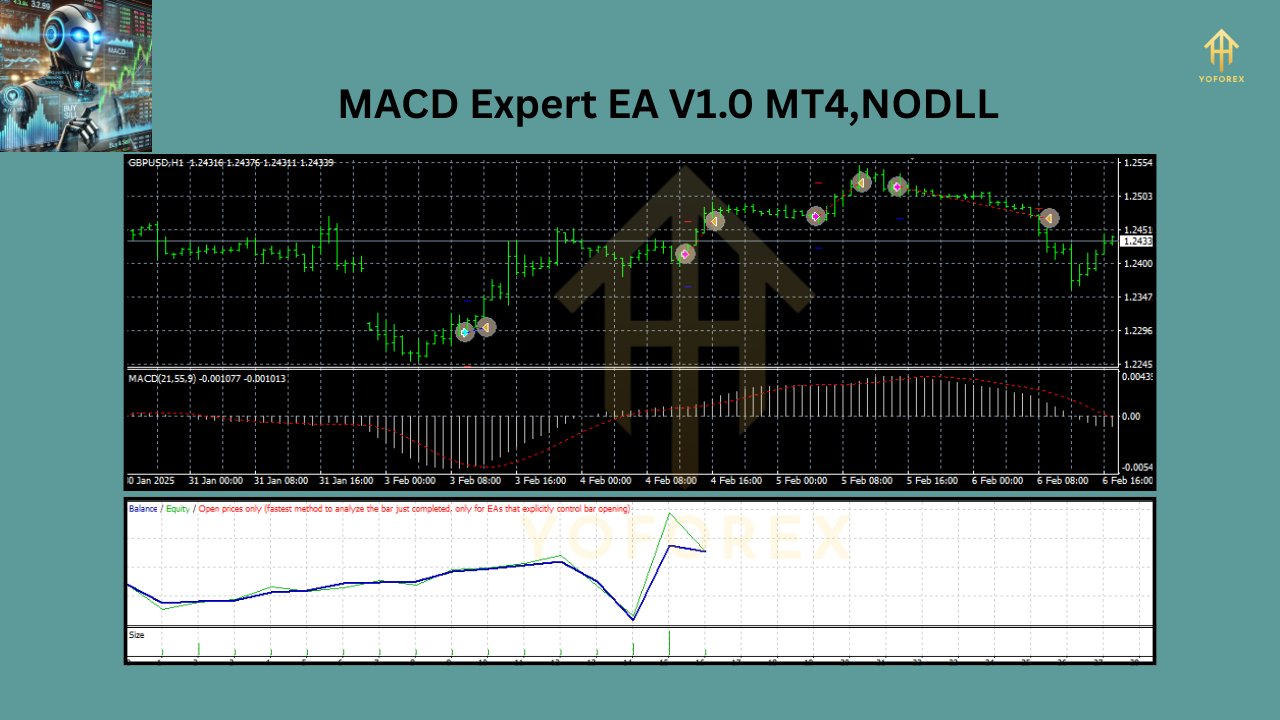
Key Specifications of MACD Expert EA V1.0 MT4
Here’s a quick overview of the essential details you need to know before running the MACD Expert EA V1.0 MT4:
| Feature | Details |
|---|---|
| Currency Pair | GBPUSD |
| Timeframes | H1 (1-hour) & M1 (1-minute) |
| Minimum Deposit | $200 |
| Platform | MetaTrader 4 (MT4) |
| Download Link | https://www.yoforex.org/ |
| Telegram Group | https://t.me/yoforexrobot |
These specifications make the EA versatile and budget-friendly, catering to both scalpers (using M1) and swing traders (using H1). Now, let’s dive into the heart of this tool: its trading strategy.
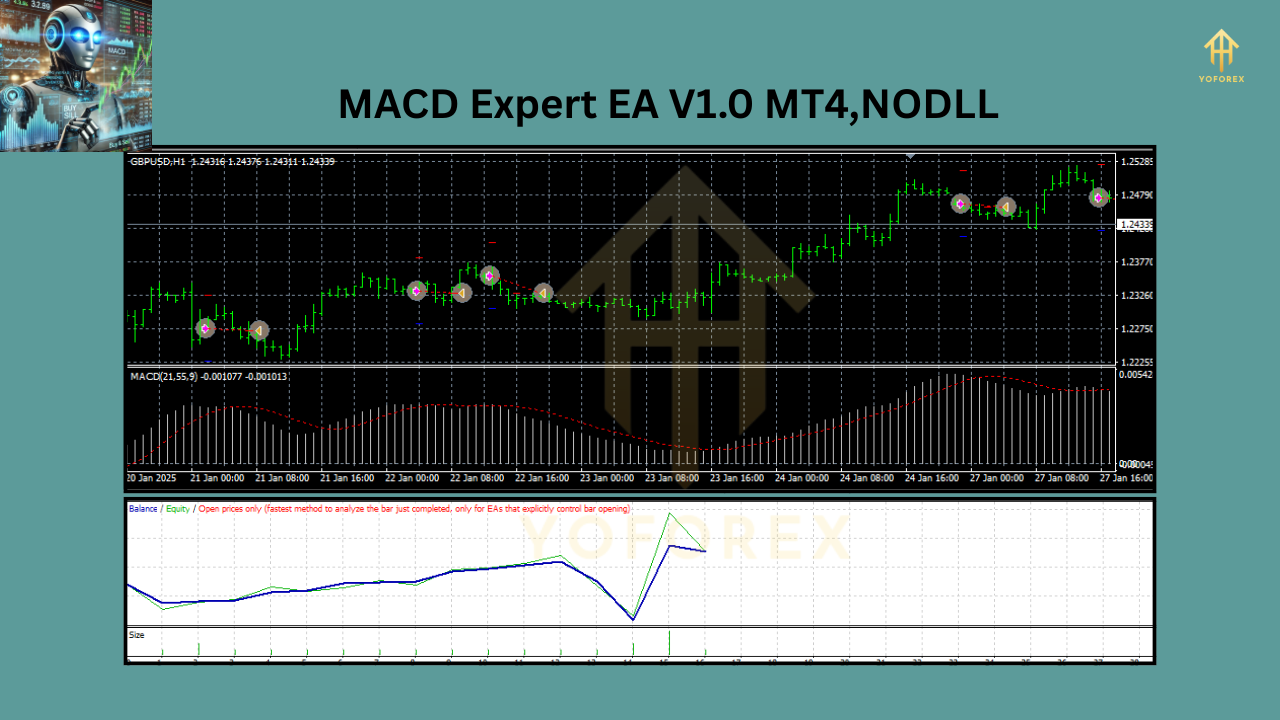
How Does the MACD Expert EA V1.0 MT4 Take Trades?
The MACD Expert EA V1.0 MT4 relies on the MACD indicator to generate buy and sell signals. The MACD is a momentum-based tool that measures the relationship between two exponential moving averages (EMAs) of a currency pair’s price. The EA uses this data to identify trend direction and potential reversals, executing trades automatically based on specific conditions. Here’s a step-by-step breakdown of its strategy:
1. Understanding the MACD Components
The MACD indicator consists of three key elements:
- MACD Line: The difference between the 12-period EMA and the 26-period EMA.
- Signal Line: A 9-period EMA of the MACD Line.
- Histogram: The visual representation of the difference between the MACD Line and the Signal Line.
The EA uses these components to detect momentum shifts and trend strength, which are critical for making informed trading decisions.
2. Buy Signal Strategy
The MACD Expert EA V1.0 MT4 opens a buy position when the following conditions are met:
- The MACD Line crosses above the Signal Line, indicating bullish momentum.
- The Histogram turns positive (moves above the zero line), confirming an upward trend.
- For added precision, the EA may wait for the crossover to occur in alignment with the GBPUSD’s price action on the H1 or M1 timeframe.
This strategy ensures the EA enters the market when the GBPUSD is gaining upward momentum, increasing the likelihood of profitable trades.
3. Sell Signal Strategy
Conversely, the EA triggers a sell position under these conditions:
- The MACD Line crosses below the Signal Line, signaling bearish momentum.
- The Histogram turns negative (drops below the zero line), confirming a downward trend.
- The EA aligns this signal with the GBPUSD’s price movement on the chosen timeframe (H1 or M1).
By waiting for these confirmations, the EA avoids false signals and focuses on high-probability setups.
4. Trade Management
Once a trade is opened, the MACD Expert EA V1.0 MT4 employs basic risk management:
- Stop Loss: A predefined level to limit potential losses if the market moves against the trade.
- Take Profit: A set target to lock in gains when the price reaches a favorable level.
- The EA may also use trailing stops (depending on customization) to maximize profits during strong trends.
This disciplined approach ensures that trades are not left to chance, balancing risk and reward effectively.
5. Timeframe Flexibility
- H1 Timeframe: Ideal for swing traders who prefer fewer, higher-quality trades with longer holding periods. The EA analyzes hourly candles to capture broader market trends.
- M1 Timeframe: Suited for scalpers who thrive on quick, frequent trades. The EA reacts to minute-by-minute price changes, capitalizing on short-term volatility in GBPUSD.
This dual-timeframe capability makes the EA adaptable to different trading styles, whether you’re looking for steady gains or rapid profits.

Why Choose MACD Expert EA V1.0 MT4?
The forex market is fast-paced and unpredictable, but the MACD Expert EA V1.0 MT4 offers several advantages that set it apart:
- Automation: No need to monitor charts all day—the EA does the work for you.
- Low Entry Barrier: With a minimum deposit of just $200, it’s accessible to traders with small accounts.
- Optimized for GBPUSD: The EA is fine-tuned for this popular currency pair, known for its liquidity and volatility.
- Proven Indicator: The MACD is a time-tested tool trusted by traders worldwide, giving the EA a solid foundation.
Getting Started with MACD Expert EA V1.0 MT4
Here’s how to set up and run the EA effectively:
- Download the EA: Visit https://www.yoforex.org/ to get your free copy of MACD Expert EA V1.0 MT4.
- Install on MT4: Open your MT4 platform, go to “File” > “Open Data Folder” > “MQL4” > “Experts,” and paste the EA file there. Restart MT4.
- Attach to Chart: Open a GBPUSD chart (H1 or M1), drag the EA onto it, and adjust settings like lot size and risk parameters.
- Fund Your Account: Ensure your account has at least $200 to meet the minimum deposit requirement.
- Run the EA: Enable auto-trading in MT4, and let the EA start analyzing and trading for you.
For real-time support and to connect with other traders, join our Telegram group at https://t.me/yoforexrobot.
Tips for Success with MACD Expert EA V1.0 MT4
To maximize your results, keep these tips in mind:
- Test on a Demo Account First: Before going live, run the EA on a demo account to understand its behavior.
- Monitor Market Conditions: The EA performs best in trending markets; avoid using it during major news events that cause erratic price swings.
- Adjust Risk Settings: Tailor the lot size and stop-loss levels to match your risk tolerance and account size.
- Stay Connected: Join our Telegram community (https://t.me/yoforexrobot) for updates and optimization advice.
Conclusion
The MACD Expert EA V1.0 MT4 is a powerful, user-friendly tool that brings automation and precision to your forex trading. With its focus on the GBPUSD pair, compatibility with H1 and M1 timeframes, and a low minimum deposit of $200, it’s an excellent choice for traders looking to streamline their strategies. By leveraging the MACD indicator’s proven signals, this EA identifies high-probability trades and manages them efficiently, saving you time and effort.
Join our Telegram for the latest updates and support


