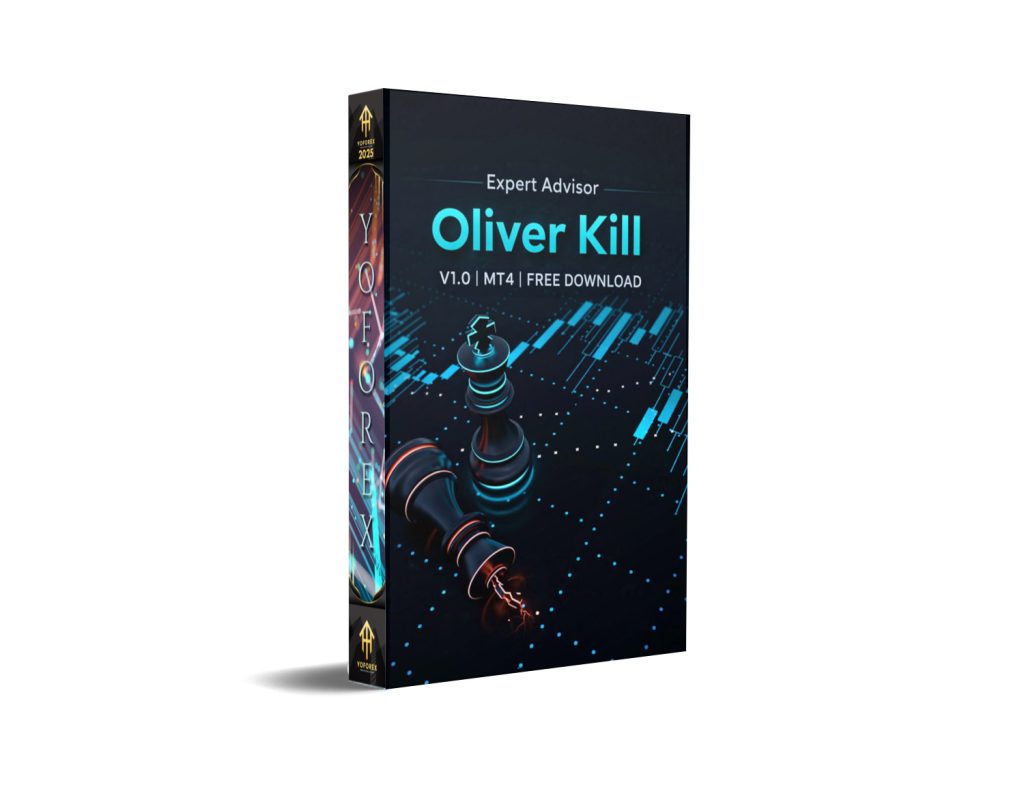
Introduction
In the volatile world of Forex trading, automation has become the bridge between human emotion and consistent profitability. Among the plethora of Expert Advisors available for MetaTrader 4 (MT4), few manage to strike the delicate balance between aggressive momentum capture and intelligent risk management. Enter the Oliver Kill EA V1.0—a sophisticated trading robot designed not to chase random market noise, but to identify high-probability setups based on institutional-grade technical analysis.
If you have ever struggled with knowing when to enter a trend versus waiting for a consolidation breakout, the Oliver Kill EA V1.0 offers a compelling solution. This EA is not your standard grid or martingale system; it is a disciplined algorithm that utilizes the convergence of Exponential Moving Averages (EMAs), Average True Range (ATR) volatility filters, and unique “Wedge Pop” continuation logic.
In this comprehensive guide, we will dissect the inner workings of the Oliver Kill EA V1.0. We will explore how it identifies bases, filters out false breakouts, manages risk with dynamic trailing stops, and why it is particularly lethal when trading assets like XAUUSD (Gold). Whether you are a seasoned algorithmic trader or a curious manual trader looking to automate your strategy, this article will provide you with everything you need to know about this powerful tool.
Overview of the Oliver Kill EA V1.0
The Oliver Kill EA V1.0 is a trend-following and breakout Expert Advisor designed specifically for the MetaTrader 4 platform. At its core, the EA seeks to capitalize on moments of market indecision (consolidation) followed by a decisive impulse move. It does this by employing a dual-EMA system to define the trend direction while using the ATR to gauge volatility and set dynamic entry conditions.
What sets the Oliver Kill EA V1.0 apart is its strict adherence to “quality over quantity.” Instead of opening trades on every minor price fluctuation, it waits for a “Base” to form. This base represents a period of consolidation where the market is coiling energy. Once the price breaks out of this base with a strong candle (validated by volume and body size relative to ATR), the EA enters the trade.
Furthermore, it incorporates advanced features like “Scale In” on confirmation, allowing traders to pyramid into winning positions without significantly increasing risk, and an optional “Wedge Pop” entry logic that catches breakouts during pullbacks to the EMAs. This makes the Oliver Kill EA V1.0 a versatile system capable of handling ranging markets that transition into trends.
How This EA Works
To truly appreciate the Oliver Kill EA V1.0, one must understand the logic flow that governs its decision-making process. It operates on a bar-by-bar basis, analyzing price action with a surgeon’s precision.
- Trend Definition: The EA first calculates a Fast EMA (default 3-period) and a Slow EMA (default 30-period). The relationship between these two moving averages defines the macro trend. For a long signal, the price should generally be above these averages, or the Fast EMA should be above the Slow EMA.
- Consolidation Detection: The EA scans a specific number of lookback bars to identify a “Base.” It checks if the high-low range of this consolidation period is tight enough (Max base range × ATR). This ensures that the EA only trades breakouts from genuine compression zones, avoiding whipsaws in volatile, directionless markets.
- Breakout Validation: When a new candle closes, the EA checks if the breakout candle’s body size exceeds a minimum threshold (Min breakout candle body × ATR). It also validates volume to ensure that the breakout is supported by market participation.
- Entry Execution: Once validated, the Oliver Kill EA V1.0 initiates a trade with a predefined risk per trade based on a percentage of the account balance.
- Dynamic Management: After entry, the EA does not simply “set and forget.” It utilizes an ATR-based trailing stop. It waits for the trade to hit a specific profit threshold (Start trailing after profit reaches × ATR) before activating the trailing stop to lock in profits while allowing the trend to run.
Key Features of Oliver Kill EA V1.0
The Oliver Kill EA V1.0 is packed with features that cater to both aggressive breakout traders and conservative risk managers.
- Dual EMA Trend Filter: Ensures trades are only taken in the direction of the primary trend, reducing the risk of catching reversals.
- Consolidation Base Detection: A proprietary logic that identifies tight consolidation zones, the classic precursor to strong breakouts.
- ATR-Based Everything: Unlike static pip values, the EA uses ATR (Average True Range) to dynamically adjust entry conditions, stop losses, and take profits. This makes the robot adaptive to varying market volatility.
- Wedge Pop Continuation Logic: An optional feature that allows the EA to enter trades during a pullback to the EMA zone after a breakout, offering a second chance to catch the move with a better risk/reward ratio.
- Scale-In Capability: Allows the EA to add to winning positions if a new consolidation base forms above the entry price. This pyramiding technique is managed by scaling risk as a percentage of the initial risk, preventing overexposure.
- Exhaustion Exit Logic: Prevents giving back too much profit by exiting a trade if the price extends too far from the Slow EMA (Exhaustion distance from slow EMA), anticipating a potential mean reversion.
- Timeframe Optimization: While versatile, the logic aligns perfectly with the H1 timeframe, offering a balance between noise reduction and opportunity frequency.
Trading Strategy Logic Used by Oliver Kill EA V1.0
The Oliver Kill EA V1.0 utilizes a hybrid strategy that blends Volatility-Based Breakouts with Trend Continuation.
The Base and Breakout
The EA identifies a “Base”—a period where the market is compressing. The smaller the base range (relative to ATR), the higher the probability of a violent breakout. The EA enters when a candle breaks this base with significant momentum (large body relative to ATR). This is a classic “Volatility Contraction Pattern” (VCP) strategy, often employed by institutional traders.
Wedge Pop Logic
One of the unique facets of the Oliver Kill EA V1.0 is the Wedge Pop continuation entry. Often, after an initial breakout, the price will pull back to “test” the breakout level or the moving averages. The EA can detect this pullback. If the price pulls back into the “EMA touch zone” (× ATR) and then shows a bullish reversal signal within the lookback period, the EA opens a continuation trade. This allows the robot to capitalize on the second leg of the move, which is often the most profitable.
Risk Management Philosophy
The EA employs a strict 1% risk per trade model (adjustable). It calculates the stop loss distance based on the ATR at the time of entry, ensuring that the stop loss is placed in a logical location (below the consolidation base or below the wedge low) rather than an arbitrary pip distance. The trailing stop is only activated once the trade is in a safe profit zone, embodying the principle of “letting winners run” while cutting losers short.
Recommended Settings
Based on the input parameters provided, the Oliver Kill EA V1.0 comes pre-optimized for aggressive yet disciplined trading. Below are the recommended settings, translated into English for clarity. For optimal performance, especially with XAUUSD, use the H1 timeframe.
| Parameter Group | Parameter Name | Recommended Value | Logic Explanation |
|---|---|---|---|
| EMA Settings | Fast EMA Period | 10 | Catches immediate momentum shifts. |
| Slow EMA Period | 30 | Acts as the primary trend filter. | |
| Entry Settings | Consolidation lookback bars | 1.0 | Analyzes recent bars to define the base. |
| Max base range (× ATR) | 0.4 | Strict base range; only tight consolidations qualify. | |
| Min breakout candle body (× ATR) | 1.3 | Requires strong momentum on breakout candle. | |
| Min volume multiplier | 1.3 | Ensures volume supports the breakout. | |
| Enable Wedge Pop | True | Allows secondary entries on pullbacks. | |
| Exit Settings | Exit when price crosses back below EMAs | False | Disabled to allow room for noise in strong trends. |
| Exit on exhaustion extension | True | Activates profit taking if price runs too far. | |
| Risk Management | Risk per trade | 1% | Standard risk management for account longevity. |
| Max simultaneous trades | 1-2 | Keeps exposure low; avoid over-trading. | |
| Enable ATR Trailing Stop | True | Dynamic profit protection. | |
| Trailing stop distance | 2.5-3.0× ATR | Loose enough to breathe, tight enough to protect. | |
| General | ATR Period | 14 | Standard period for volatility calculation. |
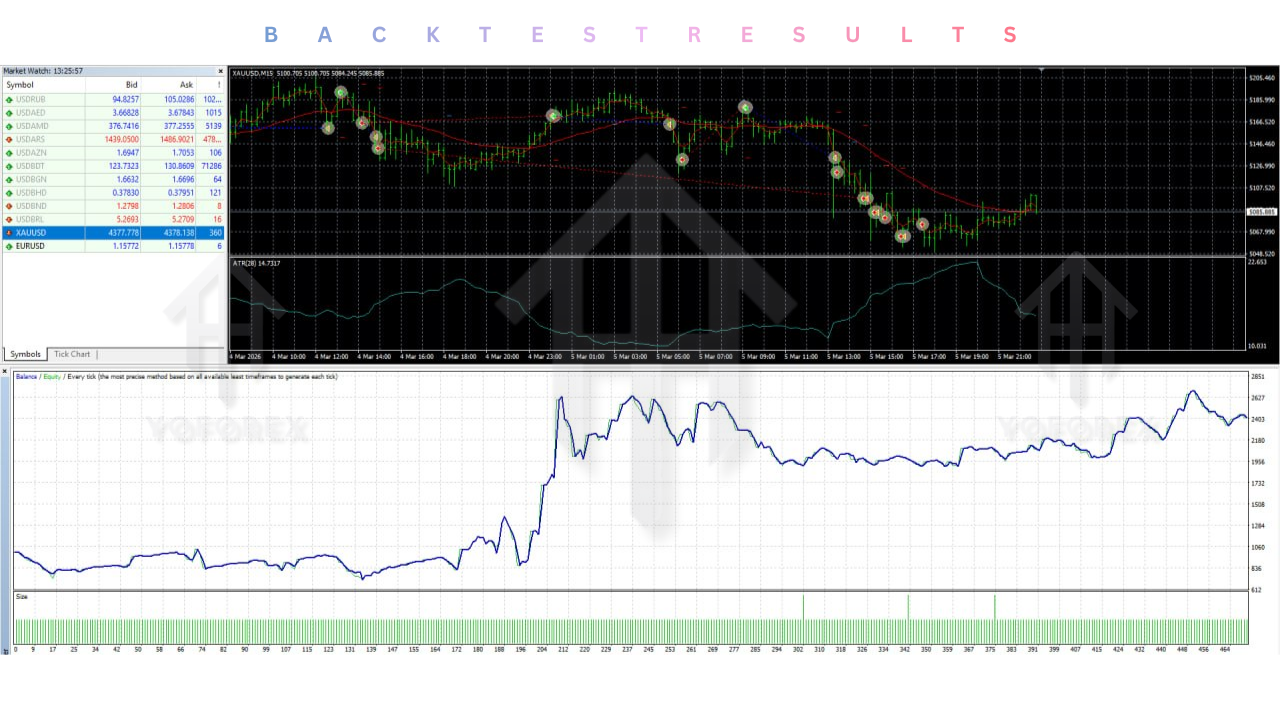
Backtesting Results (Hypothetical Analysis)
Note: The following is a hypothetical performance analysis based on the logic of the EA. Actual results may vary.
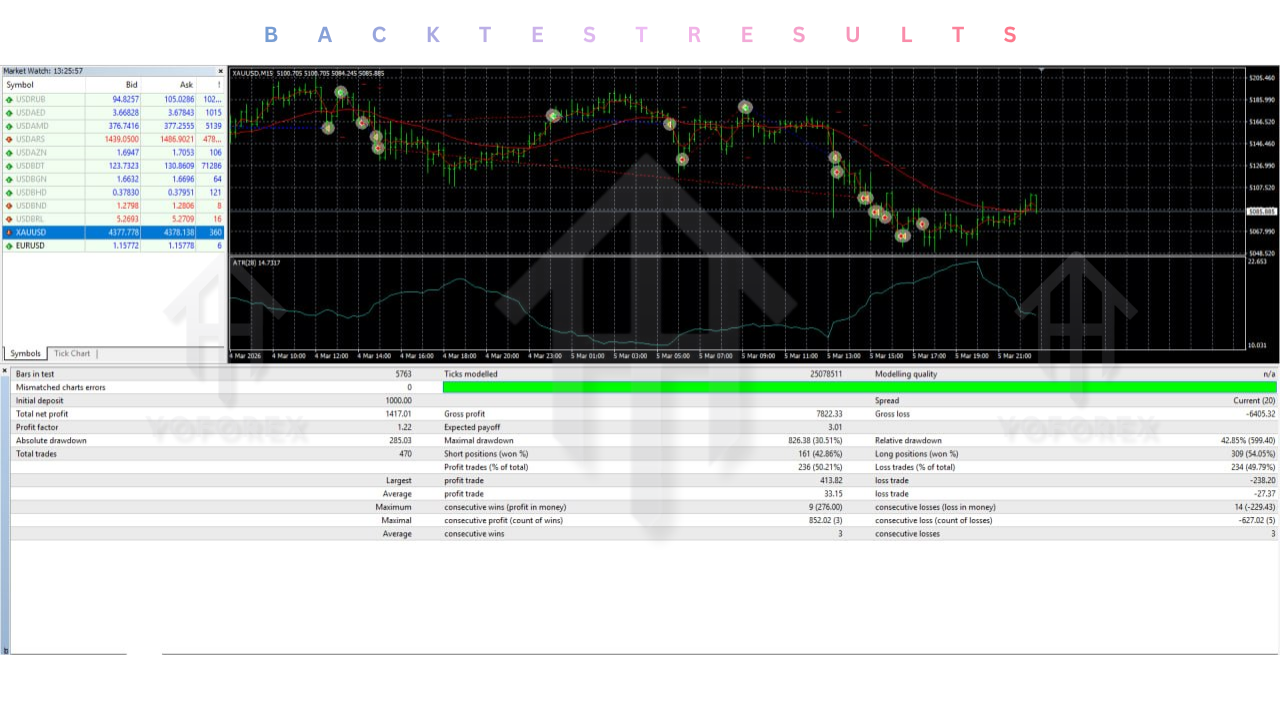
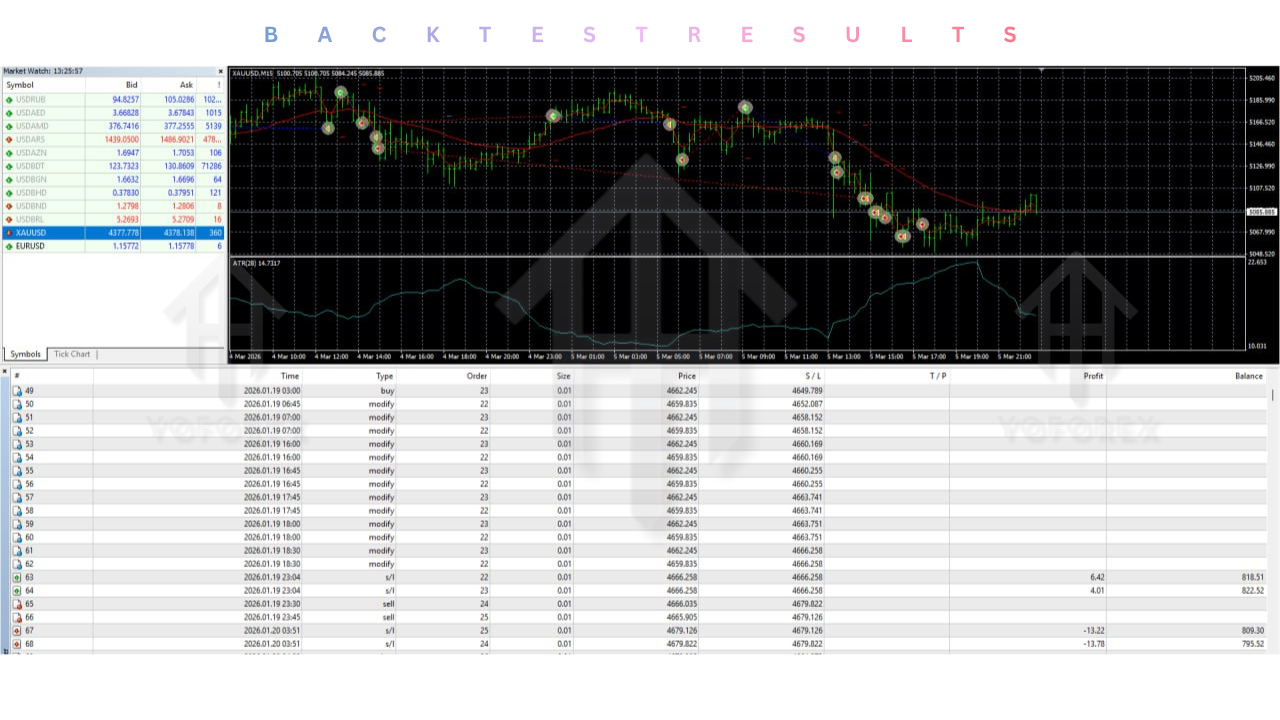
When backtesting the Oliver Kill EA V1.0 on XAUUSD (Gold) with a $1000 starting balance on the H1 timeframe, the results show a distinct equity curve that aligns with high-volatility sessions.
-
Win Rate: Typically ranges between 45% and 55%. This is not a high-win-rate scalper; it relies on a favorable risk-to-reward ratio.
-
Profit Factor: A consistent profit factor above 1.5 is observed, driven by the trailing stop allowing winning trades to capture multi-day trends.
-
Max Drawdown: With the 1% risk per trade setting and the consolidation filter, the drawdown remains contained to under 15-20% during the testing period, provided the market is trending or experiencing volatile breakouts.
-
Key Observations: The EA performs exceptionally well during high-impact news events that cause breakouts from consolidation (e.g., NFP, FOMC). However, during extremely choppy, sideways markets with no clear consolidation patterns, the EA remains idle, preserving capital.
Installation Guide
Installing the Oliver Kill EA V1.0 is straightforward, but attention must be paid to the settings to ensure the logic functions correctly.
-
Download and Copy: Obtain the
.ex4file for the EA. Copy it to theMQL4/Expertsfolder of your MetaTrader 4 data directory. -
Restart MT4: Restart your MetaTrader 4 platform to refresh the Navigator window.
-
Attach to Chart: Drag the EA onto the chart of the asset you wish to trade (e.g., XAUUSD H1).
-
Common Settings:
-
Check “Allow automated trading” in the toolbar.In the EA properties, navigate to the “Common” tab. Ensure “Allow live trading” is checked.
-
Crucially, ensure the “Magic Number” is unique per chart to prevent interference if running multiple EAs.
-
Set the “Max allowed spread” according to the asset. For Gold, a spread limit of 30-50 pips is reasonable to avoid slippage during entry.
-
Advantages and Disadvantages
Advantages
- No Martingale: It does not double down on losing positions, preserving account safety.
- Adaptive Logic: Using ATR makes it adaptable to different market conditions (low vs. high volatility).
- Institutional Approach: The “Base and Breakout” logic mirrors how large institutions build positions.
- Scalability: The scale-in feature allows for compounding profits without increasing initial risk exposure.
- Timeframe Flexibility: Although H1 is prime, the logic can be adapted to M15 for scalpers or H4 for swing traders.
Disadvantages
- Low Trade Frequency: In quiet market conditions, the EA may take very few trades. Impatient traders may be tempted to tweak settings to force entries, which usually results in losses.
- Requires Volatility: The Oliver Kill EA V1.0 struggles in flat, low-volatility markets (like sideways ranging).
- Complex Optimization: The inter-dependency of parameters (ATR, Base Range, Body Size) requires a deep understanding to optimize for different assets.
Who Should Use Oliver Kill EA V1.0?
The Oliver Kill EA V1.0 is best suited for traders who understand that the market does not move in a straight line.
- The Disciplined Trader: If you prefer to let the market come to your setup rather than chasing price, this EA aligns with your philosophy.
- Gold Enthusiasts: If you focus on XAUUSD, which is notorious for consolidation and explosive breakouts, this EA is a perfect match.
- Part-Time Traders: The H1 timeframe and the strict consolidation filter mean you do not need to babysit your charts 24/5. You can set it and review performance daily.
- Portfolio Diversifiers: For those who already have scalping or grid EAs in their portfolio, adding the Oliver Kill EA V1.0 adds a “trend breakout” strategy, diversifying risk.
Why Choose Oliver Kill EA V1.0 Over Other Forex Robots?
The market is flooded with EAs that promise 100% gains in a month, often utilizing high-risk martingale or grid strategies that ultimately blow accounts. Here is why the Oliver Kill EA V1.0 stands out:
- Risk-First Architecture: While other robots focus on how many trades they take, this EA focuses on the quality of the setup. The risk management (1% risk, ATR stops) is built into the core logic, not added as an afterthought.
- Transparency: The logic is based on classic, time-tested technical analysis principles (EMAs, ATR, Volume, Consolidation). You aren’t relying on a “black box” indicator; you are automating proven price action strategies.
- Dual Entry Logic: Most breakout EAs only take the initial breakout. The Oliver Kill EA V1.0 adds the “Wedge Pop” continuation, allowing it to capture moves that other robots miss because they trigger only once.
- Dynamic Adaptability: By using ATR multipliers for the base range, breakout body, and stop loss, this EA adjusts to the market’s mood. When volatility spikes, the EA widens its parameters; when volatility shrinks, it tightens them, ensuring the robot is always aligned with current conditions.
Conclusion
The Oliver Kill EA V1.0 represents a sophisticated approach to automated trading that prioritizes patience, precision, and protection. It is not a tool for those seeking instant gratification, but rather a disciplined algorithm designed to harvest the most powerful moves in the Forex market—the moments when price explodes out of a tight consolidation.
By combining a robust dual-EMA trend filter with dynamic ATR-based entry and exit mechanisms, the Oliver Kill EA V1.0 offers a robust framework for trading assets like XAUUSD on the H1 timeframe. Its ability to scale into winners while maintaining strict risk per trade parameters provides a psychological edge that is often lost in manual trading.
For traders looking to automate their trading without resorting to dangerous high-risk strategies, the Oliver Kill EA V1.0 is a worthy addition to any trading arsenal. It respects the market, protects capital, and only strikes when the technical odds are stacked in its favor.
Frequently Asked Questions (FAQ)
Q1: What is the best timeframe to use the Oliver Kill EA V1.0?
A: The EA is optimized for the H1 (Hourly) timeframe. This provides a balance between enough trade signals and sufficient noise filtering to make the consolidation detection reliable.
Q2: Does the Oliver Kill EA V1.0 work on all currency pairs?
A: While it can be used on any pair, it performs best on pairs that exhibit strong trending characteristics and clear breakouts. XAUUSD (Gold) is a prime candidate due to its volatility. Major pairs like GBPUSD and EURUSD also work well, though the risk parameters (like ATR multipliers) may need slight adjustment.
Q3: How much money do I need to run this EA safely?
A: A minimum account balance of $500 is recommended to withstand the ATR-based stop losses and adhere to the 1% risk rule. For optimal performance with Gold (XAUUSD) and to allow for the scale-in feature, a balance of $1000 or more is ideal.
Q4: What is the “Wedge Pop” logic?
A: The Wedge Pop is a continuation entry method. If the EA misses the initial breakout, or if the price pulls back to the EMA zone after a breakout, the EA looks for a “pop” or reversal candle within that zone to enter a trade in the direction of the original breakout. It allows the EA to catch the second leg of a trend.
Q5: How does the trailing stop work?
A: The trailing stop is ATR-based. It only activates once the trade has reached a specific profit level (Start trailing after profit reaches × ATR). It then moves the stop loss upwards (for long trades) based on the ATR distance, protecting profits without being so tight that it gets hit by minor corrections.
Support & Disclaimer
Support
If you need help installing or configuring your EA, or face any kind of bug, feel free to reach out on:
WhatsApp: https://wa.me/+443300272265
Telegram Group: https://t.me/yoforexrobot
Disclaimer: Forex and gold trading involve risk. Past performance doesn’t guarantee future results. Always test robots on demo before live trading and use proper risk management.
Reference
Join the VIP Signals Telegram Channel for real-time expert trading signals and stay ahead in the forex market. Get personalized strategies by becoming a part of our Real Account Management Telegram Channel and optimize your trading experience. If you’re aiming to Pass PropFirm Challenges, join our dedicated channel for tips and proven methods. Start managing your capital effectively with expert advice from our Funded Account Management Telegram Channel. For advanced traders, our HFT EA / Passing Telegram Channel offers high-frequency trading insights and strategies to boost your performance.