The Quantitative Qualitative Estimation (QQE) Weighted Oscillator Indicator is a powerful technical analysis tool designed for the MetaTrader 5 (MT5) platform. It builds upon the foundation of the Relative Strength Index (RSI) by incorporating a unique weighting methodology, offering traders a refined approach to analyzing market trends, identifying overbought or oversold conditions, and detecting potential trend reversals. This blog post explores the QQE Weighted Oscillator, its mechanics, applications, and strategies for leveraging it effectively in trading.
What is the QQE Weighted Oscillator?
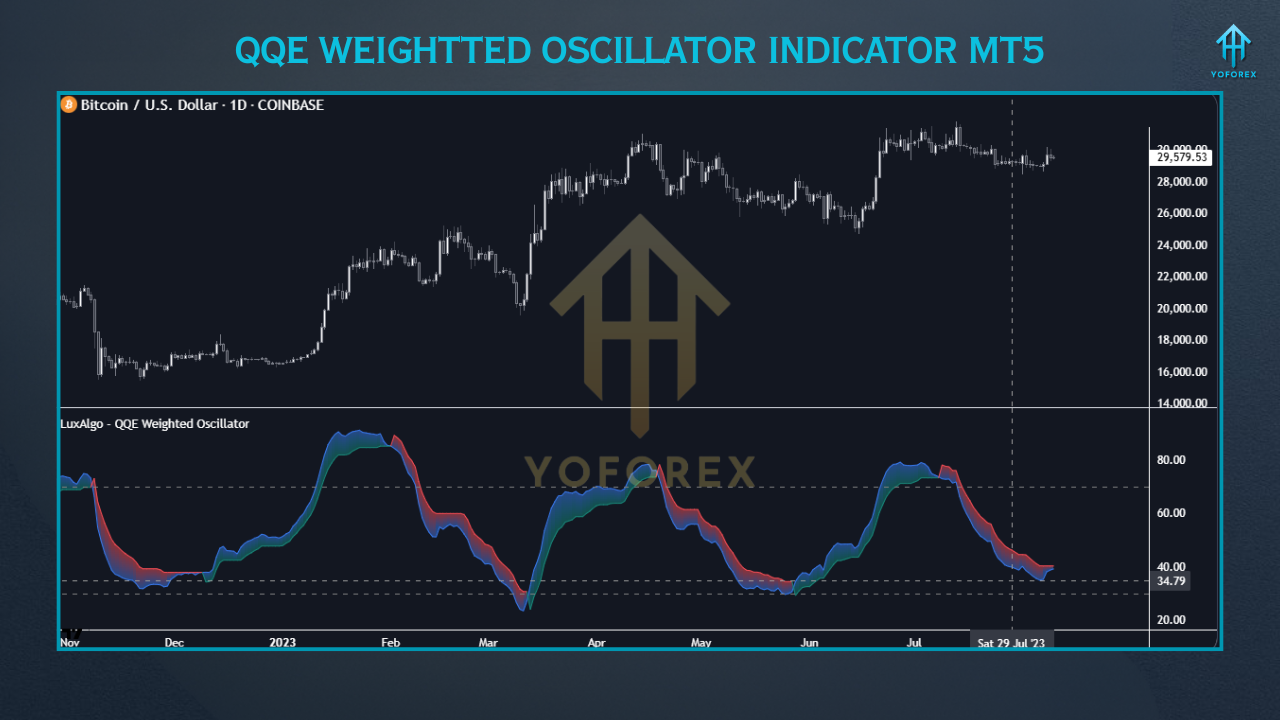
The QQE Weighted Oscillator is an advanced version of the classic QQE indicator, which itself is a derivative of the RSI. Unlike the standard RSI, the QQE Weighted Oscillator applies a weighting mechanism to the RSI calculation, making it more robust in filtering market noise and providing smoother, more reliable signals. It consists of two primary components: a smoothed RSI oscillator and a trailing stop derived from the same RSI. These elements work together to help traders identify market momentum, trend direction, and potential reversal points.
The indicator is particularly valued for its ability to combine quantitative and qualitative analysis, hence the name “Quantitative Qualitative Estimation.” The quantitative aspect relies on mathematical calculations of price movements, while the qualitative aspect interprets these movements to provide actionable trading insights. The QQE Weighted Oscillator is available for free on platforms like the LuxAlgo Library, compatible with MT5, TradingView, and other charting platforms, making it accessible to traders across various markets, including forex, stocks, cryptocurrencies, and commodities.
How the QQE Weighted Oscillator Works
The QQE Weighted Oscillator enhances the traditional RSI by applying a smoothing technique and a weighted factor to the RSI calculation. This process reduces the likelihood of false signals by requiring more significant price movements for the RSI to intersect with the trailing stop. The indicator typically displays two lines in a separate window below the price chart:
- Smoothed RSI Line: This is a modified version of the RSI, smoothed to reduce market noise and provide clearer trend signals.
- Trailing Stop Line: Derived from the smoothed RSI, this line acts as a dynamic level to indicate potential buy or sell signals.
The QQE Weighted Oscillator also incorporates a key level, typically set at 50, which serves as a neutral zone for identifying overbought (above 70) and oversold (below 30) conditions. Traders can customize settings such as the RSI period, smoothing factor, and weighting to align with their trading style and market conditions. For instance, a higher factor value can configure a longer-term trailing stop, making it suitable for medium- to long-term trading strategies.
Key Features
- Trend Identification: The oscillator helps traders determine the direction of the market trend by observing the position of the smoothed RSI relative to the trailing stop.
- Overbought/Oversold Signals: Like the RSI, the QQE Weighted Oscillator identifies extreme market conditions, signaling potential reversals.
- Divergence Detection: The indicator can spot divergences between price action and the oscillator, often indicating upcoming trend reversals.
- Customizability: Traders can adjust parameters like length, weight, and factor to suit different timeframes and markets.
Setting Up the QQE Weighted Oscillator in MT5
To use the QQE Weighted Oscillator in MT5, follow these steps:
- Download the Indicator: Obtain the QQE Weighted Oscillator from a reliable source, such as the LuxAlgo Library or the MQL5 Code Base. Ensure the file is in .mq5 format for MT5 compatibility.
- Install in MT5: Open MT5, navigate to “File” > “Open Data Folder” > “MQL5” > “Indicators,” and copy the .mq5 file into the Indicators folder. Restart MT5 to load the indicator.
- Apply to Chart: In MT5, go to the “Navigator” panel, find the QQE Weighted Oscillator under “Indicators,” and drag it onto the desired chart. Adjust settings like RSI period (default: 6), smoothing (default: 5), and QQE factor (default: 3) to optimize performance.
- Customize Settings: Experiment with parameters to match your trading strategy. For example, a shorter RSI period increases sensitivity for scalping, while a longer period suits swing trading.
Trading Strategies with the QQE Weighted Oscillator
1. Trend-Following Strategy
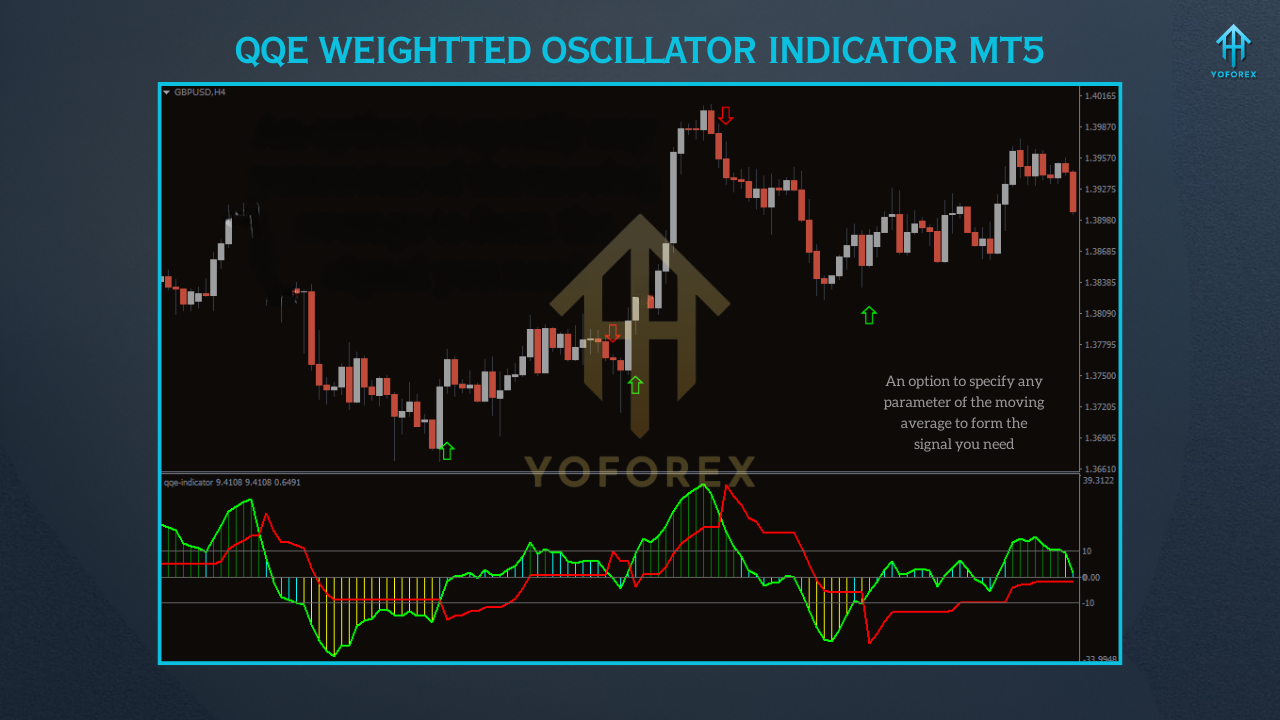
- Buy Signal: Enter a long position when the smoothed RSI line crosses above the trailing stop line and both are above the 50 level, indicating a strong bullish trend. Confirm with price action, such as a breakout above a key resistance level.
- Sell Signal: Enter a short position when the smoothed RSI line crosses below the trailing stop line and both are below the 50 level, signaling a bearish trend. Validate with bearish candlestick patterns or support breaks.
- Example: On a 4-hour Gold (XAU/USD) chart, a QQE line crossing above the zero line and remaining above 50% confirms a strong uptrend, as observed in historical data.
2. Divergence Trading
- Bullish Divergence: Look for higher lows in the QQE Weighted Oscillator while the price forms lower lows, indicating a potential bullish reversal. Enter a long position after confirmation with a bullish candlestick pattern.
- Bearish Divergence: Identify lower highs in the oscillator while the price forms higher highs, suggesting a bearish reversal. Enter a short position after a bearish candlestick confirmation.
- Tip: Use higher timeframes (e.g., daily) to filter out noise and improve signal reliability.
Best Practices and Tips
- Combine with Other Indicators: Pair the QQE Weighted Oscillator with tools like Bollinger Bands or support/resistance levels to enhance signal accuracy. For instance, a buy signal is stronger if it aligns with a bounce off a major support zone.
- Use Higher Timeframes: The indicator performs best on daily or 4-hour charts, as lower timeframes may produce more false signals.
- Avoid News-Driven Volatility: During high-impact news events, the QQE Weighted Oscillator may generate erratic signals. Check economic calendars to avoid trading during such periods.
- Risk Management: Always use stop-loss orders and position sizing based on your risk tolerance. The QQE Weighted Oscillator is not infallible, and trading involves inherent risks.
Limitations and Considerations
While the QQE Weighted Oscillator is a robust tool, it has limitations. It may lag in highly volatile markets, and false signals can occur in ranging conditions. Traders should avoid relying solely on the indicator and instead use it alongside other forms of analysis, such as candlestick patterns or trendlines. Additionally, over-optimizing settings can lead to curve-fitting, reducing the indicator’s effectiveness in live trading. Regularly backtest and adjust parameters to ensure they suit current market conditions.
Conclusion
The QQE Weighted Oscillator Indicator for MT5 is a versatile and powerful tool for traders seeking to enhance their market analysis. By combining the strengths of the RSI with a weighted smoothing mechanism, it provides clearer signals for trend identification, overbought/oversold conditions, and divergence detection. Its flexibility across markets and timeframes makes it suitable for both novice and experienced traders. However, like all technical indicators, it should be used as part of a comprehensive trading strategy, incorporating risk management and additional confirmation tools. By mastering the QQE Weighted Oscillator, traders can gain a deeper understanding of market dynamics and improve their decision-making process in the fast-paced world of trading.