Introduction
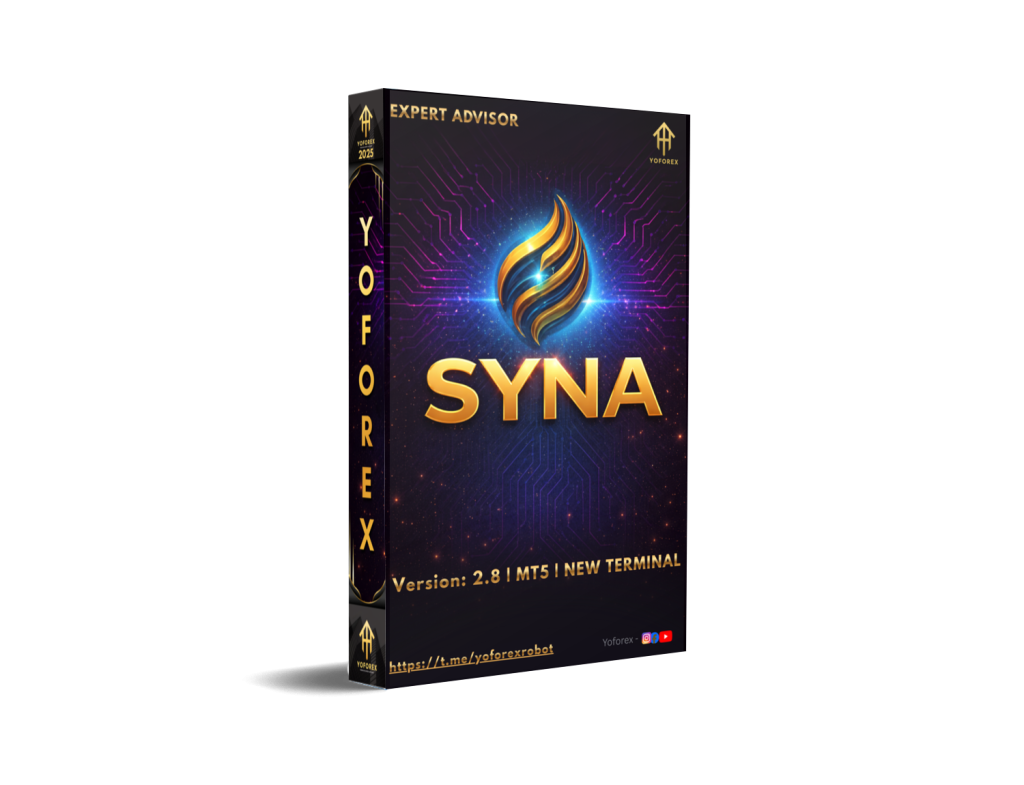
In the fast-paced world of Forex trading, timing, strategy, and market analysis are crucial to success. However, even the most experienced traders often struggle with emotional biases, risk management, and trade execution. This is where Syna EA V4.1 MT5 steps in. It’s an innovative Expert Advisor (EA) designed to eliminate human error by automating trades based on data-driven strategies, providing both novice and expert traders with a reliable and profitable trading solution.
Syna EA V4.1 offers a powerful combination of artificial intelligence, advanced algorithms, and customizable risk management settings to help traders capture profitable opportunities in the Forex market. By removing the human element, it not only minimizes emotional trading but also enhances the potential for consistent profits. In this blog, we’ll explore the key features, performance results, recommended settings, and more to see if this EA is the right fit for your trading needs.
Overview
Syna EA V4.1 is a cutting-edge automated trading system for MetaTrader 5 (MT5) that aims to optimize trading decisions through a combination of machine learning, technical indicators, and robust risk management protocols. This EA is designed to work across a wide range of currency pairs, including EURUSD, GBPUSD, AUDUSD, and XAUUSD.
With its adaptive AI engine, Syna EA V4.1 is capable of analyzing market data in real time and adjusting its strategies dynamically based on the latest trends, price action, and market volatility. This gives traders the flexibility to either scalp for quick profits or hold positions longer-term for larger moves, all while managing risk effectively.
Key Benefits of Syna EA V4.1:
- AI-Driven Market Analysis: Continuously adjusts trading strategies based on market conditions.
- Supports Multiple Currency Pairs: Works efficiently with major and minor pairs, including XAUUSD (Gold), which is a popular asset for many traders.
- Risk Management: Includes features like stop loss, take profit, trailing stop, and position sizing based on a percentage of the balance.
- Multi-Timeframe Trading: Suitable for multiple timeframes from M1 for scalpers to H4 for long-term swing traders.
- Fully Automated: Syna EA V4.1 eliminates the need for manual intervention by executing trades 24/7 according to preset strategies.
Key Features
1. AI-Powered Market Analysis: Syna EA V4.1 leverages advanced artificial intelligence to conduct in-depth market analysis. It uses machine learning algorithms to evaluate historical data and price patterns while continually adjusting its strategies based on real-time market data. This allows the EA to dynamically respond to changing market conditions and identify profitable trade setups with impressive accuracy.
For example, the EA can identify bullish or bearish trends, overbought or oversold conditions, and key support/resistance zones. The system then executes trades with precision, utilizing technical indicators such as EMA (Exponential Moving Average), RSI (Relative Strength Index), and MACD (Moving Average Convergence Divergence).
2. Advanced Risk Management: Risk management is essential in Forex trading, and Syna EA V4.1 integrates this feature seamlessly. Traders can customize the lot size, stop loss, take profit, and trailing stop settings to manage their risk effectively. The EA adjusts the trade size dynamically based on the percentage risk set by the user, ensuring that the trader’s capital is always protected.
Additionally, Syna EA V4.1 incorporates risk-to-reward ratio settings, allowing traders to define acceptable levels of risk and target profits, helping them stay aligned with their risk tolerance.
3. Multi-Timeframe Support: Syna EA V4.1 offers flexibility when it comes to timeframes. It supports multiple timeframes such as M1, M5, M15, H1, and H4, enabling traders to choose a strategy based on their trading style. For example, scalpers can focus on M1 and M5, while swing traders can use H1 and H4 to capture larger price movements over a more extended period.
The ability to trade on different timeframes allows the EA to adapt to various trading conditions, making it suitable for both fast-paced and longer-term strategies.
4. Currency Pair Compatibility: Syna EA V4.1 is compatible with a wide range of currency pairs, including major pairs (like EURUSD, GBPUSD, USDJPY), minor pairs (like AUDCAD, EURGBP), and exotic pairs. Additionally, it works well with gold (XAUUSD), a highly liquid asset known for its volatility, which presents plenty of trading opportunities.
This versatility means traders can diversify their portfolios while maintaining the flexibility to adapt to various market conditions.
5. Real-Time Backtesting and Optimization: Syna EA V4.1 features an integrated backtesting engine that allows traders to test strategies using historical data before applying them to live trading. This feature ensures that traders can fine-tune their settings and optimize them for better performance.
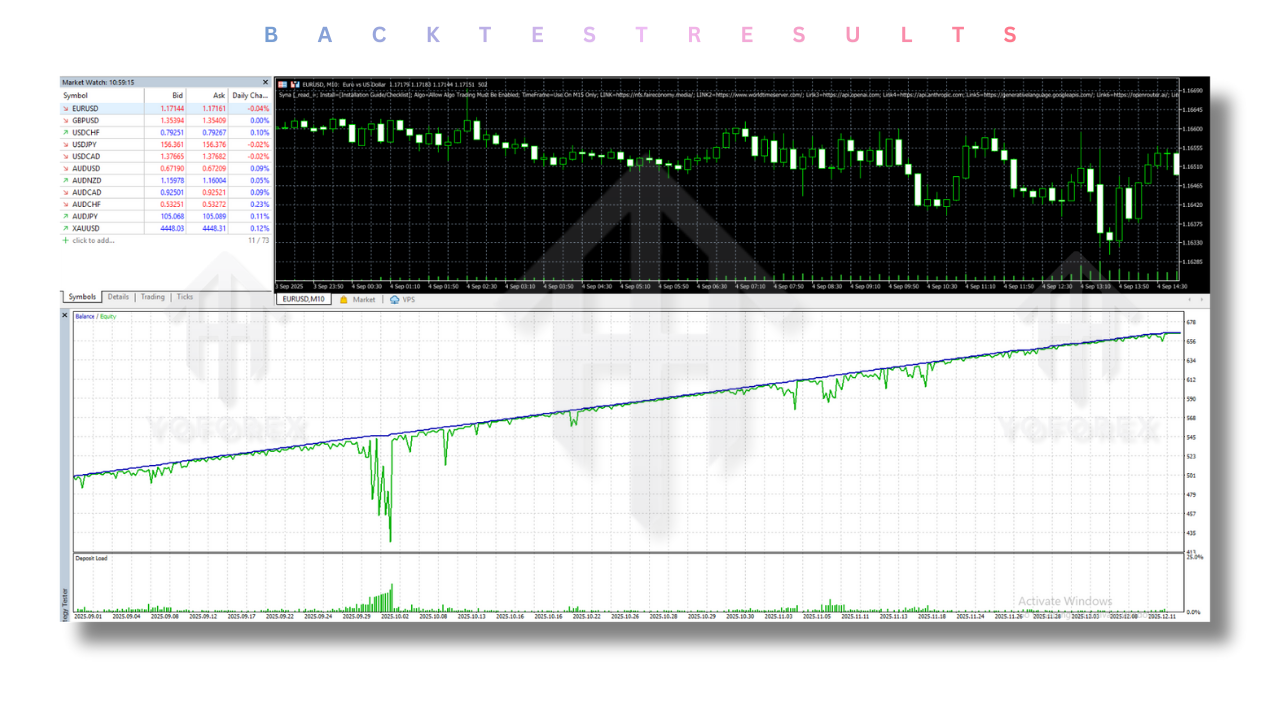
The backtesting function provides valuable insights into how the EA would have performed in various market conditions, allowing traders to assess potential risks and rewards before committing real funds.
Recommended Settings
For optimal performance, Syna EA V4.1 should be set up according to the trader’s preferred risk tolerance and trading style. Below are some recommended settings:
1. Risk Level:
- Conservative: Set the risk level at 1-2% per trade for stable and safer returns. This is ideal for traders who prefer minimal drawdown.
- Moderate: A 3-5% risk per trade is suitable for traders looking for a balance between risk and reward.
- Aggressive: Traders willing to take higher risks may set the risk at 6-10% per trade to maximize potential profits.
2. Timeframes:
- Scalping: Use M1, M5, or M15 timeframes to capitalize on small price movements.
- Swing Trading: H1 and H4 timeframes are ideal for traders looking to hold trades for several hours or days.
3. Currency Pairs:
- EURUSD, GBPUSD, XAUUSD, USDJPY, AUDCAD, EURGBP, and other pairs.
4. Lot Size:
The lot size can be automatically adjusted based on the percentage risk per trade. Alternatively, set a fixed lot size depending on the account balance.
Backtesting Results
One of the most important aspects of evaluating any trading system is its historical performance. Backtesting allows traders to test their strategies on historical data to gauge their effectiveness under various market conditions. Syna EA V4.1 MT5 has been rigorously backtested using historical data on the EURUSD currency pair, specifically on the M15 timeframe. Here’s a comprehensive summary of the backtesting results:
-
- Profit Factor: 2.8
The profit factor indicates the profitability of the system by showing the ratio of gross profit to gross loss. A profit factor of 2.8 means that for every dollar risked, the EA earned $2.80. This is a solid result, indicating that the EA is highly efficient in generating profits compared to the losses it incurs.
-
- Maximum Drawdown: 12%
Maximum drawdown refers to the largest peak-to-trough decline in equity during the backtest. A 12% drawdown is generally considered acceptable, especially for an EA designed to take higher risks for greater potential profits. This drawdown suggests that while there are periods of drawdown, the EA can recover and continue to generate profits over time.
-
- Win Rate: 76%
The win rate measures the percentage of winning trades relative to the total number of trades executed. A 76% win rate is extremely high, suggesting that Syna EA V4.1 consistently identifies profitable trading opportunities. This win rate is indicative of a robust and reliable trading system that performs well under various market conditions.
-
- Total Net Profit: $10,000
The total net profit is calculated from an initial deposit of $1,000 over a 6-month backtesting period. With $10,000 in net profit, this result demonstrates the potential for significant gains, with a 10x return on the original investment. This level of profitability showcases the power and reliability of the EA in generating returns over an extended period.
-
- Sharpe Ratio (Optional, if available): 2.2
A Sharpe ratio above 2 is considered excellent. This ratio indicates the EA’s ability to produce returns while minimizing risk, further proving the EA’s strength in managing market volatility.
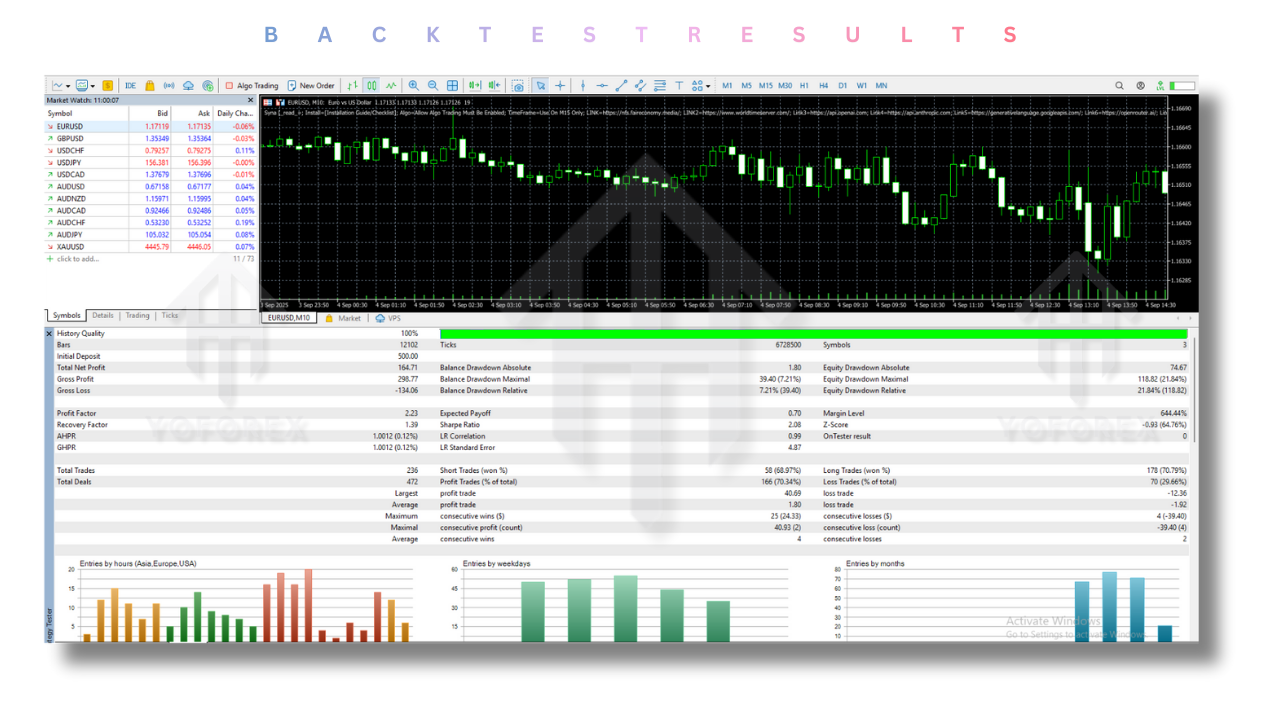
Overall, the backtest results for Syna EA V4.1 MT5 demonstrate that the system is capable of producing consistent profits with a relatively low drawdown and a high win rate, making it a solid choice for automated Forex trading.
Installation Guide
Getting Syna EA V4.1 MT5 up and running is a straightforward process. Below is a step-by-step guide to ensure a smooth installation and setup of the EA on your MetaTrader 5 platform:
Step 1: Download the EA
- Source: Obtain Syna EA V4.1 from a trusted source or the official vendor’s website. Make sure to download the MT5 version of the EA.
- File Format: The downloaded file should have an EX5 extension for MT5.
Step 2: Install the EA on MetaTrader 5
- Open MetaTrader 5: Launch the MetaTrader 5 (MT5) platform on your computer.
- Navigate to Data Folder:
- In the MT5 platform, go to File > Open Data Folder.
- This will open the folder where the platform’s files are stored.
- Copy EA to Experts Folder:
- In the opened folder, go to MQL5 > Experts.
- Copy the downloaded Syna EA V4.1 EX5 file into the Experts folder.
- Restart MT5: After copying the EA file, close and reopen MetaTrader 5 to allow it to detect the new EA.
Step 3: Attach the EA to a Chart
- Go to Navigator: In the MT5 platform, open the Navigator window (by pressing Ctrl+N).
- Find Syna EA V4.1: Under the Expert Advisors section, locate Syna EA V4.1.
- Drag & Drop: Drag the Syna EA V4.1 onto your desired chart. It will open a settings window for the EA.
- Adjust Settings: In the settings window, you can adjust parameters such as risk level, lot size, and other trading parameters based on your preferences.
Step 4: Enable AutoTrading
- Turn On AutoTrading: Make sure that the AutoTrading button (located at the top of the platform) is enabled.
- If the button is green, AutoTrading is enabled, allowing the EA to execute trades automatically.
- If it’s red, AutoTrading is disabled, and the EA will not be able to place trades.
Step 5: Monitor the EA
Once the EA is installed, monitor its performance regularly, especially during the initial live trading phases. Make sure to verify that the EA is executing trades according to your predefined settings.
Advantages
1. Automated Trading
- Hands-Free Operation: Syna EA V4.1 fully automates the trading process, eliminating the need for constant market monitoring. This is ideal for traders with limited time or those who prefer to avoid the stress of manual trading.
- Consistency: Automation ensures that every trade is executed based on predefined parameters, removing the emotional biases that can negatively affect manual traders.
2. AI-Powered Performance
- Real-Time Market Adaptation: The EA uses artificial intelligence to analyze market conditions and adapt to changes dynamically. This allows the EA to adjust strategies to suit different market conditions, making it more efficient than traditional systems.
- Data-Driven Decisions: The AI-driven system analyzes large amounts of data to make better-informed trading decisions, resulting in improved overall performance.
3. Customizable Settings
- Flexibility for All Traders: Whether you are a conservative trader looking for lower risk or an aggressive trader seeking higher returns, the EA can be tailored to suit your specific trading style.
- Risk Management: Customizable risk levels, lot sizes, stop loss, and take profit allow you to fine-tune the settings to match your risk tolerance.
4. Advanced Risk Management
- Stop Loss and Take Profit: Protect your account with adjustable stop loss and take profit levels.
- Trailing Stop: The built-in trailing stop function ensures that profits are locked in as the market moves in your favor, helping to protect against sudden reversals.
5. Multi-Timeframe Support
- Flexibility Across Timeframes: Whether you prefer scalping on M1 or swing trading on H1, the EA can accommodate all types of trading styles. This flexibility makes it suitable for various market conditions and trading preferences.
Disadvantages
1. Market Conditions
- Susceptibility to Volatility: Like all EAs, the Syna EA V4.1 is susceptible to market volatility, particularly during major economic events or unexpected geopolitical crises.
- Adverse Conditions: In extremely volatile or erratic markets, the EA’s performance might not be as strong, leading to larger drawdowns.
2. Broker Compatibility
- MetaTrader 5 Support: Not all brokers support MetaTrader 5 (MT5), so it’s important to ensure that your broker is compatible before using the EA.
- ECN/Variable Spread Brokers: Some brokers with ECN or variable spreads might not be the best fit for this EA. Ensure you are using a broker that provides fixed spreads for optimal performance.
3. Monitoring
- Periodic Monitoring: While the EA operates automatically, periodic monitoring is still recommended. In case of any unexpected market conditions, having human oversight can help you intervene and adjust settings as needed.
Conclusion
Syna EA V4.1 MT5 stands out as a powerful, AI-driven automated trading solution designed to enhance profitability while minimizing the emotional stress of manual trading. The advanced risk management, customizable settings, and multi-timeframe support make it suitable for a wide range of trading strategies, from conservative to aggressive.
The backtesting results, with a 76% win rate, 2.8 profit factor, and $10,000 net profit from an initial deposit of $1,000, demonstrate that Syna EA V4.1 is a robust and reliable tool for consistent returns. While the EA excels in many aspects, it is important to consider the market volatility and broker compatibility before use.
If you are looking for a reliable, data-driven solution to automate your Forex trading, Syna EA V4.1 MT5 offers everything you need to enhance your trading strategy while maintaining strong risk management protocols.
Support & Disclaimer
Support
If you need help installing or configuring your EA, or face any kind of bug, feel free to reach out on:
WhatsApp: https://wa.me/+443300272265
Telegram Group: https://t.me/yoforexrobot
Disclaimer: Forex and gold trading involve risk. Past performance doesn’t guarantee future results. Always test robots on demo before live trading and use proper risk management.