Introduction
The evolution of financial markets has led to the increasing adoption of automated trading technologies. Among these technologies, Expert Advisors (EAs) have become widely used tools for traders who want to automate their trading strategies and reduce the need for constant manual market analysis. Expert Advisors are programs designed to run within trading platforms such as MetaTrader 5 (MT5), where they can analyze market conditions, generate trade signals, and execute orders automatically based on predefined algorithms. One such automated trading solution that has gained attention among forex traders is Syna EA V5.1 MT5. Syna EA V5.1 MT5 is designed to help traders implement algorithmic trading strategies without needing to manually monitor the markets all the time. In fast-moving markets like forex, where price movements occur every second, it can be difficult for traders to consistently identify trading opportunities while also managing risk effectively. Automated systems aim to address this challenge by applying programmed logic that evaluates market conditions in real time and executes trades when specific criteria are met. By automating the trading process, Syna EA V5.1 attempts to bring structure, discipline, and efficiency to trading activities.Another important aspect of automated trading systems like Syna EA V5.1 MT5 is the ability to reduce emotional decision-making. Many traders struggle with psychological factors such as fear, greed, hesitation, or overtrading, which can negatively impact trading performance. Since Syna EA V5.1 MT5 follows a predefined set of rules and conditions, it can execute trades consistently without emotional interference. This makes automated trading appealing for both beginner and experienced traders who prefer a systematic approach to the market.Syna EA V5.1 MT5 operates within the MetaTrader 5 platform, which is known for its advanced trading tools, improved execution speed, and support for algorithmic trading. MT5 provides an environment where Expert Advisors can function efficiently, offering features such as backtesting, optimization, multi-asset trading, and advanced charting capabilities. With these tools, traders can test and refine automated strategies before deploying them in real market conditions.However, while automated trading systems can offer convenience and efficiency, they are not a guaranteed solution for profits. The performance of any EA depends on several factors, including market volatility, broker conditions, trading settings, and overall risk management. Therefore, traders should approach automated systems like Syna EA V5.1 MT5 as a tool that can assist trading decisions rather than a completely hands-off profit generator. Understanding how the EA works and configuring it properly is essential for achieving the best possible results.
Overview
Syna EA V5.1 MT5 is an automated trading program specifically developed for the MetaTrader 5 trading platform. It is designed to analyze market data, identify potential trading opportunities, and execute trades automatically according to its built-in algorithmic strategy. By combining technical analysis tools, trading logic, and risk management parameters, the EA aims to assist traders in executing trades in a structured and systematic manner.At its core, Syna EA V5.1 functions as a market analysis and trade execution system. The EA continuously scans price movements and market indicators to detect conditions that match its programmed strategy. When these conditions are met, the EA can automatically open trading positions, manage them according to predefined rules, and close them when exit conditions are triggered. This entire process can occur without the need for manual intervention, making it especially useful for traders who prefer automated trading or who cannot monitor the market throughout the day.The EA is designed to operate within the technical environment provided by MT5, which allows it to access price data, trading signals, and account information in real time. MetaTrader 5 supports multiple asset classes including forex pairs, commodities, indices, and cryptocurrencies, giving traders flexibility in how they deploy automated trading systems. Syna EA V5.1 MT5 can therefore be used on different trading instruments depending on its strategy configuration and the trader’s preferences.One of the key aspects of Syna EA V5.1 is its ability to integrate trading logic with risk management settings. The EA typically includes configurable parameters such as lot size, stop loss, take profit, and risk percentage. These parameters allow traders to control how much capital is exposed to each trade while maintaining consistency in execution. Proper risk management is crucial in automated trading, and these built-in controls help traders align the EA’s operation with their overall trading plan.Another important feature of the system is its customization capability. Traders can adjust various settings within the EA to suit their trading style, preferred currency pairs, or market conditions. This flexibility allows Syna EA V5.1 MT5 to be optimized for different strategies and environments, whether the trader prefers conservative trading with lower risk or more aggressive strategies with higher trade frequency.In addition, Syna EA V5.1 MT5 benefits from the backtesting and optimization tools available in MetaTrader 5. These tools allow traders to test the EA using historical market data to evaluate how the strategy might have performed under past conditions. Through backtesting, traders can analyze performance metrics such as profitability, drawdown levels, and trade frequency, helping them make informed decisions about whether and how to use the EA in live trading.Overall, Syna EA V5.1 MT5 represents a modern approach to trading that combines algorithmic decision-making with the advanced capabilities of the MetaTrader 5 platform. By automating trade analysis and execution, it provides traders with a system that can operate continuously in the market, potentially identifying opportunities that might otherwise be missed during manual trading. While it should always be used with careful monitoring and proper risk management, Syna EA V5.1 MT5 can serve as a valuable tool for traders seeking to incorporate automation into their trading strategy.
How Syna EA V5.1 MT5 Works?
1. Market Data Collection
The first step in the EA’s operation is collecting real-time market data from the MetaTrader 5 platform.
Syna EA V5.1 MT5 constantly receives information such as:
- Bid and ask prices
- Candle data (open, high, low, close)
- Market volatility
- Spread information
- Timeframe price movements
This data allows the EA to understand what is currently happening in the market. Every time a new price tick arrives, the EA recalculates its strategy conditions.
2. Technical Indicator Analysis
Once the market data is received, Syna EA V5.1 MT5 begins analyzing it using technical indicators and mathematical formulas.
Depending on its internal strategy, it may analyze factors such as:
- Trend direction
- Market momentum
- Overbought and oversold levels
- Support and resistance zones
- Price volatility
- Market breakout signals
The EA evaluates these indicators together to determine whether the current market conditions match its entry criteria.
3. Trade Signal Generation
After analyzing market conditions, Syna EA V5.1 MT5 generates buy or sell signals when its strategy rules are satisfied.
For example, a trade signal may be triggered when:
- A trend indicator confirms bullish movement
- A momentum indicator confirms strong buying pressure
- Price breaks a resistance level
- A reversal signal appears at support
The EA combines multiple confirmations before opening a trade in order to reduce false signals.
4. Trade Entry Execution
When a valid signal is generated, the EA automatically executes a trade order through the broker using the MT5 platform.
Syna EA V5.1 MT5 determines several trade parameters before opening a position:
- Trade direction (Buy or Sell)
- Lot size or position size
- Stop loss level
- Take profit level
- Slippage tolerance
The order is then sent instantly to the broker’s server for execution.
5. Position Management
After opening a trade, Syna EA V5.1 MT5 continues to monitor the position and the market conditions.
During this phase the EA may:
- Adjust stop loss levels
- Move stop loss to break-even
- Trail the stop loss as price moves in profit
- Close partial positions
- Close trades based on strategy rules
This ensures that trades are actively managed without requiring manual intervention.
6. Risk Management Control
Syna EA V5.1 MT5 includes built-in risk management features to help protect trading capital.
These controls may include:
- Maximum lot size limits
- Stop loss protection
- Maximum number of trades per session
- Risk percentage per trade
- Drawdown control mechanisms
Risk management settings allow traders to control how aggressive or conservative the EA operates.
7. Continuous Market Monitoring
One of the major advantages of automated trading systems is their ability to monitor markets 24 hours a day.
Syna EA V5.1 MT5 constantly scans charts for new trading opportunities across:
- Different currency pairs
- Multiple timeframes
- Various market sessions
This ensures that potential setups are not missed even when the trader is offline.
8. Trade Exit Conditions
Trades are closed automatically based on predefined exit conditions. These may include:
- Take profit level reached
- Stop loss triggered
- Opposite signal generated
- Trailing stop activated
- Strategy exit rules met
Syna EA V5.1 MT5 ensures that trades follow strict exit logic rather than emotional decision-making.
9. Strategy Optimization and Backtesting
Before running Syna EA V5.1 MT5 on a live account, traders can test its strategy using MetaTrader 5 backtesting tools.
Backtesting allows traders to:
- Analyze historical performance
- Identify optimal settings
- Evaluate drawdown levels
- Optimize parameters for better results
This helps traders understand how the EA might perform under different market conditions.
10. VPS-Based Continuous Operation
For uninterrupted trading, many traders run Syna EA V5.1 MT5 on a Virtual Private Server (VPS).
Using a VPS provides:
- 24/7 EA operation
- Stable internet connection
- Faster trade execution
- Reduced downtime risks
This ensures that the EA continues trading even when the trader’s computer is turned off.
Key Features
1. Fully Automated Trading System
One of the most important features of Syna EA V5.1 is its fully automated trading capability. Once the EA is installed and configured on the MetaTrader 5 platform, it can perform trading operations without requiring constant manual intervention.
Syna EA V5.1 MT5 continuously monitors the market and automatically performs several tasks such as:
- Scanning price movements
- Identifying trading opportunities
- Opening buy or sell positions
- Managing open trades
-
Closing trades according to predefined rules
This automation helps traders avoid the need to constantly watch charts and manually execute trades. It also ensures that trading decisions follow a consistent strategy rather than emotional reactions.
2. Advanced Algorithmic Trading Strategy
Syna EA V5.1 MT5 is built around an algorithmic trading strategy that uses mathematical formulas and technical analysis to identify potential trading opportunities.
The EA analyzes various market factors such as:
- Price trends
- Momentum indicators
- Market volatility
- Support and resistance levels
- Price action patterns
By combining multiple indicators and conditions, the EA attempts to filter out weak signals and identify more reliable trade setups. This systematic approach helps traders maintain consistency in their trading strategy.
3. Intelligent Trade Entry and Exit System
Another important feature of Syna EA V5.1 MT5 is its automated trade entry and exit mechanism. The EA does not simply open trades randomly; instead, it follows predefined rules before entering or exiting a position.
For trade entry, the EA evaluates:
- Market trend confirmation
- Indicator alignment
- Price breakout or reversal signals
- Market volatility conditions
For trade exits, the EA may use several methods such as:
- Take profit targets
- Stop loss levels
- Trailing stop mechanisms
- Opposite signal detection
These rules help ensure that trades are managed systematically and according to the programmed strategy.
4. Built-in Risk Management Tools
Effective risk management is essential in trading, and Syna EA V5.1 MT5 includes several built-in risk control features that help protect trading capital.
Some of the key risk management functions include:
- Adjustable stop loss settings
- Configurable take profit levels
- Lot size management
- Risk percentage per trade
- Maximum number of open trades
These features allow traders to control their exposure and reduce the chances of excessive losses during unfavorable market conditions.
5. Customizable Trading Parameters
Syna EA V5.1 MT5 offers a high level of customization, allowing traders to adjust its behavior according to their trading style or risk tolerance.
Traders can modify parameters such as:
- Lot size or trade volume
- Stop loss and take profit distances
- Maximum drawdown limits
- Trading hours
- Number of simultaneous trades
This flexibility makes it possible to adapt the EA to different trading environments and strategies.
6. Multi-Currency Trading Capability
Syna EA V5.1 MT5 can be applied to multiple trading instruments within the MetaTrader 5 platform. Traders are not limited to a single currency pair.
It may be used on various instruments such as:
- Major forex pairs
- Minor currency pairs
- Commodities
- Indices
- Cryptocurrencies (depending on broker availability)
This multi-asset capability allows traders to diversify their trading approach across different markets.
7. 24/5 Market Monitoring
Financial markets, particularly the forex market, operate 24 hours a day during weekdays. Syna EA V5.1 is designed to continuously monitor the market during these hours.
Syna EA V5.1 MT5 can:
- Scan the market for new trading opportunities
- Execute trades when conditions are met
- Manage open positions in real time
When hosted on a VPS (Virtual Private Server), the EA can operate continuously without interruption, ensuring that trading opportunities are not missed.
8. MetaTrader 5 Platform Integration
Syna EA V5.1 MT5 is specifically designed to work within the MetaTrader 5 trading platform, which offers a powerful environment for automated trading.
MT5 provides several advantages that enhance EA performance, including:
- Fast order execution
- Advanced charting tools
- Multiple timeframes
- Multi-asset trading support
- Improved strategy testing tools
The EA integrates directly with these features to ensure smooth operation.
9. Backtesting and Strategy Testing
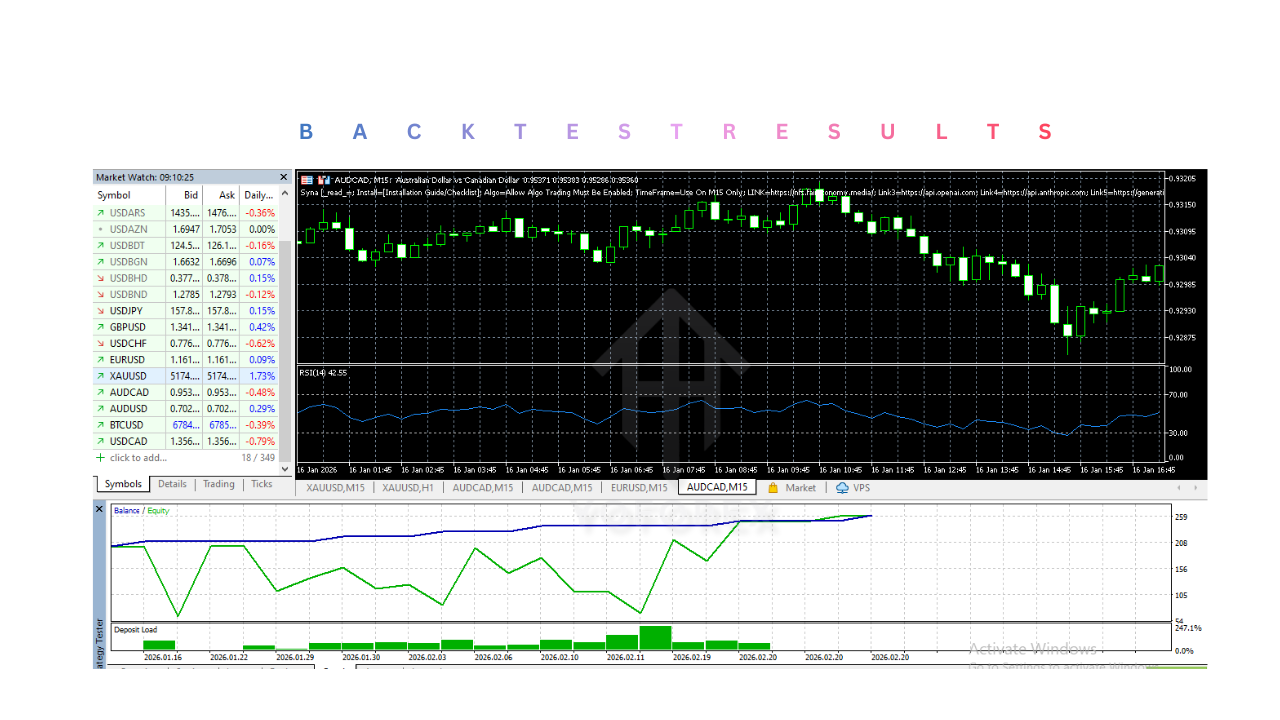
MetaTrader 5 provides a Strategy Tester, which allows traders to test the EA using historical market data.
Through backtesting, traders can:
- Evaluate how Syna EA V5.1 MT5 performed in past market conditions
- Identify potential strengths and weaknesses
- Optimize trading parameters
- Analyze drawdowns and profitability
Backtesting is an important step before running the EA on a live trading account.
10. Trade Management Automation
Syna EA V5.1 MT5 not only opens trades but also actively manages them after they are placed.
The EA can automatically perform actions such as:
- Adjusting stop loss levels
- Moving trades to break-even
- Closing trades when profit targets are reached
- Managing multiple positions simultaneously
This automated trade management ensures that trades follow a predefined strategy even when the trader is not actively monitoring the market.
11. User-Friendly Setup
Despite being an automated trading system, Syna EA V5.1 is designed with a relatively simple installation and setup process.
Traders can easily:
- Install Syna EA V5.1 MT5 into the MetaTrader 5 platform
- Attach it to a trading chart
- Configure settings according to their preferences
- Enable automated trading
Once these steps are completed, the EA can begin monitoring the market and executing trades.
12. Continuous Strategy Execution
One of the biggest strengths of automated trading systems is their ability to execute strategies consistently.
Unlike manual trading, where traders may hesitate or miss opportunities, Syna EA V5.1 MT5 executes trades exactly according to its programmed logic. This helps maintain discipline and consistency in trading decisions.
Installation & Setup Guide
1. Download the Syna EA V5.1 File
The first step is obtaining the Syna EA V5.1 Expert Advisor file. Typically, the EA is provided in the compiled MT5 format.
Common file format:
-
.ex5
In some cases, developers may also provide a source file format:
-
.mq5
After downloading the EA file, save it in a location that is easy to access, such as your desktop or downloads folder.
Before installing the EA, ensure that you have the MetaTrader 5 trading platform installed on your computer.
2. Install MetaTrader 5 Platform
If MetaTrader 5 is not already installed, download it from your broker’s official website or the MetaTrader website.
Steps to install MT5:
- Download the MT5 installation file.
- Run the installation program.
- Follow the installation instructions.
- Launch the MetaTrader 5 platform.
- Log in using your trading account credentials.
Once installed, MT5 will serve as the environment where Syna EA V5.1 MT5 operates.
3. Open the MetaTrader 5 Data Folder
To install Syna EA V5.1 MT5, you need to access the MT5 data directory where Expert Advisors are stored.
Follow these steps:
- Open the MetaTrader 5 platform.
- Click on File in the top menu.
- Select Open Data Folder.
A folder window will open containing all MetaTrader files and directories.
4. Navigate to the Experts Folder
Inside the MT5 data directory, locate the folder where Expert Advisors are stored.
Directory path:
Steps:
- Open the MQL5 folder.
- Locate the Experts folder.
- Open the Experts directory.
This is where all EA files must be placed for MetaTrader 5 to detect them.
5. Copy the Syna EA V5.1 File
Now copy the downloaded Syna EA V5.1 MT5 file into the Experts folder.
Steps:
- Locate the Syna EA V5.1.ex5 file on your computer.
- Copy the file.
- Paste it into the Experts folder.
Once the file is placed in the correct directory, MetaTrader will be able to load the EA.
6. Restart MetaTrader 5
After placing Syna EA V5.1 MT5 file in the Experts folder, restart the MT5 platform.
You can do this in two ways:
Method 1
-
Close MetaTrader 5 and open it again.
Method 2
- In the Navigator panel, right-click Expert Advisors
- Click Refresh
This allows the platform to recognize the newly installed EA.
After refreshing, the EA should appear in the Navigator panel under Expert Advisors.
7. Enable Automated Trading in MT5
Before using any Expert Advisor, automated trading must be enabled within MetaTrader 5.
Steps:
-
Click Tools in the top menu.
-
Select Options.
-
Go to the Expert Advisors tab.
-
Enable the following options:
- Allow automated trading
- Allow DLL imports (if required)
- Allow WebRequest for listed URLs (if required)
Click OK to save the settings.
Additionally, ensure that the AutoTrading button on the MT5 toolbar is activated.
When enabled, the AutoTrading button will appear green.
8. Open a Trading Chart
Syna EA V5.1 MT5 must be attached to a chart to operate.
Steps:
- Select the trading instrument you want to trade (for example EURUSD).
- Open the chart.
- Choose the preferred timeframe (such as M15, H1, or H4).
Some EAs perform better on specific timeframes, so traders should follow the recommended settings if available.
9. Attach the EA to the Chart
Once the chart is open, Syna EA V5.1 MT5 can be attached.
Steps:
- Locate Syna EA V5.1 in the Navigator panel.
- Drag the EA onto the chart.
Alternatively:
-
Double-click the EA name to attach it to the selected chart.
After doing this, a settings window will appear.
10. Configure EA Input Parameters
Syna EA V5.1 MT5 settings window allows traders to adjust various parameters according to their preferences.
Common parameters may include:
- Lot size
- Stop loss value
- Take profit value
- Risk percentage
- Maximum open trades
- Slippage tolerance
- Trading hours
Traders should configure these parameters carefully according to their account size and risk tolerance.
After configuring the settings, click OK.
11. Confirm EA Activation
After attaching Syna EA V5.1 MT5 and applying the settings, confirm that it is running properly.
You should see:
- A smiley face icon in the top-right corner of the chart
- The AutoTrading button enabled in MT5
If the smiley icon is visible, it means the EA is active and monitoring the market.
12. Monitor the EA Operation
Even though Syna EA V5.1 MT5 operates automatically, traders should periodically monitor its activity.
Important things to check:
- Trade execution
- Account balance and equity
- Drawdown levels
- Open positions
- Error messages in the MT5 terminal
Monitoring ensures that the EA continues operating correctly under changing market conditions.
13. Use a VPS for Continuous Operation
For optimal performance, many traders run Expert Advisors on a Virtual Private Server (VPS).
Advantages of using a VPS:
- 24/7 EA operation
- Stable internet connection
- Faster trade execution
- Protection against power outages
- Reduced platform downtime
Running Syna EA V5.1 MT5 on a VPS allows it to trade continuously even when your computer is turned off.
14. Test the EA on a Demo Account First
Before running Syna EA V5.1 MT5 on a live trading account, it is strongly recommended to test it on a demo account.
Demo testing helps traders:
- Understand how the EA behaves
- Verify trade execution
- Test different settings
- Evaluate risk management performance
Only after satisfactory demo performance should traders consider using the EA in live market conditions.
Advantages
1. Eliminates Emotional Trading
One of the biggest advantages of using an automated trading system is that it removes emotional decision-making from trading.
Human traders often face psychological challenges such as:
- Fear of losing money
- Greed during profitable trades
- Overtrading after losses
- Hesitation when entering trades
These emotions can lead to poor trading decisions. Since Syna EA V5.1 MT5 operates based on predefined rules and algorithms, it executes trades objectively without being influenced by emotions. This helps maintain discipline and consistency in trading.
2. Saves Time and Reduces Manual Work
Manual trading requires constant chart analysis and monitoring of market conditions. Traders may spend many hours each day watching price movements and waiting for trading opportunities.
Syna EA V5.1 MT5 automates many of these tasks, including:
- Market analysis
- Trade signal detection
- Trade execution
- Position management
Because the EA performs these functions automatically, traders can save significant time and reduce the need for continuous screen monitoring.
3. 24/5 Market Monitoring
The forex market operates 24 hours a day during weekdays, and market opportunities can appear at any time.
Syna EA V5.1 MT5 can monitor the market continuously and react instantly when trading conditions are met. This means:
- Trading opportunities are not missed
- The system can operate even when the trader is asleep
- Market events in different sessions can be captured
When combined with a VPS (Virtual Private Server), the EA can run without interruption.
4. Consistent Strategy Execution
Human traders may deviate from their strategy due to emotions or lack of discipline. Automated trading systems execute trades strictly according to their programmed logic.
Syna EA V5.1 MT5 follows the same trading rules every time, ensuring:
- Consistent trade entries
- Consistent exit conditions
- Reliable strategy execution
This consistency helps maintain the integrity of the trading strategy.
5. Fast Trade Execution
Speed is an important factor in trading, especially in fast-moving markets.
Since Syna EA V5.1 MT5 is integrated with the MetaTrader 5 platform, it can execute trades instantly when signals appear. This provides several benefits:
- Faster order placement
- Reduced slippage in some cases
- Immediate response to market signals
Automated execution is generally faster than manual trading.
6. Built-in Risk Management
Syna EA V5.1 MT5 includes several risk management features that help traders control their exposure to the market.
These may include:
- Stop loss settings
- Take profit targets
- Lot size management
- Risk percentage per trade
- Maximum trade limits
Proper risk management settings can help protect trading capital and reduce the impact of losing trades.
7. Backtesting and Strategy Testing
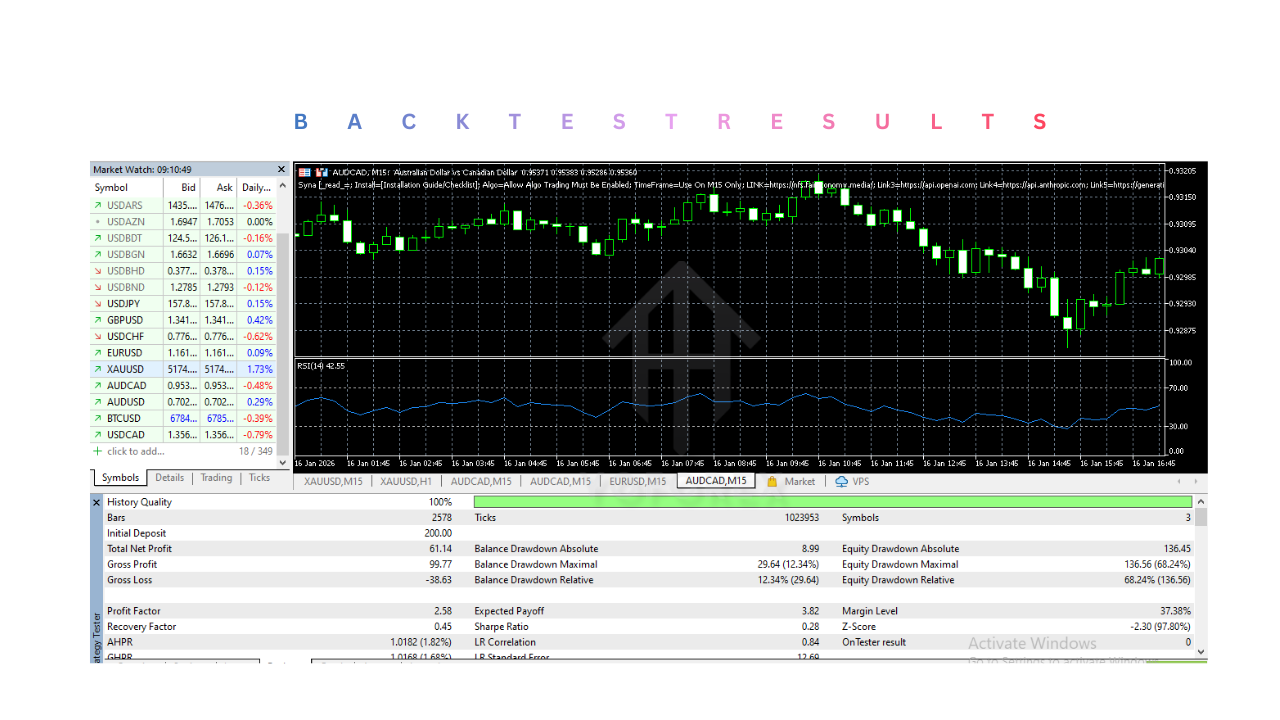
MetaTrader 5 allows traders to backtest Expert Advisors using historical data.
With Syna EA V5.1 MT5, traders can:
- Test the EA using past market data
- Analyze potential profitability
- Evaluate drawdowns
- Optimize settings for better performance
Backtesting helps traders gain confidence in the system before using it in live trading.
8. Suitable for Beginners and Experienced Traders
Automated trading systems can be useful for traders at different experience levels.
For beginners:
- Syna EA V5.1 MT5 simplifies trading operations
- Reduces the need for complex analysis
For experienced traders:
- It can complement existing strategies
- Allows automation of trading systems
This makes the EA accessible to a wide range of traders.
Disadvantages
1. No Guaranteed Profits
One of the most important limitations of any trading EA is that profits are never guaranteed.
Financial markets are unpredictable, and strategies that perform well under certain conditions may fail under others. Even the most advanced automated systems can experience losing periods.
Traders should understand that the EA is a tool for executing strategies, not a guaranteed profit machine.
2. Performance Depends on Market Conditions
Many automated strategies work best under specific market conditions.
For example:
- Trend-following strategies perform better in trending markets
- Range strategies perform better in sideways markets
If the market behaves differently from what the strategy expects, Syna EA V5.1 MT5’s performance may decline.
3. Requires Proper Configuration
Incorrect settings can significantly affect the EA’s performance.
Common configuration mistakes include:
- Using excessively large lot sizes
- Setting stop losses too wide or too tight
- Running the EA on unsuitable currency pairs
- Using incorrect timeframes
Traders must understand Syna EA V5.1 MT5’s parameters and adjust them carefully.
4. Broker Conditions Can Affect Performance
The performance of automated trading systems can be influenced by broker conditions such as:
- Spread size
- Order execution speed
- Slippage
- Trading restrictions
Some brokers may not be suitable for certain automated strategies, which can impact the EA’s results.
5. Requires VPS for Best Performance
Although Syna EA V5.1 MT5 can run on a personal computer, many traders prefer using a VPS server for continuous operation.
A VPS ensures:
- Stable internet connection
- 24/7 trading operation
- Faster order execution
However, VPS hosting involves an additional monthly cost.
6. Technical Issues May Occur
Since automated trading systems rely on technology, technical problems can occasionally occur.
Possible issues include:
- Internet connection failure
- Platform crashes
- Server downtime
- Software bugs
These problems may interrupt the EA’s operation if not properly managed.
7. Requires Monitoring
Although Syna EA V5.1 MT5 is automated, it should not be treated as a completely “set and forget” system.
Traders should still monitor:
- Account performance
- Drawdown levels
- Trade frequency
- Market conditions
Regular monitoring ensures that the EA continues operating properly.
Who Should Use Syna EA V5.1 MT5?
1. Traders Who Prefer Automated Trading
Some traders prefer automation rather than manually analyzing charts and executing trades. Syna EA V5.1 MT5 is suitable for traders who want a hands-off or semi-automated trading experience.
These traders may benefit because the EA:
- Automatically scans the market for trading opportunities
- Executes trades based on predefined strategy rules
- Manages open trades without manual intervention
- Continuously monitors market conditions
Automation allows traders to focus on strategy monitoring instead of constant chart analysis.
2. Busy Professionals With Limited Time
Many traders have full-time jobs or other commitments that prevent them from actively monitoring the market throughout the day.
Syna EA V5.1 MT5 can be useful for these individuals because it can:
- Monitor the market 24/5
- Automatically execute trades when conditions are met
- Manage trades even when the trader is offline
When combined with a VPS, the EA can run continuously without requiring the trader’s computer to remain active.
3. Traders Who Struggle With Emotional Decision-Making
Emotional trading is one of the most common reasons traders experience losses.
Some emotional challenges include:
- Fear of entering trades
- Closing profitable trades too early
- Holding losing trades too long
- Overtrading after losses
Since Syna EA V5.1 MT5 follows predefined rules, it executes trades based on logic rather than emotions. This makes it suitable for traders who want a disciplined and systematic trading approach.
4. Beginner Traders Learning Automated Trading
New traders who are interested in learning algorithmic or automated trading may also find Syna EA V5.1 useful.
It allows beginners to:
- Understand how automated trading systems operate
- Learn about trade management rules
- Explore risk management settings
- Study EA performance through backtesting
However, beginners should first test the EA on a demo account before using it on a live account.
5. Experienced Traders Looking to Automate Strategies
Experienced traders who already have trading knowledge may use Syna EA V5.1 to automate part of their trading strategy.
Benefits for experienced traders include:
- Reducing manual trade execution
- Running multiple strategies simultaneously
- Improving trade execution speed
- Allowing automation to handle repetitive tasks
Some traders use automated systems alongside their manual trading strategies to diversify their approach.
6. Traders Who Want Consistent Strategy Execution
Manual traders may sometimes deviate from their trading plans due to emotions or hesitation.
Syna EA V5.1 MT5 is suitable for traders who want strict adherence to a trading strategy because the EA executes trades according to its programmed rules without deviation.
Why Use Syna EA V5.1 MT5?
There are several reasons why traders choose automated trading tools like Syna EA V5.1. The EA is designed to simplify the trading process, improve efficiency, and help maintain disciplined trading practices. Below are the main reasons traders use this EA.
1. Automates the Trading Process
One of the main reasons to use Syna EA V5.1 is its ability to automate trading activities.
Syna EA V5.1 MT5 can automatically perform tasks such as:
- Analyzing market conditions
- Identifying trading opportunities
- Executing buy and sell orders
- Managing open positions
- Closing trades based on exit rules
Automation helps eliminate the need for constant manual involvement.
2. Saves Time for Traders
Manual trading often requires significant time spent analyzing charts and waiting for setups.
Using Syna EA V5.1 MT5 allows traders to save time because the EA performs market analysis automatically. Traders can simply monitor performance rather than actively searching for trades.
This makes the EA particularly useful for traders who cannot dedicate many hours to trading each day.
3. Enables 24/5 Market Monitoring
Financial markets, especially forex, operate continuously during weekdays. Opportunities may appear at any time during different market sessions.
Syna EA V5.1 MT5 monitors the market continuously and can react instantly when trading conditions are met.
This ensures that:
- Opportunities are not missed
- Trades can be executed during different trading sessions
- The system can operate even when the trader is offline
4. Reduces Emotional Trading
Trading decisions influenced by emotions often lead to mistakes.
By following predefined rules and algorithms, Syna EA V5.1 MT5 removes emotional bias from trading decisions. It executes trades consistently based on the programmed strategy.
This helps traders maintain discipline and avoid impulsive decisions.
5. Improves Trade Execution Speed
Automated systems can execute trades much faster than manual traders.
Syna EA V5.1 MT5 can:
- Detect trading signals instantly
- Send orders to the broker immediately
- React quickly to market changes
This speed can be beneficial in fast-moving markets where delays may affect trade outcomes.
6. Provides Built-In Risk Management
Risk management is essential for long-term trading success.
Syna EA V5.1 MT5 includes several risk control settings such as:
- Stop loss levels
- Take profit targets
- Adjustable lot sizes
- Maximum trade limits
These features help traders maintain control over their exposure to market risks.
7. Allows Strategy Testing Through Backtesting
Before using Syna EA V5.1 MT5 in live trading, traders can test its performance using MetaTrader 5’s strategy tester.
Backtesting helps traders:
- Analyze historical performance
- Evaluate profitability potential
- Identify drawdowns
- Optimize strategy settings
This provides valuable insights into how the EA may behave under different market conditions.
8. Provides Structured and Systematic Trading
Automated trading systems follow structured logic and rules.
Using Syna EA V5.1 MT5 helps traders maintain a systematic approach to trading, which is often more effective than random or impulsive trading decisions.
A structured strategy can improve long-term trading discipline.