Unlocking the Power of the X Smart Trader Indicator for MT5: A Comprehensive Guide
Introduction
In the fast-paced world of forex trading, having the right tools can make all the difference. The X Smart Trader Indicator for MetaTrader 5 (MT5) is a modern trading system designed to provide traders with accurate, non-repainting signals for safer and more informed trading decisions. This blog explores the features, benefits, and practical applications of the X Smart Trader Indicator, offering insights into how it can elevate your trading strategy in 2025. Whether you’re a beginner or an experienced trader, this powerful tool promises to enhance your market analysis and improve your trading outcomes.
The X Smart Trader Indicator is tailored for the MT5 platform, one of the most advanced trading platforms available, known for its robust charting tools, multi-asset support, and automated trading capabilities. By incorporating advanced technical indicators and a user-friendly interface, the X Smart Trader Indicator stands out as a versatile solution for traders aiming to capitalize on market opportunities while managing risks effectively.
What is the X Smart Trader Indicator?
The X Smart Trader Indicator is a sophisticated trading system developed for MT5, designed to deliver reliable trading signals without repainting. Repainting indicators can mislead traders by altering past signals, but the X Smart Trader Indicator ensures consistency, making it ideal for both manual and automated trading strategies. It integrates a variety of technical indicators, including Moving Averages, Relative Strength Index (RSI), Moving Average Convergence Divergence (MACD), and Stochastic Oscillators, to provide a comprehensive view of market trends and momentum.
This indicator operates in multiple modes, such as Dynamic Mode for scalping and Normal Mode for day trading or swing trading, catering to different trading styles. Its non-repainting nature, combined with a filter oscillator and a trading assistant, simplifies the process of identifying high-probability trade setups. Additionally, the system includes an advanced order management system, allowing traders to set precise stop-loss and take-profit levels, and a back-testing tool to evaluate strategies using historical data.
Key Features
1. Non-Repainting Signals
One of the standout features of the X Smart Trader Indicator is its non-repainting signals. This ensures that once a signal is generated, it remains fixed, providing traders with confidence in their decision-making process. Whether you’re trading forex, stocks, or commodities, this reliability is crucial for avoiding false signals and maintaining a consistent strategy.
2. Multi-Mode Functionality
The indicator offers two primary modes:
-
Dynamic Mode: Ideal for scalpers, this mode generates a higher number of signals for fast-paced trading, though it comes with increased risk.
-
Normal Mode: Suited for day traders and swing traders, this mode provides a balanced approach with moderate signal frequency and lower risk.
These modes allow traders to customize the indicator based on their preferred trading style and risk tolerance.
3. Advanced Technical Indicators
The X Smart Trader Indicator combines several well-known technical indicators to generate accurate signals:
-
Moving Averages: Help identify the overall trend direction.
-
RSI: Measures momentum to detect overbought or oversold conditions.
-
MACD: Identifies changes in trend strength and direction.
-
Stochastic Oscillator: Pinpoints potential reversal points.
By combining these indicators, the system provides a holistic view of market conditions, enabling traders to make informed decisions.
4. User-Friendly Interface
The charting interface is intuitive and customizable, supporting various chart types such as line, bar, and candlestick charts. Traders can overlay multiple indicators and tools on a single chart, making it easier to analyze complex market patterns.
5. Order Management and Back-Testing
The indicator includes an advanced order management system for setting stop-loss and take-profit levels efficiently. Additionally, its back-testing tool allows traders to test strategies against historical data, providing insights into potential performance under real-world conditions. This feature is invaluable for refining strategies before deploying them in live markets.
6. Trading Assistant
The trading assistant feature simplifies trade execution by providing clear signals and recommendations. It helps traders identify optimal entry and exit points, reducing the need for extensive market knowledge. This makes the X Smart Trader Indicator accessible to both novice and experienced traders.
How to Use the X Smart Trader Indicator
Installation
Installing the X Smart Trader Indicator on MT5 is straightforward:
-
Download the Indicator: Obtain the .mq5 or .ex5 file from a trusted source, such as the MQL5 Market or a reputable website like Best-MetaTrader-Indicators.com.
-
Install on MT5: Copy the file to the MT5 indicators folder (typically found at C:\Program Files\MetaTrader 5\MQL5\Indicators).
-
Apply to Chart: Open MT5, navigate to the “Navigator” window, and drag the X Smart Trader Indicator onto your desired chart.
-
Configure Settings: Adjust the settings, such as mode (Dynamic or Normal), timeframes, and indicator parameters, to align with your trading strategy.
Trading with the Indicator
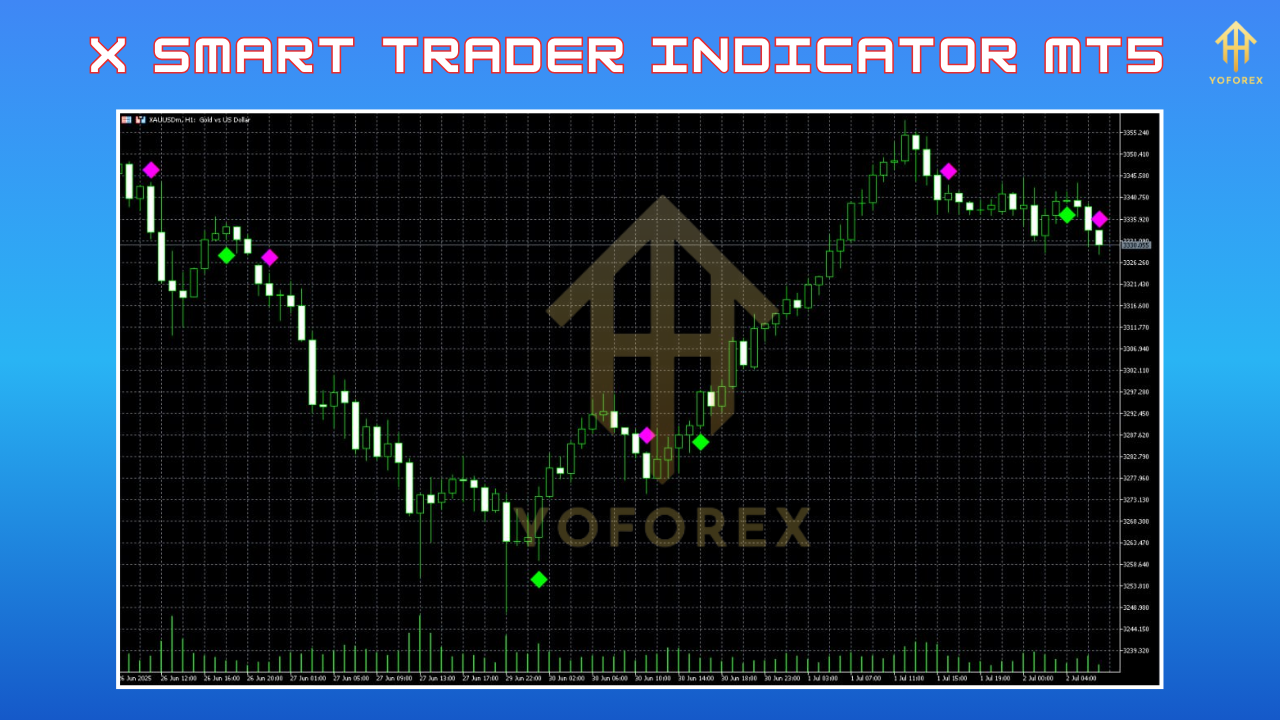
The X Smart Trader Indicator generates clear buy and sell signals:
-
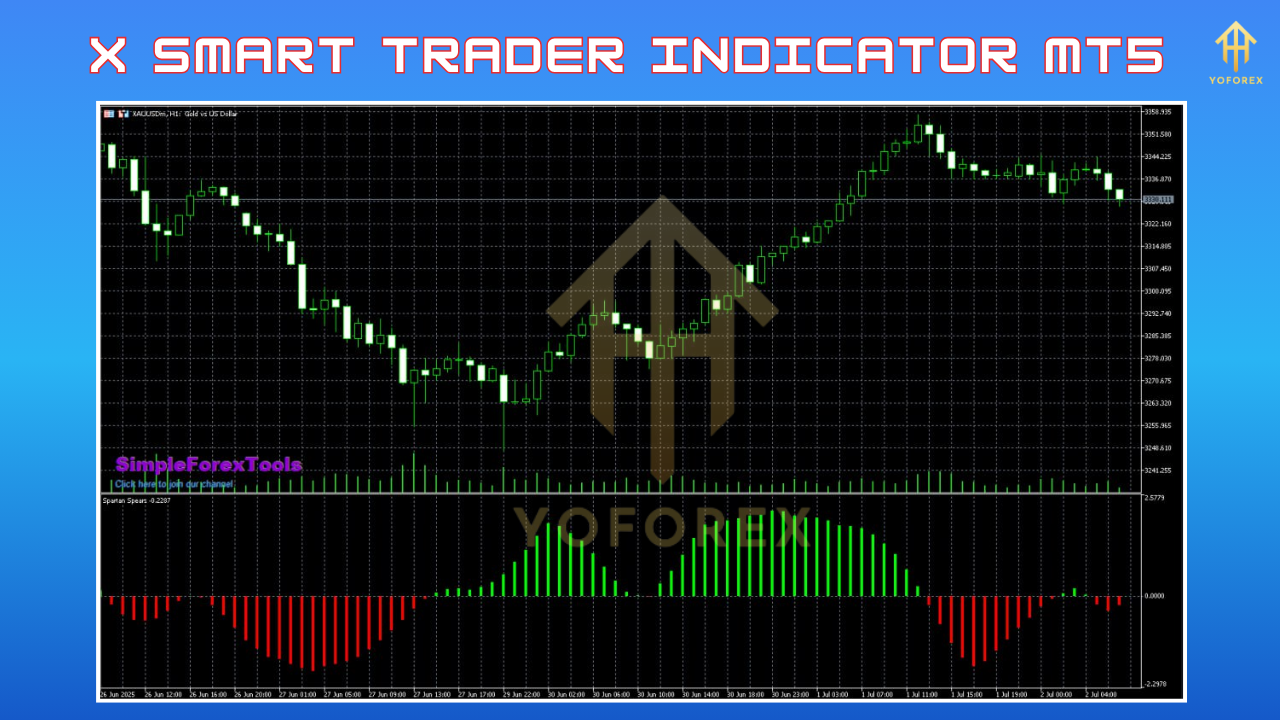
Buy Signal: A green arrow appears on the chart, accompanied by a green histogram in the indicator window, indicating a bullish trend.
-
Sell Signal: A red arrow and red histogram signal a bearish trend.
To trade effectively:
-
Confirm Signals: Use the filter oscillator to validate signals. For example, ensure the oscillator aligns with the arrow’s direction (e.g., green for buy, red for sell).
-
Set Stop-Loss and Take-Profit: Place stop-loss a few pips above/below the previous local high/low. Close trades when an opposite signal (e.g., a red diamond for a buy trade) appears or when the oscillator changes color.
-
Choose the Right Timeframe: Use recommended timeframes based on the mode (e.g., lower timeframes like M1 or M5 for Dynamic Mode, higher timeframes like H1 or H4 for Normal Mode).
Risk Management
The X Smart Trader Indicator emphasizes risk management. Traders should:
-
Test the indicator on a demo account for at least a month before using it in live trading.
-
Adhere to strict money management rules, such as risking only 1-2% of the account per trade.
-
Monitor economic news and events, as they can impact market volatility and signal reliability.
Benefits of the X Smart Trader Indicator
1. Versatility
The indicator is compatible with any trading instrument on MT5, including forex pairs, stocks, commodities, and indices. This versatility makes it suitable for traders with diverse portfolios.
2. Enhanced Decision-Making
By combining multiple indicators and a filter oscillator, the X Smart Trader Indicator reduces the likelihood of false signals, enabling traders to make more accurate decisions.
3. Time Efficiency
The trading assistant and clear visual signals save time by automating much of the analysis process. Traders can focus on executing trades rather than deciphering complex market data.
4. Accessibility for All Traders
With its user-friendly interface and clear instructions, the indicator is accessible to beginners while offering advanced features for seasoned traders.
Potential Drawbacks and Considerations
While the X Smart Trader Indicator is powerful, it’s not without limitations:
-
Learning Curve: Beginners may need time to understand the indicator’s settings and signals.
-
Market Dependency: Like all technical indicators, its effectiveness depends on market conditions. Volatile or ranging markets may produce less reliable signals.
-
Testing Required: As recommended by forex experts, thorough testing on a demo account is essential to ensure compatibility with your trading style and broker.
Traders should also be cautious of over-reliance on any single indicator. Combining the X Smart Trader Indicator with fundamental analysis and other tools can enhance its effectiveness.
Comparison with Other MT5 Indicators
The X Smart Trader Indicator stands out when compared to other popular MT5 indicators, such as the Supertrend Indicator or Matrix Arrow Indicator. While the Supertrend Indicator excels at identifying trend changes based on price action, it lacks the multi-indicator integration and order management features of the X Smart Trader. Similarly, the Matrix Arrow Indicator combines up to 10 standard indicators but may not offer the same level of customization or non-repainting reliability.
Tips for Maximizing the X Smart Trader Indicator
-
Combine with Other Tools: Use the indicator alongside support and resistance levels, Fibonacci retracements, or volume profiles for a more robust strategy.
-
Stay Disciplined: Follow the indicator’s signals strictly and avoid emotional trading decisions.
-
Monitor Market Conditions: Avoid trading during high-impact news events unless your strategy accounts for volatility.
-
Regularly Back-Test: Use the built-in back-testing tool to refine your strategy and adapt to changing market conditions.
-
Join Trading Communities: Engage with communities like those on MQL5 or Jim Brown’s Facebook and Telegram groups to share insights and learn from other traders.
Real-World Applications
The X Smart Trader Indicator is particularly effective for:
-
Scalping: Dynamic Mode is ideal for capturing quick price movements in volatile markets.
-
Day Trading: Normal Mode suits traders looking for intraday opportunities with balanced risk.
-
Swing Trading: Higher timeframes and Normal Mode help identify longer-term trends.
For example, a trader focusing on the EUR/USD pair could use the indicator on an H1 timeframe in Normal Mode to identify a bullish trend. When a green arrow and green histogram appear, they could enter a buy trade, setting a stop-loss below the recent swing low and a take-profit at a key resistance level. By combining the indicator with volume analysis, they could further confirm the trade’s potential.
Where to Get the X Smart Trader Indicator
The X Smart Trader Indicator is available for download from trusted sources like:
-
Best-MetaTrader-Indicators.com: Offers free access to the indicator and other MT5 tools.
-
FxProSystems.com: Provides the indicator along with a detailed manual and lifetime support.
-
MQL5 Market: A reliable platform for purchasing or downloading free/paid indicators.
Always ensure you download from reputable sources to avoid corrupted files or scams. After downloading, test the indicator thoroughly on a demo account before using it in live trading.
Conclusion
The X Smart Trader Indicator for MT5 is a powerful, non-repainting trading system that combines advanced technical indicators, a user-friendly interface, and robust risk management features. Its versatility, reliability, and multi-mode functionality make it an excellent choice for traders of all levels. By following the recommended settings, testing on a demo account, and combining it with other analysis tools, traders can unlock its full potential and achieve consistent results in the dynamic forex market.
Whether you’re scalping, day trading, or swing trading, the X Smart Trader Indicator provides the tools you need to navigate the markets with confidence. Start exploring this innovative system today and take your trading to the next level in 2025!