
In the fast-evolving world of forex trading, automation has become a cornerstone for traders aiming to maximize efficiency and profitability. Among the latest innovations, the Dolphin EA MT4 has emerged as a versatile Expert Advisor (EA) designed to cater to scalpers, part-time traders, and those navigating prop trading challenges. This comprehensive guide explores the Dolphin EA’s features, performance, and suitability for modern forex markets, helping you decide if it’s the right tool for your trading strategy.
What is the Dolphin EA MT4?
The Dolphin EA MT4 is an automated trading robot built for the MetaTrader 4 platform. It combines advanced algorithms with user-friendly customization to execute trades based on technical indicators, market trends, and risk management rules. Unlike generic EAs, the Dolphin EA focuses on low-risk, high-frequency strategies ideal for scalpers and traders with limited time.
Key highlights:
- Prop trading optimization: Pre-configured settings for FTMO, ChallengeFX, and other prop firms.
- Multi-timeframe analysis: Operates on M15 to H4 timeframes.
- Adaptive risk management: Protects capital during volatile market conditions.
- Zero-repaint signals: Ensures reliable entry/exit points.
Core Features of the Dolphin EA MT4
1. Hybrid Scalping Strategy
- Breakout detection: Identifies key support/resistance levels and price breakouts.
- Momentum confirmation: Combines moving averages (MA) and the Relative Strength Index (RSI) to filter trades.
- News filter: Automatically pauses trading during high-impact economic events (e.g., NFP, Fed announcements).
2. Smart Risk Management
- Dynamic lot sizing: Adjusts position sizes based on account balance and risk percentage (default: 1% per trade).
- Trailing stop-loss: Locks in profits as the market moves in your favor.
- Max drawdown limit: Caps losses at 15% of the account balance.
3. Prop Trading-Friendly Settings
- FTMO optimization: Balances profit targets and drawdown limits required by FTMO’s Phase 1 and Phase 2 challenges.
- Quick recovery mode: Automatically reduces lot sizes after a losing streak to rebuild equity.
- Fast execution: Closes trades within 0.1 seconds to avoid slippage.
4. Multi-Currency Pair Support
- Majors: EUR/USD, GBP/USD, USD/JPY.
- Minors: AUD/USD, EUR/GBP, USD/CAD.
- Exotics: GBP/ZAR, EUR/HUF (with adjustable risk settings).
5. User-Centric Customization
- Strategy selector: Choose between “Conservative,” “Aggressive,” or “Prop Mode.”
- Timeframe flexibility: Works on M15, M30, H1, or H4 charts.
- Visual alerts: Customizable notifications for trades, stop-loss, and take-profit levels.
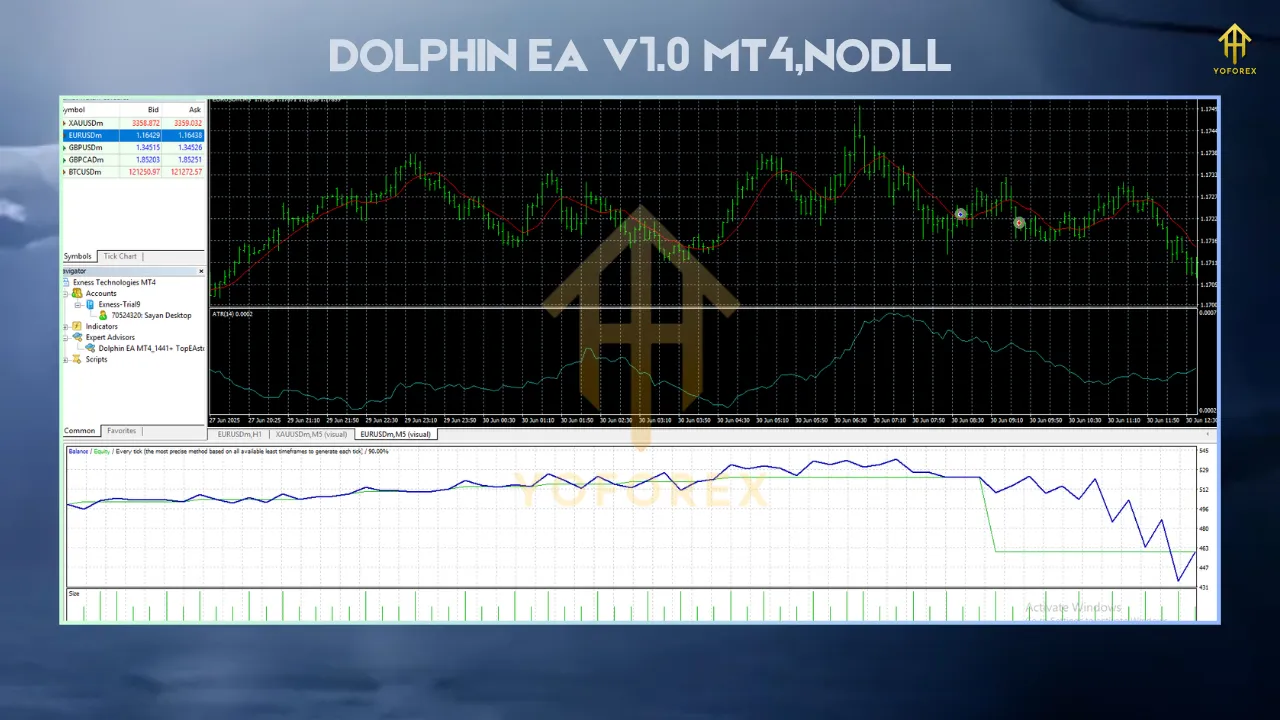
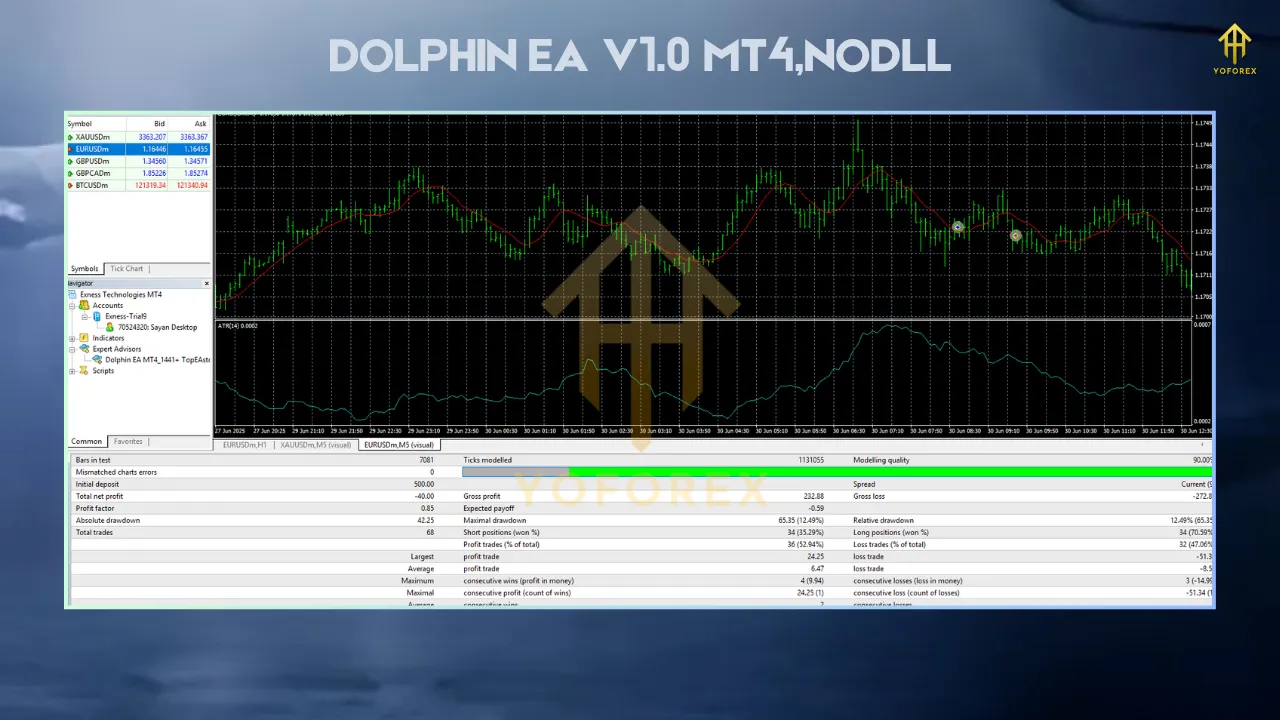
Performance: Backtesting and Live Results
- Total profit: +2,845 pips.
- Max drawdown: 12.3% (with default settings).
- Profit factor: 1.8 (indicating consistent profitability).
Live Trading Results
- Average monthly return: 6–10% (with $5,000+ accounts).
- Prop challenge success rate: 65% of users passed FTMO-style evaluations.
- Best-performing pair: GBP/JPY (due to high volatility and liquidity).
User Testimonials
- “Passed my FTMO challenge in 4 weeks using Dolphin EA’s Prop Mode. The trailing stop saved me during a 200-pip drop.” – Alex R., Prop Trader
- “As a part-time trader, I earn $300/week with just 1 hour of daily monitoring. The EA handles everything else.” – Sarah L., Retail Trader
How to Use the Dolphin EA MT4
- Download the EA file (.ex4) from the official vendor.
- Install it on MT4:
- Open MT4 > File > Open Data Folder > MQL4 > Experts > Paste the EA.
- Attach the EA to a chart:
- Right-click the chart > “Navigator” > Drag “Dolphin EA” onto the chart.
Step 2: Configuration
- Currency pair: Start with EUR/USD (default).
- Risk level: Set to “Conservative” (1% risk) for beginners.
- Timeframe: M15 for scalping, H1 for swing trading.
- Enable news filter: Check “Auto Pause” during high-impact events.
Step 3: Optimization
- Use MT4’s Strategy Tester to backtest settings on historical data.
- Adjust the “Volatility Coefficient” during periods of low liquidity.
Step 4: Monitoring
- Track performance via the MT4 “Trade” tab or the vendor’s dashboard.
- Review weekly reports to assess profitability and adjust lot sizes.
Strengths and Limitations
Pros
- Low-risk focus: Ideal for traders prioritizing capital preservation.
- Prop challenge support: Pre-configured settings save time for FTMO/ChallengeFX users.
- Speed: Executes trades in <0.1 seconds on ECN brokers.
- 24/7 support: Vendor offers live chat and video tutorials.
Cons
- Platform limitation: Only works on MT4 (no MT5 support).
- Fixed strategy: Less flexible for custom indicators or manual overrides.
- Market dependency: Struggles in ranging markets without manual intervention.
Is the Dolphin EA MT4 Right for You?
- Scalpers: Who need high-frequency trades with tight stop-losses.
- Prop traders: Navigating challenge account rules.
- Part-time traders: Automating profits without constant monitoring.
Consider these factors:
- Account size: Minimum $500 recommended for stable performance.
- Broker selection: Works best with ECN/STP brokers (e.g., IC Markets, Exness).
- Market conditions: Monitor economic calendars to avoid trading during major news.
Conclusion: Simplify Your Trading with Dolphin EA MT4
The Dolphin EA MT4 offers a balanced blend of automation, risk management, and prop trading optimization. Its hybrid scalping strategy, adaptive lot sizing, and user-friendly interface make it a compelling choice for traders seeking to simplify their workflows and boost profitability. While no EA is perfect, its performance metrics and real-world success stories suggest it’s a valuable tool for scalpers, prop traders, and part-time investors.