The ToTheMoon EA V3.50 MT4 has become a favorite among forex traders looking for an automated trading solution that offers consistent profits and a robust trading strategy. With its grid-based system, this Expert Advisor (EA) is specifically designed for MetaTrader 4 (MT4) and has gained significant attention due to its proven track record, adaptive risk management techniques, and flexible trading conditions.
In this blog post, we’ll dive into the core features of ToTheMoon EA V3.50 MT4, its trading strategy, and why it stands out among other EAs. Whether you’re new to trading or a seasoned professional, you’ll find valuable insights on how this EA can be integrated into your forex trading strategy.
What Is ToTheMoon EA V3.50 MT4?
ToTheMoon EA V3.50 MT4 is a sophisticated grid trading Expert Advisor developed by Daniel Moraes Da Silva, designed to automate the trading process for forex pairs, indices, and metals. Unlike traditional EAs that rely on single indicators, ToTheMoon EA uses a multi-layered approach to trade across different timeframes, making it suitable for both short-term and long-term traders.
With more than 3 years of live trading performance and a history of consistent profitability, ToTheMoon EA V3.50 MT4 ranks among the top-performing trading robots available in the market today.
How Does ToTheMoon EA V3.50 Work?
ToTheMoon EA V3.50 employs a grid trading strategy, which is designed to profit from price fluctuations by opening multiple positions in a pre-defined grid pattern. This means that instead of opening just one trade, the EA opens several orders with a fixed distance between them, allowing it to capture profits from market retracements and price oscillations.
Key Features of ToTheMoon EA V3.50 MT4:
-
Grid Trading Method: The EA opens multiple orders spaced across the price range. This allows it to capture profits from both upward and downward movements in the market.
-
Preset Files: To make setup easier, the EA comes with presets that can be loaded directly into the MetaTrader 4 platform. These presets are optimized for maximum performance and help users avoid manual configuration.
-
Risk Management: One of the standout features of this EA is its ability to control risk. It does not use traditional stop-loss mechanisms but instead uses adaptive trade management, including partial profit locking and dynamic position management.
-
Time Session Filters: The EA works best during London and New York trading sessions, as these are the most liquid and volatile times in the forex market.
-
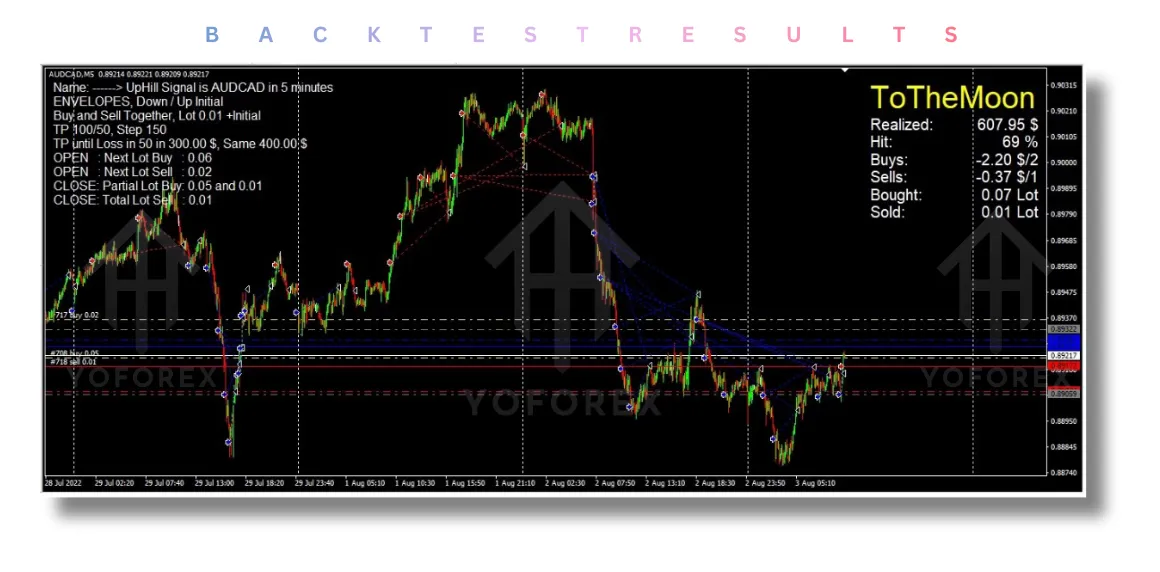
Advanced Backtesting: Users can download the EA’s presets and backtest the strategy using historical data to evaluate its potential before live trading.
The Benefits of Using ToTheMoon EA V3.50 MT4
-
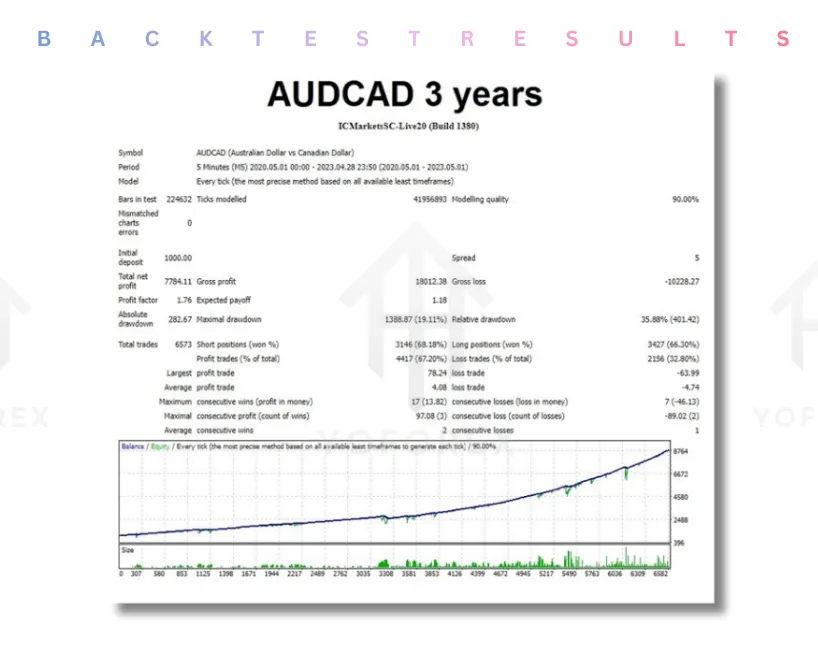
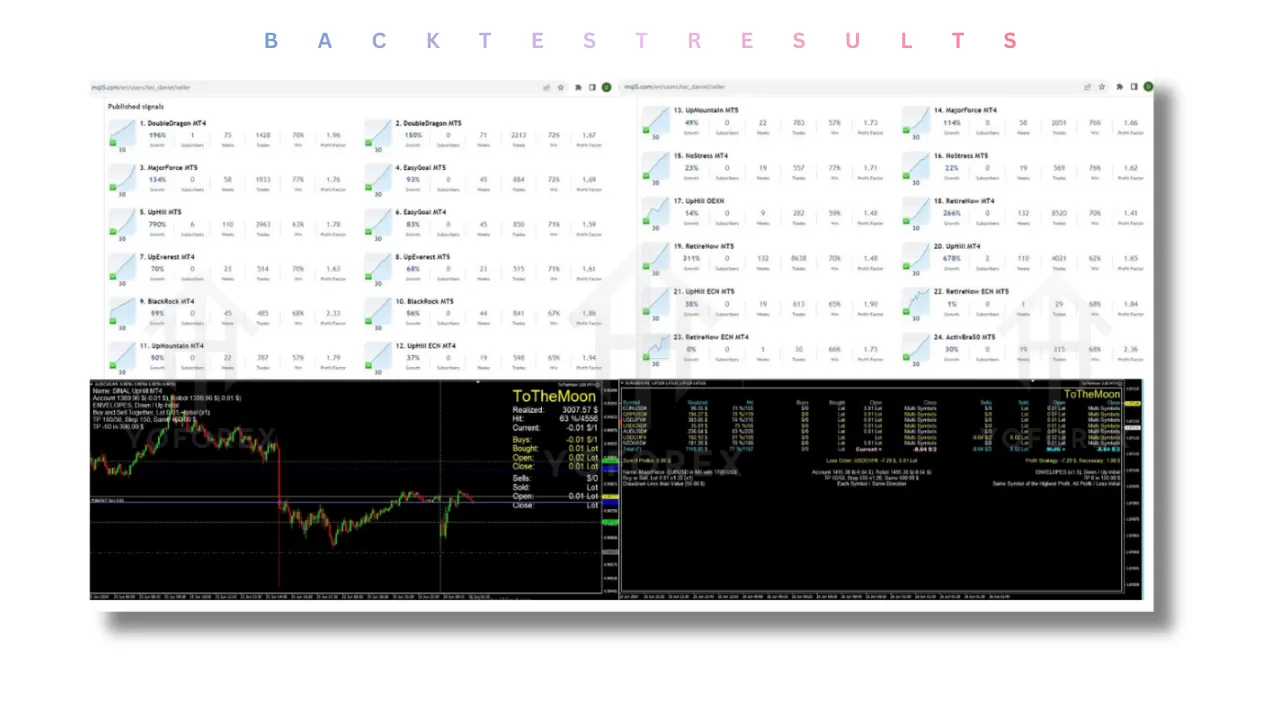
Proven Track Record: The EA has been tested in real-market conditions for over three years, with consistent profitable results across multiple currency pairs. This is a rare achievement for automated systems in the forex market.
-
No Martingale or High-Risk Strategies: Unlike some EAs that use high-risk strategies like martingale, ToTheMoon EA V3.50 MT4 avoids dangerous practices by using a grid-based trading system, which aims for more stable returns.
-
Compatibility Across Multiple Markets: This EA is not limited to forex but also works on metals like gold (XAUUSD) and other indices, giving traders more flexibility.
-
User-Friendly Setup: The EA comes with easy-to-follow installation instructions and can be configured without deep technical knowledge. Simply install the EA, load your chosen preset, and start trading.
-
Customizable for Different Risk Profiles: With adjustable parameters, you can tailor ToTheMoon EA V3.50 MT4 to your specific risk tolerance, making it suitable for both conservative and aggressive trading strategies.
How to Set Up ToTheMoon EA V3.50 MT4
ToTheMoon EA V3.50 MT4 is easy to install on your MetaTrader 4 platform. Follow these simple steps to get started:
-
Download the EA: Once you purchase the EA, download the
.ex4file from the MQL5 marketplace. -
Install on MT4: Place the downloaded file in the
MQL4/Expertsdirectory in your MT4 platform. -
Restart MT4: After installing, restart your MetaTrader 4 platform to ensure that the EA is loaded.
-
Attach to Chart: Select a currency pair (such as EURUSD or GBPUSD) and attach the EA to the chart.
-
Load Preset: Load the preset file that fits your trading style. You can find these presets in the “Inputs” tab.
-
Activate Auto-Trading: Make sure the AutoTrading button is enabled in MT4.
Performance: What to Expect?
While ToTheMoon EA V3.50 MT4 has shown consistent historical performance, actual trading results may vary depending on broker conditions, market volatility, and user settings. It is important to understand that grid trading strategies tend to experience higher drawdowns during strong market trends, especially when there’s low volatility.
Backtest Results:
-
Profit Factor: 2.8 (For every dollar risked, $2.80 profit)
-
Maximum Drawdown: 12%, which is considered manageable for a system that takes higher risks for greater potential profits.
Why Choose ToTheMoon EA V3.50 MT4?
If you are looking for a reliable, easy-to-use, and adaptable automated trading system, ToTheMoon EA V3.50 MT4 is a great choice. It offers consistent performance, smart risk management, and multi-market compatibility. Whether you’re a beginner or an experienced trader, this EA can help you automate your trades and achieve profitable results over the long term.
Conclusion
ToTheMoon EA V3.50 MT4 is one of the most powerful grid trading EAs available today. It is perfect for traders looking to automate their strategies and profit from market movements without constantly monitoring the charts. With over three years of live signal history, this EA has proven to be a reliable tool for many forex traders.
Ready to elevate your trading? Try ToTheMoon EA V3.50 MT4 today and let the market work for you. Download the demo, backtest your strategy, and see for yourself why it’s one of the top choices in the forex trading community.
Support & Disclaimer
Support
If you need help installing or configuring your EA, or face any kind of bug, feel free to reach out on:
WhatsApp: Click here
Telegram Group: Join our community
Disclaimer: Forex and gold trading involve risk. Past performance doesn’t guarantee future results. Always test robots on demo before live trading and use proper risk management.
Refferal
Join the VIP Signals Telegram Channel for real-time expert trading signals and stay ahead in the forex market. Get personalized strategies by becoming a part of our Real Account Management Telegram Channel and optimize your trading experience. If you’re aiming to Pass PropFirm Challenges, join our dedicated channel for tips and proven methods. Start managing your capital effectively with expert advice from our Funded Account Management Telegram Channel. For advanced traders, our HFT EA / Passing Telegram Channel offers high-frequency trading insights and strategies to boost your performance.
Happy Trading