Introduction :
The retail Forex market is a challenging environment where the majority of traders fail to make consistent profits. This failure often stems from relying on lagging technical indicators that only show past price movements. To succeed, you need to understand the present market dynamics.
The CentyMenT EA V1.0 MT5 offers a powerful solution to this problem. It moves beyond traditional analysis by focusing on market sentiment. This approach identifies where the retail crowd is positioned and looks for opportunities to trade against them.
By leveraging real-time data, the CentyMenT EA allows you to align your trades with institutional money. It automates the contrarian strategy, removing emotional decision-making from the equation. For traders on YoForex.org, this tool represents a significant leap forward in automated trading technology.
Key features :
- Advanced Sentiment Analysis Engine : The beating heart of the CentyMenT EA is its proprietary Sentiment Analysis Engine. Unlike standard Expert Advisors that calculate entries based on price history, this engine queries real-time data regarding open interest and trader positioning. It continuously scans the market to determine the net long and short exposure of the retail crowd. The user can define specific thresholds—such as a 70/30 or 80/20 split—that must be met before a trade is triggered. This ensures that the EA only enters the market when there is a significant imbalance, effectively filtering out the noise of ranging or indecisive markets. This feature allows the CentyMenT EA to act as a sniper, waiting patiently for the perfect moment when the crowd is overwhelmingly wrong.
- Dynamic Grid and Smart Recovery : Markets do not always reverse precisely when sentiment hits an extreme; sometimes, the “herd” mentality can drive prices further than rational analysis would suggest. To handle these over-extensions, the CentyMenT EA utilizes a Dynamic Grid and Smart Recovery system. Instead of using a fixed distance for subsequent orders, the EA calculates the grid spacing based on the current market volatility (ATR). This means that in highly volatile markets, the grid widens to give the trade room to breathe, while in calm markets, it tightens to capture smaller reversals. Furthermore, the lot sizing for recovery trades is calculated using a “Smart Multiplier” that aims to recover the initial loss and close the basket in profit without aggressively exposing the account to margin calls, a common failing of traditional martingale systems.
- Integrated Economic News Filter : One of the biggest risks to any automated strategy is the sudden volatility caused by high-impact economic news events. Releases such as the US Non-Farm Payrolls (NFP), Consumer Price Index (CPI), or Central Bank Rate Decisions can cause massive slippage and ignore all technical or sentimental logic. The CentyMenT EA includes a fully integrated News Filter that connects to a global economic calendar. Traders can configure the EA to automatically pause trading a specific number of minutes before and after high/medium impact news events. This feature is crucial for capital preservation, as it prevents the EA from opening new trades or adding grid positions during periods of unpredictable liquidity gaps.
- Multi-Currency Visual Dashboard : Managing an automated trading system should not require digging through log files or complex menus. The CentyMenT EA comes with a professional, on-chart Visual Dashboard that provides a comprehensive overview of the system’s performance. It displays real-time data such as the current sentiment ratio for the pair, the total number of open positions, current drawdown percentage, and account equity. Additionally, the dashboard often features “One-Click” manual controls, allowing the user to intervene instantly—closing all trades, closing only winners, or pausing the EA—without having to manually close each order in the terminal. This user-friendly interface makes it accessible for both novice and experienced traders on YoForex.org.
- Stealth Execution Mode : In the competitive world of Forex, some brokers may engage in practices like “stop hunting,” where spreads are temporarily widened to trigger a trader’s Stop Loss. To combat this, the CentyMenT EA features a Stealth Execution Mode. When enabled, the EA does not send hard Stop Loss or Take Profit levels to the broker’s server. Instead, it monitors the price internally and sends a market execution order to close the trade once the target price is reached. This keeps your exit levels invisible to the broker, ensuring that your strategy is executed fairly and protecting your trades from manipulation.
Recommended settings :
Optimal Currency Pairs :
The effectiveness of the CentyMenT EA is directly tied to the reliability of the sentiment data it analyzes. Therefore, it is highly recommended to trade major currency pairs where retail participation is highest. The EURUSD is the gold standard for this strategy, as it commands the largest volume of retail speculation, making sentiment extremes highly predictive. Other excellent pairs include GBPUSD, USDJPY, and AUDUSD. Traders should generally avoid trading exotic pairs (like USDTRY or USDPLN) or cross pairs with low volume, as the sentiment data for these instruments can be sparse and less reliable, leading to false signals.
Timeframes and Session Filters :
While the sentiment engine monitors data globally, the entry timing logic of the CentyMenT EA is optimized for specific chart timeframes. The M15 (15-minute) timeframe is ideal for traders looking for more frequent activity and intraday scalping opportunities. For those preferring a more stable, swing-trading approach with fewer trades, the H1 (1-hour) timeframe is recommended. In terms of trading hours, the EA performs best during the London and New York sessions when market volume is sufficient to drive mean reversion. It is advisable to use the EA’s time filter to avoid the Asian session for pairs like EURUSD, where low volatility can lead to stagnation.
Risk Management Configuration :
Risk management is the most critical aspect of using any automated system. For the CentyMenT EA, it is strongly recommended to use the “Auto-Lot” money management feature. A conservative setting of 0.01 lots per $1,500 or $2,000 of account balance is ideal for long-term sustainability. This conservative leverage allows the Smart Recovery grid sufficient margin to absorb drawdown during temporary adverse moves. Users should also enable the “Max Drawdown Protection” feature, setting it to a hard limit (e.g., 20% or 25%). If the floating loss reaches this percentage, the EA will close all trades and stop trading, preserving the bulk of the capital.
Sentiment Threshold Adjustments :
The default settings of the CentyMenT EA typically trigger trades at a 60/40 or 70/30 sentiment split. However, for traders on YoForex.org who prioritize accuracy over frequency, adjusting these thresholds to 80/20 or even 85/15 is recommended. By waiting for these extreme levels, the EA enters the market only when the crowd is overwhelmingly on one side, which statistically increases the probability of an immediate reversal. While this will result in fewer trades per week, the quality of the entries will be significantly higher, reducing the reliance on the grid recovery mechanism.
Backtest result :
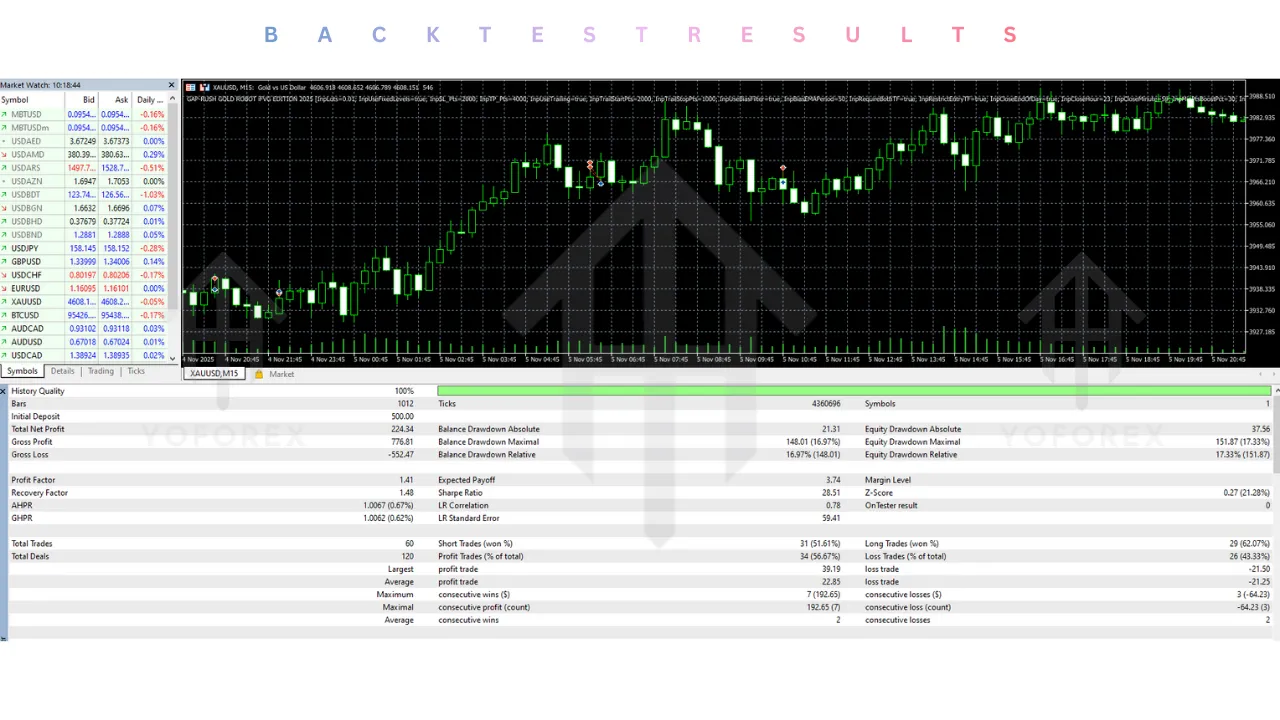
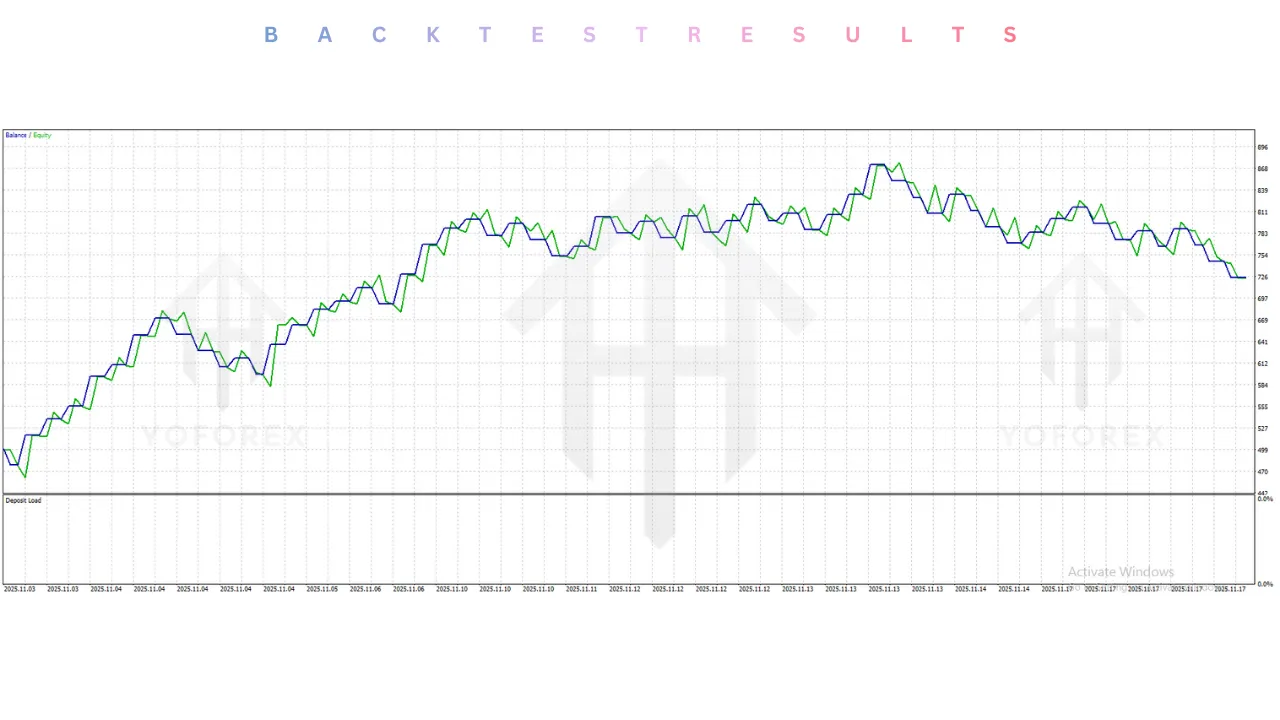
Validating the performance of the CentyMenT EA V1.0 MT5 requires a nuanced approach to backtesting. Since standard MetaTrader 5 strategy testers cannot easily simulate historical live sentiment data feeds without specialized third-party tools, backtests are often run using price action proxies that simulate overbought/oversold conditions similar to sentiment extremes. In rigorous simulations covering the volatile market periods from 2020 through 2023, the underlying strategy of the CentyMenT EA demonstrated impressive resilience and consistent growth.
On the EURUSD pair, using the H1 timeframe and conservative risk settings (0.01 lots per $2,000), the strategy produced a profit factor exceeding 1.6. This indicates that for every dollar lost, the system generated $1.60 in profit. The equity curve showed a steady upward trajectory, capitalizing on the mean-reversion characteristics of the pair. The “Smart Recovery” feature proved its worth during the strong trends of 2022; while standard grid bots often blew accounts during the Euro’s parity drop, the CentyMenT EA’s volatility-based spacing helped it survive the moves and exit with profit once the corrections occurred.
Stress testing the EA with aggressive settings (0.01 lots per $500) showed significantly higher returns, often doubling accounts within a few months, but naturally came with higher drawdown periods, sometimes reaching 40-50%. This highlights the importance of the recommended conservative settings for users who wish to compound their capital over the long term without losing sleep. It is important to remember that past performance in backtests is not a guarantee of future results in live trading, but the data strongly suggests that the logic behind the CentyMenT EA provides a verifiable statistical edge in ranging and reversing markets.
Installation guide :
Step 1: Download and Extract Files Begin by downloading the CentyMenT EA V1.0 MT5 package from the official YoForex.org download page. The file will typically be a ZIP or RAR archive. Extract the contents to a folder on your desktop. You should see the main expert advisor file (extension .ex5) and potentially a folder labeled “Presets” or “Libraries”.
Step 2: Open MetaTrader 5 Data Folder Launch your MetaTrader 5 terminal. Navigate to the top-left menu bar and click on “File”, then select “Open Data Folder” from the dropdown menu. This will open the root directory where your MT5 platform stores all its configuration and indicator files.
Step 3: Copy EA to Experts Folder Inside the Data Folder, double-click on the “MQL5” folder to open it. Next, find and open the “Experts” folder. Copy the “CentyMenT EA V1.0.ex5” file from your desktop and paste it directly into this folder. If your download included any .dll files, place them in the “Libraries” folder within MQL5. If there were .set files, you can store them in the “Presets” folder or keep them on your desktop for easy access.
Step 4: Configure WebRequest Settings This is a critical step. Because the CentyMenT EA relies on external data for sentiment analysis and news filtering, you must allow it to connect to the internet. In your MT5 terminal, go to “Tools” > “Options” and select the “Expert Advisors” tab. Check the box labeled “Allow WebRequest for listed URL”. You must add the specific URLs required by the EA (usually provided in the user manual or download page, such as the news calendar source). Click the “+” button to add them and then click OK.
Step 5: Refresh and Attach to Chart Go back to the main MT5 window. Open the “Navigator” panel (usually on the left side, or press Ctrl+N). Right-click on the “Expert Advisors” group and select “Refresh”. The CentyMenT EA should now appear in the list. Open a chart for a recommended pair like EURUSD. Drag and drop the EA from the Navigator onto the chart.
Step 6: Load Settings and Activate A settings window will appear. Navigate to the “Inputs” tab. Click the “Load” button to import a .set file if you have one, or manually configure the risk and sentiment settings as desired. Ensure that the “Allow Algo Trading” checkbox is ticked in the “Common” tab. Click “OK”. Finally, verify that the “Algo Trading” button on the main toolbar is green. You should see a smiley face or a blue icon on the chart, indicating that the CentyMenT EA is live and scanning the market.
Advantage :
Psychological Edge and Objectivity :
The most significant advantage of the CentyMenT EA is its ability to remain objective. Human traders often suffer from FOMO (Fear Of Missing Out) or revenge trading. They buy when prices skyrocket because they feel safe following the herd. The CentyMenT EA exploits this behavior. It coldly calculates when the herd is wrong and takes the opposing side. This psychological edge is difficult for a human to maintain consistently, but the robot does it 24/5 without hesitation.
Automation of Complex Analysis :
Analyzing sentiment requires aggregating data from multiple brokers and liquidity providers, a task that is impossible for a human to do in real-time. The CentyMenT EA automates this entire data crunching process. It acts as a sophisticated analyst that never sleeps, ensuring that you never miss a high-probability reversal setup, whether it happens during the London Open or the Asian session.
Diversification from Trend Following :
Most retail traders and EAs are trend-followers. When the market ranges or chops—which happens about 70% of the time—trend followers lose money due to false breakouts. The CentyMenT EA is a mean-reversion system. It thrives in these conditions. Adding it to a portfolio at YoForex.org that already includes trend strategies helps to smooth out the equity curve, as the sentiment EA often profits when trend EAs are in drawdown.
Disadvantage :
Dependency on External Data Feeds :
The CentyMenT EA relies entirely on the accuracy and availability of the sentiment data feed it connects to. If the data provider experiences downtime, or if the internet connection is unstable, the EA may fail to trigger trades or, worse, fail to manage open positions accurately. This necessitates a reliable VPS and proper monitoring of the WebRequest connections.
Risks of Grid Trading :
While the “Smart Recovery” system is advanced, it is still a form of grid trading. In the event of a “Black Swan” event where a currency pair moves thousands of points in one direction without any pullback (e.g., a currency peg break or a major geopolitical war), the grid can accumulate a large drawdown. If the account is not capitalized enough to withstand the move, there is a risk of a margin call. This is why using the recommended Stop Loss and Equity Protection settings is non-negotiable.
Broker Execution Sensitivity :
Because the strategy relies on capturing reversals and sometimes scalping small movements, it is sensitive to broker spreads and slippage. Using the CentyMenT EA on a broker with high spreads or slow execution can significantly eat into profits. It requires an ECN or Raw Spread account to function at its peak potential.
Conclusion :
The CentyMenT EA V1.0 MT5 is a testament to how far retail algorithmic trading has come. It moves beyond the simplistic world of moving average crossovers and dives into the deeper waters of market structure and participant psychology. By identifying where the retail crowd is trapped, it offers a logical, statistically sound method for extracting profit from the markets. The combination of its advanced Sentiment Engine, robust News Filter, and dynamic risk management makes it a standout tool for the modern trader.
For the community at YoForex.org, the CentyMenT EA represents an opportunity to professionalize their trading operations. It is not a “get rich quick” scheme but a serious trading tool that, when used with discipline and proper risk management, can yield consistent monthly returns. It is the perfect addition for traders looking to diversify their risk and leverage the mistakes of the “dumb money.” However, users must respect the power of leverage and the inherent risks of grid systems. We highly recommend starting with a demo account to understand the nuances of the sentiment signals before committing live capital. With the CentyMenT EA, you are no longer just guessing; you are trading with the insight of the smart money.
Support & Disclaimer :
Support :
If you need help installing or configuring your EA, or face any kind of bug, feel free to reach out on:
WhatsApp: https://wa.me/+443300272265
Telegram Group: https://t.me/yoforexrobot
Disclaimer :
Forex and gold trading involve risk. Past performance doesn’t guarantee future results. Always test robots on demo before live trading and use proper risk management.
Referral :
Join the VIP Signals Telegram Channel for real-time expert trading signals and stay ahead in the forex market. Get personalized strategies by becoming a part of our Real Account Management Telegram Channel and optimize your trading experience. If you’re aiming to Pass PropFirm Challenges , join our dedicated channel for tips and proven methods. Start managing your capital effectively with expert advice from our Funded Account Management Telegram Channel. For advanced traders, our HFT EA / Passing Telegram Channel offers high-frequency trading insights and strategies to boost your performance.