Introduction
In the vast universe of automated trading, finding an Expert Advisor (EA) that balances complexity with safety is rare. Most off-the-shelf robots either gamble with your capital using high-risk strategies like martingale or grid trading, or they are too simplistic to adapt to changing market conditions. Enter the Galaxy 5 EA V1.00, a sophisticated yet user-friendly trading robot designed specifically for the MetaTrader 5 platform.
Unlike single-strategy EAs that often fall apart when volatility spikes, the Galaxy 5 EA V1.00 utilizes a portfolio of five distinct, non-correlated trading logics. This approach is akin to having a team of specialized analysts working simultaneously, diversifying risk and smoothing out the equity curve.
Today, we will dissect every aspect of the Galaxy 5 EA V1.00. We will look under the hood at its advanced neural network filters, review its impressive backtesting data covering nearly two decades, and provide a strict installation guide. If you are looking for transparency and robust engineering in your forex trading journey, this guide is for you.
Overview of the Galaxy 5 EA V1.00
The Galaxy 5 EA V1.00 is not just another forex robot; it is a portfolio management system disguised as a single EA. Built to harness the power of the MetaTrader 5 platform, this EA leverages multi-currency and multi-timeframe analysis to execute trades with high precision.
The core philosophy behind Galaxy 5 EA V1.00 is diversification. Statistical analysis shows that trading multiple non-correlated strategies together leads to a higher probability of profit while reducing the risk of ruin . The Galaxy 5 EA V1.00 achieves this by merging five separate trading logics into one streamlined interface.
Typically, to run a portfolio of five EAs, you would need five charts and five separate installations cluttering your terminal. With the Galaxy 5 EA V1.00, you load a single robot on a single chart, and it handles the rest. It has been developed with a focus on institutional-grade testing, including Monte Carlo simulations and Walk-Forward matrices, ensuring that the strategy is robust enough to survive the “black swan” events that plague the forex market.
How This EA Works
The operational mechanics of the Galaxy 5 EA V1.00 are built on a “one chart, many symbols” architecture. To use the Galaxy 5 EA V1.00, you attach it to a single chart—specifically the NZDCAD H1 timeframe. Once attached, the EA scans a predefined basket of currency pairs including NZDCAD, EURCAD, USDCHF, AUDUSD, CADJPY, EURCHF, EURJPY, and GBPNZD .
But the Galaxy 5 EA V1.00 does not simply trade every pair equally. Instead, it uses advanced algorithms to select which of its five internal strategies to deploy on which currency pair at any given moment. It utilizes a neural network component to filter out “false breakouts” and identify high-probability support and resistance zones .
Each of the five internal logics operates independently. If Strategy A is losing money on EURJPY, Strategy C might be winning on NZDCAD. The Galaxy 5 EA V1.00 manages these positions simultaneously, ensuring that a loss in one area is offset by a gain in another. It dynamically adjusts pending orders every candle to adapt to market behavior, ensuring it is always trading in alignment with current volatility rather than using static, outdated entry points .
Key Features
The Galaxy 5 EA V1.00 comes packed with features that distinguish it from the average forex robot. Here are the technical specifications that matter:
- 5 Non-Correlated Strategies: The titular feature. You are essentially buying five EAs in one, each with different exit logics (Time-based exits, Profit Trailing, and Fixed Take Profits) .
- Strict Risk Management: The Galaxy 5 EA V1.00 explicitly states: No Martingale, No Grid, No Scalp, No Hedge . This is crucial for traders who want to avoid exponential drawdowns.
- Multi-Currency Capability: It trades up to 8 major pairs simultaneously from a single chart .
- Prop Firm Ready: The Galaxy 5 EA V1.00 includes specific settings for proprietary trading firm challenges, such as daily drawdown limits and trailing drawdown protection .
- Advanced Exit Strategies: Unlike EAs that just use a static Stop Loss, this EA utilizes different approaches per strategy, including volatility-adjusted stops and time-based exits to lock in profits before the weekend gap .
- Long-Term Data Validation: Backtested on 17+ years of tick data (99% quality) and verified on 30 years of M1 data .
Trading Strategy Logic Used by Galaxy 5 EA V1.00
Understanding the logic is vital. The Galaxy 5 EA V1.00 does not rely on a single “Holy Grail” indicator. Instead, it uses a fusion of approaches:
1. Support and Resistance Zones (AI-Powered)
The primary entry filter for the Galaxy 5 EA V1.00 is a custom support and resistance indicator. However, it is not a simple “horizontal line” breaker. The EA uses a neural network to distinguish between a genuine breakout and a liquidity grab (false breakout). It only triggers trades when the price action aligns with the AI’s confidence level .
2. Trend and Volume Confirmation
Before entering a trade suggested by the support/resistance levels, the Galaxy 5 EA V1.00 cross-references the trend direction and volume. This multi-dimensional analysis ensures that the EA does not try to “catch a falling knife.”
3. The Portfolio Effect (Correlation Check)
The genius of Galaxy 5 EA V1.00 lies in how it selects its trades. It constantly runs correlation checks. If Strategy A and Strategy B are highly correlated in the current market, the EA might only take one trade to avoid over-exposure. This keeps the equity curve smooth .
4. Adaptive Pending Orders
For every new candle, the Galaxy 5 EA V1.00 modifies its pending orders. If volatility increases, the EA widens the stop loss proportionally (or narrows it for range-bound markets), making the EA adaptive rather than static .
5. Friday Exit Protocol
To protect against weekend gaps (which can destroy accounts), the Galaxy 5 EA V1.00 automatically closes all trades by a set time on Friday. This prevents the account from being exposed to unpredictable Monday morning opens .
Recommended Settings
To achieve optimal performance with the Galaxy 5 EA V1.00, adhering to the recommended setup is critical. The developer has optimized everything internally, meaning you only need to adjust risk parameters.
Platform: MetaTrader 5 (MT5) – Not compatible with MT4.
Timeframe: H1 (Hourly)
Primary Chart: NZDCAD (Recommended)
Account Type: ECN or Raw Spread (Low latency/Low spread)
Input Parameter Guide:
| Parameter | Recommended Value | Explanation |
|---|---|---|
| UseMoneyManagement | true (for Live), false (for Testing) |
Enables dynamic risk calculation. |
| mmRiskPercent | 1.0 – 2.0 |
This is the % of balance risked per trade. 1% is standard. |
| mmLotsIfNoMM | 0.01 per $1000 |
Fixed lot sizing if MM is off. |
| Max Spread in Point | 140 |
Prevents the EA from trading during high spread events. |
| FridayExitTime | 19:00 (UTC+2) |
Adjust this strictly to your broker’s server time. |
| Max DrawDown to close all | 80 (Optional) |
A safety switch to close all trades if total drawdown hits 80%. |
Important: The Galaxy 5 EA V1.00 comes “Plug & Play.” The internal strategies are already pre-optimized for the H1 timeframe. Do not change the TP/SL multipliers unless you are an advanced user .
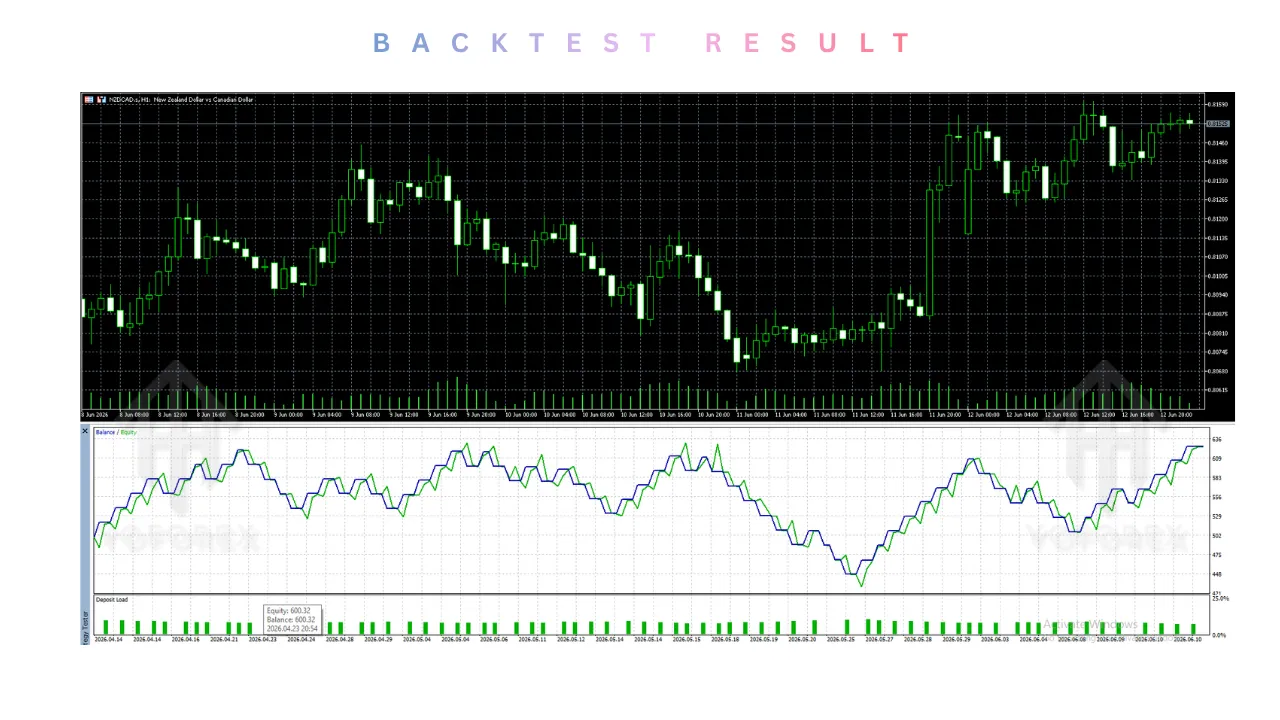
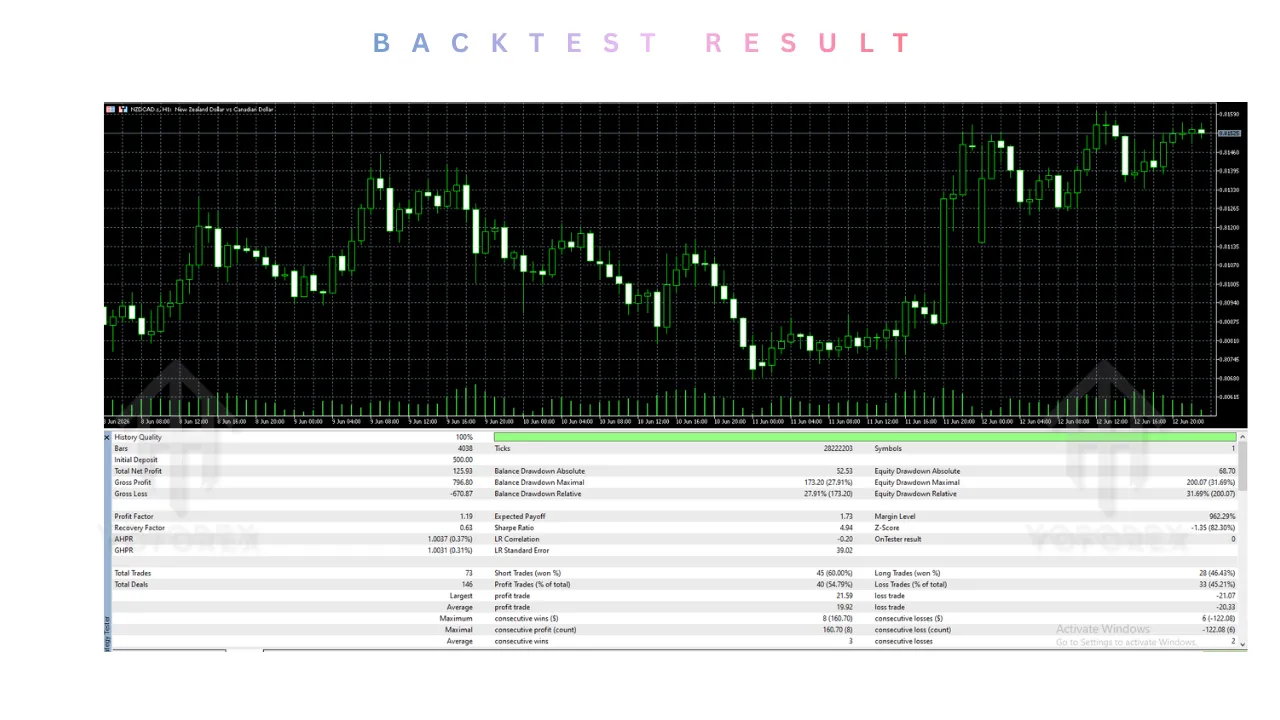
Backtesting Result
While no EA can predict the future, the backtesting standards of the Galaxy 5 EA V1.00 are among the most rigorous available.
The Galaxy 5 EA V1.00 was tested on 17 years of tick data with a 99% modeling quality. Furthermore, it was stress-tested using Monte Carlo methods:
- Randomized Trades Order: Simulating if trades happened in a different sequence.
- Randomized History Data: Simulating different volatility environments.
- Sensitivity Analysis: Testing how the EA performs if the spread widens unexpectedly .
Note: Specific numeric profit reports vary by broker conditions, but the consistency of the equity curve remains the standout metric. Users have reported that the backtests show a smooth, upward sloping curve without the jagged drops associated with martingale systems .
Installation Guide
Setting up the Galaxy 5 EA V1.00 is straightforward, even for beginners.
-
Obtain the File: Download the
.ex5or.mq5file for the Galaxy 5 EA V1.00. -
Open MT5: Launch your MetaTrader 5 platform.
-
Open Data Folder: Click “File” -> “Open Data Folder”.
-
Navigate to Folder: Go to
MQL5->Experts. -
Copy File: Paste the Galaxy 5 EA V1.00 file into the
Expertsfolder. -
Restart MT5: You must restart the platform for the Navigator window to recognize the new file.
-
Attach to Chart: Open the NZDCAD H1 chart. Drag the Galaxy 5 EA V1.00 from the Navigator window onto the chart.
-
Set Permissions: In the EA properties window, check “Allow Automated Trading” and “Allow modification of signals settings”.
-
Set Parameters: Input your risk percentage (
RiskormmRiskPercent) and click OK.
The smiley face icon on the chart should be active. That’s it—the Galaxy 5 EA V1.00 is now actively managing the portfolio.
Advantages and Disadvantages
Advantages
- Safety First: The strict “No Martingale / No Grid” policy makes Galaxy 5 EA V1.00 suitable for long-term account growth without the risk of blowing up.
- Diversified Exposure: Trades multiple pairs, reducing reliance on the direction of a single currency.
- Institutional Testing: The Monte Carlo and Walk-Forward tests provide confidence that the Galaxy 5 EA V1.00 isn’t just “curve-fitted” to past data .
- Low Maintenance: Once set up, the EA handles everything, including Friday exits.
Disadvantages
- Requires Patience: Because it avoids high-risk strategies, the Galaxy 5 EA V1.00 might have lower monthly returns compared to aggressive scalpers.
- MT5 Exclusive: Users stuck on the older MT4 platform cannot use this specific version of Galaxy 5 EA V1.00.
- Broker Sensitivity: As it trades multiple pairs, a broker with slow execution or high hedging restrictions could hinder the EA’s ability to manage the portfolio effectively.
Who Should Use Galaxy 5 EA V1.00?
The Galaxy 5 EA V1.00 is not for the “get rich quick” crowd. It is designed for:
- Prop Firm Traders: Those taking FTMO or MyFundedFX challenges will appreciate the drawdown controls and the daily loss limiters built into the Galaxy 5 EA V1.00 .
- Conservative Investors: If you cannot sleep at night worrying about a margin call, the transparent risk management of the Galaxy 5 EA V1.00 offers peace of mind.
- Busy Professionals: You don’t have time to watch charts for 8 pairs. The Galaxy 5 EA V1.00 does the heavy lifting for you on a single H1 chart.
Why Choose Galaxy 5 EA V1.00 Over Other Forex Robots?
Many forex robots promise the stars but deliver high-octane gambling. Here is why the Galaxy 5 EA V1.00 stands out:
1. The Portfolio Effect vs. The Single Pair EA
Most EAs trade only one pair (e.g., EURUSD only). If that pair goes into a consolidation phase, the EA loses money. Galaxy 5 EA V1.00 spreads the risk. While EURJPY sleeps, NZDCAD might trend .
2. No Dangerous Strategies
It is shocking how many top-selling EAs use “Recovery Zones” (Martingale). Galaxy 5 EA V1.00 explicitly rejects these methods. It uses a hard Stop Loss on every single trade . You know the maximum you can lose on a trade before it even opens.
3. The “Swap” of Logics
Some EAs change their strategy based on a calendar. The Galaxy 5 EA V1.00 uses real-time correlation checks. It treats the market as a dynamic organism, adjusting its five internal logics (some using profit trailing, some using time exits) based on current conditions, not static rules .
Conclusion
The Galaxy 5 EA V1.00 represents a significant step up from the standard forex robot offerings. By merging five distinct strategies into a single, diversified portfolio, it offers a level of sophistication usually reserved for institutional hedge funds, packaged into a user-friendly MT5 application.
While it requires a disciplined approach and a broker that supports multi-currency trading, the safety features (No Grid/Martingale) combined with the rigorous 17-year backtesting make the Galaxy 5 EA V1.00 a top contender for anyone serious about algorithmic trading.
Whether you are looking to pass a prop firm challenge or simply grow your personal account with a reduced emotional burden, the Galaxy 5 EA V1.00 deserves a spot on your watch list
Support & Disclaimer
Support
If you need help installing or configuring your EA, or face any kind of bug, feel free to reach out on:
WhatsApp: Click here
Telegram Group: Join our community
Disclaimer:
Forex and gold trading involve risk. Past performance doesn’t guarantee future results. Always test robots on demo before live trading and use proper risk management.
REFERRAL
Join the VIP Signals Telegram Channel for real-time expert trading signals and stay ahead in the forex market. Get personalized strategies by becoming a part of our Real Account Management Telegram Channel and optimize your trading experience. If you’re aiming to Pass PropFirm Challenges , join our dedicated channel for tips and proven methods. Start managing your capital effectively with expert advice from our Funded Account Management Telegram Channel. For advanced traders, our HFT EA / Passing Telegram Channel offers high-frequency trading insights and strategies to boost your performance.