
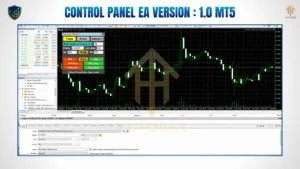
In the world of MetaTrader 5 (MT5), CONTROL PANEL EA V1 stands out as a robust, user-friendly expert advisor (EA) designed for traders who crave control, precision, and adaptability. This EA offers a visual, on-screen control interface—just like a cockpit—where traders can instantly modify trade behavior, risk settings, and execution preferences without digging through settings windows or code.
Whether you’re a manual trader looking for support tools or a semi-automated strategy enthusiast, CONTROL PANEL EA V1 MT5 delivers versatility and real-time responsiveness tailored for today’s fast-paced forex environment.
Overview of CONTROL PANEL EA V1 MT5
CONTROL PANEL EA V1 is not your average “set-and-forget” bot. Instead, it combines manual discretion with semi-automated execution logic through an intelligent control interface directly on your MT5 chart. This interactive panel allows traders to:
Open/close positions instantly
Set TP, SL, trailing stop and break-even conditions
Lock profits
Reverse positions
Manage risk dynamically
All in real time, without interrupting trading flow.
This makes it ideal for scalpers, intraday traders, and swing traders who want visual oversight and real-time control.
Key Features
🧠 Smart Interface Design
The EA installs an intuitive graphical panel that sits neatly on your chart. Traders can access every core feature—entry/exit, order types, and stop-loss settings—through simple button clicks.
⚡ Fast Execution Buttons
No need to right-click or type in trade levels manually. Execute trades instantly via the panel:
Buy / Sell
Close All / Close Profitable / Close Losing
Reverse Position
📊 Real-Time Data Feedback
The EA shows real-time account information such as equity, margin usage, drawdown, number of open trades, and profit/loss—all within the panel for fast decision-making.
🔒 Built-In Risk Management
Control Panel EA V1 provides highly customizable options for risk per trade, lot sizing (fixed or dynamic), SL/TP input, trailing stops, breakeven automation, and more.
🔁 One-Click Strategy Tools
With a single tap, you can activate features like:
Trailing Stop
Auto Breakeven
Profit Lock
Manual Lot Adjustment
🛠️ Compatible With Any Symbol & Broker
The EA works on any symbol—forex, indices, metals, or crypto—and is fully compatible with ECN and non-ECN brokers using MT5.
Trading Strategy Behind CONTROL PANEL EA
Unlike automated systems based on fixed logic, CONTROL PANEL EA V1 empowers manual or semi-automated traders with real-time management tools. Here’s how it supports various strategies:
Scalping: Rapid order placement and closure for low-pip profits
Intraday Trading: Live monitoring and mid-session management of SL/TP levels
Swing Trading: Trail stop adjustments and profit-lock features to capture long trends
Risk Strategy: Auto-lot calculation based on equity percentage for risk management
The EA doesn’t make trade decisions for you but enhances your decision-making process through execution efficiency and precision timing.
Who Should Use This EA?
Forex traders who want fast manual control with some automation
Traders with a discretionary system but need quick execution tools
Beginners wanting to learn trade mechanics in a visual format
Experts who need a professional-level interface to support rapid entries/exits
Installation & Setup
Copy the EA file to the MQL5/Experts folder.
Attach it to any MT5 chart (preferably M1 or M5 for speed).
Allow DLL imports and automated trading.
Configure your initial risk settings via the panel or inputs.
Start trading — everything else is on-screen and visual!
Build With
MetaTrader 5 (MT5)
MQL5 Scripting Language
Advanced OnChart GUI Logic
Adaptive Risk Algorithms
Thanks for the visit …
For any query please feel free to contact us on our official telegram channel – Yoforex Premium –