
Veerox Hedging EA V1.0 MT5
Introduction to Veerox Hedging EA V1.0 MT5
In the modern forex market, consistency and risk control have become more important than aggressive profit chasing. Traders today are actively searching for automated systems that can survive volatile sessions, unexpected news spikes, and prolonged ranging conditions. This is where hedging-based Expert Advisors have carved a strong position in professional trading setups.
Veerox Hedging EA V1.0 MT5 is developed to address these exact challenges. It is designed with a structured hedging logic that focuses on drawdown control, position balancing, and long-term account sustainability. Unlike many grid or martingale systems that rely on increasing lot sizes to recover losses, this Expert Advisor emphasizes calculated exposure and market neutrality.
The philosophy behind Veerox Hedging EA is simple but powerful: protect capital first, then allow profits to grow steadily. This makes it suitable not only for experienced traders but also for intermediate users who want a more disciplined automated trading approach.
In this detailed guide, we will explore every aspect of Veerox Hedging EA V1.0 MT5, including how it works, its internal logic, risk management structure, ideal market conditions, installation process, advantages, limitations, and who should use it.
Overview of Veerox Hedging EA V1.0 MT5
Veerox Hedging EA V1.0 MT5 is an automated forex trading system developed exclusively for the MetaTrader 5 platform. It operates using a hedging-based trading strategy, meaning it can open buy and sell positions simultaneously or strategically balance opposing trades to reduce directional risk.
This approach allows the system to adapt to uncertain market conditions, particularly during sideways markets, sudden trend reversals, or high-impact news events. Rather than predicting a single market direction, Veerox Hedging EA focuses on managing exposure across both sides of price movement.
The EA is not designed for reckless high-frequency trading. Instead, it aims for controlled execution, gradual equity growth, and stable performance over time. This makes Veerox Hedging EA V1.0 MT5 a suitable solution for traders who value account longevity over short-term gains.
How Veerox Hedging EA Works (Detailed Explanation)
The internal logic of Veerox Hedging EA revolves around intelligent position management rather than aggressive entry frequency.
1. Market Analysis
The EA continuously monitors price behavior, volatility levels, and market structure. It identifies zones where price may experience uncertainty or reversal potential.
2. Trade Execution
When conditions align, Veerox Hedging EA V1.0 MT5 opens initial positions with controlled lot sizes. If the market moves against the first trade, the EA may open a hedge position to offset unrealized losses.
3. Hedging Logic
The hedging mechanism is not random. Veerox Hedging EA calculates distance, exposure, and timing before placing counter trades. This ensures that hedging serves as protection rather than compounding risk.
4. Trade Management
Once positions are active, the EA manages them dynamically. It monitors floating profit, equity levels, and price retracements to close positions at optimized levels.
5. Exit Strategy
Trades are closed based on predefined profit targets, equity recovery conditions, or market stabilization. This systematic approach ensures Veerox Hedging EA V1.0 MT5 does not rely on hope-based recovery.
Key Features of Veerox Hedging EA V1.0 MT5
1. Advanced Hedging-Based Trading Logic
Veerox Hedging EA V1.0 MT5 is built around a structured hedging mechanism that balances buy and sell exposure instead of relying on single-direction price prediction. This allows the EA to manage uncertainty during sideways markets, sudden reversals, and volatile price movements more effectively than traditional directional systems.
2. Strong Drawdown Control System
One of the standout features of Veerox Hedging EA is its focus on capital protection. The EA continuously monitors equity, margin usage, and floating drawdown to prevent excessive account stress. Trades are managed carefully to reduce prolonged drawdown phases and stabilize overall account performance.
3. Smart Trade Recovery Without Martingale
Unlike aggressive recovery systems that increase lot sizes dangerously, Veerox Hedging EA V1.0 MT5 uses balanced position management to recover trades. The recovery logic relies on hedging and price normalization rather than lot multiplication, making it safer for long-term trading.
4. Fully Automated Trade Management
Veerox Hedging EA operates completely automatically once installed. From market analysis to order execution, trade monitoring, and exit decisions, the EA manages the entire trading process without manual intervention, making it suitable for hands-free trading setups.
5. Adaptive Lot Sizing Options
The EA supports both fixed and risk-based lot sizing, allowing traders to align the system with their account size and risk tolerance. This flexibility makes Veerox Hedging EA V1.0 MT5 suitable for small, medium, and large trading accounts.
6. Multi-Market Compatibility
Veerox Hedging EA is optimized for major forex pairs and high-liquidity instruments, including EURUSD, GBPUSD, USDJPY, and XAUUSD. It performs best on instruments with stable spreads and predictable volatility patterns.
7. Timeframe Flexibility
The EA is designed to operate efficiently on M15, M30, and H1 timeframes. This gives traders the freedom to select timeframes based on their preferred trading style while maintaining consistent execution quality.
8. Built-In Risk Limitation Parameters
Veerox Hedging EA V1.0 MT5 includes configurable safety limits such as maximum open trades, drawdown thresholds, and equity protection levels. These parameters act as an additional safety layer to protect the account during unfavorable market conditions.
9. Optimized for MT5 Execution Engine
The EA is specifically developed for the MetaTrader 5 platform, utilizing its advanced execution capabilities and order management structure. This ensures faster processing, better stability, and improved trade handling compared to legacy MT4 systems.
10. Works Across Different Market Conditions
Veerox Hedging EA is not restricted to trending markets alone. Its hedging logic allows it to adapt to ranging, volatile, and transitional market phases, making it a versatile Expert Advisor for varying trading environments.
11. Low Maintenance Trading Solution
Once configured properly, Veerox Hedging EA V1.0 MT5 requires minimal monitoring. This makes it ideal for traders who want an automated solution without the need for constant manual supervision.
12. Customizable Strategy Parameters
Advanced users can fine-tune multiple internal parameters, including hedging distance, profit targets, and exposure limits. This customization allows experienced traders to optimize Veerox Hedging EA according to their specific broker conditions and trading goals.
13. Long-Term Account Sustainability Focus
Every design element of Veerox Hedging EA is aimed at maintaining account stability over extended periods. The system prioritizes consistency, controlled exposure, and gradual growth rather than short-term aggressive returns.
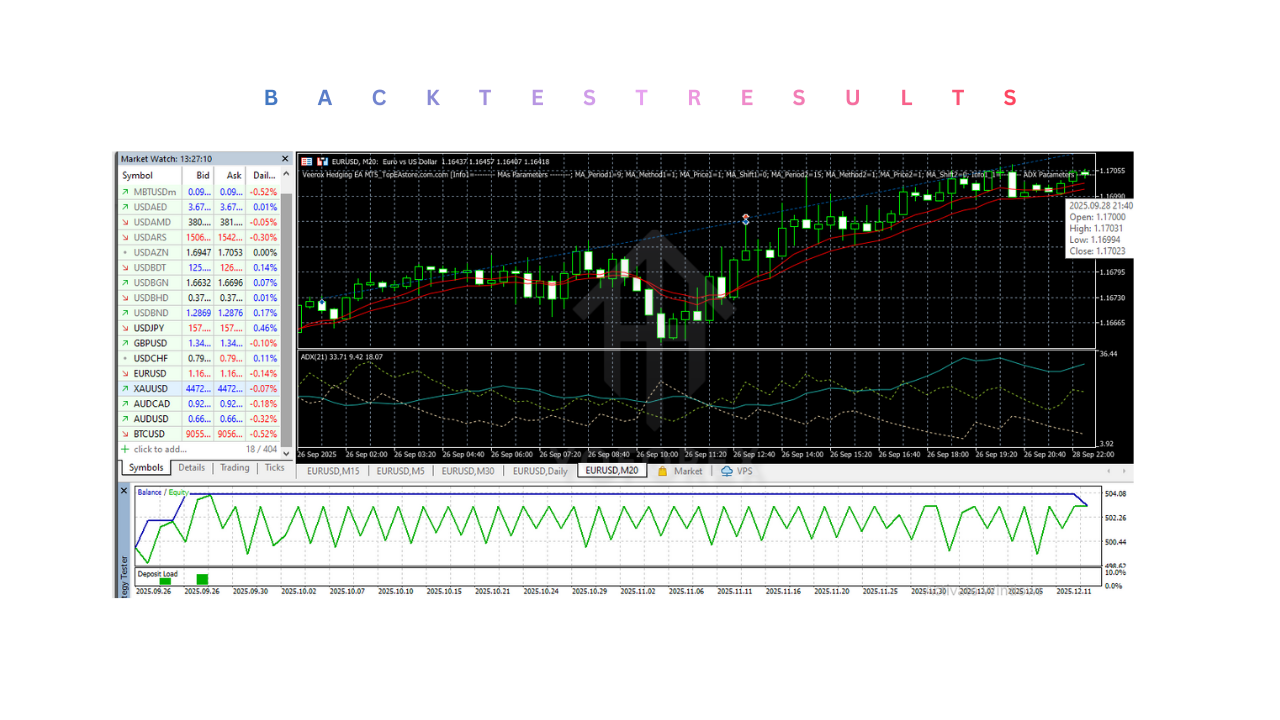
Installation and Setup Guide for Veerox Hedging EA V1.0 MT5
Installing Veerox Hedging EA V1.0 MT5 correctly is essential to ensure smooth operation and stable performance. Follow the steps below carefully to avoid common setup mistakes and to allow the EA to function exactly as intended.
Step 1: Download and Prepare the EA File
After downloading the Veerox Hedging EA file, make sure it is saved in an easily accessible location on your computer. The file will usually be in .ex5 format, which is compatible with MetaTrader 5.
Ensure that MetaTrader 5 is already installed on your system before proceeding.
Step 2: Open MetaTrader 5 Data Folder
- Launch your MetaTrader 5 platform
- Click on File in the top menu
- Select Open Data Folder
- Navigate to the following path:
MQL5 → Experts
This is the folder where all Expert Advisors must be placed for MT5 to recognize them.
Step 3: Install Veerox Hedging EA
Copy the Veerox Hedging EA V1.0 MT5 file and paste it into the Experts folder.
Once done:
- Close MetaTrader 5 completely
- Reopen MetaTrader 5
This restart allows the platform to refresh and load the new Expert Advisor properly.
Step 4: Enable Algo Trading
Before attaching the EA to a chart, ensure automated trading is enabled:
- Click on Tools → Options
- Go to the Expert Advisors tab
- Enable the following options:
- Allow algorithmic trading
- Allow DLL imports (if required)
- Allow WebRequest for listed URL (if applicable)
Click OK to save the settings.
Step 5: Attach Veerox Hedging EA to a Chart
- Open the chart of your preferred trading pair (for example, EURUSD or XAUUSD)
- Select the recommended timeframe (M15, M30, or H1)
- From the Navigator panel, drag Veerox Hedging EA V1.0 MT5 onto the chart
- A settings window will appear
Confirm that:
- Algo Trading is enabled
- The smiling face icon appears in the top-right corner of the chart
This confirms that Veerox Hedging EA is active and running.
Step 6: Configure Input Settings
In the EA input settings, you can adjust parameters such as:
- Lot size or risk percentage
- Maximum number of open trades
- Hedging distance
- Profit target levels
- Drawdown protection limits
For beginners, it is strongly recommended to start with default settings, as these are optimized for balanced risk and stable performance.
Advanced users may fine-tune settings based on account size and risk tolerance.
Step 7: Use a VPS for Best Performance (Recommended)
To ensure uninterrupted execution, it is advised to run Veerox Hedging EA V1.0 MT5 on a VPS (Virtual Private Server). A VPS helps by:
- Keeping the EA active 24/7
- Preventing disconnections
- Reducing slippage due to latency
This is especially important for hedging strategies that rely on precise execution timing.
Step 8: Monitor Initial Performance
After setup:
- Allow the EA to run without interference
- Avoid changing settings frequently
- Monitor margin usage and equity levels
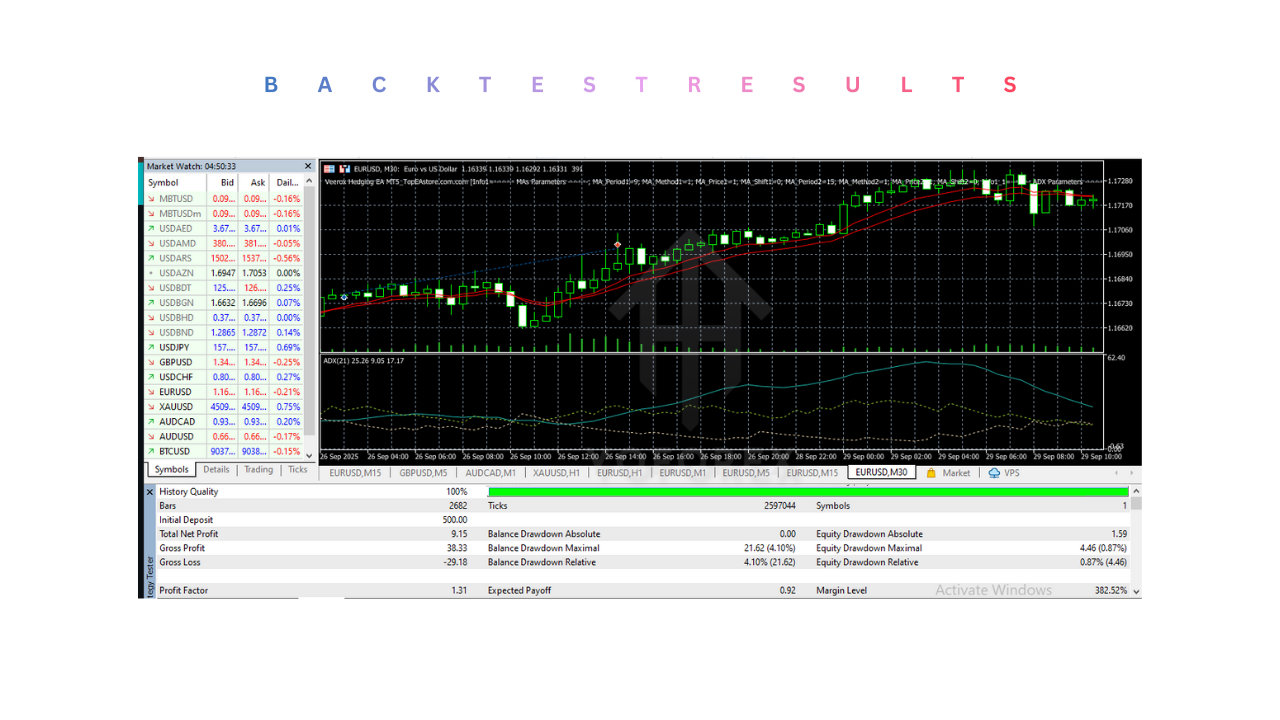
Advantages of Veerox Hedging EA V1.0 MT5
- Uses a hedging-based strategy to balance buy and sell exposure, reducing directional risk
- Focuses on drawdown control and capital protection rather than aggressive profit chasing
- Avoids risky martingale lot multiplication methods
- Fully automated trading with minimal manual intervention
- Works in different market conditions, including ranging and volatile phases
- Customizable risk and lot size settings for various account sizes
- Optimized specifically for the MetaTrader 5 platform
Disadvantages of Veerox Hedging EA V1.0 MT5
- Requires sufficient margin due to simultaneous hedged positions
- Not suitable for traders looking for fast or high-risk returns
- Performance depends on broker quality and spread conditions
- Hedging trades may remain open longer during market recovery phases
- Beginners may need time to understand hedging and risk settings
Who Should Use Veerox Hedging EA V1.0 MT5?
- Traders who prefer capital protection and controlled risk over aggressive profit strategies
- Users looking for a hedging-based automated trading system instead of martingale or grid EAs
- Forex traders who want steady, long-term account growth rather than short-term gains
- Traders using MT5 hedging-enabled accounts with sufficient margin
- Intermediate to experienced traders who understand drawdown management and risk control
- Traders who want a fully automated, low-maintenance EA for hands-free trading
- Users trading major forex pairs or gold (XAUUSD) with stable broker conditions
Why Use Veerox Hedging EA V1.0 MT5?
- Designed to protect capital first by using a structured hedging strategy
- Helps reduce drawdowns during volatile and uncertain market conditions
- Avoids high-risk martingale and aggressive lot multiplication techniques
- Fully automated trading system suitable for hands-free operation
- Adapts to different market phases, including ranging and trend transitions
- Allows custom risk and lot size control based on account capacity
- Optimized specifically for MetaTrader 5 execution and stability
- Suitable for traders seeking long-term, consistent performance rather than quick gains
Conclusion
Veerox Hedging EA V1.0 MT5 is designed for traders who prioritize stability, risk control, and long-term account sustainability. By using a structured hedging approach, the EA aims to reduce drawdowns and manage market uncertainty more effectively than aggressive trading systems. It avoids risky martingale techniques and instead focuses on balanced position management and disciplined trade execution. This Expert Advisor is best suited for traders who understand the importance of patience, proper risk settings, and reliable broker conditions. When used correctly on a hedging-enabled MT5 account, Veerox Hedging EA can serve as a dependable automated trading solution for those seeking consistent performance rather than short-term speculation.
Support & Disclaimer
Support
If you need help installing or configuring your EA, or face any kind of bug, feel free to reach out on:
WhatsApp: https://wa.me/+443300272265
Telegram Group: https://t.me/yoforexrobot
Disclaimer:
Forex and gold trading involve risk. Past performance doesn’t guarantee future results. Always test robots on demo before live trading and use proper risk management.
Referral
Join the VIP Signals Telegram Channel for real-time expert trading signals and stay ahead in the forex market. Get personalized strategies by becoming a part of our Real Account Management Telegram Channel and optimize your trading experience. If you’re aiming to Pass PropFirm Challenges , join our dedicated channel for tips and proven methods. Start managing your capital effectively with expert advice from our Funded Account Management Telegram Channel. For advanced traders, our HFT EA / Passing Telegram Channel offers high-frequency trading insights and strategies to boost your performance.