Volatility Hypertrend Scalping Indicator V1.0 MT4 – Complete Review & Trading Guide
The Volatility Hypertrend Scalping Indicator V1.0 MT4 is a powerful technical tool designed for forex traders who rely on volatility-based signals to identify high-probability entry and exit points. Built using the core concept of Average True Range (ATR), this indicator helps traders detect dynamic price movements, trend strength, and reversal zones with high clarity. Whether you are a beginner or an intermediate trader, this tool simplifies market volatility into actionable buy and sell signals using simple arrows and alerts.
In this review, we will explore its features, strategy logic, advantages, limitations, recommended usage, and performance insights. This 1200-word guide is tailored for forex traders who want a clean and reliable scalping tool for MT4 without unnecessary complexity.
What Is the Volatility Hypertrend Scalping Indicator?
The Volatility Hypertrend Scalping Indicator V1.0 MT4 is a volatility-driven trend-scalping indicator designed to identify short-term directional moves. The core concept is based on ATR, which measures how much an asset typically moves within a given period. When volatility increases, price action tends to break out of ranges, creating opportunities for quick scalping trades.
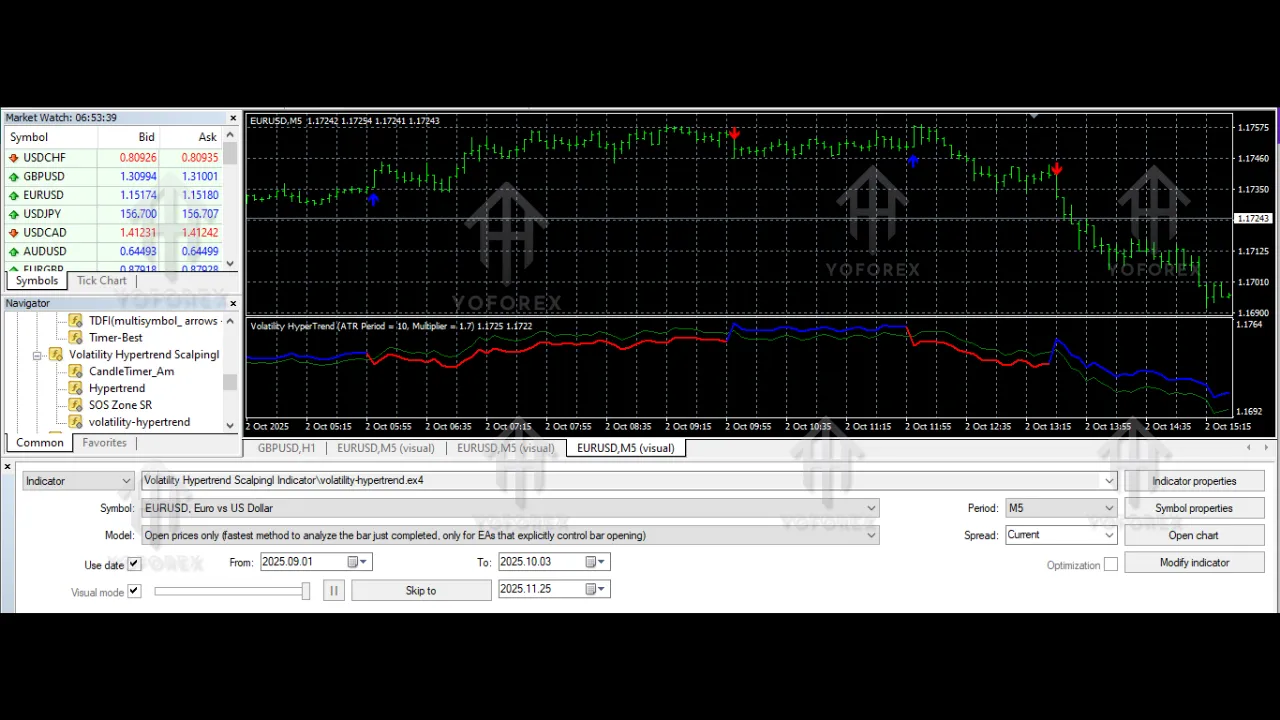
The indicator displays colored arrows to signal buying and selling opportunities. These arrows are supported by built-in alerts that notify traders instantly when a new signal forms. As a result, traders never miss critical entries and can react quickly to market shifts.
The indicator is particularly popular among traders who prefer:
-
Fast intraday trades
-
Trend-following signals
-
Noise-reduced entries
-
Clear visual confirmation
-
ATR-based volatility setups
How the Indicator Works (Core Logic Explained)
The Volatility Hypertrend Scalping Indicator V1.0 MT4 blends volatility expansion, ATR filtering, and trend acceleration to generate signals. Below is a simplified explanation of how the logic operates:
1. ATR-Based Volatility Calculation
ATR helps measure the average distance between highs and lows over a defined period. Higher ATR values indicate more volatility, which often leads to stronger trends. The indicator uses ATR to:
-
Filter out weak market phases
-
Highlight when price is ready to expand
-
Avoid false entries during tight consolidations
2. Trend Direction Detection
Once volatility increases, the indicator evaluates price structure to determine trend direction. It checks:
-
Higher highs and higher lows (bullish trend)
-
Lower highs and lower lows (bearish trend)
-
Momentum strength
3. Buy & Sell Arrow Signals
When trend and volatility conditions align, the indicator prints:
-
Blue/Green arrow for Buy
-
Red arrow for Sell
These arrows are not random; they appear only when volatility, trend strength, and momentum converge.
4. Alerts System
The indicator provides:
-
Popup alerts
-
Push notifications
-
Sound alerts
This ensures traders receive real-time notifications without constantly watching the charts.
Key Features of Volatility Hypertrend Scalping Indicator V1.0 MT4
Here are the main features that make this indicator attractive for scalpers:
✔ ATR-Based Signal Filtering
ATR eliminates weak market conditions and ensures signals appear only when volatility supports strong moves.
✔ Clear Buy/Sell Arrows
The indicator uses simple graphical arrows that show exactly where a trend begins or reverses.
✔ Multi-Timeframe Scalping Compatibility
Works best on:
-
M1
-
M5
-
M15
These timeframes capture the intraday volatility required for scalping.
✔ Real-Time Alerts
You get instant alerts when a trend shift occurs.
✔ Non-Repainting Structure
Signals remain stable after candle close, ensuring accuracy.
✔ Easy-to-Use for Beginners
Even traders with minimal technical knowledge can follow the indicator.
Trading Strategy Explained
The Volatility Hypertrend Scalping Indicator V1.0 MT4 works best in trending or semi-trending conditions. The entry logic is extremely simple, making it suitable for:
-
Scalping
-
Intraday
-
Breakout trading
-
Volatility expansion trading
Buy Entry Strategy
Enter a Buy when:
-
A bullish arrow appears.
-
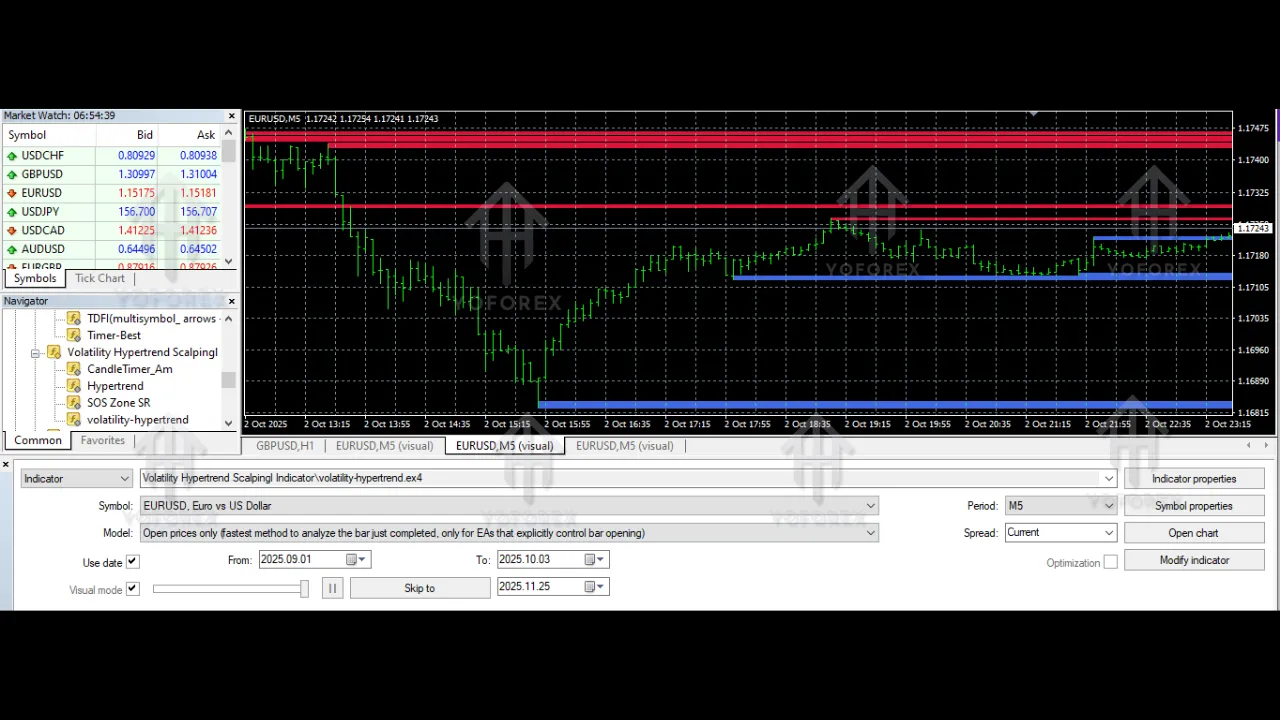
Price stays above recent swing lows.
-
ATR value is rising.
Exit at:
-
Previous resistance
-
ATR-defined take profit
-
Opposite sell arrow
Sell Entry Strategy
Enter a Sell when:
-
A bearish arrow appears.
-
Price breaks below support levels.
-
ATR shows increasing volatility.
Exit at:
-
Previous support
-
ATR-based target
-
Opposite buy arrow
Recommended Timeframes, Pairs & Settings
Timeframes
Best for scalping:
-
M1
-
M5
-
M15
Currency Pairs
The indicator works on all major pairs, but best results come from:
-
EURUSD
-
GBPUSD
-
XAUUSD (Gold)
-
USDJPY
-
US30 / GER40 (if your broker supports CFDs in MT4)
These pairs normally generate higher volatility peaks, providing more opportunities.
Advantages of Volatility Hypertrend Scalping Indicator
1. Simple Yet Effective
The arrow-based approach helps traders avoid cluttered charts and noisy information.
2. Good for Beginners
Because the logic is visually straightforward, you can apply it even without advanced trading experience.
3. Works in Real-Time Volatility
ATR ensures signals appear at meaningful moments, not random fluctuations.
4. Helps Identify Trend Direction
You can easily spot whether the market is bullish or bearish.
5. Multiple Alert Options
Great for traders who cannot stay glued to the screen.
Disadvantages to Consider
1. Not Accurate in Flat Markets
If the ATR is extremely low, the indicator can generate choppy signals.
2. Not a Standalone Trading System
For best results, combine it with:
-
Support/resistance
-
Trendlines
-
Price action
-
Volume analysis
-
Higher timeframe confirmation
3. Scalping Requires Discipline
Since the indicator focuses on short timeframes, strict money management is essential.
Best Ways to Use the Indicator (Pro Tips)
-
Avoid entries during low-volatility sessions
Example: Asian session in major pairs. -
Confirm arrows with simple price action
Higher highs = buy
Lower lows = sell -
Use a fixed Stop Loss
Suggested SL:
5–12 pips for M1/M5
15–25 pips for M15 -
Always check the spread
Higher spreads can reduce profitability in scalping. -
Use with a fast ECN broker
Lower spreads and fast execution improve results.
Who Should Use This Indicator?
The Volatility Hypertrend Scalping Indicator V1.0 MT4 is ideal for:
-
Day traders
-
Scalpers
-
New traders learning trend direction
-
Traders who prefer ready-to-use signals
-
Volatility-based strategy traders
If you prefer long-term swing trading, the indicator may feel too fast-paced. However, for intraday scalping, it is a perfect fit.
Does It Repaint?
Based on its design logic, signals appear only after candle close — meaning they remain fixed and reliable. This helps build confidence in real trading environments.
However, slight shifts may occur during candle formation, which is completely normal for MT4 indicators.
Final Verdict: Is the Volatility Hypertrend Scalping Indicator Worth Using?
Yes — the Volatility Hypertrend Scalping Indicator V1.0 MT4 is a powerful and practical tool for traders who want simple, volatility-based buy and sell signals. It simplifies market volatility through ATR, highlights strong moves using arrows, and provides alert notifications to ensure you never miss opportunities. While no indicator guarantees profit, this tool fits well into disciplined scalping and intraday strategies.