
Introduction
Automated trading has become a powerful component of modern forex trading. With the increasing use of Expert Advisors (EAs) on platforms like MetaTrader 4 (MT4), traders are able to execute strategies automatically without constant monitoring. Among the many automated solutions available, GBPUSD FlagScalper v5 EA V5.0 MT4 has gained attention for its focused strategy on the GBPUSD currency pair and its ability to identify short-term scalping opportunities.Scalping strategies aim to capture small price movements in the market within short time frames. When executed effectively, they can produce consistent returns over time. However, manual scalping requires intense concentration, fast decision-making, and constant screen time. This is where automated tools like FlagScalper come into play. They help traders implement scalping strategies with speed, precision, and consistency.GBPUSD FlagScalper v5 EA V5.0 MT4 is designed specifically to take advantage of flag pattern formations and short-term market momentum in the GBPUSD pair. By combining pattern recognition, algorithmic analysis, and predefined trading logic, the EA aims to identify high-probability trading setups and execute them automatically.Another reason why GBPUSD FlagScalper v5 EA V5.0 MT4is appealing to traders is its integration with the MetaTrader 4 platform, one of the most widely used trading platforms in the forex market. MT4 supports automated trading through Expert Advisors, making it easier for traders to install, configure, and run automated strategies.
Overview
GBPUSD FlagScalper v5 EA V5.0 MT4is an automated trading system developed for the MetaTrader 4 (MT4) platform. The EA is built to trade primarily on the GBPUSD currency pair, focusing on short-term price movements that occur after flag pattern formations.
The strategy behind this EA revolves around a classic technical analysis concept known as the flag pattern. In forex trading, a flag pattern appears after a strong price movement, followed by a consolidation phase that resembles a small channel or flag. When the price breaks out of this consolidation area, it often continues in the direction of the previous trend.GBPUSD FlagScalper v5 EA V5.0 MT4 is programmed to detect these formations and enter trades automatically when specific conditions are met. This removes emotional decision-making and allows the system to execute trades with speed and precision.GBPUSD FlagScalper v5 EA V5.0 also includes risk management parameters that allow traders to control trade size, stop loss levels, and overall exposure. This is important in scalping strategies where multiple trades may be executed within a short period.
GBPUSD FlagScalper v5 EA V5.0 MT4 typically works best under certain market conditions:
- High liquidity
- Moderate volatility
- Tight spreads
- Stable broker execution
Since GBPUSD is one of the most liquid pairs in the forex market, it provides an ideal environment for scalping strategies.
In addition to pattern recognition, the EA may also incorporate technical filters such as trend confirmation, volatility checks, and spread monitoring to improve trade accuracy.
Overall, GBPUSD FlagScalper v5 EA V5.0 is designed to help traders automate a scalping strategy that would otherwise require significant manual effort and real-time monitoring.
How GBPUSD FlagScalper v5 EA V5.0 MT4 Works?
This MT4 scalping system is built to automate short-duration trades on GBPUSD, with the logic centered around flag-style continuation setups, momentum confirmation, and strict entry-exit rules. Instead of waiting for a trader to watch charts manually, it scans the market continuously and executes trades when its programmed conditions are met.
Core working logic
1. It watches the GBPUSD chart continuously
GBPUSD FlagScalper v5 EA V5.0 MT4 stays active on the selected chart and checks price action in real time. It does not “guess” randomly. It follows a fixed rule set based on pattern behavior, momentum, spread conditions, and trade management rules.
2. It looks for short-term continuation opportunities
The strategy is designed around the idea that after a strong move, price may pause briefly in a narrow range and then continue in the same direction. That pause-and-break structure is often associated with a flag pattern.
In practical terms, the system typically looks for:
- A strong directional move
- A brief consolidation or pullback
- A breakout from that consolidation
- Confirmation that market conditions are still favorable
3. It filters bad entries
GBPUSD FlagScalper v5 EA V5.0 MT4 does not enter every possible signal. It usually filters trades using conditions such as:
- Current spread level
- Volatility level
- Directional momentum
- Time of day
- Existing open trades
- Minimum distance for stop loss / take profit
- News-sensitive or unstable market conditions
These filters are important because scalping depends on precision. A weak entry can easily become a losing trade when profit targets are small.
4. It opens trades automatically
When all conditions line up, GBPUSD FlagScalper v5 EA V5.0 MT4 opens a buy or sell order without requiring manual confirmation. This is one of its biggest strengths because scalping opportunities appear and disappear very quickly.
5. It manages the trade after entry
Once a trade is open, GBPUSD FlagScalper v5 EA V5.0 MT4 handles it according to its internal rules or your configured settings. This may include:
- Stop loss placement
- Take profit placement
- Trailing stop logic
- Break-even logic
- Maximum trade duration
- One-trade-at-a-time or limited concurrent trade logic
6. It repeats the process continuously
As long as MT4 is running and auto trading is enabled, it keeps scanning for new opportunities. Many traders run such systems on a VPS so they can work 24/5 with minimal interruption.
Key Features
1. Fully automated trade execution
This is designed for traders who want GBPUSD FlagScalper v5 EA V5.0 MT4 to handle entries and exits without manual intervention.
Why this matters
- Removes the need to stare at charts all day
- Helps react faster than manual trading
- Reduces hesitation and emotional mistakes
- Maintains consistency in execution
2. GBPUSD-focused strategy
Instead of trying to trade many pairs with the same logic, GBPUSD FlagScalper v5 EA V5.0 MT4 is aimed primarily at GBPUSD.
Why this matters
- The strategy can be tuned for one pair’s behavior
- GBPUSD has strong liquidity and regular intraday movement
- Focused optimization may improve precision compared with generic multi-pair systems
3. Scalping-oriented logic
GBPUSD FlagScalper v5 EA V5.0 MT4 is built for short-term moves, not long swing trades.
What that usually means
- Small but frequent trade targets
- Fast entries and exits
- Dependence on tight spreads and quick execution
- Best performance during active market sessions
4. Pattern-based entry approach
GBPUSD FlagScalper v5 EA V5.0 MT4‘s trading style appears tied to continuation structures such as mini consolidations after an impulsive move.
5. Risk settings can usually be customized
Most MT4 EAs in this category allow adjustment of core money management settings.
Common adjustable settings
- Fixed lot size
- Risk percentage
- Stop loss
- Take profit
- Maximum spread
- Slippage tolerance
- Trading hours
- Maximum number of open positions
6. Fast reaction speed
Since scalping depends on timing, GBPUSD FlagScalper v5 EA V5.0 MT4 can execute much faster than a human trader.
Benefit
- Better entry efficiency
- Less delay in volatile price movement
- More disciplined exits
7. MT4 compatibility
GBPUSD FlagScalper v5 EA V5.0 MT4 runs on MetaTrader 4, which remains a widely used platform for forex automation.
Benefit
- Easy installation
- Familiar interface
- Built-in strategy tester
- Broad broker support
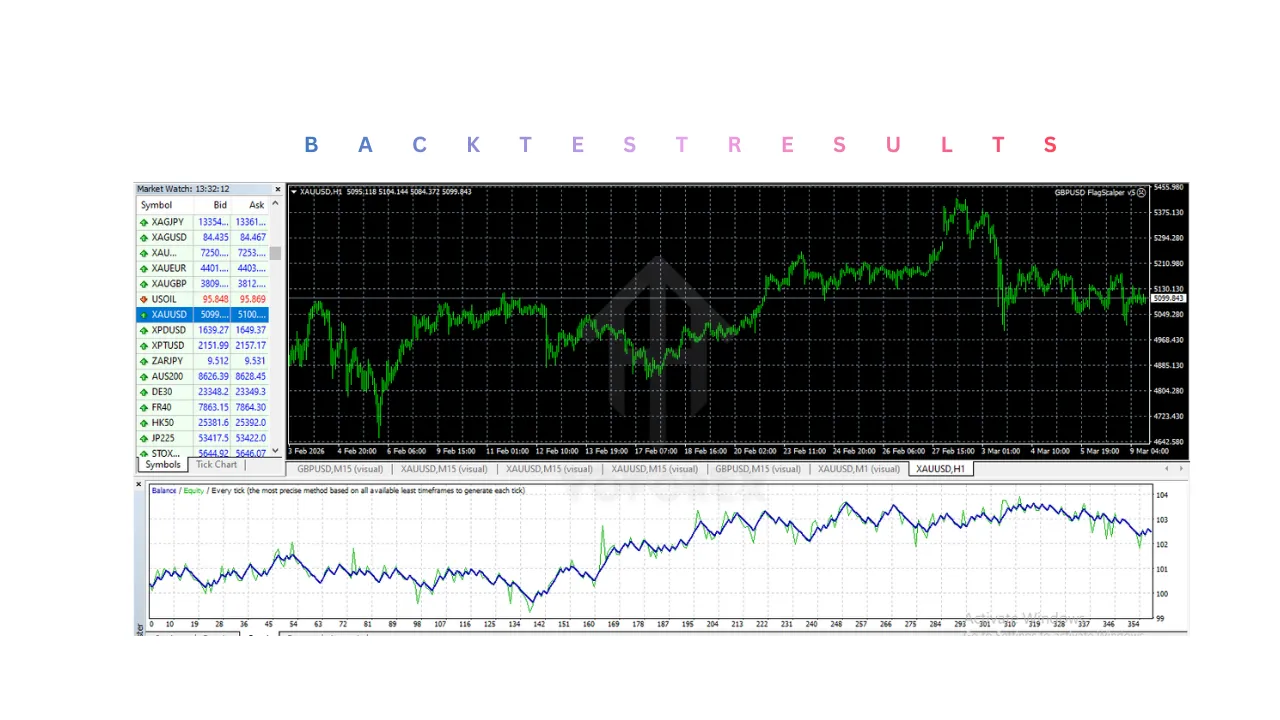
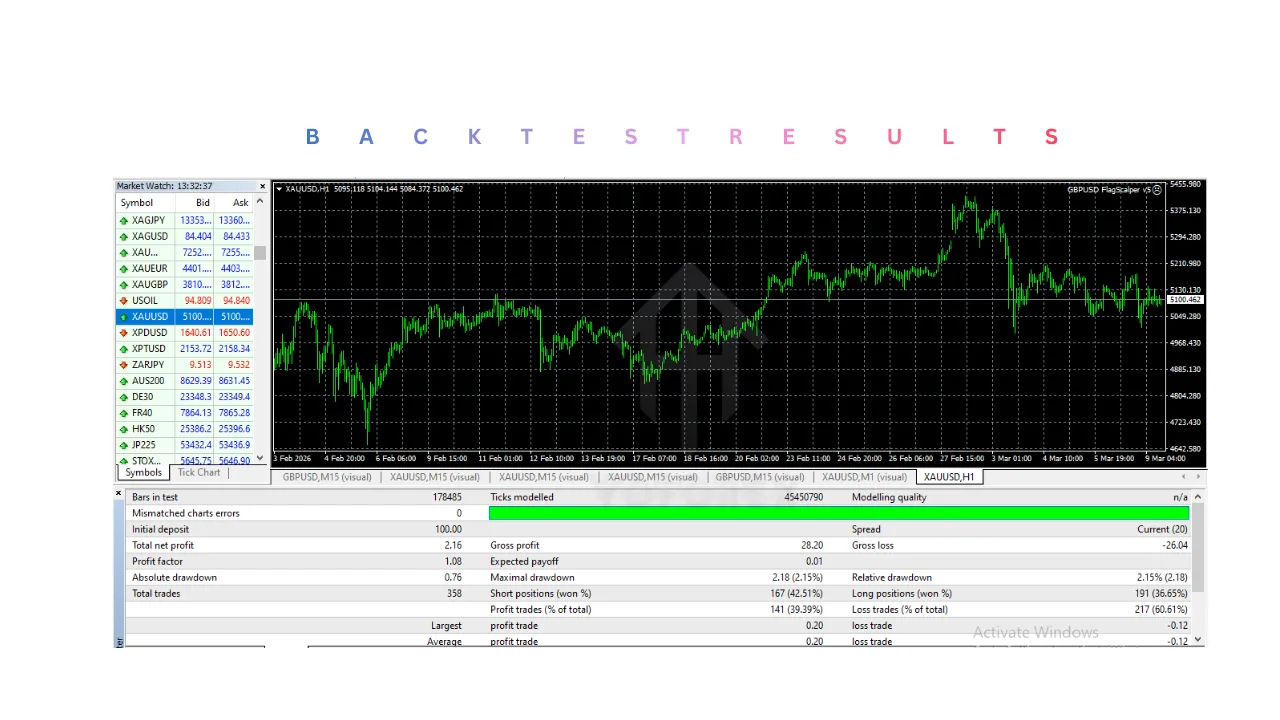
8. Backtesting support
You can test GBPUSD FlagScalper v5 EA V5.0 MT4 in the MT4 Strategy Tester before using it live.
Installation & Setup Gide
Step 1. Get GBPUSD FlagScalper v5 EA V5.0 MT4 file
You usually receive the file in one of these formats:
.ex4.mq4
The compiled file is often .ex4, while .mq4 is the editable source version.
Step 2. Open MetaTrader 4
Launch your MT4 platform on desktop.
Step 3. Open the data folder
From the top menu in MT4:
- Click File
- Click Open Data Folder
Then go to:
MQL4 > Experts
Step 4. Copy the file into the Experts folder
Paste GBPUSD FlagScalper v5 EA V5.0 MT4 file into the Experts folder.
Step 5. Restart MT4
Close and reopen the platform so MT4 can load the EA properly.
Step 6. Enable automated trading
In MT4, make sure:
- AutoTrading is turned on
- The button appears active
- GBPUSD FlagScalper v5 EA V5.0 MT4 permissions allow live trading
Also check:
- Tools > Options > Expert Advisors
- Enable automated trading if needed
Step 7. Open the correct chart
Open a GBPUSD chart.
Use the timeframe recommended by the seller or documentation. Scalping systems often work on lower timeframes such as:
- M1
- M5
- M15
Do not assume GBPUSD FlagScalper v5 EA V5.0 MT4 will perform the same on every timeframe.
Step 8. Attach the EA to the chart
In the Navigator panel:
- Find the EA under Expert Advisors
- Drag it onto the GBPUSD chart
A settings window will open.
Step 9. Configure the input settings
This is one of the most important parts.
Main settings to review
- Lot size
- Risk %
- Stop loss
- Take profit
- Spread filter
- Trading session filter
- Magic number
- Slippage
- Trailing stop
- Max simultaneous orders
Step 10. Confirm GBPUSD FlagScalper v5 EA V5.0 MT4 is active
Once attached correctly, you should usually see:
- A smiling face icon on the chart corner in MT4
- AutoTrading active
- No permission errors in the Experts or Journal tab
Step 11. Run it on a VPS
For continuous operation, many traders use a VPS.
Why VPS matters
- Keeps GBPUSD FlagScalper v5 EA V5.0 MT4 online even when your PC is off
- Reduces disconnections
- Can improve execution stability
- Helpful for 24-hour market coverage
Step 12. Monitor early performance carefully
Do not install GBPUSD FlagScalper v5 EA V5.0 MT4 and forget it on day one.
Check:
- Whether trades are opening as expected
- If spread filters are working
- Whether stop loss and take profit behave correctly
- Whether the broker environment suits scalping.
Advantages
1. Saves time
A manual scalper may need hours of focused screen time. GBPUSD FlagScalper v5 EA V5.0 MT4 automates most of that workload.
Good for
- Busy traders
- Part-time traders
- Traders who cannot monitor charts all session long
2. Removes emotional trading
Many losses happen because traders override their own system.
This helps reduce
- Fear-based exits
- Revenge trading
- FOMO entries
- Overtrading
GBPUSD FlagScalper v5 EA V5.0 MT4 follows programmed logic instead of emotion.
3. Faster than manual execution
Scalping opportunities are short-lived. A machine can respond instantly when conditions match.
Result
- Better timing
- More consistency
- Less hesitation
4. More disciplined trade management
GBPUSD FlagScalper v5 EA V5.0 MT4 can apply stop loss, take profit, and exit rules exactly as coded.
5. Useful for repeatable strategy execution
If the strategy has a clear statistical edge, automation helps preserve it through consistent execution.
6. Easier to test than manual methods
You can backtest and demo test it before using real capital.
7. Specialized for a single pair
A focused approach may work better than a generic system trying to trade many unrelated markets with the same rules.
Disadvantages
1. Scalping is highly sensitive to broker conditions
Even a decent strategy can perform poorly if:
- Spread is too wide
- Slippage is high
- Execution is slow
- The broker restricts scalping behavior
This is one of the biggest real-world risks.
2. Performance can change with market conditions
GBPUSD FlagScalper v5 EA V5.0 MT4 that works in stable, active sessions may struggle during:
- Low liquidity
- Sudden volatility spikes
- Choppy sideways movement
- Major news releases
No EA performs equally well in all environments.
3. Backtest results may not match live results
Historical performance can look strong, but real trading involves:
- Variable spreads
- Slippage
- Execution delays
- News spikes
- Broker differences
That is why demo or forward testing matters.
4. It still needs supervision
Automation does not mean zero responsibility.
You still need to watch for:
- Platform disconnections
- VPS issues
- Wrong settings
- Unexpected drawdowns
- Broker-side execution problems
5. Over-optimization risk
Many traders keep tweaking settings to make the backtest look perfect. That often leads to fragile results that fail in live markets.
6. Limited flexibility outside its intended use
A system designed for GBPUSD scalping may not adapt well to:
- Other currency pairs
- Different sessions
- Higher timeframes
- Broader swing trading conditions
7. Losses can still happen quickly
Scalping often uses smaller targets but frequent entries. If the market turns unfavorable, multiple losing trades can occur in a short time.
That is why risk control is critical.
Who Should Use GBPUSD FlagScalper v5 EA V5.0 MT4?
1. Traders who want automation
GBPUSD FlagScalper v5 EA V5.0 MT4 is a good fit for people who prefer rule-based trading over manual chart watching.
2. Traders focused on GBPUSD
If your main interest is the GBPUSD pair, GBPUSD FlagScalper v5 EA V5.0 MT4 may be more relevant than a multi-pair generic EA.
3. Traders with access to a low-spread broker
Since scalping depends heavily on trading costs, this suits users who already have or can obtain a broker with good execution.
4. Traders willing to demo test first
The best users are those who treat GBPUSD FlagScalper v5 EA V5.0 MT4 like a system to validate, not a magic shortcut.
5. Traders who understand basic risk management
Even with automation, you should know how to manage:
- Position size
- Drawdown
- leverage
- Account exposure
6. Busy traders with limited screen time
If you cannot monitor the market constantly, automation can help maintain participation.
Why Use GBPUSD FlagScalper v5 EA V5.0 MT4?
1. To automate a fast trading style
Scalping is difficult to execute manually over long periods. Automation makes the style more practical.
2. To improve consistency
A trader may break rules during stress. The EA does not improvise emotionally.
3. To capitalize on short-lived setups
Small intraday opportunities can disappear within seconds. Automation helps act immediately.
4. To reduce screen fatigue
Manual scalping can be mentally exhausting. A system handles the repeated monitoring task.
5. To apply a structured method
Instead of random entries, GBPUSD FlagScalper v5 EA V5.0 MT4 attempts to follow a defined setup with trade filters and risk logic.
6. To make testing easier
You can measure how the strategy behaves historically and in demo conditions before real deployment.
7. To support a broader trading workflow
Some traders use GBPUSD FlagScalper v5 EA V5.0 MT4 not as their only tool, but as one part of a larger approach that includes:
- risk caps
- broker quality checks
- session filtering
- portfolio diversification
- manual oversight.
Conclusion
In summary, GBPUSD FlagScalper v5 EA V5.0 MT4 is designed as an automated trading solution for traders who want to take advantage of short-term movements in the GBPUSD currency pair without needing to manually monitor the market all the time. By focusing on pattern-based continuation setups and combining them with predefined trading rules, the system attempts to identify moments when momentum is likely to continue after a short consolidation. Once these conditions are detected, the EA can execute trades automatically and manage them using its programmed risk controls such as stop loss, take profit, and other trade management settings. This structured and rule-driven approach helps ensure that trades are executed consistently and without emotional interference, which is one of the main advantages of automated trading systems.
Another important aspect of GBPUSD FlagScalper v5 EA V5.0 MT4 is its specialization. Instead of trying to trade multiple currency pairs using a single generalized strategy, it is optimized specifically for GBPUSD, one of the most actively traded and liquid currency pairs in the forex market. This focus allows the system to align its logic with the typical behavior, volatility patterns, and intraday movements of the pair. For traders who prefer a targeted strategy rather than a broad multi-pair system, this can be a valuable advantage. Additionally, since it runs on the widely used MetaTrader 4 platform, traders benefit from a familiar interface, easy installation, and access to tools such as strategy testing and performance monitoring.
However, it is also important to understand that no automated trading system is guaranteed to perform perfectly in every market condition. Scalping strategies, in particular, depend heavily on factors such as broker execution speed, spread levels, and market volatility. If spreads are too high or execution is slow, the efficiency of the strategy can be reduced. For this reason, traders often pair such systems with low-spread brokers and stable VPS hosting to maintain consistent operation. Proper configuration and realistic risk management are also essential, as incorrect settings or overly aggressive position sizes can increase the risk of losses.
Overall, GBPUSD FlagScalper v5 EA V5.0 MT4 can be a useful tool for traders who are interested in automated scalping and want a system that follows structured trading rules without constant manual involvement. When used responsibly, tested on demo accounts, and combined with appropriate broker conditions and risk controls, GBPUSD FlagScalper v5 EA V5.0 MT4 can serve as part of a disciplined trading approach. Like any trading tool, GBPUSD FlagScalper v5 EA V5.0 MT4 works best when traders treat it as a strategy that requires monitoring, evaluation, and sensible risk management rather than expecting it to operate as a completely hands-off profit generator.
Support & Disclaimer
Support
If you need help installing or configuring your EA, or face any kind of bug, feel free to reach out on:
WhatsApp: Click here
Telegram Group: Join our community
Disclaimer:
Forex and gold trading involve risk. Past performance doesn’t guarantee future results. Always test robots on demo before live trading and use proper risk management.
REFERRAL
Join the VIP Signals Telegram Channel for real-time expert trading signals and stay ahead in the forex market. Get personalized strategies by becoming a part of our Real Account Management Telegram Channel and optimize your trading experience. If you’re aiming to Pass PropFirm Challenges , join our dedicated channel for tips and proven methods. Start managing your capital effectively with expert advice from our Funded Account Management Telegram Channel. For advanced traders, our HFT EA / Passing Telegram Channel offers high-frequency trading insights and strategies to boost your performance.