Introduction
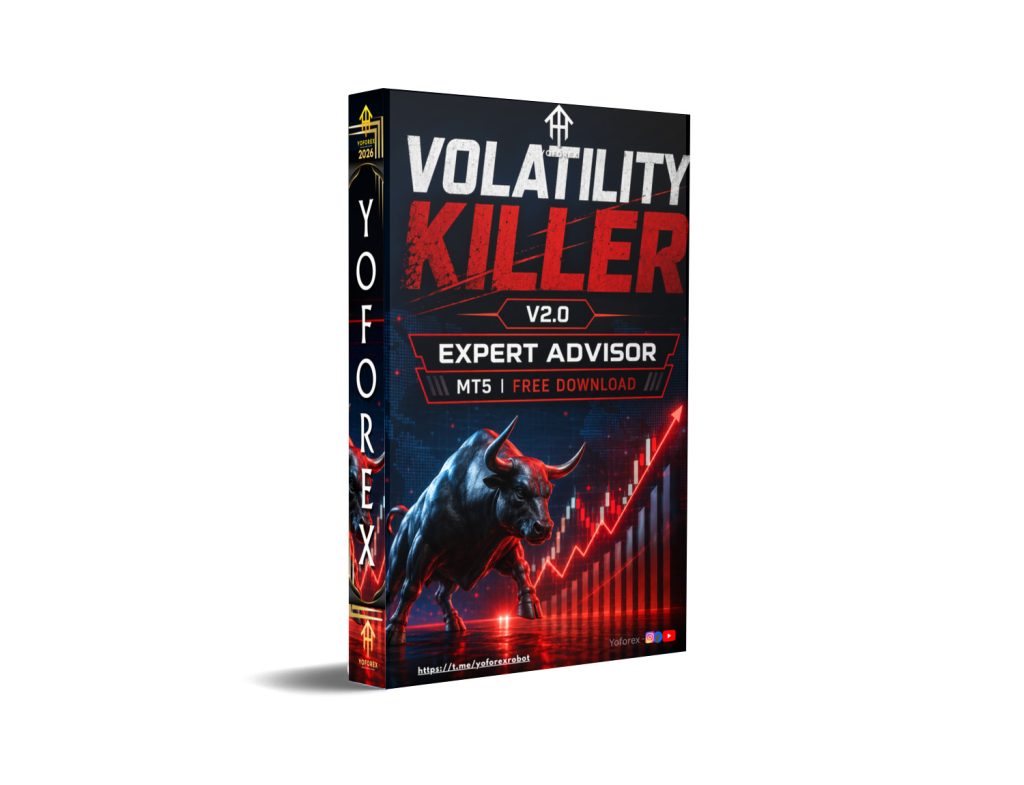
Volatility is one of the most powerful forces in the forex market. Rapid price movements can create profitable opportunities, but they can also expose traders to sudden losses if risk is not managed properly. Many traders struggle to handle unstable market conditions because manual trading often cannot react quickly enough during periods of strong momentum, sharp reversals, or economic news releases. This is one of the main reasons automated trading systems have become increasingly popular among forex traders worldwide.VOLATILITY KILLER EA V2.0 MT5 is an automated trading system designed specifically for the MetaTrader 5 platform. The EA focuses on identifying and managing volatile market conditions through algorithmic trading logic, automated trade execution, and dynamic risk management. Unlike basic trading robots that operate under fixed market assumptions, this system is designed to adapt to changing volatility conditions and attempt to capitalize on strong price movements while reducing unnecessary exposure during unstable periods.VOLATILITY KILLER EA V2.0 MT5 is primarily developed for traders who want an automated solution capable of operating efficiently during active market sessions and volatile trading environments. By combining volatility analysis, trend detection, trade filtering, and automated execution, the system aims to provide a structured trading experience while minimizing emotional decision-making.Version 2.0 introduces several enhancements compared to earlier releases, including improved trade filtering, optimized market entry logic, enhanced volatility management, and better MT5 compatibility. These improvements are intended to provide more stable performance during different market conditions while maintaining fast trade execution and flexible risk management.
Overview
VOLATILITY KILLER EA V2.0 MT5 is an automated Expert Advisor developed for the MetaTrader 5 platform with a primary focus on volatility-based trading strategies. The system continuously analyzes market conditions in real time and attempts to identify periods where volatility creates profitable trading opportunities.
The EA is designed to react to:
- Strong price movement
- Market breakouts
- Momentum acceleration
- Volatility spikes
- Trend continuation opportunities
Instead of relying solely on traditional fixed trading patterns, the system adapts its trade execution logic according to changing market conditions. This allows it to respond dynamically during active sessions and volatile environments where rapid price movement often creates short-term opportunities.
Version 2.0 introduces several upgrades, including:
- Improved volatility filtering
- Faster execution logic
- Better spread management
- Enhanced market trend analysis
- Improved risk management settings
- Optimized MT5 performance
- More stable trade handling
VOLATILITY KILLER EA V2.0 MT5 operates automatically once attached to a chart and activated inside MetaTrader 5. It continuously monitors the market, analyzes trading conditions, opens positions, manages risk, and closes trades according to its programmed algorithm.
One of the key strengths of volatility-based systems is their ability to adapt to active market environments rather than relying on low-volatility conditions. However, because volatility can also increase risk exposure, proper risk management and broker selection remain extremely important.
VOLATILITY KILLER EA V2.0 MT5 may be suitable for:
- Active forex traders
- Momentum traders
- Scalpers
- Automated trading users
- MT5 traders seeking volatility-focused strategies.
How VOLATILITY KILLER EA V2.0 MT5 Works?
1. Continuous Market Scanning
The first stage of operation is real-time market monitoring.
VOLATILITY KILLER EA V2.0 MT5 continuously scans the forex market while active on the MT5 platform.
During Market Scanning, the EA Analyzes:
- Price movement
- Market volatility
- Momentum strength
- Breakout activity
- Trend direction
- Spread conditions
- Trading volume
- Price acceleration
This process runs continuously during active trading sessions.
2. Volatility Detection System
The core component of VOLATILITY KILLER EA V2.0 MT5 is its volatility analysis engine.
What Is Volatility Trading?
Volatility trading focuses on identifying strong market movement where prices move rapidly within short periods.
VOLATILITY KILLER EA V2.0 MT5 attempts to detect:
- Sudden price expansion
- Increased market activity
- Strong directional movement
- Breakout momentum
- High-speed price fluctuations
When volatility reaches predefined conditions, the EA prepares for potential trade entries.
3. Trend Direction Analysis
VOLATILITY KILLER EA V2.0 MT5 may use trend filters before opening trades.
Trend Detection Helps Identify:
- Bullish trends
- Bearish trends
- Market continuation
- Reversal conditions
- Sideways ranging markets
This helps improve trade accuracy by avoiding random entries.
4. Breakout Identification
Volatility often increases during market breakouts.
The EA Monitors:
- Support breakouts
- Resistance breakouts
- Momentum spikes
- Price expansion zones
Once breakout conditions align with volatility and momentum filters, VOLATILITY KILLER EA V2.0 MT5 may execute trades automatically.
5. Momentum Confirmation
Before entering a trade, the EA may confirm momentum strength.
Momentum Confirmation May Include:
- Strong candle movement
- Consecutive directional candles
- Increased market speed
- Volatility expansion
- Price acceleration
This helps filter weak or unstable market setups.
6. Automatic Trade Entry
Once all conditions align, VOLATILITY KILLER EA V2.0 MT5 automatically executes a trade.
The Entry Process Includes:
- Determining trade direction
- Calculating lot size
- Applying stop loss
- Setting take profit
- Sending the order instantly
Fast execution is critical during volatile conditions because prices move rapidly.
7. Dynamic Risk Management
Risk management is built directly into the system.
VOLATILITY KILLER EA V2.0 MT5 May Control:
- Lot size
- Maximum trades
- Risk percentage
- Stop-loss distance
- Exposure limits
This helps reduce excessive account risk during strong market movement.
8. Stop Loss Protection
VOLATILITY KILLER EA V2.0 MT5 automatically applies stop losses to trades.
Purpose of Stop Loss
A stop loss helps:
- Limit potential losses
- Protect account balance
- Prevent uncontrolled drawdown
Example:
- Buy trade opens at 1.1000
- Stop loss placed at 1.0970
- Trade closes automatically if the market drops
9. Take Profit Management
VOLATILITY KILLER EA V2.0 MT5 automatically closes trades when profit targets are reached.
Profit Management May Include:
- Fixed take-profit targets
- Dynamic exits
- Momentum-based exits
- Volatility-based profit locking
This helps secure gains during fast market movement.
10. Trade Exit Logic
VOLATILITY KILLER EA V2.0 MT5 continuously monitors open positions.
Trades May Close When:
- Profit targets are reached
- Volatility weakens
- Trend reverses
- Momentum disappears
- Spread conditions worsen
This allows the EA to react dynamically to changing market behavior.
11. Spread Filtering Technology
Spread conditions are extremely important during volatile periods.
Why Spread Filtering Matters?
During unstable markets:
- Spreads may widen dramatically
- Execution costs increase
- Slippage becomes more common
VOLATILITY KILLER EA V2.0 MT5 monitors spreads continuously.
The EA May Avoid Trading When:
- Spreads exceed safe levels
- Liquidity becomes unstable
- Broker pricing becomes irregular
This helps improve trade quality.
12. Volatility Protection System
VOLATILITY KILLER EA V2.0 MT5 not only trades volatility but also protects against excessive volatility.
During Extreme Conditions, the EA May:
- Pause trading temporarily
- Delay entries
- Reduce trade frequency
- Increase trade filtering
This helps avoid dangerous market spikes.
13. Multi-Timeframe Analysis
VOLATILITY KILLER EA V2.0 MT5 may analyze multiple chart timeframes simultaneously.
Example
- Higher timeframe confirms overall trend
- Lower timeframe identifies precise entry opportunities
This improves market filtering and entry precision.
14. Real-Time Price Action Monitoring
The EA continuously evaluates price action behavior.
Price Action Analysis May Include:
- Candle strength
- Breakout candles
- Momentum candles
- Support and resistance reactions
- Short-term trend continuation
This helps the system react quickly to market movement.
15. VPS-Based Continuous Operation
VOLATILITY KILLER EA V2.0 MT5 performs best when connected to a VPS.
Why VPS Matters?
Volatility trading requires:
- Fast execution
- Stable internet
- Continuous operation
A VPS improves:
- Order execution speed
- Platform stability
- Reduced latency
- 24/7 uptime
16. Trading Session Filtering
VOLATILITY KILLER EA V2.0 MT5 may trade only during active market sessions.
Preferred Sessions Include:
- London session
- New York session
- London-New York overlap
These sessions provide:
- Higher liquidity
- Stronger volatility
- Better momentum opportunities
17. News Event Sensitivity
Major economic events often create strong volatility.
Examples Include:
- Interest rate decisions
- Inflation reports
- Federal Reserve announcements
- Employment reports
- Geopolitical events
VOLATILITY KILLER EA V2.0 MT5 may adjust trading behavior during major news periods.
18. Adjustable Trading Settings
Users can customize settings according to their trading preferences.
Adjustable Settings May Include:
- Risk percentage
- Lot size
- Stop-loss levels
- Take-profit targets
- Trading hours
- Maximum open trades
This flexibility allows adaptation to different account sizes and strategies.
19. Continuous Trade Monitoring
After entering a trade, VOLATILITY KILLER EA V2.0 MT5 continues monitoring the market.
Monitoring Includes:
- Floating profit/loss
- Volatility changes
- Trend continuation
- Spread movement
- Trade duration
This helps manage trades dynamically rather than leaving them unattended.
20. Broker Dependency
The EA’s performance depends heavily on broker quality.
Important Broker Factors
- Low spreads
- Fast execution
- Stable pricing
- Low slippage
- Reliable servers
Poor broker conditions may negatively affect performance.
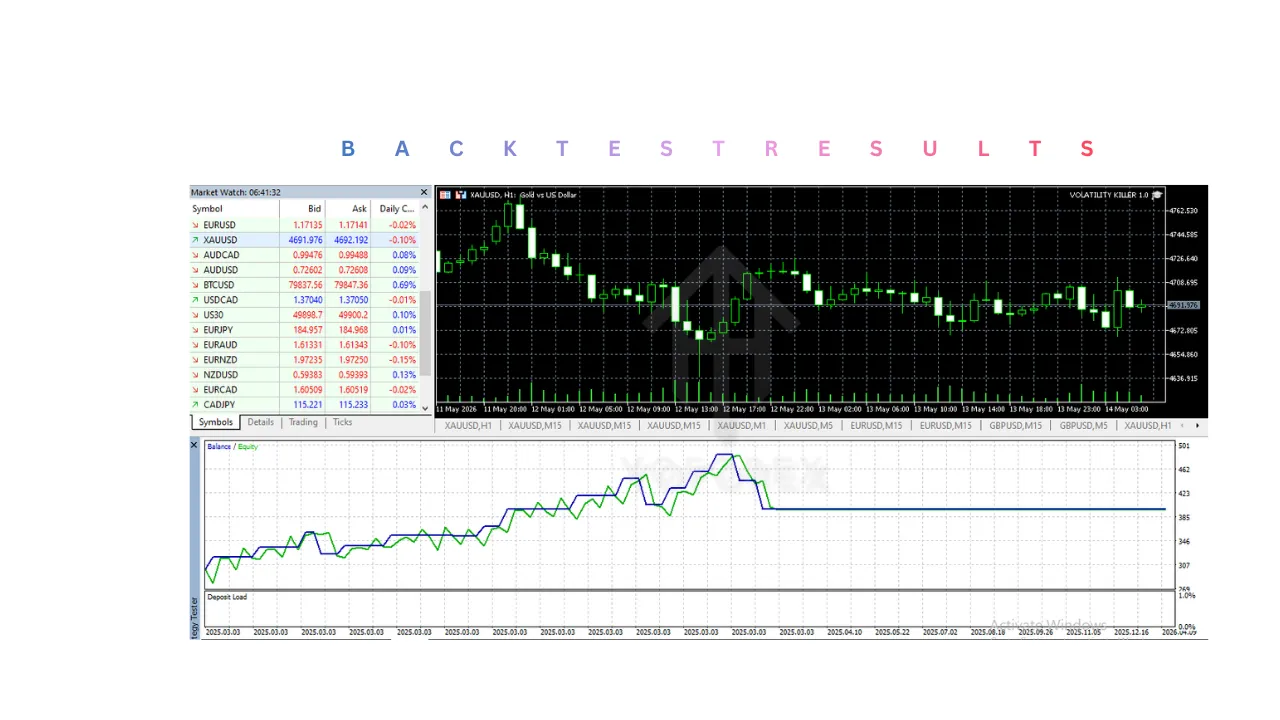
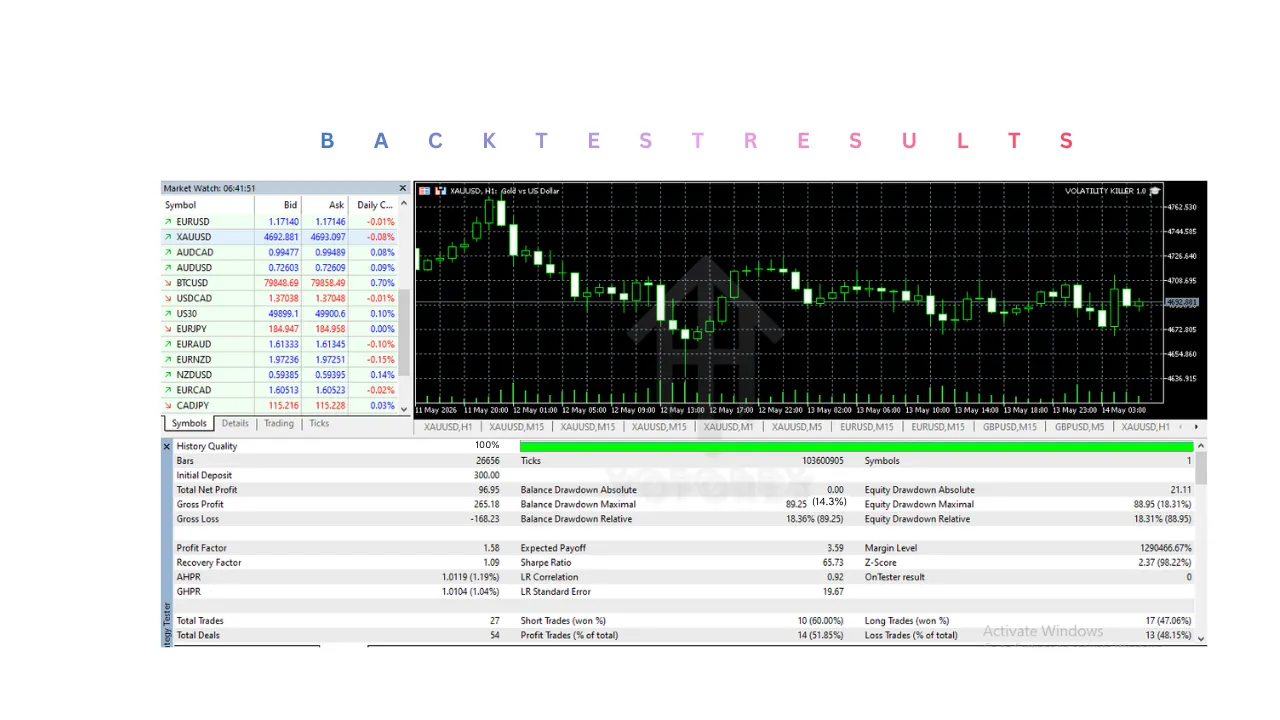
21. Backtesting Capability
MT5 allows traders to backtest the EA using historical data.
Backtesting Helps Traders:
- Evaluate historical performance
- Analyze drawdown
- Optimize settings
- Study volatility behavior
However, live market conditions may differ from historical results.
22. Demo Account Testing
Before live trading, traders should test VOLATILITY KILLER EA V2.0 MT5 on a demo account.
Benefits of Demo Testing
- Understand trading behavior
- Learn volatility reactions
- Evaluate broker quality
- Optimize risk settings
This helps reduce beginner mistakes.
Key Features
1. Volatility-Based Trading Strategy
The primary feature of the VOLATILITY KILLER EA V2.0 MT5 is its volatility-focused trading logic.
The system continuously monitors:
- Rapid price movement
- Market acceleration
- Volatility spikes
- Breakout conditions
- Momentum activity
Once favorable conditions are detected, the EA automatically executes trades.
2. Fully Automated Trading
VOLATILITY KILLER EA V2.0 MT5 automates the complete trading process.
This includes:
- Market analysis
- Trade execution
- Stop-loss placement
- Take-profit management
- Trade exits
- Risk management
This reduces the need for constant manual monitoring.
3. Dynamic Market Adaptation
Unlike fixed-rule systems, VOLATILITY KILLER EA V2.0 MT5 adapts to changing market volatility.
The system may:
- Adjust trading activity
- Filter unstable conditions
- Modify trade timing
- Avoid low-quality setups
This improves flexibility during active market periods.
4. Advanced Risk Management
VOLATILITY KILLER EA V2.0 MT5 includes multiple risk control features.
Common settings include:
- Adjustable lot size
- Risk percentage control
- Stop-loss settings
- Maximum open trades
- Spread filtering
These tools help traders manage exposure more effectively.
5. Fast Trade Execution
Volatility-based systems require rapid execution speed.
VOLATILITY KILLER EA V2.0 MT5 is optimized for:
- Quick market entries
- Fast order handling
- Rapid trade management
This helps improve performance during strong market movement.
6. MT5 Platform Optimization
The EA is developed specifically for MetaTrader 5.
MT5 provides:
- Faster processing speed
- Improved backtesting
- Advanced charting
- Multi-thread optimization
- Better execution handling
This enhances overall system efficiency.
7. Spread Filtering Technology
VOLATILITY KILLER EA V2.0 MT5 monitors spread conditions continuously.
It may avoid trading when:
- Spreads become excessively high
- Liquidity decreases
- Market pricing becomes unstable
This helps reduce unnecessary trading costs.
8. Volatility Monitoring System
VOLATILITY KILLER EA V2.0 MT5 continuously measures market volatility levels.
During extreme conditions, the system may:
- Pause new trades
- Reduce activity
- Delay entries
- Increase trade filtering
This improves market protection.
9. Multi-Timeframe Analysis
VOLATILITY KILLER EA V2.0 MT5 may analyze several timeframes simultaneously.
Example:
- Higher timeframe identifies trend direction
- Lower timeframe identifies precise entries
This improves trade accuracy.
10. VPS Compatibility
The system supports VPS hosting for uninterrupted operation.
Advantages include:
- 24/7 trading
- Faster execution
- Stable connectivity
- Reduced latency
VPS hosting is highly recommended.
11. Customizable Settings
Traders can customize VOLATILITY KILLER EA V2.0 MT5 according to their trading style.
Adjustable settings may include:
- Risk percentage
- Lot size
- Trading sessions
- Stop loss
- Take profit
- Maximum trades
This flexibility helps adapt the system to different market conditions.
Installation & Setup Guide
Step 1: Download VOLATILITY KILLER EA V2.0 MT5 Files
Download the package containing:
.ex5EA file- Setup presets
- User guide
Save the files to your computer.
Step 2: Install MetaTrader 5
If MT5 is not installed:
- Download MT5 from your broker.
- Install the platform.
- Log into your trading account.
Ensure the platform is functioning correctly.
Step 3: Open the MT5 Data Folder
Inside MT5:
- Click File
- Select Open Data Folder
- Open:
- MQL5
- Experts
Step 4: Copy VOLATILITY KILLER EA V2.0 MT5 File
Paste the .ex5 file into the Experts folder.
Restart MT5 afterward.
Step 5: Enable Algorithmic Trading
Inside MT5:
- Open Tools
- Select Options
- Go to Expert Advisors
Enable:
- Allow algorithmic trading
- Allow DLL imports if required
Step 6: Attach VOLATILITY KILLER EA V2.0 MT5 to a Chart
- Open the preferred trading chart
- Select the desired timeframe
- DragVOLATILITY KILLER EA V2.0 MT5 onto the chart
The settings window will appear.
Step 7: Configure Trading Settings
Adjust settings such as:
- Lot size
- Risk percentage
- Stop loss
- Take profit
- Trading session
Conservative settings are recommended initially.
Step 8: Activate VOLATILITY KILLER EA V2.0 MT5
Enable the Algo Trading button in MT5.
The EA will begin analyzing the market automatically.
Step 9: Monitor Performance
Although automated, regular monitoring remains important.
Monitor:
- Drawdown
- Spread conditions
- Trade frequency
- Margin usage
- Broker execution quality
This helps maintain stable performance.
Advantages
1. Volatility-Focused Trading
VOLATILITY KILLER EA V2.0 MT5 is designed specifically for active market conditions.
2. Fully Automated Operation
The system handles market analysis and execution automatically.
3. Fast Execution Speed
Rapid execution improves performance during volatile movement.
4. Dynamic Market Adaptation
The EA adjusts to changing market conditions.
5. Advanced Risk Management
Users can customize risk according to account size and trading goals.
6. Reduced Emotional Trading
Automation minimizes impulsive trading decisions.
7. Continuous Market Monitoring
VOLATILITY KILLER EA V2.0 MT5 operates continuously without fatigue.
8. Spread Protection
Spread filtering helps avoid poor trading conditions.
9. MT5 Optimization
MT5 provides faster processing and better execution handling.
10. VPS Support
Stable VPS hosting improves execution consistency.
Disadvantages
1. Volatility Can Increase Risk
Rapid price movement may create larger drawdowns during unstable conditions.
2. Broker Quality Matters
Poor execution or high spreads can affect performance negatively.
3. VPS Hosting Recommended
Stable low-latency hosting is often required.
4. Not Ideal for Complete Beginners
Understanding volatility-based trading requires some market knowledge.
5. Frequent Trades May Increase Costs
Active trading can increase spread and commission expenses.
6. Drawdowns Are Still Possible
No EA can completely eliminate trading risk.
7. Performance Depends on Market Conditions
Low-volatility environments may reduce trading opportunities.
8. Requires Proper Risk Management
Aggressive settings may increase exposure significantly.
Who Should Use VOLATILITY KILLER EA V2.0 MT5?
1. Active Forex Traders
Why Active Traders Benefit
VOLATILITY KILLER EA V2.0 MT5 is designed to operate during periods of strong market activity.
Active traders usually prefer:
- Frequent trading opportunities
- Rapid market movement
- Short-term momentum setups
- Continuous market participation
The EA helps automate these processes efficiently.
Benefits for Active Traders
Continuous Market Monitoring
The system scans the market 24/7 without interruption.
Faster Reaction Speed
The EA reacts instantly to volatility spikes and momentum changes.
Increased Trading Opportunities
Volatile markets often create multiple short-term setups during active sessions.
2. Momentum Traders
Why Momentum Traders Should Use It?
Momentum trading focuses on identifying strong directional movement in the market.
VOLATILITY KILLER EA V2.0 MT5 continuously searches for:
- Rapid price acceleration
- Breakout activity
- Strong bullish movement
- Strong bearish movement
How the EA Supports Momentum Trading?
Automatic Momentum Detection
The system identifies momentum conditions automatically.
Quick Trade Execution
Trades are executed rapidly once strong movement is detected.
Momentum-Based Trade Management
VOLATILITY KILLER EA V2.0 MT5 may close trades when momentum weakens.
3. Scalpers
Why Scalpers Benefit
Scalpers attempt to profit from short-term market movement.
VOLATILITY KILLER EA V2.0 MT5 supports scalping through:
- Fast entries
- Fast exits
- Short holding periods
- Continuous opportunity scanning
Scalping Advantages
Rapid Execution
Fast execution is critical for short-term trading.
Spread Filtering
The EA may avoid trading during high spread conditions.
Continuous Market Analysis
The market is analyzed continuously for scalp setups.
4. Traders Who Prefer Automated Trading
Why Automation Is Helpful?
Manual trading during volatile conditions can be difficult because prices move rapidly.
VOLATILITY KILLER EA V2.0 MT5 automates:
- Market analysis
- Trade execution
- Stop-loss placement
- Take-profit management
- Trade exits
Benefits of Automation
Reduced Manual Work
The trader does not need to monitor charts constantly.
Faster Decision-Making
VOLATILITY KILLER EA V2.0 MT5 reacts immediately according to programmed logic.
Consistent Trading Rules
The system follows predefined rules without emotional interference.
5. Traders Who Struggle With Emotional Trading
Emotional Trading Creates Problems
Manual traders often make mistakes because of:
- Fear
- Greed
- Panic
- Overtrading
- Revenge trading
How the EA Helps?
Rule-Based Execution
VOLATILITY KILLER EA V2.0 MT5 follows programmed conditions consistently.
Reduced Impulsive Decisions
Trades are executed based on logic rather than emotions.
Improved Trading Discipline
Automation creates more consistent market behavior.
6. MT5 Platform Users
Why MT5 Traders Benefit?
VOLATILITY KILLER EA V2.0 MT5 is developed specifically for MetaTrader 5.
MT5 provides:
- Faster execution
- Better optimization
- Improved backtesting
- Advanced processing speed
Benefits for MT5 Users
Better System Performance
The EA is optimized for MT5 architecture.
Improved Backtesting
Users can test strategies using historical data.
Faster Order Handling
MT5 improves automated trade processing.
7. Traders Using VPS Hosting
Why VPS Users Benefit?
Volatility trading depends heavily on execution quality.
A VPS helps improve:
- Execution speed
- Platform stability
- Low latency
- Continuous uptime
Advantages of VPS Operation
24/7 Trading
The EA continues operating even when the local computer is turned off.
Faster Market Access
Reduced latency improves trade precision.
Stable Connectivity
A VPS reduces the risk of internet interruptions.
8. Intermediate Traders
Why Intermediate Traders Are Suitable?
Intermediate traders usually understand:
- Volatility behavior
- Risk management
- Broker conditions
- MT5 platform operation
This helps them configure the EA more effectively.
Benefits for Intermediate Users
Better Risk Management
Experienced traders can optimize settings more efficiently.
Improved Strategy Understanding
They understand how volatility affects trading performance.
Better Trade Supervision
Intermediate users can monitor performance more effectively.
9. Traders Seeking Short-Term Opportunities
Why Short-Term Traders Benefit
The EA focuses on active market movement rather than long-term investing.
This appeals to traders who prefer:
- Intraday setups
- Momentum opportunities
- Active sessions
- Faster market participation
Benefits for Short-Term Trading
Frequent Trading Opportunities
Volatile markets create repeated short-term setups.
Reduced Long-Term Exposure
Trades are usually managed within shorter durations.
Active Market Participation
The EA remains highly responsive during volatile sessions.
10. Traders Using Low-Spread Brokers
Why Broker Quality Matters
Volatility systems perform best with:
- Fast execution
- Low spreads
- Minimal slippage
- Stable pricing
Broker Benefits
Better Entry Precision
Low spreads improve trade quality.
Reduced Trading Costs
Scalping and active trading become more efficient.
Improved Performance Stability
Reliable execution supports automated trading consistency.