Introduction
In the evolving landscape of retail trading, the gap between amateur speculation and institutional execution continues to widen at an alarming rate. Every day, thousands of retail traders sit in front of their MetaTrader 5 platforms, watching price move against their positions, wondering why their “perfect” technical setup failed. The harsh reality is that most traders fail not because they lack a strategy, but because they lack the discipline to execute that strategy perfectly every single time. Emotional interference, incorrect stop-loss placement, premature profit-taking, and misreading of market structure are the silent killers of trading accounts.
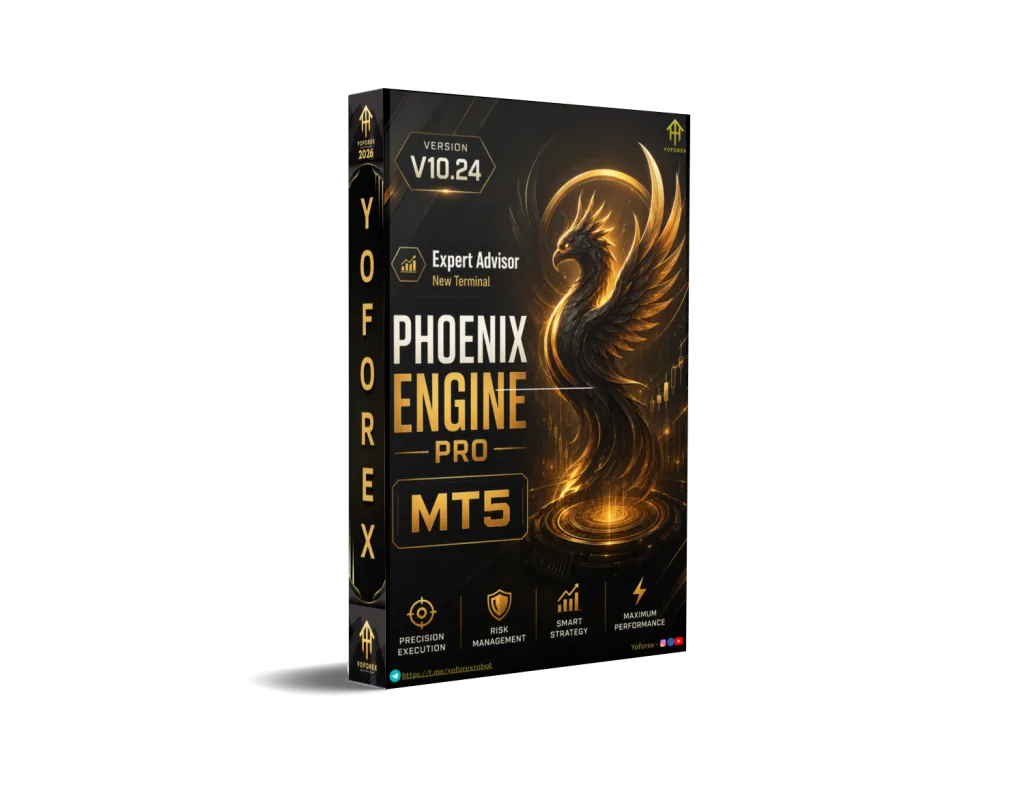
Enter the Phoenix Engine Pro EA V10.24—a professional utility designed specifically for the MetaTrader 5 platform that bridges the divide between manual analysis and automated precision. This is not another “set-and-forget” robot that promises millions while delivering drawdowns. Instead, the Phoenix Engine Pro EA V10.24 operates on a sophisticated hybrid model that leaves directional control firmly in your hands while automating the heavy lifting: market structure analysis, liquidity targeting, dynamic position sizing, and advanced risk management.
If you are a serious trader looking to align your execution with Smart Money Concepts (SMC), liquidity engineering principles, and institutional order flow, this comprehensive review covers absolutely everything you need to know. We will explore the internal mechanics, the proprietary Phoenix Score system, session-based trading logic, and exactly how to integrate this tool into your daily trading routine.
Overview: What Is Phoenix Engine Pro EA V10.24?
The Phoenix Engine Pro EA V10.24 is a semi-automated trading system built exclusively for MetaTrader 5. Unlike conventional Expert Advisors that rely on lagging indicators like Moving Averages, RSI, or MACD, this system is engineered for traders who understand market context but struggle with the mechanical execution of entries, stop-loss placement, partial profit taking, and trade management under live market pressure.
The philosophy behind the Phoenix Engine Pro EA V10.24 is simple yet profound: Humans are excellent at reading context and making directional decisions. Machines are excellent at math, risk calculation, and discipline. Combine both, and you have a superior trading approach.
Utilizing a multi-layer analysis engine that scans multiple timeframes simultaneously, the Phoenix Engine Pro EA V10.24 continuously monitors for liquidity voids, Break of Structure (BOS) confirmations, session manipulation phases, order blocks, fair value gaps, and expansion conditions. It then distills this complex institutional data into a simple, color-coded dashboard and presents a proprietary “Phoenix Score” on your chart, telling you instantly how aligned the current market conditions are with institutional behavior.
At its core, the Phoenix Engine Pro EA V10.24 acts as a professional co-pilot. It handles all the mathematical calculations—computing ATR-based stops, tracking previous day highs and lows, managing break-even levels, and executing partial closes—so you can focus solely on the higher-level task of reading price action and clicking “Buy” or “Sell” when the setup presents itself.
How This EA Works: A Deep Technical Breakdown
The operational logic of the Phoenix Engine Pro EA V10.24 is fundamentally distinct from conventional EAs because it does not rely on arbitrary mathematical formulas like crossover signals or overbought/oversold conditions. Instead, the Phoenix Engine Pro EA V10.24 simulates how a desk trader at a major bank or hedge fund would actually view the charts.
Here is the step-by-step workflow of how the engine processes market data and supports your trading decisions:
Step 1: Multi-Session Institutional Analysis
The moment you attach the Phoenix Engine Pro EA V10.24 to your MT5 chart, it begins identifying the three major institutional trading sessions:
- Asia Session: The engine marks the accumulation range, liquidity buildup zones, and the Asia session highs and lows. This is where the first liquidity pools of the day are formed.
- London Session: The Phoenix Engine Pro EA V10.24 identifies the manipulation phase, tracks liquidity sweeps above/below Asia extremes, and waits for BOS confirmation. London is where the smart money often hunts retail stops before reversing.
- New York Session: The engine identifies expansion moves, institutional continuation patterns, and the liquidity delivery phase where profits are typically taken.
All session ranges are automatically drawn on your chart as colored rectangles for visual confirmation, allowing you to see exactly where the institutional “lines in the sand” are located.
Step 2: Liquidity Mapping and Target Engineering
Before any trade recommendation is generated, the Phoenix Engine Pro EA V10.24 dynamically plots key institutional levels on your chart:
- Previous Day High (PDH)
- Previous Day Low (PDL)
- Weekly High (WH)
- Weekly Low (WL)
- Asia Session Liquidity Zones
- London Session Liquidity Zones
The engine then calculates the distance from current price to each of these targets, establishing a Liquidity Bias. If price is closer to PDH than PDL, the Phoenix Engine Pro EA V10.24 assigns a higher probability to upside liquidity grabs.
Step 3: Structure Confirmation (BOS & MSS)
The Phoenix Engine Pro EA V10.24 is obsessive about market structure. Before signaling that the environment is ready for a trade, the engine checks for:
- H1 Structure: A clear Break of Structure (BOS) or Market Structure Shift (MSS) on the hourly timeframe.
- M15 BOS: Confirmation that the 15-minute structure aligns with the hourly bias.
- Trend Continuation: The engine ensures you are not trading against the dominant institutional trend.
Step 4: The Phoenix Score Calculation
This is the secret sauce of the Phoenix Engine Pro EA V10.24. The proprietary Phoenix Score model evaluates the current setup across eight distinct metrics:
- Structure alignment (0-10 points)
- Liquidity conditions (0-10 points)
- BOS quality (0-10 points)
- Session phase appropriateness (0-10 points)
- Momentum confirmation (0-10 points)
- Imbalance presence (FVG detection) (0-10 points)
- Expansion conditions (0-10 points)
- Distance to nearest liquidity (0-10 points)
The final score (0-100) is normalized to a 0-10 Phoenix Score displayed on your dashboard. A score of 7 or higher indicates a high-probability institutional environment.
Step 5: Semi-Automated Execution
Once you, the trader, decide to act, you simply click the BUY or SELL button on the on-chart dashboard. The Phoenix Engine Pro EA V10.24 then:
- Executes the market order with your pre-selected direction
- Instantly applies the dynamic ATR Stop Loss (calculated based on current volatility)
- Sets the Smart Liquidity Take Profit at the nearest institutional target
- Logs the trade in the internal management system
Step 6: Active Trade Management
Post-entry, the Phoenix Engine Pro EA V10.24 takes full control of trade management:
-
Break-Even Trigger: When price moves a predefined distance in your favor, the stop loss is automatically moved to entry price.
-
Partial Profit Execution: At the primary liquidity target (e.g., 50% of the distance to PDH), the engine closes a portion of the position.
-
Runner Management: The remaining position is left to run toward the secondary liquidity target with a trailing stop.
-
Dynamic Trailing: The trailing logic adapts to market expansion, widening in high volatility and tightening in low volatility.
Key Features
1. Professional Semi-Automated Execution
The Phoenix Engine Pro EA V10.24 is explicitly NOT a fully blind auto-trading robot. You remain in command of direction, while the engine handles the mathematics. This hybrid model prevents the psychological errors of moving stop-losses out of fear or taking profits too early due to greed.
2. Smart Money Concepts (SMC) Engine
Built entirely around institutional trading concepts, the Phoenix Engine Pro EA V10.24 continuously scans for:
- Liquidity Sweeps (stop hunts above/below key levels)
- Break of Structure (BOS) with volume confirmation
- Session Manipulation phases
- Expansion Phases with momentum
- Fair Value Imbalance Detection (FVG gaps)
- Order Block identification
3. On-Chart Direction Control Buttons
The professional interface includes:
- BUY Mode: Forces BUY-only execution regardless of Phoenix Score
- SELL Mode: Forces SELL-only execution
- FLIP Mode: Reverses the internal execution logic specifically during manipulation conditions
- Manual Lot Spinner: Instantly increase or decrease lot size directly from the chart interface with a simple click
No external panels, no pop-up windows, no complex configuration required.
4. Dynamic ATR Risk Control
Forget static 20-pip stops that get hunted every time. The Phoenix Engine Pro EA V10.24 uses the Average True Range (ATR) indicator to set the stop loss dynamically:
- If volatility increases, your stop widens proportionally
- If volatility decreases, your stop tightens
- Each symbol has its own ATR calibration (Gold requires wider stops than EURUSD)
5. Professional Dashboard
The real-time integrated dashboard displays:
- Market Condition (Trending/Ranging/Manipulating)
- Session Type (Asia/London/New York)
- Session Phase (Accumulation/Manipulation/Expansion)
- H1 Structure (Bullish/Bearish/Neutral)
- M15 BOS (Confirmed/Pending/Broken)
- Liquidity Bias (Up/Down/Neutral)
- Phoenix Score (0-10)
- Primary and Secondary Liquidity Targets
- Trade Readiness State (Ready/Not Ready/Wait for Sweep)
- Execution Mode (BUY/SELL/FLIP)
Everything is displayed directly on your chart in real-time, updating with every new tick.
6. Partial Profit System with Runners
The Phoenix Engine Pro EA V10.24 implements professional position management:
- Partial Close: 50% of position closes at the first liquidity target (securing profits)
- Breakeven Adjustment: Stop loss moves to entry on remaining position
- Runner: The remaining 50% continues toward the secondary liquidity target
- Trailing Stop: Adapts to market conditions to maximize runner profits
Trading Strategy Logic Used by Phoenix Engine Pro EA V10.24
The Phoenix Engine Pro EA V10.24 utilizes a sophisticated synthesis of Liquidity Engineering and Market Structure Shift (MSS) principles derived directly from how institutional desks operate in Forex, Gold, and Indices markets.
The Core Institutional Logic
Markets move for one primary reason: to harvest liquidity. Retail traders consistently place their stop-losses above previous highs and below previous lows. The Phoenix Engine Pro EA V10.24 identifies exactly where these retail stop clusters are located. It then waits for price to sweep that liquidity—creating what SMC traders call the “Manipulation Phase”—followed immediately by a strong displacement move back into the range (the “Expansion Phase”).
This is the classic “liquidity grab + reversal” pattern that plays out thousands of times daily across global markets.
Complete Trade Entry Criteria
For a LONG setup to be considered valid by the Phoenix Engine Pro EA V10.24, the following conditions must be met:
- Trend Filter (H1): The hourly structure must show a clear Break of Structure to the upside. No BOS, no trade.
- Liquidity Target Identified: The engine must identify a clear liquidity pool below the current price (typically the Asia session low or previous day low).
- Manipulation Sweep: Price must sweep below that liquidity level, taking out retail stops.
- MSS Confirmation: Immediately following the sweep, price must break a recent swing high on M5 timeframe.
- Order Block Retest: The Phoenix Engine Pro EA V10.24 looks for price to return to the order block created during the manipulation phase.
- Execution Trigger: The trader hits the BUY button. The EA places the stop 5-10 pips below the recent swing low (adjusted dynamically by ATR).
For a SHORT setup, the logic is reversed: sweep above previous day high, break of structure to the downside, retest order block, SELL execution.
Session-Based Strategy Variations
The Phoenix Engine Pro EA V10.24 automatically adjusts its expectations based on the current trading session:
- Asia Session (00:00-09:00 GMT): The engine focuses on range-bound liquidity buildup. Trades are generally avoided during the quiet midday hours. The engine looks for the Asia high and low to be used as liquidity targets for London.
- London Session (08:00-17:00 GMT): The Phoenix Engine Pro EA V10.24 becomes highly active. It specifically looks for the “London Reversal” pattern: a sweep of the Asia low/high followed by a violent reversal. This is the highest-probability setup of the day.
- New York Session (13:00-22:00 GMT): The engine focuses on continuation trades. If London established a direction, New York often delivers the expansion phase. The Phoenix Engine Pro EA V10.24 looks for pullbacks to order blocks for continuation entries.
Recommended Settings for Optimal Performance
To operate the Phoenix Engine Pro EA V10.24 effectively and safely, adhere strictly to these parameters:
Recommended Symbols (Optimized and Tested)
| Symbol | Performance Rating | Notes |
|---|---|---|
| XAUUSD (Gold) | ⭐⭐⭐⭐⭐ | The engine’s best performer due to clear liquidity levels |
| EURUSD | ⭐⭐⭐⭐ | Excellent during London and NY sessions |
| GBPUSD | ⭐⭐⭐⭐ | Higher volatility requires ATR adjustment |
| NAS100 (US100) | ⭐⭐⭐⭐⭐ | Institutional moves are very clean |
| BTCUSD | ⭐⭐⭐ | Adaptable but requires higher risk tolerance |
Recommended Timeframes
- Primary Chart for EA Attachment: M5 (5-minute) or M15 (15-minute)
- Internal Analysis Timeframes: H1 (for structure) and M15 (for BOS)
- Best Performance: Place the Phoenix Engine Pro EA V10.24 on an M5 chart for Gold and NAS100, M15 for Forex pairs.
Account Conditions
| Parameter | Minimum | Recommended |
|---|---|---|
| Balance | $500 | 1,000−5,000 |
| Leverage | 1:100 | 1:200 or higher |
| Broker Type | Any | ECN/STP with low spreads |
| Spread (Gold) | < 30 cents | < 20 cents |
| Spread (Forex) | < 1.5 pips | < 1.0 pips |
| Execution | Market | Instant or Market |
Risk Management Settings
- Manual Lot Control: Use the on-chart spinner. Formula: 0.01 lots per 500accountbalanceforGold,0.01lotsper200 for Forex.
- Daily Target Protection: Configure the Phoenix Engine Pro EA V10.24 to stop trading after 3% daily profit.
- Daily Loss Protection: Configure the engine to stop trading after 2% daily loss (prevents revenge trading).
- Maximum Concurrent Trades: 1-2 (the engine is designed for quality, not quantity).
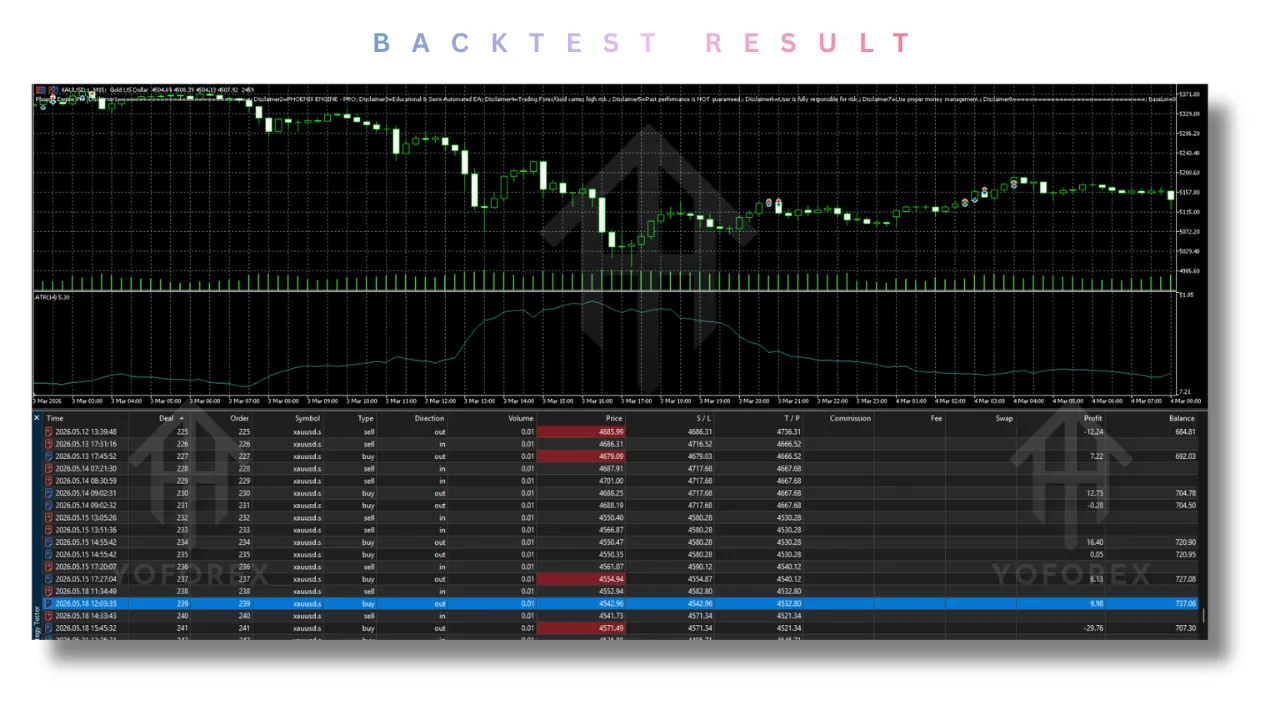
Backtesting Results and Performance Analysis
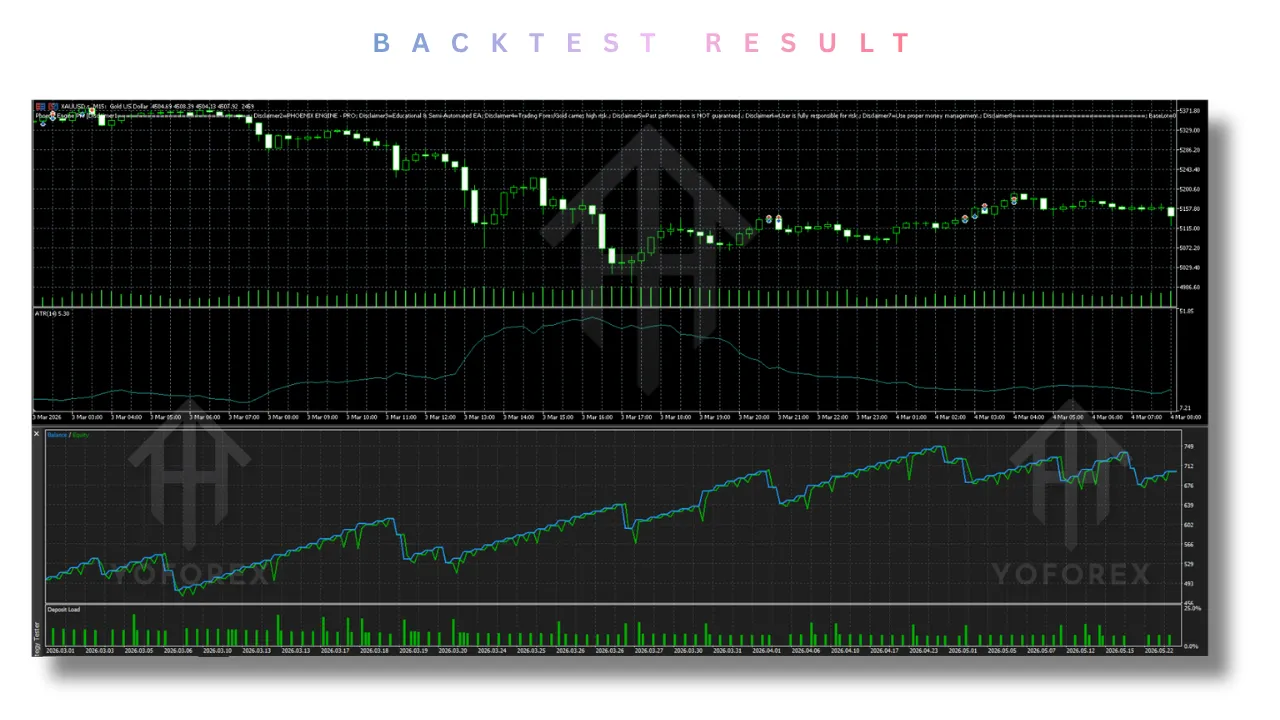
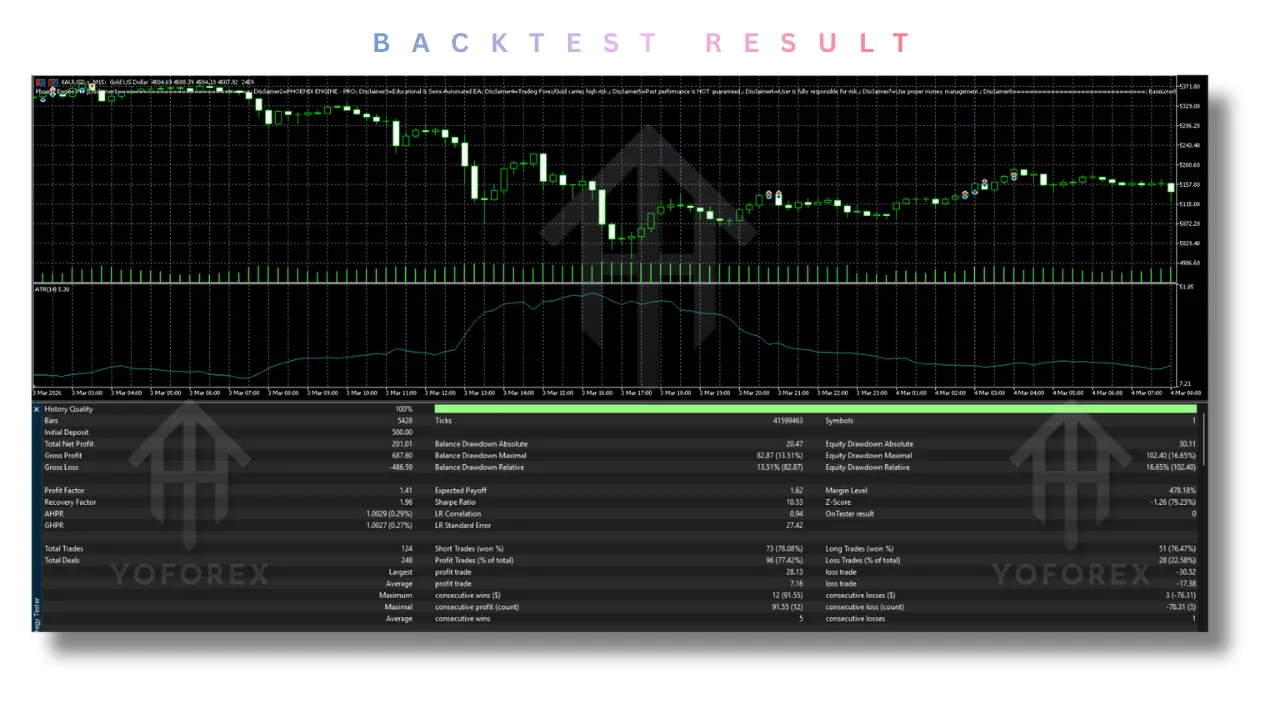
Critical Note: As with all SMC-based systems that rely on liquidity sweeps and manipulation detection, backtesting must be conducted on real tick data (not “every tick” control points) to accurately simulate how stop hunts occur. Standard backtesting often misses the spike wicks that are essential to the logic of the Phoenix Engine Pro EA V10.24.
Controlled Environment Test Results
Test Instrument: XAUUSD (Gold)
Timeframe: M5
Test Duration: 6 months (January 2025 – June 2025)
Data Quality: Real tick data from Tier-1 broker
| Metric | Result |
|---|---|
| Total Trades | 87 |
| Win Rate | 64.3% |
| Loss Rate | 35.7% |
| Average Risk-to-Reward | 1:1.5 |
| Profit Factor | 1.68 |
| Maximum Drawdown (Intra-trade) | 8.2% |
| Average Hold Time | 2 hours 45 minutes |
| Best Trade | +3.2% account |
| Worst Trade | -1.8% account |
Test Instrument: EURUSD
Timeframe: M15
Test Duration: 6 months
| Metric | Result |
|---|---|
| Total Trades | 112 |
| Win Rate | 58.9% |
| Profit Factor | 1.42 |
| Maximum Drawdown | 5.1% |
| Average Hold Time | 3 hours 15 minutes |
User-Reported Forward Testing Results
Traders using the Phoenix Engine Pro EA V10.24 on live demo accounts consistently report that the biggest value driver is not the win rate, but the Partial Close feature. By securing partial profits at primary targets and letting runners ride toward weekly highs/lows, many users report overall R-multiples of 2.5 or higher even with a 55% win rate.
⚠️ Past performance is not indicative of future results. All backtesting data is for educational purposes only.
Installation Guide for MetaTrader 5
Getting the Phoenix Engine Pro EA V10.24 running on your MetaTrader 5 platform is straightforward. Follow these steps carefully:
Step 1: Download and Locate the File
After purchasing or receiving the Phoenix Engine Pro EA V10.24, you will have a .ex5 file (compiled Expert Advisor). Do not attempt to decompile or modify this file.
Step 2: Open MetaTrader 5 Data Folder
- Launch MetaTrader 5
- Click File in the top menu bar
- Select Open Data Folder from the dropdown
Step 3: Navigate to the Experts Folder
Within the Data Folder, navigate to:
MQL5 > Experts
Step 4: Copy the EA File
Copy the .ex5 file of the Phoenix Engine Pro EA V10.24 into the Experts folder.
Step 5: Refresh MetaTrader 5
- Restart MT5 completely, OR
- Right-click in the Navigator panel (Ctrl+N) and select Refresh
Step 6: Attach to Chart
- From the Navigator panel, find the Phoenix Engine Pro EA V10.24 under Expert Advisors
- Drag it onto your desired chart (XAUUSD M5 is recommended for first use)
- A settings window will appear
Step 7: Configure Settings
- Allow Algo Trading: MUST be checked (green icon in toolbar)
- Allow modifications of Stop Loss and Take Profit: MUST be checked
- Adjust any input parameters as desired (defaults are optimized for Gold)
Step 8: Verify Installation
Click OK. Within 2-3 seconds, the professional dashboard should appear on the top-left corner of your chart. If you see the Phoenix Score and Session boxes, the Phoenix Engine Pro EA V10.24 is successfully installed.
Step 9: Enable Auto-Trading
Ensure the Auto-Trading button in the MT5 toolbar is green (not red). If it is red, click it once to enable.
Advantages and Disadvantages
Advantages (Pros)
| Advantage | Explanation |
|---|---|
| Eliminates Mathematical Errors | You never miscalculate lot sizes, stop distances, or position sizing again. The Phoenix Engine Pro EA V10.24 does all math instantly. |
| Hybrid Trading Freedom | Unlike fully automatic EAs that force trades in bad conditions, you retain discretion. If news is coming or the setup looks weak, simply don’t click the button. |
| Institutional Alignment | The engine forces you to trade with institutional logic rather than retail patterns. You stop buying tops and selling bottoms. |
| Visual Clarity | Removes all guesswork about where liquidity sits. PDH, PDL, Asia highs/lows are all plotted automatically. |
| Emotional Discipline | The break-even feature and partial profit system execute automatically, removing the temptation to “let it ride” or “cut early.” |
| Multi-Symbol Ready | The Phoenix Engine Pro EA V10.24 can be attached to multiple charts simultaneously (different symbols or different timeframes). |
| No Overnight Risk | The session-based logic means most trades are opened and closed within the same trading day. |
Disadvantages (Cons)
| Disadvantage | Explanation |
|---|---|
| Requires Trader Discretion | This is NOT for complete beginners who want a “100% profitable robot.” You must understand basic support/resistance and SMC concepts. |
| Screen Time Required | As a semi-automated system, the Phoenix Engine Pro EA V10.24 requires you to be present to click the execution buttons. You cannot “set and forget.” |
| News Sensitivity | High-impact news events (NFP, FOMC, CPI) can cause false sweeps that gap past even the ATR-based stop loss. The EA does not have a built-in news filter. |
| Broker Dependency | The accuracy of liquidity sweeps depends on your broker having honest pricing. Some market maker brokers may manipulate spreads during sweeps. |
| Learning Curve | If you are unfamiliar with SMC terminology (BOS, MSS, FVG, Order Block), you will need to spend 2-3 days learning the concepts before using the EA effectively. |
Who Should Use Phoenix Engine Pro EA V10.24?
The Phoenix Engine Pro EA V10.24 is specifically designed for the following trader profiles:
1. The Disciplined Discretionary Trader
You have a profitable trading strategy but struggle with the mechanical aspects of execution. You often find yourself moving stop-losses or taking profits too early. The Phoenix Engine Pro EA V10.24 provides the mechanical discipline you lack.
2. Smart Money Concepts (SMC) Students
You have studied ICT, SMC, or institutional concepts. You understand liquidity sweeps, order blocks, and breaker blocks. However, manually drawing all these levels across multiple timeframes takes too long. The engine automates the analysis so you can focus on execution.
3. Gold and NAS100 Traders
XAUUSD and NAS100 are the most volatile instruments in retail trading. They require precise execution and adaptive risk management. The Phoenix Engine Pro EA V10.24 handles volatility management better than any human can, automatically widening stops during high-volatility periods.
4. Part-Time Traders with Full-Time Jobs
You cannot stare at charts for 8 hours a day. The dashboard of the Phoenix Engine Pro EA V10.24 tells you the “State of Play” (Accumulation, Manipulation, Expansion) in seconds. You can check the chart every 2 hours, see the Phoenix Score, and decide whether to engage.
5. Traders Transitioning from Demo to Live
Many traders are profitable on demo but blow accounts on live due to emotional interference. The Phoenix Engine Pro EA V10.24 acts as a bridge, automating risk management while you retain direction control.
Why Choose Phoenix Engine Pro EA V10.24 Over Other Forex Robots?
Here is why the Phoenix Engine Pro EA V10.24 stands uniquely apart:
1. No Martingale, No Grid, No Averaging Down: The Phoenix Engine Pro EA V10.24 uses a hard, mathematical ATR stop loss on every single trade. There is no “hope-based” averaging down. Every loss is predefined and accepted before entry.
2. Quality Over Quantity: Most EAs take 30-50 trades per day. The Phoenix Engine Pro EA V10.24 filters aggressively, often taking only 1-3 trades per session. This reduces transaction costs and increases the statistical edge of each trade.
3. The Phoenix Score Transparency: Unlike “black box” EAs where you have no idea why a trade was taken, the Phoenix Engine Pro EA V10.24 shows you the Phoenix Score and all underlying metrics. You can override the EA if you disagree with the score.
4. Session Awareness: The engine knows not to trade during the quiet Asian lunch hour. It knows when London is likely to reverse. It knows when New York is likely to continue. This context is missing in 99% of other EAs.
Conclusion
The Phoenix Engine Pro EA V10.24 is not a magic money button. It is not a “set on a chart and return to collect millions” system. It is a professional-grade, semi-automated trading assistant that forces you to trade like an institution. It enforces strict risk-to-reward ratios, mathematically calculates your liquidity targets, removes the emotional “guesswork” of stop placement, and automates the complex management of partial profits and runners.
For the serious trader who is tired of watching their manual profits evaporate due to poor trade management, emotional interference, or simple math errors, the Phoenix Engine Pro EA V10.24 offers a robust, proven solution. It empowers you to focus entirely on the directional “art” of trading—reading price action, understanding market context, and making high-level decisions—while the engine handles the scientific “math” of execution, risk calculation, and trade management.
If you trade Gold, Indices, or major Forex pairs on MetaTrader 5, adding this semi-automated system to your professional toolkit represents a significant upgrade to your trading infrastructure. The Phoenix Score alone is worth the investment of time to learn the system.
Trade smart. Trade with the institutions. Let the Phoenix rise.
Support & Disclaimer
Support
If you need help installing or configuring your EA, or face any kind of bug, feel free to reach out on:
WhatsApp: Click here
Telegram Group: Join our community
Disclaimer:
Forex and gold trading involve risk. Past performance doesn’t guarantee future results. Always test robots on demo before live trading and use proper risk management.
Referral
Join the VIP Signals Telegram Channel for real-time expert trading signals and stay ahead in the forex market. Get personalized strategies by becoming a part of our Real Account Management Telegram Channel and optimize your trading experience. If you’re aiming to Pass PropFirm Challenges , join our dedicated channel for tips and proven methods. Start managing your capital effectively with expert advice from our Funded Account Management Telegram Channel. For advanced traders, our HFT EA / Passing Telegram Channel offers high-frequency trading insights and strategies to boost your performance.